All in One Place Complete Gamification

00
Days
:
00
Hours
:
00
Minute
:
00
Second

Category: Guide Lines

Explore GameEngine guidelines for practical tips, best practices, and helpful resources to build, manage, and improve engaging gamification experiences in WordPress.

  • What Is WordPress Gamification? A Complete Guide to Boost User Engagement

    What Is WordPress Gamification? A Complete Guide to Boost User Engagement

    Have you ever wondered why millions of people spend hours playing mobile games, earning badges, climbing leaderboards, and completing daily challenges — even when there’s no real prize at the end?

    The answer is psychology. Games are designed to trigger dopamine, reward effort, and keep people coming back.

    Now imagine applying that same psychology to your WordPress website.

    That’s exactly what WordPress Gamification is all about. Whether you run an online course platform, a membership site, a WooCommerce store, or a community forum, gamification can transform passive visitors into loyal, highly engaged users.

    In this complete guide, we’ll break down everything you need to know about WordPress Gamification — what it is, how it works, the best plugins, including GameEngine, and how to implement it on your site step by step.

    What Is WordPress Gamification?

    WordPress gamification is the process of integrating game-design mechanics — such as points, badges, levels, leaderboards, challenges, and rewards — into a WordPress website to motivate desired user behaviors.

    Instead of passive browsing, visitors become active participants who earn rewards for actions like logging in, registering, commenting, publishing posts, completing courses, making purchases, or referring friends.

    This strategy is rooted in behavioral psychology: humans are naturally motivated by achievement, progress, competition, and social recognition. By incorporating these elements into your website, you can significantly boost user engagement, retention, and loyalty.

    According to MarketsandMarkets, the global gamification market is on track to exceed $48 billion by 2029. 

    Why Gamification Works on WordPress

    WordPress powers over 43% of all websites, making it the ideal platform to deploy engagement mechanics at scale. Its open plugin ecosystem allows you to add sophisticated gamification without any custom development — plugins like GameEngine handle everything automatically.

    Gamification works because it satisfies three core psychological needs:

    Autonomy (users choose which actions to take),

    Mastery (leveling up creates a sense of growth), and

    Purpose (earning visible badges ties effort to meaningful recognition).

    When these needs are met, bounce rates drop, session time increases, and users naturally share their achievements.

    Core Gamification Elements

    Points & XP

    Award points for every trackable action. Users can spend or redeem them for rewards, discounts, or exclusive content.

    Badges & Achievements

    Visual trophies displayed on user profiles, triggering social proof and the desire to collect more.

    Levels & Ranks

    Structured progression with clear milestones — from Beginner to Expert — creates ongoing motivation.

    Leaderboards

    Public ranking that sparks friendly competition, especially effective in communities and LMS platforms.

    Quests & Challenges

    Time-limited tasks that drive specific behaviors — perfect for product launches or seasonal campaigns.

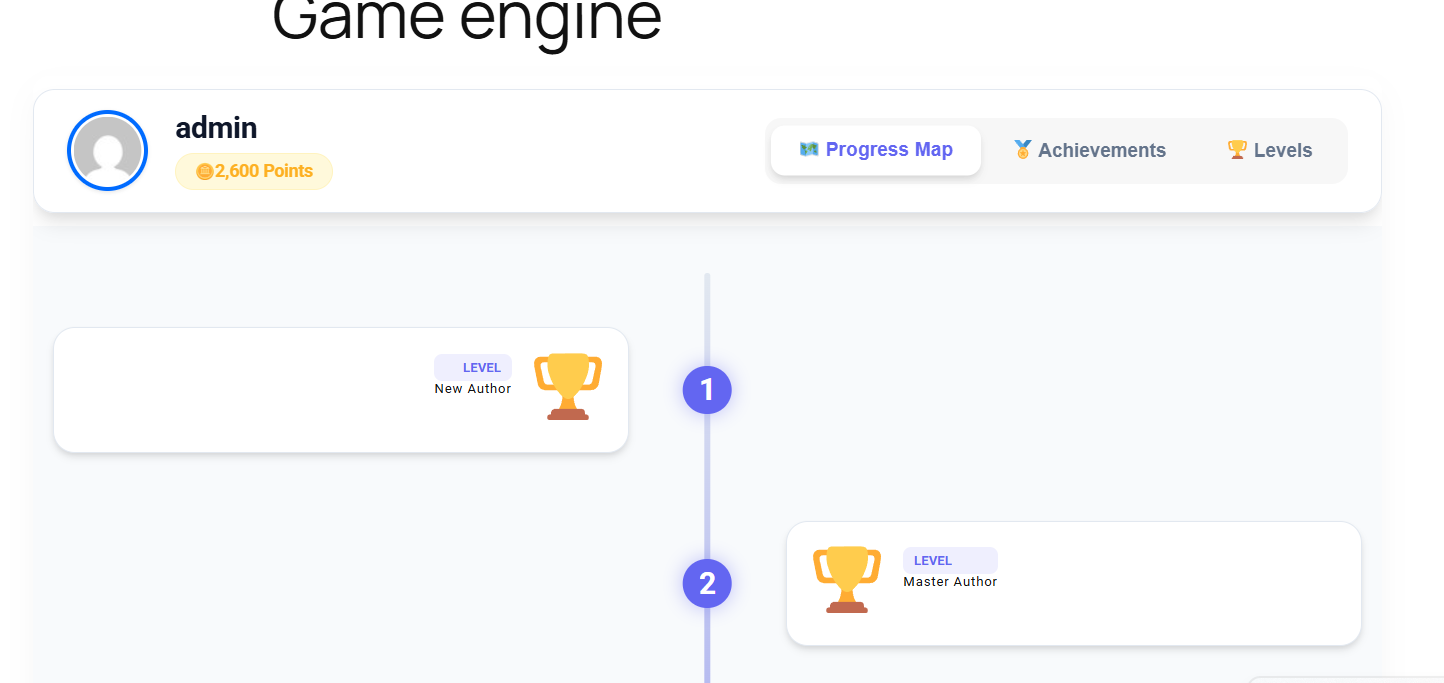
    Progress Maps

    Visual roadmaps showing users where they stand and what comes next, dramatically reducing drop-offs.

    GameEngine: A Complete WordPress Gamification Plugin Review

    GameEngine is a powerful self-hosted WordPress gamification plugin that automatically rewards users with points, badges, and levels. Its tagline — “Gamify Your WordPress Site with Smart Rewards” — perfectly captures its goal: increase engagement, guide user behavior, and build long-term loyalty with minimal setup.

    It works seamlessly with LMS, WooCommerce, and Membership plugins right out of the box, making it one of the most versatile gamification solutions available.

    Unlike many competitors that rely heavily on paid add-ons, GameEngine delivers a complete package — most essential and advanced features are included in one plugin.

    What Makes GameEngine Stand Out

    GameEngine directly competes with GamiPress and myCred by offering 80+ features in a single plugin. While competitors often require multiple expensive add-ons for full functionality, GameEngine bundles everything together for better value and simplicity.

    GameEngine Full Feature Breakdown

    Core Gamification

    Build a powerful reward system with Flexible Points (XP or Coins), Achievements & Badges, Ranks, Levels & Progress System. Automatically reward WordPress actions like login, registration, publishing posts, and comments. Use Content Restriction & Unlock Rules along with Dependency Logic (Milestones) to create structured user journeys.

    Rewards & WooCommerce

    Turn your store into a loyalty machine with Points to Coupons, Pay With Points, Points Cart Discount, and Points Payment Gateway. Users can withdraw points as real money through the Wallet system. Includes Time-Based Rewards (Happy Hours & weekend bonuses), Rewards Marketplace, Dynamic Leaderboards, and Manual Points Management.

    Engagement & Tracking

    Boost daily activity with Daily Visit Rewards, Profile-Based Rewards, and Content Interaction Rewards. Keep everything organized with detailed Activity Logs, Points Expiry settings, and a Visual Progress Roadmap that shows current level and next milestones.

    Display & Integration

    Send instant Email Reward Alerts, display points, badges, and leaderboards anywhere using Shortcodes. Provide users with a clean User Profile Dashboard, apply Advanced Reward Filters, connect with external tools via REST API, and easily manage data with Import & Export tools.

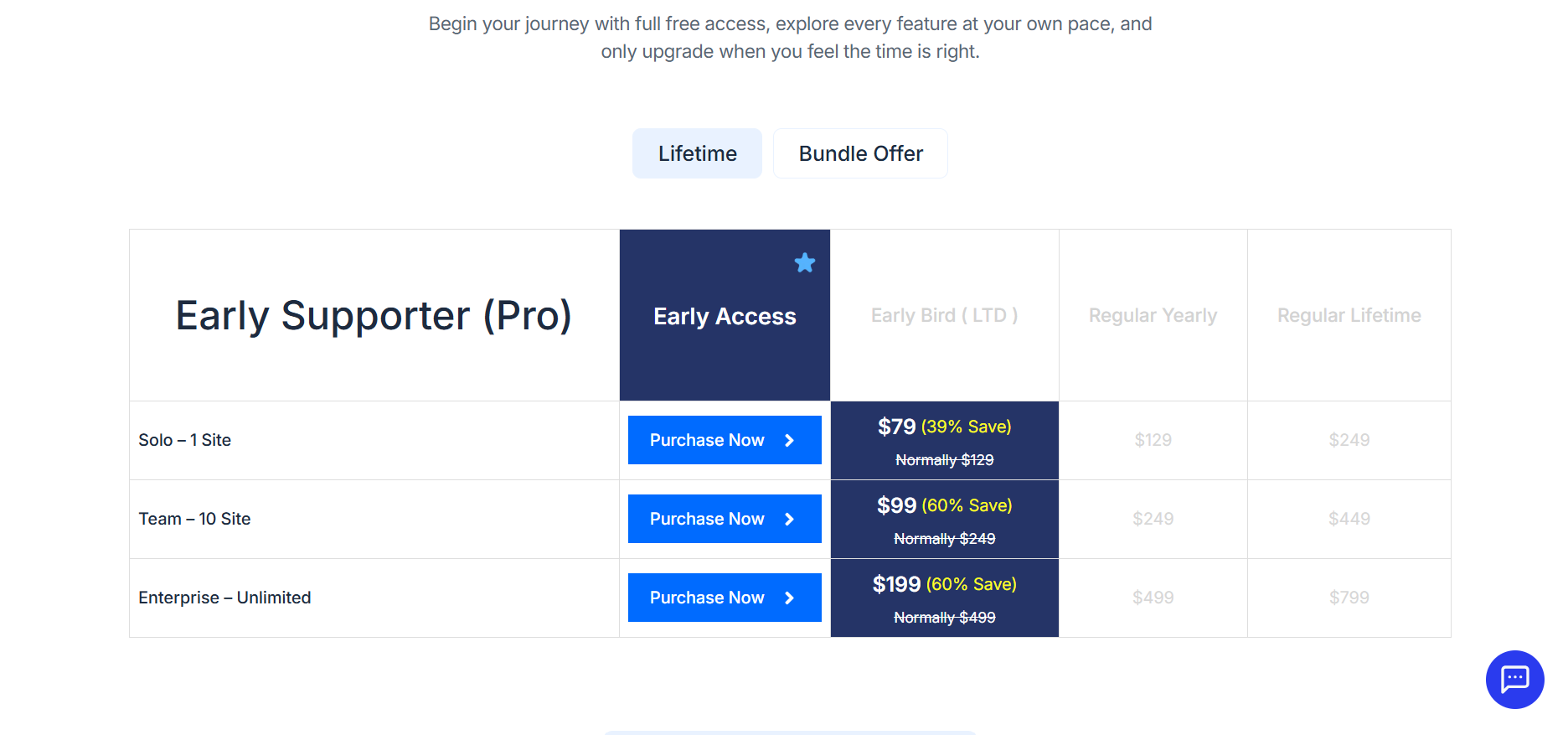
    GameEngine Pricing 

    GameEngine offers a free version with core features. Pro version includes advanced automation and rewards.

    Plan

    Early Bird LTD (Lifetime)

    Regular Yearly

    Regular Lifetime

    Solo (1 Site)

    $79 (39% off)

    $129/yr

    $249

    Team (10 Sites)

    $99 (60% off)

    $249/yr

    $449

    Enterprise (Unlimited Sites)

    $199 (60% off)

    $499/yr

    $799

    Note: Early Bird prices are one-time lifetime payments. The Team plan at $99 for 10 sites is currently one of the best deals in the gamification category.

    Best For: eLearning sites, WooCommerce stores, membership communities, and content blogs that want a complete, high-performance gamification system without ongoing add-on costs.

    How to Set Up WordPress Gamification with GameEngine (Step-by-Step)

    Let’s walk through a practical setup using GameEngine as your primary gamification tool.

    Step 1 — Install and Activate GameEngine

    The first step is getting GameEngine installed on your WordPress site.

    1. Go to gameengine.pro and download the free version, or search for “GameEngine” in your WordPress plugin directory.
    1. In your WordPress admin panel, go to Plugins > Add New > Upload Plugin.
    1. Upload the .zip file and click Install Now.
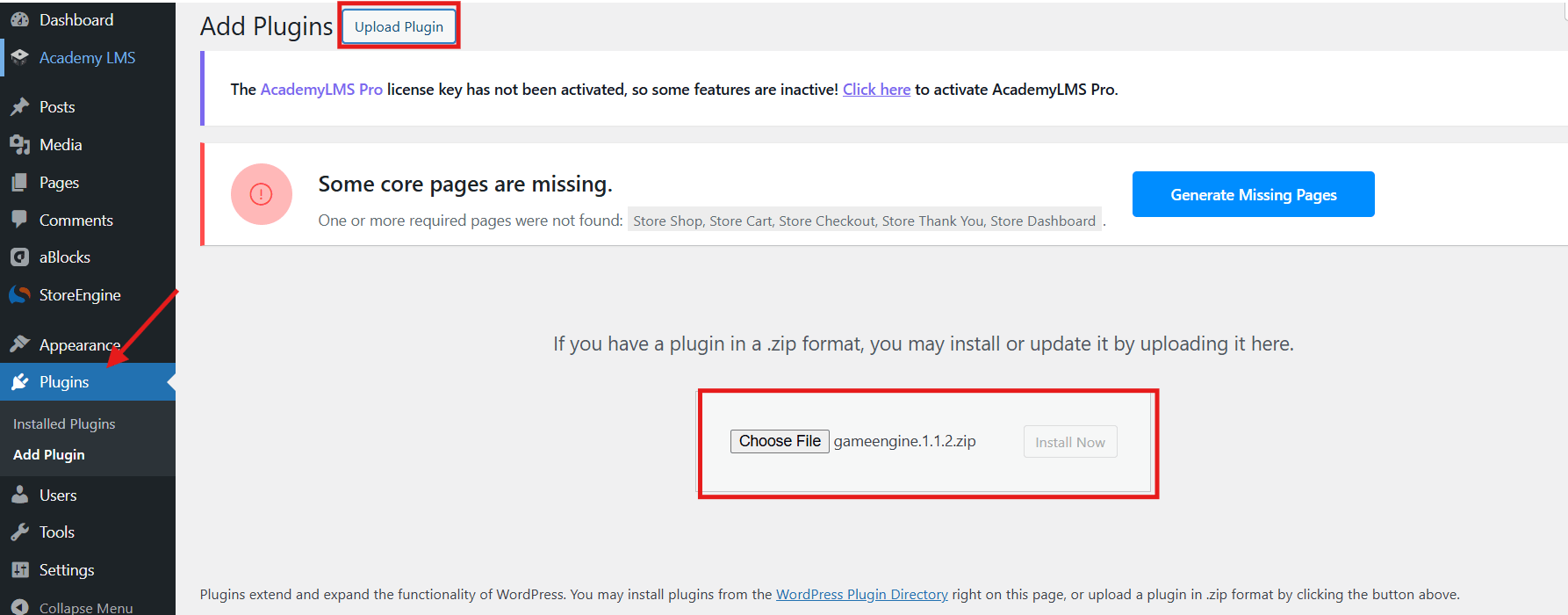
    Click Install Now
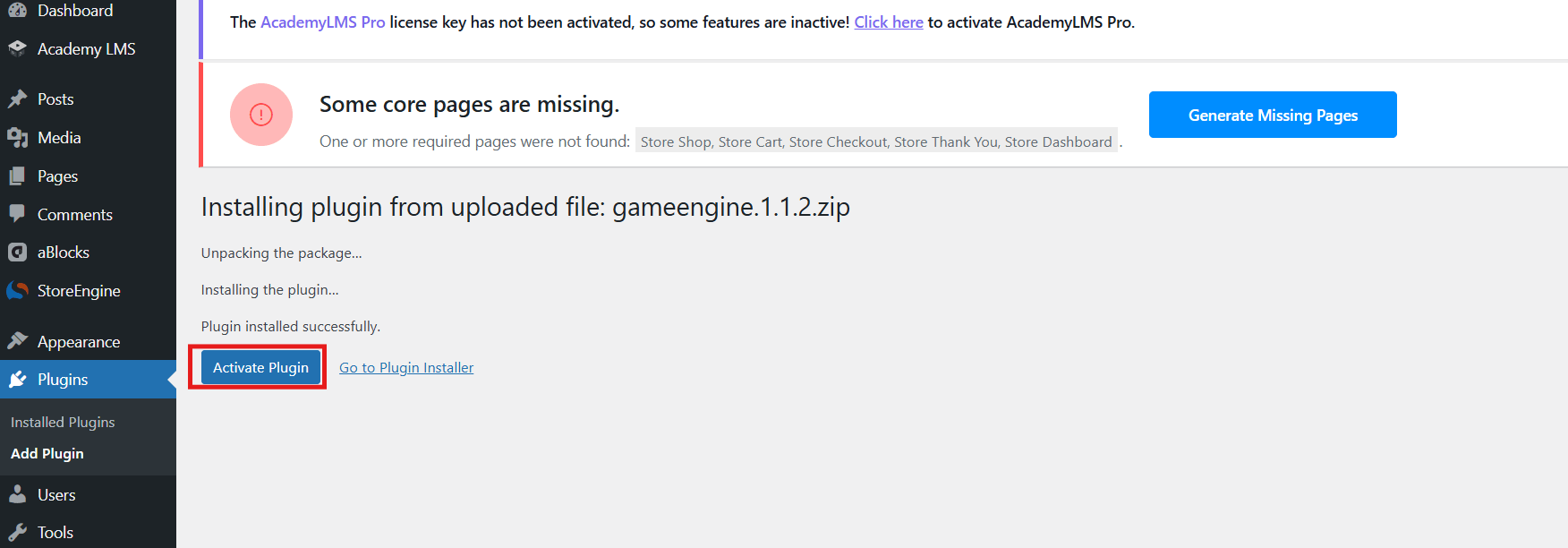
    1. Once installed, click Activate.
    Activate Plugin

    Once activated, you will see a new GameEngine menu in your WordPress sidebar with options like Dashboard, Points System, Achievements, Levels, Logs, Leaderboards, and more.

    Step 2: Set Up Points & Achievements & Levels 

    1. Go to GameEngine > Points System.
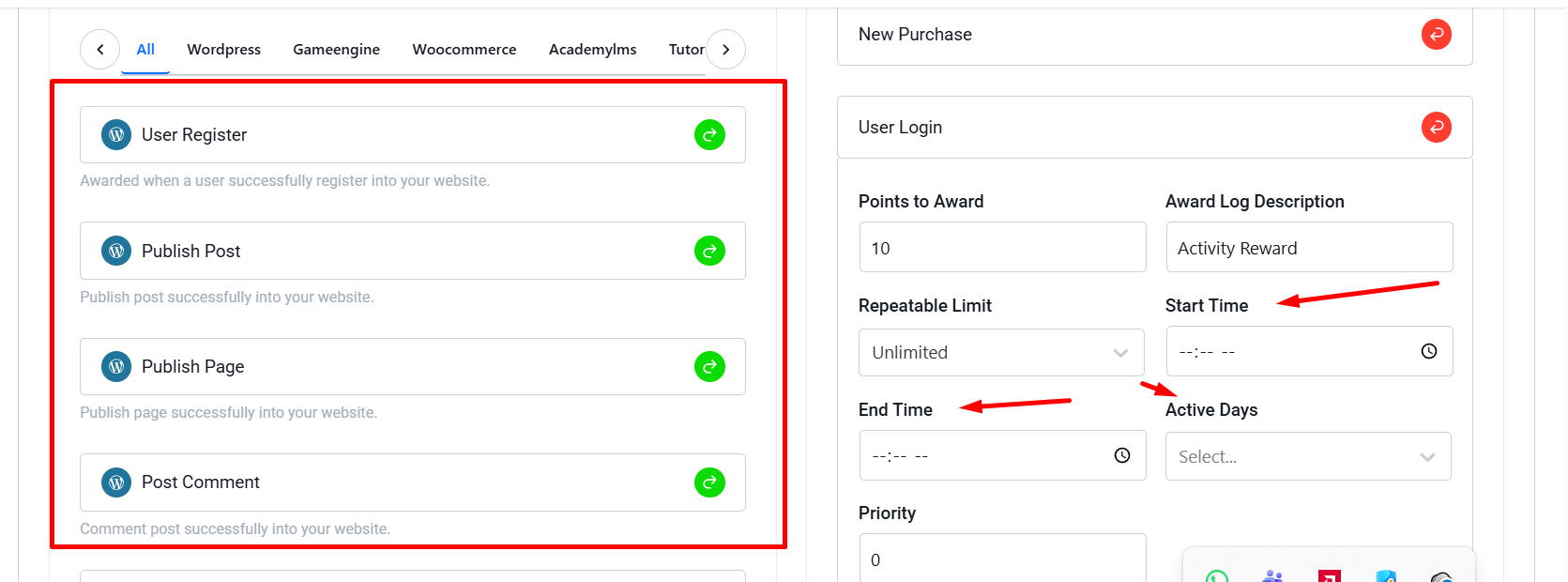
    1. In the Automatic Point Awards section, you will see an Available Hooks panel.
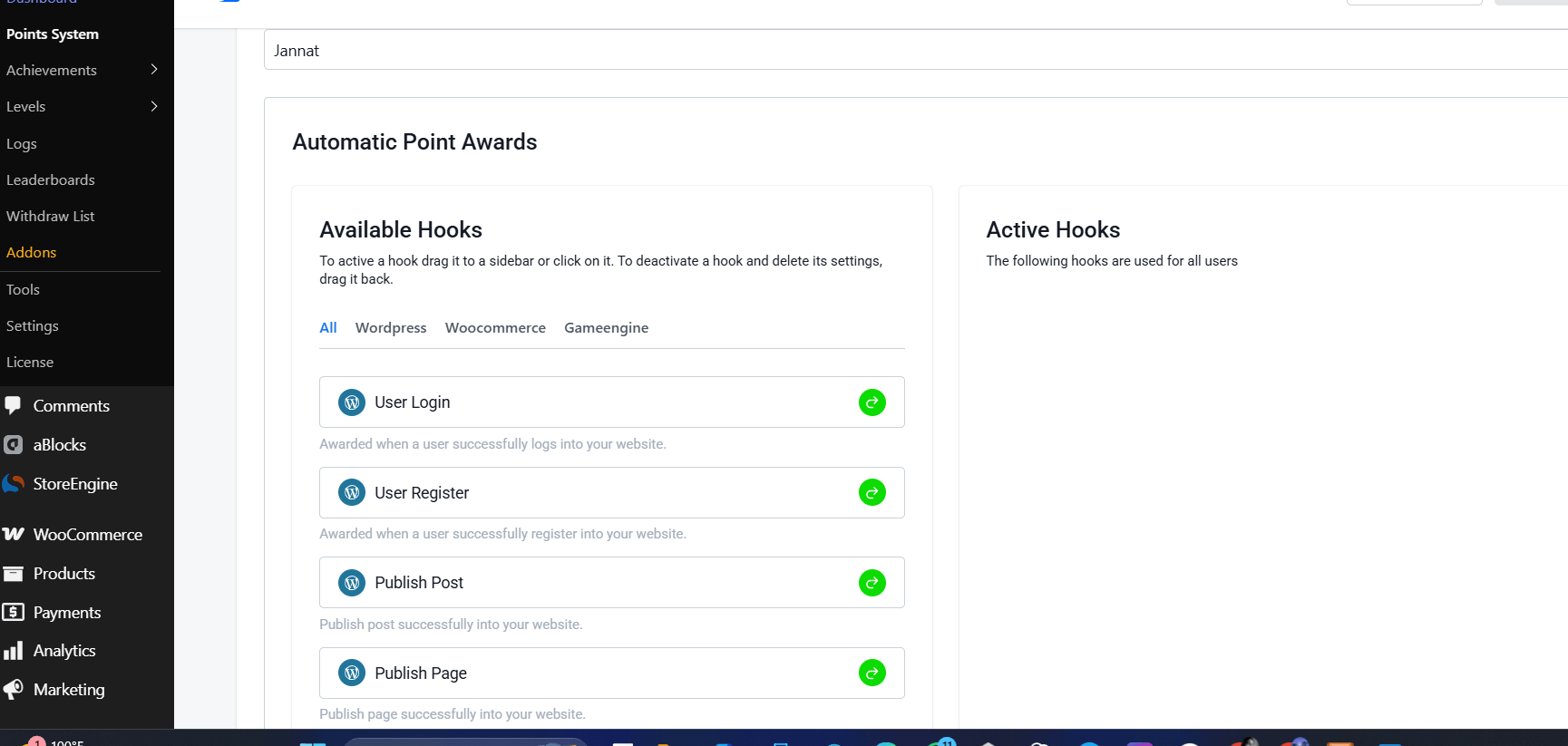
    Automatic Point Awards section

    3. Hooks are organized into three tabs:

    • WordPress — (User Login, User Registration, Publish Post, Post Comment, Daily Visit, Profile Update, etc.)
    • WooCommerce — (New Purchase, Purchase Specific Product, Review Product, Refund, etc.)
    • GameEngine — (Internal triggers like unlocking achievements)
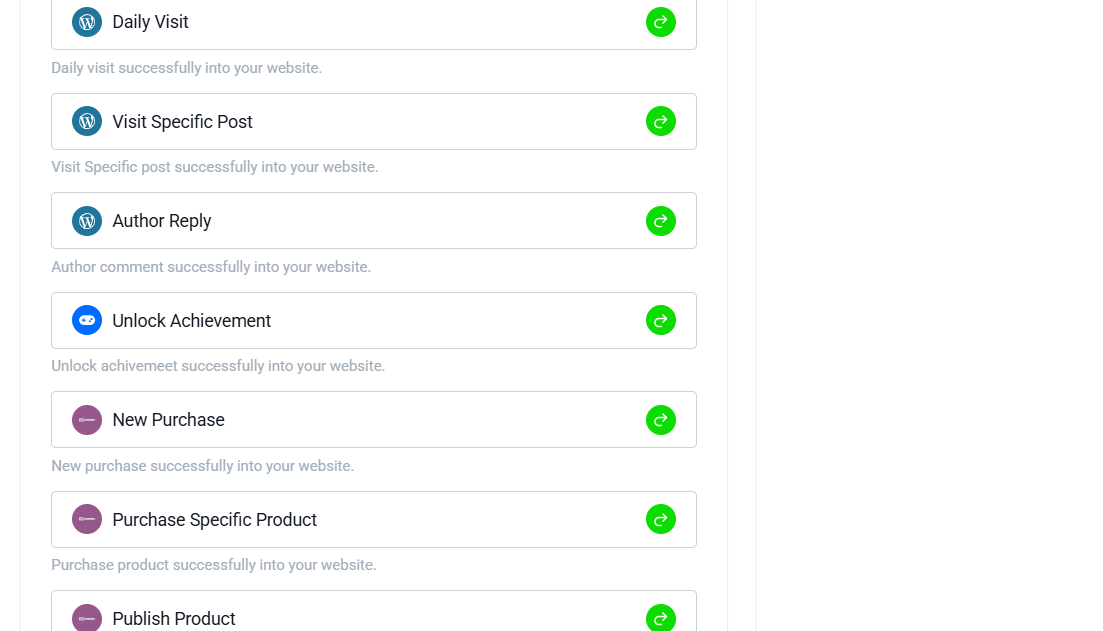
    unlocking achievements

    4. Drag or click the desired hooks to the Active Hooks panel on the right.

    5. Set the number of points to be awarded for each action. Example: For a store, activate “New Purchase” and award 10 points per order or 1 point per $1 spent.

    Note: You can also set up Automatic Point Deductions below for actions like refunds.

    Step 3: Create Achievements (Badges)

    1. Go to GameEngine > Achievements.
    1. Click + Add New Achievement.
    1. Fill in the details:
    1. Achievement Name (e.g., “First Login”)
    1. Maximum earnings per user
    1. Achievement Type
    1. Write a Congratulations Message

    Here’s what the achievement creation screen looks like:
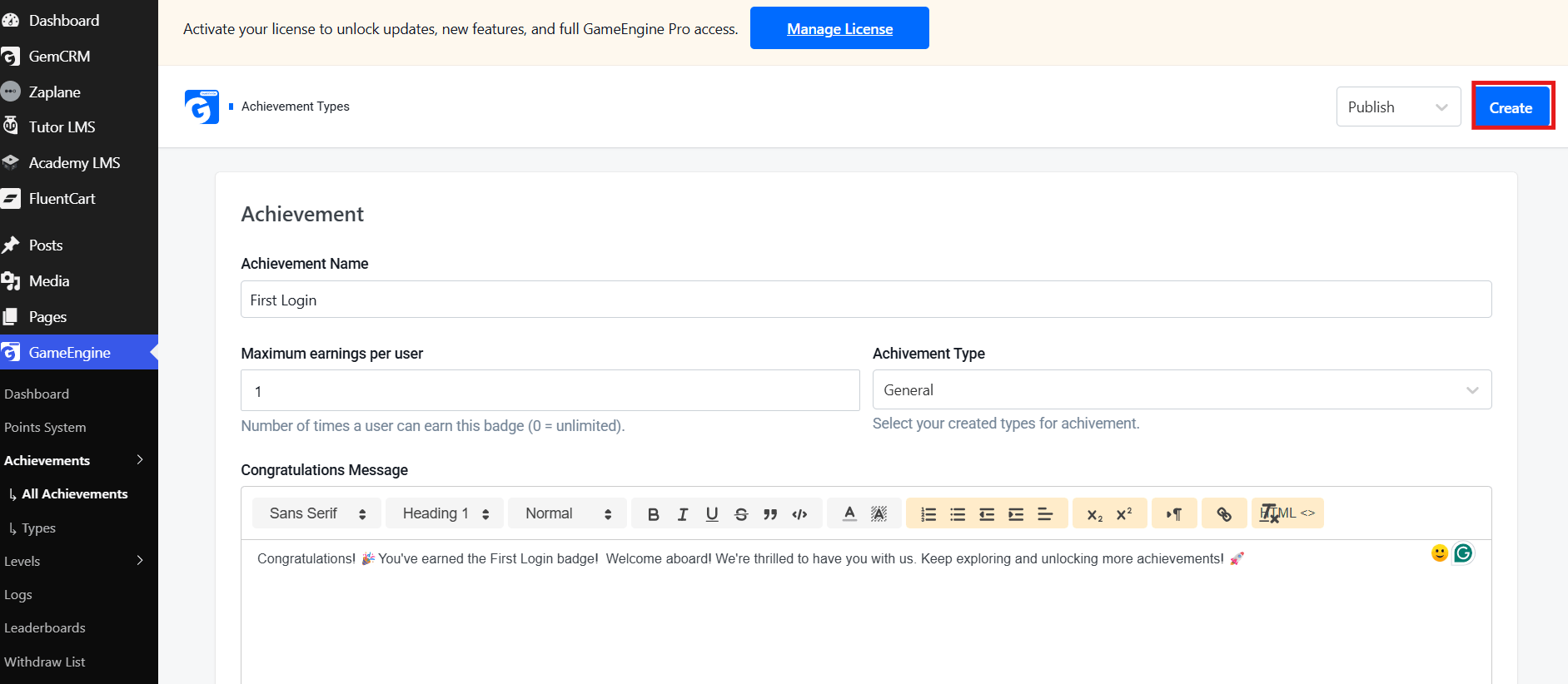
    Achievement Creation
    1. Upload a custom badge image, set the trigger conditions, and click Publish.

    Repeat this process to create multiple engaging badges.

    Step 4: Set Up Levels

    1. Go to GameEngine > Levels.
    1. Click the + Create button (top right).
    1. Fill in the level details:
    • Level Name (e.g., Beginner, Intermediate, Expert)
    • Level Type
    • Benefits Description
    • Congratulations Message

    Here’s what the level creation screen looks like:
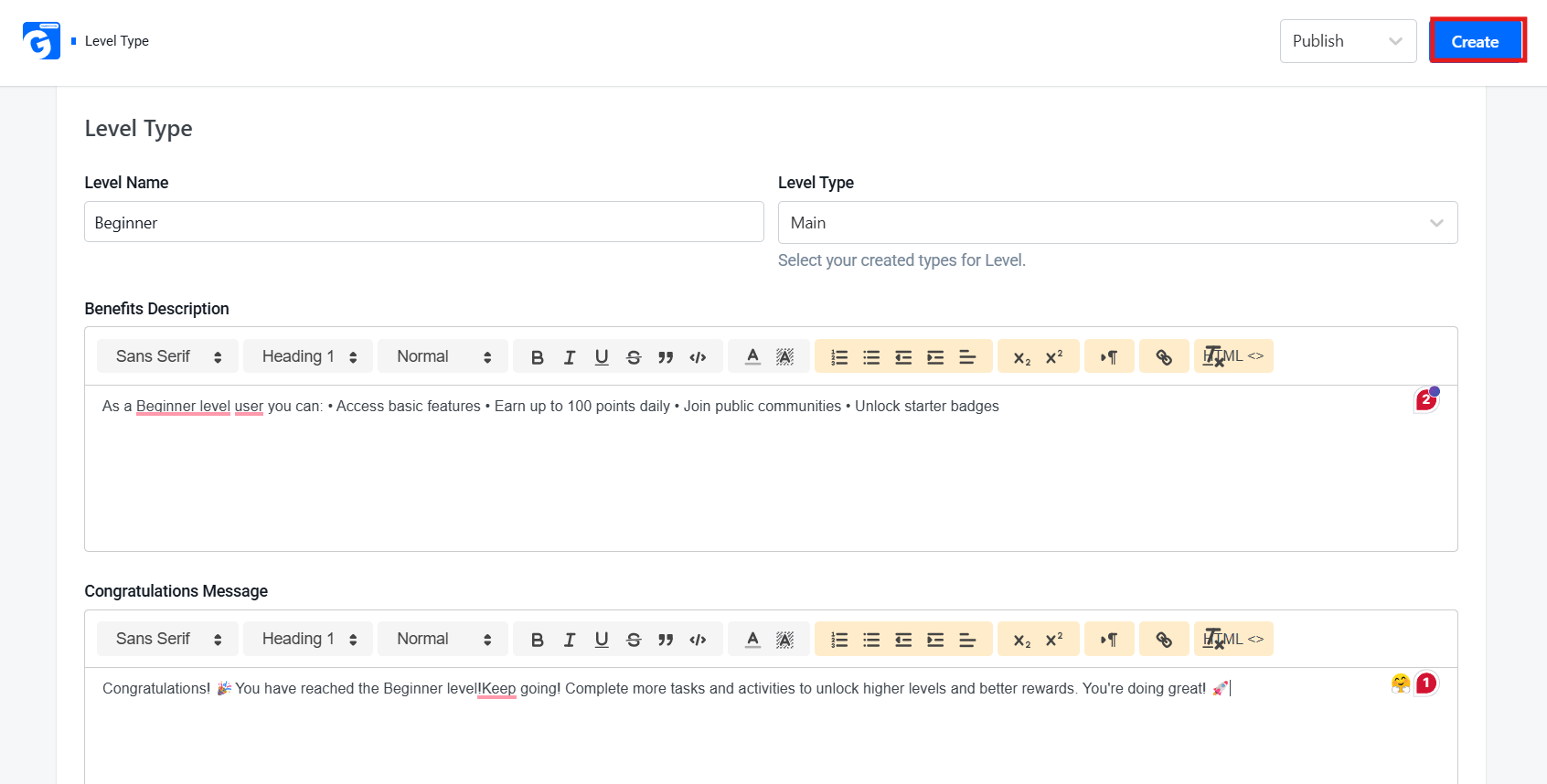
     Level Creation

    5. Define the required points or achievements needed to unlock each level.

    6. Set dependency logic so users progress smoothly from one level to the next.

    Step 5: Configure Leaderboards

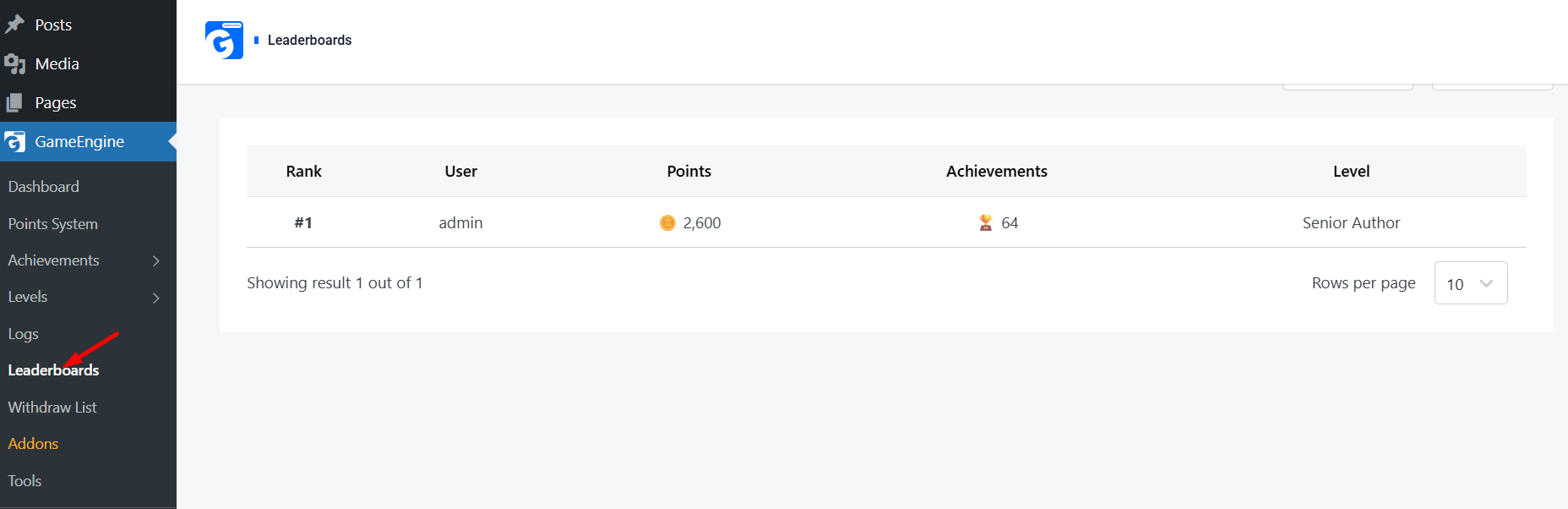
    1. Go to GameEngine > Leaderboards.
    1. Customize filters such as All Points, All Time, Monthly, or Weekly.
    1. The leaderboard updates automatically as users earn points and unlock achievements.

    Here’s what the Leaderboards screen looks like:
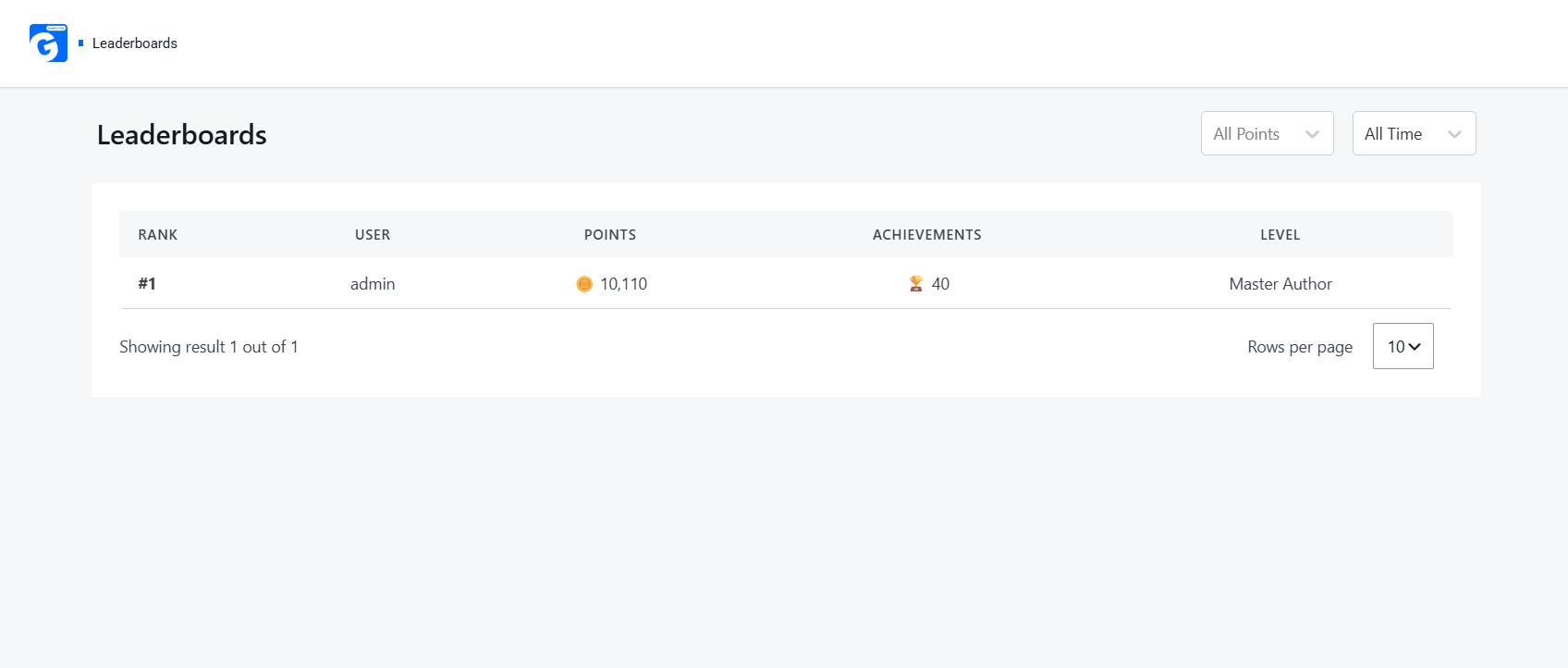
    Leaderboards

    Step 7: Monitor Activity

    1. Go to GameEngine > Logs.
    1. Here you can view all point transactions, badge unlocks, and system events in detail.
    1. Use Manual Points Update (if available) for giving bonus points or making corrections.

    Here’s what the Logs screen looks like:
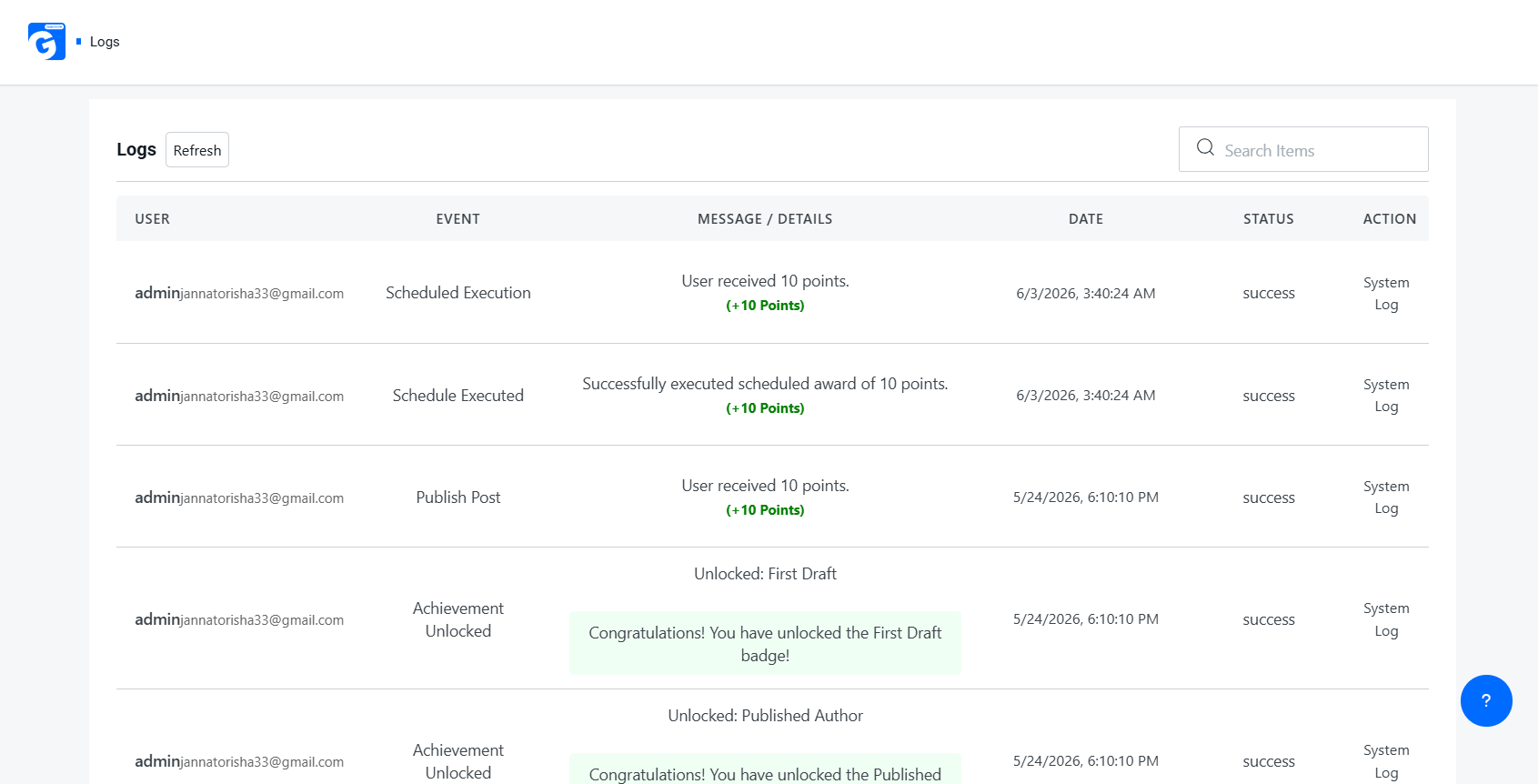
    Logs

    Best Practices & Common Mistakes (Gamification & Reward System)

    Best Practices (Do’s)

    • Start with one point type — Complexity can always be added later (e.g., reputation points + redeemable points + streak multipliers). Most successful programs begin simply.
    • Use Daily Visit Rewards (or Daily Login Streaks) to build return habits from day one. This is one of the highest-ROI mechanics in gamification.
    • Enable immediate feedback — Email/SMS/Push reward alerts are great. Even better: in-app instant notifications + visual feedback (confetti, sound, animation) when points are earned.
    • Use Points Expiry Control wisely. This is very effective for maintaining activity, but be transparent and generous (e.g., 6–12 months expiry, with warnings).
    • Align reward triggers strictly with business goals, not vanity metrics. This is probably the most important point. Reward what actually drives revenue or key behaviors.

    Additional Strong Do’s:

    • Make the first reward feel generous (First-time user bonus).
    • Show clear progress toward the next reward (progress bars are very powerful).
    • Test different reward frequencies — variable rewards (random drops) often outperform fixed ones.
    • Allow multiple redemption options (even if some are “coming soon”) to increase perceived value.

    Common Mistakes (Don’ts)

    • Don’t gamify every action — Perfect. This is a very common failure mode. Reward only meaningful actions.
    • Avoid leaderboards in very small communities — Spot on. In small groups, they can be demotivating. Consider personal bests, team leaderboards, or localized ones instead.
    • Never use withdrawal/real-money features without proper legal review. This can turn your program into regulated gambling or financial services in many jurisdictions.
    • Don’t skip mobile testing — Most users will interact via mobile. Ensure badges, dashboards, and notifications are fully responsive.

    Additional Important Don’ts:

    • Don’t make earning feel too slow (users quit fast if progress is invisible).
    • Don’t over-rely on extrinsic rewards — eventually combine them with intrinsic motivation (status, achievement, community).
    • Don’t ignore reward fatigue — rotate rewards and mechanics over time.
    • Don’t create too many badge types — quality > quantity (10–15 well-designed badges are better than 50 generic ones).
    • Don’t forget to celebrate milestones (level-ups, anniversaries, etc.).

    Conclusion

    WordPress gamification is one of the highest-leverage strategies available to site owners today. Whether you run an online store, an LMS, a membership community, or a content site, adding points, badges, and levels transforms passive visitors into loyal, motivated participants.

    GameEngine stands out in 2026 as a genuinely complete solution — its 80+ built-in features, WooCommerce-native reward tools, REST API, real-money withdrawal system, and competitive lifetime pricing make it the strongest single-plugin option on the market. The Early Bird LTD pricing (from $79 for 1 site, $99 for 10 sites) makes it accessible for freelancers and agencies alike.

    Start with the free version, explore the triggers and point system, then upgrade when your engagement data confirms the ROI. 

    Frequently Asked Questions (FAQs)

    Is WordPress Gamification suitable for small websites?

    Absolutely. Even a small blog or community can benefit from a simple badge and points system. You don’t need thousands of users — even a few dozen engaged members create a meaningful community dynamic.

    Does WordPress Gamification slow down my site?

    Well-coded plugins like GameEngine are optimized for performance. However, as with any plugin, monitor your site speed after installation using tools like GTmetrix or Google PageSpeed Insights.

    Can I use multiple gamification plugins together?

    It’s possible, but it can lead to conflicts and complexity. It’s generally better to choose one comprehensive solution like GameEngine and use its built-in features.
  • GameEngine vs myCred: A Side-by-Side Comparison for WordPress Store Owners

    GameEngine vs myCred: A Side-by-Side Comparison for WordPress Store Owners

    Running a WooCommerce store without a loyalty or gamification system is leaving money on the table. When customers feel rewarded, they come back. When they feel engaged, they spend more.

    Two plugins that WordPress store owners keep comparing are GameEngine and myCred. Both promise to gamify your site and reward your users — but they are built very differently, priced differently, and designed for different goals.

    In this honest GameEngine vs myCred comparison, we break down every feature, every pricing tier, and every real difference so you can make the right call for your store.

    What Is GameEngine?

    GameEngine

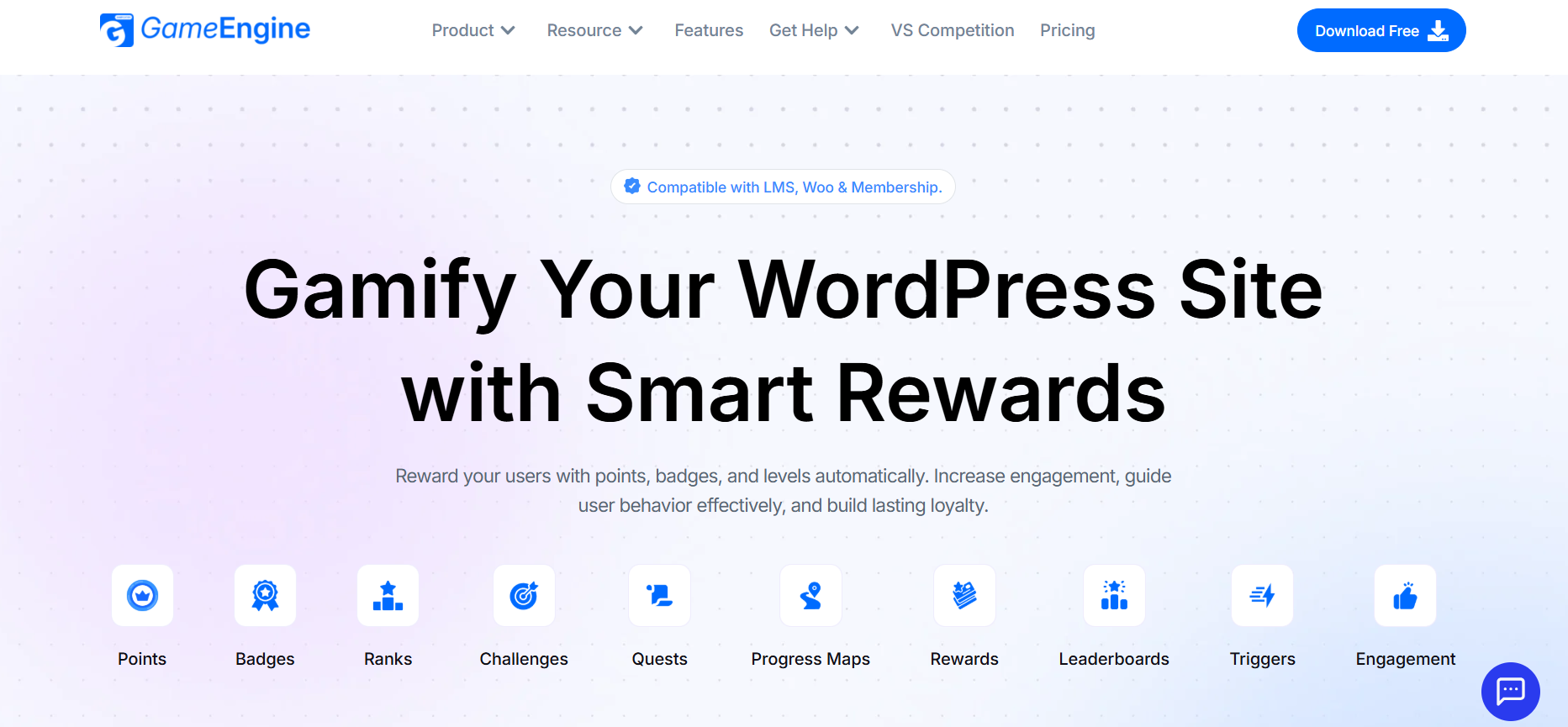
    GameEngine is a modern, purpose-built gamification plugin that goes well beyond basic points management. Its tagline says it clearly: “Gamify Your WordPress Site with Smart Rewards.”

    The plugin is compatible with LMS platforms, WooCommerce, and Membership plugins. It automatically rewards users with points, badges, and levels, and offers one of the most comprehensive gamification feature sets available for WordPress today. 

    GameEngine offers a free version, with paid plans available as either a one-time lifetime license or an annual subscription. 

    GameEngine core strengths:

    • Points, Badges, Ranks, Challenges, Quests, Progress Maps, Leaderboards — all built-in
    • Compatible with LMS, WooCommerce, and Membership plugins
    • Points Withdrawal to real money — unique feature
    • Free version available with paid Early Bird lifetime deal

    GameEngine: Key Features

    Core Gamification: Points (XP/Coins), Badges & Achievements, Ranks, Levels & Progress System, Challenges & Quests, Progress Maps, and Dependency Logic (Milestones) — together these create a complete progression engine that guides users step by step, rewards every action, and builds structured journeys that keep them coming back.

    Rewards & WooCommerce: Points to Coupons, Pay With Points, Points Cart Discount, Points Payment Gateway, Rewards Marketplace, Points Withdrawal to real money, and Wallet Management dashboard — every major WooCommerce reward method is built in, so customers can earn, spend, and even cash out their points without any extra add-ons.

    Engagement & Triggers: WordPress Core Triggers (login, registration, comments), Time-Based Rewards (Happy Hours), Daily Visit Rewards, Profile-Based Rewards, Content Interaction Rewards, and Dynamic Leaderboards — GameEngine automatically fires rewards for the actions that matter most, keeping users engaged consistently across your entire site.

    Admin & Management: Activity Logs, Manual Points Update, Points Expiry Control, Advanced Reward Filters, Email Reward Alerts, Shortcode Display System, and User Profile Dashboard — admins have full control over every reward, every user, and every point transaction from one clean dashboard.

    Technical: Content Restriction & Unlock Rules, REST API Access, and Import & Export Tools — lock premium content behind points or levels, connect GameEngine with external systems via API, and migrate your full gamification data anytime with ease.

    What is myCred?

    myCred

    myCred is one of the most established points management plugins for WordPress. It has been around for over a decade, building a large and loyal community of users, developers, and third-party add-on creators along the way. The core plugin is completely free and integrates with WooCommerce, BuddyPress, bbPress, and many other popular platforms.

    At its core, myCred is a points economy system. Customers earn points for purchases, reviews, sign-ups, and social actions — then spend those points on discounts, products, or custom rewards. It also supports badges and ranks to give users a sense of progression and status on your site.

    For store owners needing a straightforward, free loyalty solution with years of proven use, myCred offers a reliable and well-documented starting point. 

    MyCred core strengths:

    • Free core plugin with over a decade of active development
    • Multiple point types support (coins, gems, tokens, etc.)
    • Badges and ranks system for basic gamification
    • Large developer community with extensive tutorials and third-party support

    GameEngine vs myCred: Feature Comparison

    Feature

    GameEngine

    myCred

    Points, Badges & Ranks

    ✅ Built-in

    ✅ Built-in

    Challenges & Quests

    ✅ Yes

    ❌ No

    Progress Maps & Milestones

    ✅ Yes

    ❌ No

    Leaderboards

    ✅ Built-in

    ✅ Add-on

    Time-Based & Daily Rewards 

    ✅ Built-in

    ✅ Yes (built-in)

    Pay With Points

    ✅ Built-in

    ✅ Add-on

    Points Cart Discount

    ✅ Built-in

    ✅ Add-on

    Points to Coupons

    ✅ Built-in

    ✅ Add-on

    Rewards Marketplace

    ✅ Built-in

    ❌ Limited

    Points Withdrawal (Real Money)

    ✅ Built-in

    ✅ Add-on (Professional+)

    Wallet Management

    ✅ Yes

    ❌ No

    Points Expiry Control

    ✅ Built-in

    ✅ Add-on

    Content Restriction by Points

    ✅ Built-in

    ✅ Add-on

    WooCommerce Integration

    ✅ Built-in

    ✅ Add-on

    LMS Integration

    ✅ Built-in

    ✅ Add-on

    REST API

    ✅ Full API

    ✅ Limited

    Free Version

    ✅ Yes

    ✅ Yes

    Ease of Use: GameEngine vs myCred

    GameEngine is designed with simplicity in mind from the start. The admin dashboard is clean and modern, with clearly labeled settings and an intuitive setup flow. Store owners with no technical background can configure point rules, set up challenges, and launch a full rewards system within a few hours. Everything lives in one place — no switching between multiple add-on settings pages.

    myCred has a functional admin panel but follows an older WordPress plugin pattern. The core setup is straightforward, but as you add more add-ons, the experience becomes fragmented. Each add-on has its own settings page, which can make managing a fully equipped myCred setup feel scattered and time-consuming for non-technical users.

    Edge: GameEngine — cleaner, faster, and more beginner-friendly out of the box.

    Performance: GameEngine vs myCred

    GameEngine is built with performance as a priority. It uses optimized database queries, efficient background processing, and works smoothly alongside popular WordPress caching solutions. Even on high-traffic stores with large user bases, GameEngine is designed to stay fast and lightweight without requiring manual optimization.

    myCred logs every single point transaction to the database by default, which can lead to significant database bloat over time on active stores. High transaction volumes can slow down query performance, and managing this requires manual maintenance — such as regular log pruning and caching configuration — that adds overhead for store owners.

    Edge: GameEngine — better suited for growing and high-traffic stores.

    Integrations: GameEngine vs myCred

    GameEngine is built to work natively with WooCommerce, LMS platforms, and Membership plugins right out of the box — no separate purchases needed. It also offers a full REST API for connecting with external apps, CRMs, and third-party systems. Everything is included in the core product.

    myCred supports a wide range of integrations, including WooCommerce, BuddyPress, bbPress, and many others — but most advanced integrations require buying individual add-ons separately. The ecosystem is large and well-established, giving myCred an advantage in breadth of third-party compatibility, especially for niche platforms.

    Edge: GameEngine for built-in depth. myCred for the breadth of the third-party ecosystem.

    GameEngine vs myCred: Pricing Comparison

    GameEngine Pricing

    GameEngine offers transparent, all-in-one pricing with no separate add-on purchases needed.

    Early Bird Limited Time Deal (Current):

    GameEngine Pricing

    A free version is available and includes core gamification features. 
    myCred Pricing

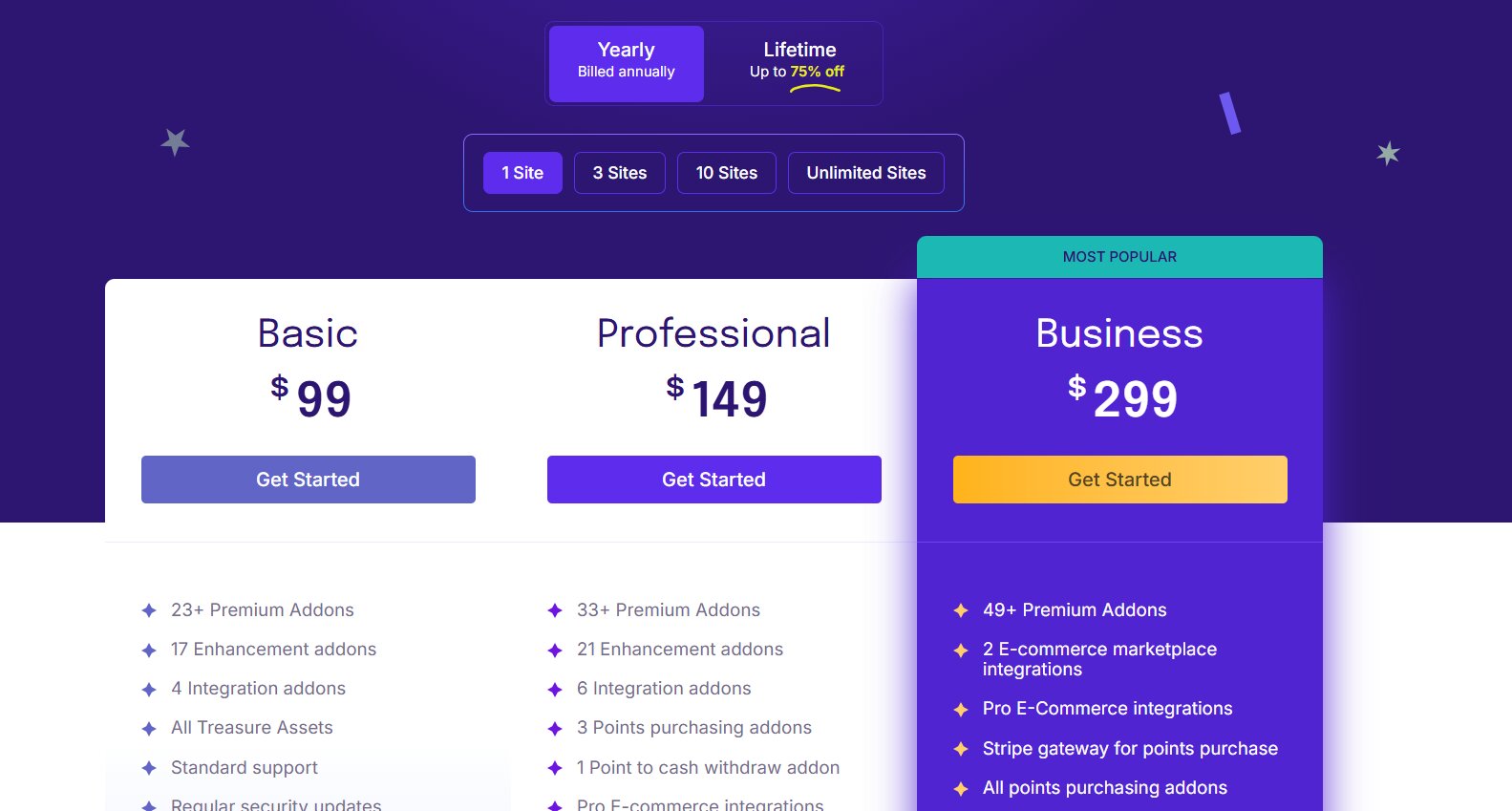
    myCred’s core plugin is free on WordPress.org, but the real costs begin when you need advanced features. myCred uses a bundle-based pricing model with Yearly and Lifetime options across three paid plans:
    myCred Pricing

    The free core plugin only covers basic points management. More advanced features — including WooCommerce integration, leaderboards, referrals, points-to-cash withdrawals, and custom reward rules — are locked behind paid plans.  The Business plan at $299 lifetime is needed for full E-commerce functionality, including Stripe gateway and marketplace integrations. 

    Pricing verdict: GameEngine at $79 lifetime gives you the complete feature set for one site — no add-ons, no extra tiers. myCred’s free core covers only the basics; real WooCommerce and e-commerce features require the Professional ($149) or Business ($299) lifetime plan. For a fully equipped store, GameEngine is the better value. 

    GameEngine vs myCred: What the Competition Page Says

    GameEngine’s own website addresses the comparison head-on with a dedicated page titled “GameEngine vs GamiPress vs myCred — The Truth.” After analyzing 80+ features across all three plugins, they label both GamiPress and myCred as “Add-On Heavy” — meaning both have a solid free core, but nearly every advanced feature comes at an extra cost.

    GameEngine’s philosophy is the opposite: one product, one price, everything included. No hunting for add-ons, no surprise renewal fees, no piecing together a system from separate purchases. What you install is what you get — fully featured from day one.

    Which Plugin Should You Choose?

    Choose GameEngine if you:

    • You want challenges, quests, progress maps, and milestones — not just points
    • You run a WooCommerce store and need deep, built-in rewards integration
    • You want to let users withdraw points as real money — a unique feature myCred does not offer
    • You want time-based rewards like Happy Hours and daily login bonuses
    • You want everything in one plugin without piecing together expensive add-ons
    • You are launching a new store and want to start with a modern, scalable system
    • You run an LMS, membership site, or community alongside your store

    Choose myCred  if you:

    • You need a free, zero-cost basic loyalty system to get started today
    • Your store is small with simple point-of-purchase needs
    • You are already using myCred’s ecosystem and do not want to migrate
    • Community support and years of third-party tutorials matter to you
    • You only need basic badges and ranks — no quests, milestones, or challenges

    Final Verdict

    For any store owner who wants real gamification — quests, progress maps, leaderboards, time-based rewards, a rewards marketplace, points-to-cash withdrawal, and deep WooCommerce integration all in one plugin — GameEngine is the clear winner.

    It is more modern, more feature-complete, and with the current Early Bird pricing, more affordable than building the equivalent system with myCred add-ons.

    MyCred remains a valid option only for basic, free loyalty points on a small store with minimal needs.

    If you are serious about customer engagement and long-term loyalty, GameEngine is the better long-term investment.

    Frequently Asked Questions

    Does GameEngine have a free version?

    Yes. GameEngine offers a free version with core gamification features. You can download it and explore the platform before upgrading to a paid plan.
    Can users withdraw points as real money in GameEngine? 

    Yes. GameEngine has a built-in Points Withdrawal System included in all plans — no add-on needed. myCred also supports points-to-cash withdrawal, but only as an add-on available from the Professional plan ($149) and above. 

    Does GameEngine replace myCred completely?

    For most use cases, yes. GameEngine covers everything myCred offers — points, badges, ranks, WooCommerce rewards — and adds a full gamification layer including quests, challenges, progress maps, and a rewards marketplace. Migration tools (Import & Export) are also built in. 

  • GamiPress vs GameEngine: Which WordPress Gamification Plugin Should You Use in 2026?

    GamiPress vs GameEngine: Which WordPress Gamification Plugin Should You Use in 2026?

    If you want to add gamification to your WordPress site in 2026, two names keep coming up — GameEngine and GamiPress. Both promise to boost user engagement, reward loyal visitors, and make your site more interactive. But which one is actually worth your time and money?

    In this in-depth comparison, we break down everything you need to know — features, pricing, ease of use, performance, and more — so you can make the right choice for your website.

    What Is GameEngine?

    GameEngine

    GameEngine is a modern, all-in-one WordPress gamification plugin built for site owners who want a complete reward system without the complexity of managing multiple add-ons. Compatible with LMS, WooCommerce, and Membership plugins, it lets you reward users with points, badges, and levels automatically — increasing engagement, guiding user behavior, and building lasting loyalty.

    Core features:

    • Points, Badges, Ranks, Challenges, Quests
    • Progress Maps, Rewards, Dynamic Leaderboards, Triggers
    • Engagement tools — all built in, no extra add-ons required
    • Free version available with core gamification features
    • REST API for connecting with external apps and systems
    • Lightweight and performance-focused

    GameEngine is developed by Kodezen LLC, the same team behind Academy LMS and StoreEngine. It targets bloggers, WooCommerce store owners, LMS platforms, and membership sites that want powerful gamification up and running quickly.

    GameEngine: Key Features

    Core Gamification: GameEngine covers every essential gamification need out of the box. You can create XP or Coin-based points systems, reward users for logins, registrations, posts, and comments, and award badges for milestones. Users progress through levels with a clear visual roadmap, complete structured challenges and quests, and unlock content based on points, badges, or levels. Dependency logic lets you chain goals so users must complete one before unlocking the next.

    Rewards & WooCommerce: GameEngine’s WooCommerce integration is one of its strongest selling points. Users can pay directly with points at checkout, apply point-based cart discounts, or convert points into coupons from a dynamic rewards shop. A full rewards marketplace lets users redeem points for custom benefits. Time-based rewards like happy hours and weekend bonuses keep engagement consistent, while dynamic leaderboards add healthy competition. Admins can also allow users to withdraw points as real money through a dedicated wallet management dashboard.

    Analytics & User Management: Every point change, badge award, and manual trigger is recorded in detailed activity logs. Expiring points naturally create urgency and motivate users to keep engaging. Daily visit rewards build long-term habits, while profile-based and content interaction rewards encourage users to engage more deeply with your site. Each user gets a personal dashboard showing their points, ranks, and achievements at a glance.

    Developer & Advanced Tools: GameEngine includes a full REST API for connecting with external apps, systems, or headless WordPress setups. Shortcodes make it easy to display points, badges, leaderboards, and profiles anywhere on your site. Advanced reward filters let you control rewards based on conditions like word count, content type, or user behavior. Email alerts notify users the moment they earn a reward, and built-in import/export tools make migration and backups straightforward.

    GameEngine Pricing

    Begin your journey with full free access, explore every feature at your own pace, and only upgrade when you feel the time is right.

    GameEngine Pricing

    The Early Bird lifetime deal is exceptional value — especially since nearly all features are included without purchasing separate add-ons. 

    What Is GamiPress?

    GamiPress

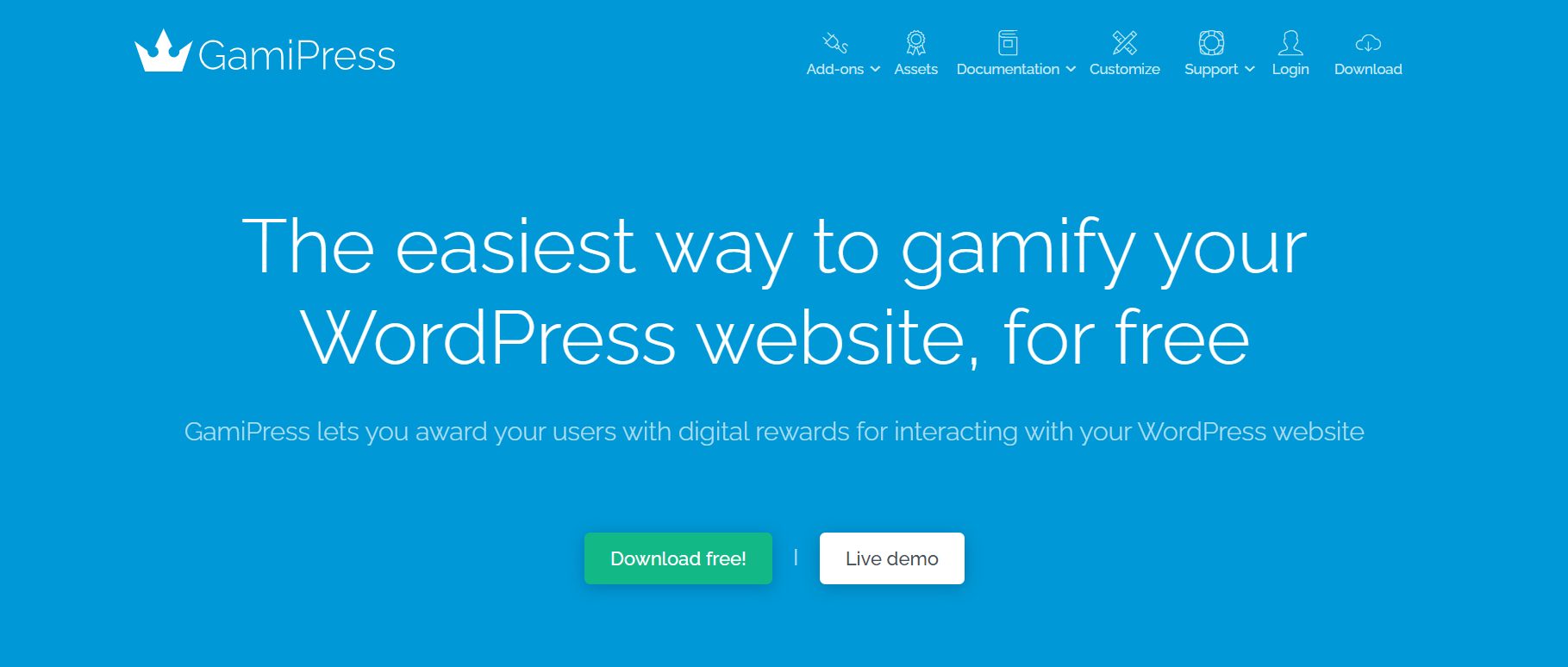
    GamiPress is one of the most established WordPress gamification plugins available today. It has been around for years and has built a massive reputation for flexibility and deep plugin integrations.

    Key highlights:

    • Free core plugin on WordPress.org
    • Three reward systems: Points, Achievements, and Ranks
    • 400+ integrations with other WordPress plugins
    • Deep compatibility with WooCommerce, LearnDash, BuddyPress, BuddyBoss, Tutor LMS, and more
    • Developer-friendly with extensive hooks and filters
    • An active community and regularly updated

    GamiPress works as a toolkit — you build your gamification system by combining the core plugin with the add-ons you need. This makes it incredibly powerful but also more complex and more expensive over time.

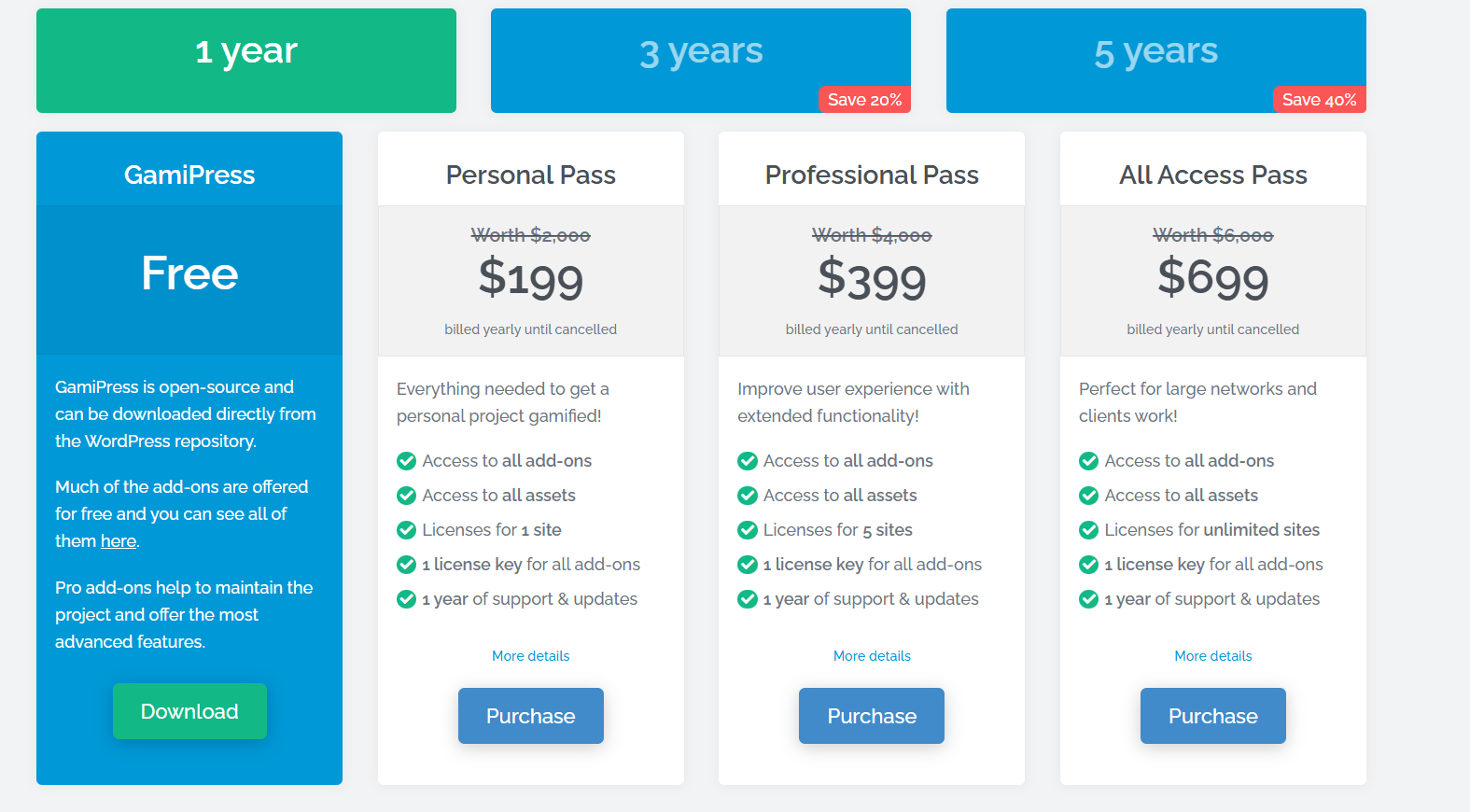
    GamiPress Pricing

    GamiPress is open-source and completely free to download from the WordPress repository. Many add-ons are also free, but Pro add-ons help maintain the project and unlock the most advanced features.
    GamiPress Pricing

    All paid plans include every add-on, all assets, and 1 year of support and updates, billed annually until cancelled.

    GameEngine vs GamiPress: Feature Comparison 

    Feature

    GameEngine

    GamiPress

    Points, Badges, Ranks

    ✅ Built-in

    ✅ Yes

    Challenges & Quests

    ✅ Built-in

    ⚠️ Add-on

    Leaderboards

    ✅ Built-in

    ⚠️ Add-on

    Progress Maps

    ✅ Built-in

    ❌ No

    WooCommerce Rewards

    ✅ Built-in

    ⚠️ Add-on

    Pay With Points

    ✅ Built-in

    ⚠️ Add-on

    Points Withdrawal

    ✅ Built-in

    ⚠️ Add-on

    REST API

    ✅ Full

    ⚠️ Limited

    Rewards Marketplace

    ✅ Built-in

    ❌ No

    Free Version

    ✅ Yes

    ✅ Yes

    Add-on Ecosystem

    ⚠️ Growing

    ✅ 400+

    LearnDash / BuddyBoss

    ⚠️ Limited

    ✅ Deep

    Ease of Use

    GameEngine

    GameEngine is designed for simplicity. Everything is built in — you do not need to hunt for add-ons to get leaderboards, quests, or WooCommerce checkout rewards. The shortcode display system and clean admin interface make it fast to deploy on any WordPress site. You can start using core features without any technical knowledge.

    Best for: Beginners, bloggers, WooCommerce store owners, and anyone who wants powerful gamification without managing multiple plugins.

    GamiPress

    GamiPress has a steeper learning curve. Once you start adding multiple add-ons, each with its own settings, managing everything can feel overwhelming for beginners. The documentation is thorough, and the community is active, but the setup time is significantly longer.

    Best for: Experienced WordPress users who want maximum flexibility and don’t mind a more involved configuration process.

    Performance

    GameEngine is built as a lightweight, performance-focused plugin designed to run smoothly even on active, high-traffic sites. With everything bundled into a single plugin instead of scattered across add-ons, you get more predictable, lower overhead. 

    GamiPress is well-optimized for its age, but adding many add-ons can increase page load time. A caching plugin is recommended for complex GamiPress setups.

    Winner: GameEngine for out-of-the-box performance.

    Integrations

    GameEngine

    GameEngine integrates with LMS platforms, WooCommerce, and Membership plugins, and includes a full REST API for connecting to external apps and custom systems. This makes it a strong fit for headless WordPress builds and custom integrations. Its native plugin-specific integration list is still growing.

    GamiPress

    GamiPress leads with 400+ plugin integrations — LearnDash, BuddyBoss, BuddyPress, Tutor LMS, LifterLMS, Gravity Forms, WPForms, GeoDirectory, and many more. If you use a niche plugin, GamiPress almost certainly has a connector for it.

    GameEngine Review: An Honest Assessment

    What Makes GameEngine Stand Out

    The biggest advantage of GameEngine is what it includes out of the box. Features that cost extra in GamiPress — leaderboards, quests, challenges, progress maps, points-to-coupons, pay-with-points, wallet management, points withdrawal, time-based rewards, REST API, rewards marketplace — are all built into GameEngine at no extra cost.

    For WooCommerce store owners, GameEngine is particularly powerful. Users can earn points on purchases, spend them at checkout, convert them to coupons, apply cart discounts, or even withdraw them as real money — all within one plugin.

    The REST API makes it suitable for developers building custom front-ends or connecting gamification to external systems. The Import & Export Tools make it easy to migrate or back up your data.

    The Early Bird lifetime pricing ($79 for 1 site) is also a major advantage — it is genuinely hard to beat when compared to paying for GamiPress add-ons year after year.

    Where GameEngine Still Has Room to Grow

    GameEngine’s list of native plugin integrations is still expanding. If your site is built on LearnDash, BuddyBoss, or BuddyPress, GamiPress has deeper, more tested native connections at this time.

    The community and documentation are also newer and smaller compared to GamiPress, which has years of tutorials, forum threads, and user guides.

    GameEngine Verdict

    GameEngine is one of the most feature-complete gamification plugins available for WordPress in 2026. It is modern, lightweight, well-priced, and ships with capabilities that most competitors charge extra for. For new WordPress sites — especially WooCommerce stores and membership platforms — it is the strongest choice right now.

    Which Plugin Should You Choose?

    Choose GameEngine if you:

    • Run a WooCommerce store and want built-in points-at-checkout features
    • Want leaderboards, quests, challenges, progress maps, and a rewards marketplace without buying add-ons
    • Need REST API access for external integrations or custom builds
    • Want lifetime pricing with no recurring annual cost
    • Are starting a new site in 2026 and want a modern, all-in-one solution
    • Are you a beginner who wants a fast, simple setup

    Choose GamiPress if you:

    • Use LearnDash, BuddyBoss, BuddyPress, Tutor LMS, or LifterLMS
    • Need one of GamiPress’s 400+ specific plugin integrations
    • Already have GamiPress set up and running well
    • Want the largest community and documentation library
    • Prefer a modular system where you only pay for what you use

    Final Verdict

    GameEngine is the stronger choice for most new WordPress sites in 2026. It delivers a complete, feature-rich gamification system — leaderboards, quests, WooCommerce rewards, REST API, wallet management, and more — all in one plugin, at a price that makes long-term sense.

    GamiPress remains the best option for sites with complex, specific integration needs — particularly those built on LearnDash, BuddyBoss, or BuddyPress, where GamiPress’s 400+ integrations are genuinely hard to replace.

    Our pick for 2026: GameEngine — for its all-in-one approach, modern feature set, REST API, and excellent Early Bird lifetime value.

    Frequently Asked Questions

    Does GameEngine have a free version?

    Yes. GameEngine offers a free version with core gamification features. The Pro version adds advanced tools and is available as a lifetime deal starting at $79 for a single site.
    Is GamiPress free?

    The GamiPress core plugin is free on WordPress.org. However, most advanced features — including leaderboards, quests, and WooCommerce checkout rewards — require paid add-ons, with an all-access bundle starting around $199/year.

    Which plugin is better for WooCommerce stores?

    GameEngine is the stronger choice. It includes Pay With Points, Points Cart Discount, Points to Coupons, a Rewards Marketplace, and Wallet Management — all built in without needing add-ons.

    Which plugin is better for LearnDash?

    GamiPress has a deep, dedicated LearnDash integration. GameEngine does not confirm a specific LearnDash integration at this time.

  • How to Build a WooCommerce Loyalty Program That Actually Increases Customer Retention

    How to Build a WooCommerce Loyalty Program That Actually Increases Customer Retention

    Acquiring a new customer can cost 5x more than retaining an existing one. But how do you stop customers from visiting once and never coming back? The answer is a well-designed Loyalty Program.

    A loyalty program isn’t just about giving points; it’s about creating an experience that makes customers feel rewarded for every interaction. With GameEngine Pro, you can build a high-converting loyalty system in minutes.

    Why most loyalty programs fail

    Before the strategy, it’s worth understanding what goes wrong with the average points program — because the failure mode is almost always the same.

    Most stores set up points for purchases and nothing else. Customers earn points when they spend money, which means they only think about the program when they’re already spending money. There’s no reason to log in between purchases. No reason to engage with the brand outside a transaction. The program becomes invisible until checkout — at which point it’s just a small discount, not a relationship.

    “A loyalty program that only rewards purchases teaches customers that your store is just a place to buy things. A loyalty program that rewards behavior teaches them it’s a place worth belonging to.”

    The programs that actually retain customers reward the whole relationship — not just the transaction. That’s the design principle behind everything in this guide.

    1. Reward More Than Just Purchases

    If you only give points for buying, users only visit when they have money to spend. To increase retention, you need them to visit your site even when they aren’t shopping.

    • Registration Points: Give an immediate “Welcome Bonus” to new members.
    • Daily Visit Points: Reward users for logging in every day.
    • Review Points: Encourage customers to leave feedback on products they’ve bought.
    Rewards

    2. Use a Visual Progress Map

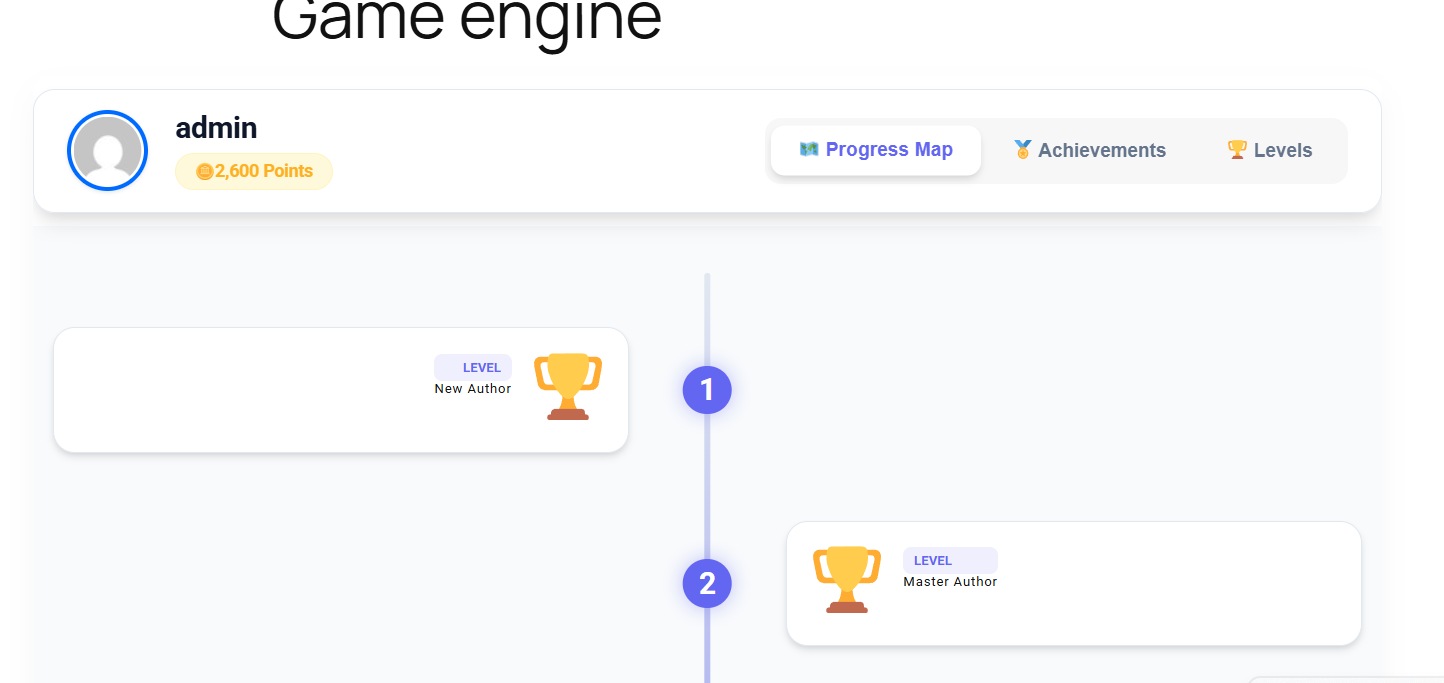
    Psychologically, people hate leaving things unfinished. Use the GameEngine Progress Map to show customers their journey.

    • When a customer sees they are only one purchase away from reaching the “Gold Member” rank on a beautiful zig-zag roadmap, they are much more likely to complete that next order.
    Visual Progress Map

    3. Let Customers “Pay with Points” at Checkout

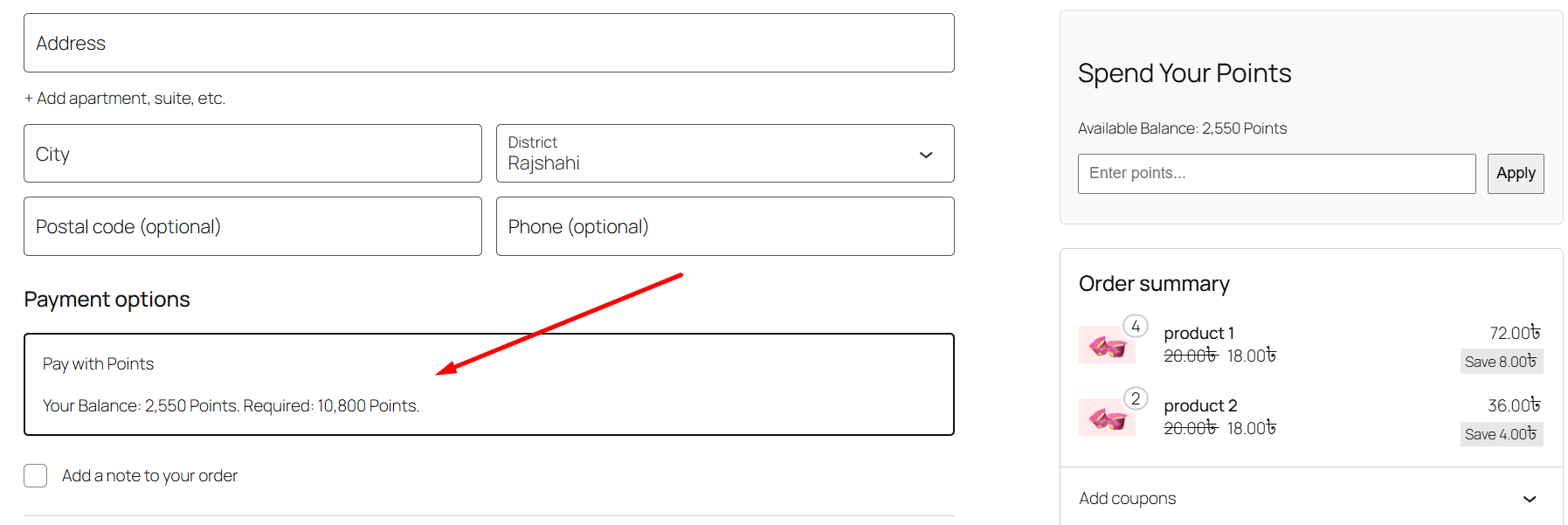
    The most effective loyalty programs give points a real monetary value. GameEngine Pro allows you to integrate a Points Payment Gateway directly into WooCommerce.

    • Customers can pay for their entire order or use Partial Payments to get a few dollars off their total. This makes them feel like their points are “real cash,” making your store their preferred choice over competitors.
    Pay with Points

    4. Launch a Dynamic Rewards Marketplace

    Sometimes, customers prefer a discount code they can use later or share with a friend. Set up a Rewards Store using our shortcode:
    [gameengine_marketplace]

    • Let users “buy” a 20% off coupon for 1000 points. The system automatically generates a unique WooCommerce coupon for them, creating a fun “shopping” experience within your loyalty program.
    Dynamic Rewards

    5. Offer “Happy Hour” Incentives

    Create urgency by offering double points or special badges during specific times.

    • Weekend Bonus: Set your rules to be active only on Saturdays and Sundays.
    • Flash Rewards: Offer extra points for purchases made between 6 PM and 9 PM. This drives traffic to your store exactly when you need it most.
    Offer Incentives

    6. Provide a Path to Real Cash (Payouts)

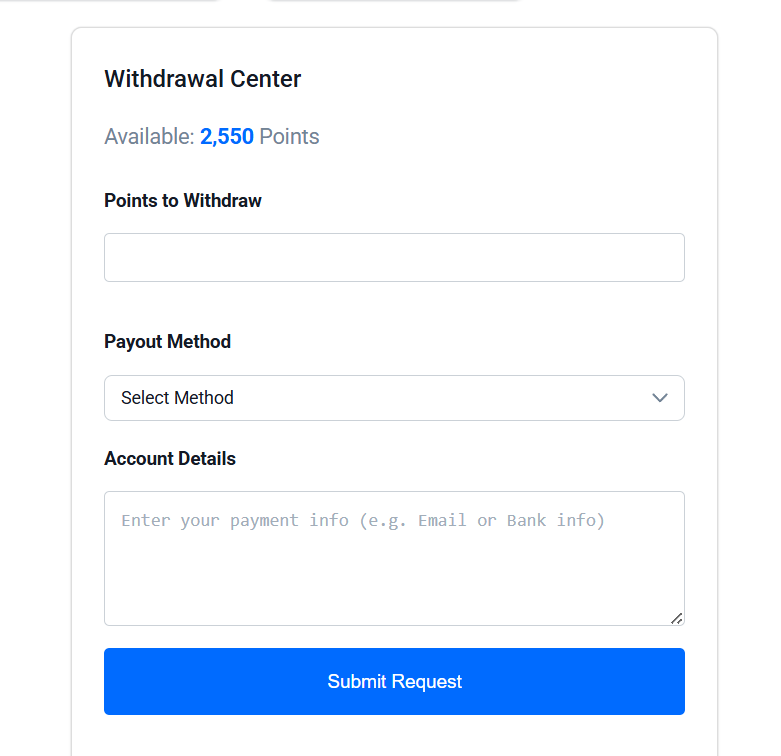
    For high-end stores or affiliate-based models, you can allow users to convert their points into real money.

    • With the Points Payout system, loyal customers can request a withdrawal to their Bank, bKash, or PayPal. This turns your store into a platform where they can actually “earn” while they shop.
     Points Payout system

    How the full loop works together

    Each layer above is useful on its own. But the real retention power comes from how they connect. Here’s what the full customer journey looks like when all six layers are running:

    Joins the store

    Gets a welcome bonus. Sees their balance immediately. Progress map shows what’s ahead.

    Returns daily

    Login bonus builds a habit. Happy Hours create urgency on specific days.

    Makes a purchase

    Earns points. Sees how close they are to the next level on the progress map.

    Spends rewards

    Redeems at checkout or in the marketplace. Points feel like real value.

    Refers a friend

    Earns referral points. Brings new customers in while deepening their own loyalty.

    Cycle continues

    Each action feeds the next. The program runs itself — no manual management needed.

    What to expect from results

    5× Lower cost to retain vs. acquire a new customer

    ↑ 40% Increase in repeat purchase rate after first redemption

    ↑ 3× More site visits from users with an active points balance

    ↓ 30% Lower churn rate for customers enrolled in a loyalty program

    These numbers take time to materialize. The first month is mostly setup and awareness. The second month is when habits start forming. By month three, you’ll see a clear split in behavior between customers who are engaged with the loyalty program and those who aren’t — and the gap in repeat purchase rate is usually significant enough to justify everything.

    The bottom line

    The stores that win on retention aren’t necessarily the ones with the best products or the lowest prices. They’re the ones that make customers feel like coming back is worth something. A loyalty program built on GameEngine Pro does exactly that — it turns every interaction into progress, every purchase into momentum, and every return visit into a habit.

    You don’t need to build all six layers at once. Start with a welcome bonus, daily login points, and a basic marketplace. Get that working, watch how your customers respond, then add Happy Hours and the progress map. Layer it in over a few weeks and by the time you’ve got everything running, you’ll have built something your customers will genuinely miss if it disappeared.

    Ready to stop losing customers to the “buy once and leave” pattern?

    GameEngine Pro gives you every tool in this guide — triggers, marketplace, payment gateway, progress map, Happy Hours, and payouts — in one plugin, with no monthly loyalty platform fee.

    Get GameEngine Pro ↗See all features ↗

    FREQUENTLY ASKED QUESTIONS

    Do I need WooCommerce for GameEngine Pro’s loyalty features?

    Not for everything. The core gamification features — points, levels, badges, leaderboards, and the progress map — work independently of WooCommerce. But the purchase triggers, pay-with-points gateway, and rewards marketplace coupon generation do require WooCommerce to be active. For a pure loyalty program focused on shopping behavior, WooCommerce is essential.

    Can I run the loyalty program alongside an existing WooCommerce coupon strategy?

    Yes. Points spending and standard WooCommerce coupons operate independently. A customer can apply a discount code and use partial points payment on the same order, or you can restrict stacking via the GameEngine settings. Most stores let both work together initially, then adjust once they see how customers are using each mechanic.

    How do I prevent customers from gaming the system for free rewards?

    GameEngine Pro has several abuse-prevention controls built in. You can set daily caps on how many points a specific trigger can award per user, add cooldown periods between repeated actions, and link marketplace coupons to the redeeming user’s email address so they can’t be shared. For payout requests, set a minimum threshold and review period to catch unusual activity before it processes.

    Should I announce the loyalty program to existing customers or just let them discover it?

    Announce it — loudly. Customers won’t engage with something they don’t know exists. Send an email to your existing list explaining how to earn points, show them the progress map, and give them a retroactive welcome bonus if possible. The launch moment is your best chance to create an initial spike in engagement that builds momentum for the first few weeks.

    How long before the loyalty program starts visibly affecting retention numbers?

    Realistically, give it 6–8 weeks before drawing conclusions. The first two weeks are awareness-building. Weeks three and four are when customers start forming return habits around daily login bonuses and Happy Hours. By week six, you should see a measurable difference in repeat visit rates between customers who’ve engaged with the program and those who haven’t. Compare 30-day repeat purchase rates before and after launch for the clearest signal.

  • How to Restrict WordPress Content Based on User Points or Rank

    How to Restrict WordPress Content Based on User Points or Rank

    Most websites treat every visitor the same. A user who signed up yesterday sees the same content as someone who has been active for six months, completed every course, and referred a dozen friends. There’s no acknowledgment of that loyalty — and no reward for it.

    Content restriction flips that. It creates a tiered experience where the most engaged users get access to things that newer or less active users are still working toward. Not to punish newcomers, but to give everyone something to aim for.

    Exclusivity is one of the best ways to motivate your community. By “locking” special content and requiring users to earn a certain number of points or reach a specific rank to see it, you turn your website into a goal-oriented experience.

    Restrict WordPress Content

    With GameEngine, you can easily restrict text, download links, or premium videos based on a user’s progress. Here is how to set it up using a simple shortcode.

    What content restriction actually does for your site

    Before diving into the shortcodes, it’s worth being clear about what you’re building and why it works.

    When a user can see that something exists — a guide, a video, a download — but can’t access it yet, something interesting happens. The locked content becomes a goal. The points or rank required to unlock it become meaningful in a way they weren’t before. Suddenly “earn 100 points” isn’t an abstract number. It’s the thing standing between them and that resource they want.

    • “The most motivating progress bar isn’t the one that shows how far someone has come. It’s the one that shows them exactly what they’re about to unlock.”
    • That’s the mechanic. Visibility of the reward combined with a clear path to reach it. GameEngine handles both sides — the lock on the content, and the points system that gives users the key.
    • Downloads & resources
    • Lock PDF guides, templates, or toolkits behind a points threshold. Reward active readers with assets casual visitors can’t access.
    • Premium video content
    • Gate bonus lessons or behind-the-scenes content behind a level or badge. Gives course completers something extra to look forward to.
    • VIP member areas
    • Restrict entire sections to users who’ve reached a specific rank. Turns your highest tier into something genuinely exclusive.
    • Secret links & offers
    • Hide discount codes, affiliate links, or special offers behind a points gate. Only your most engaged users ever see them.

    2. Restricting Content by Points

    If you want to hide a secret link or a special message from anyone who has less than 50 points, you can use the following shortcode:

    [gameengine_restrict type="points" value="50"] Your secret content goes here... [/gameengine_restrict]

    What happens?

    • Users with 50+ points see the content immediately.
    • Users with less than 50 points see a default “Locked” message.

    3. Restricting Content by Achievement (Badges)

    You can also lock content behind a specific milestone. For example, only users who have earned the “Senior Author” badge (ID: 15) can see a specific resource.

    [gameengine_restrict type="achievement" value="15"] Link to Premium PDF [/gameengine_restrict]

    4. Restricting Content by Level (Rank)

    This is perfect for membership sites. You can restrict content to users who have reached a high level, such as “Level 5 – Gold Member.”

    [gameengine_restrict type="level" value="5"] This video is for Gold Members only! [/gameengine_restrict]

    5. Customizing the “Locked” Message

    You don’t want to just hide content; you want to tell users how to unlock it! You can add a custom message directly inside the shortcode:

    [gameengine_restrict type="points" value="100" message="Earn 100 points to unlock this premium video!"] ... [/gameengine_restrict]

    6. Works with Any Page Builder

    Because GameEngine uses standard WordPress shortcodes, this feature works perfectly with Elementor, Gutenberg, Divi, or any other page builder. Simply drop a “Shortcode” or “Text” widget and wrap your content with the restriction tags.

    The bottom line

    Content restriction done well doesn’t feel like a paywall. It feels like a destination. When users can see that something is waiting for them — a guide, a video, a resource they actually want — and they know exactly what it takes to get there, the locked content becomes one of the best engagement tools on your site.

    The shortcode itself takes thirty seconds to add. The real work is deciding what’s worth locking and setting the threshold at a level that feels genuinely attainable. Too easy and the exclusivity disappears. Too hard and users give up before they get there. Most sites find the sweet spot somewhere around three to five sessions worth of activity for the first locked piece — close enough to feel reachable, far enough to feel earned.

    Start with one piece of restricted content. Watch how your users respond. Then build a ladder of locked resources that give people a reason to keep climbing.

    Ready to build a content ladder your users actually want to climb?

    Content restriction is available in GameEngine — combine it with points, achievements, levels, and the rewards marketplace for a complete engagement system.

    Get GameEngine ↗See all features ↗

    FREQUENTLY ASKED QUESTIONS

    Can I restrict content for logged-out visitors too?

    Yes. If a user isn’t logged in at all, they’ll see the locked message by default — since GameEngine has no points or level data to check against an anonymous visitor. This makes content restriction a useful tool for encouraging registration, not just rewarding existing users.

    Can I nest multiple restrictions on the same content?

    You can use separate restriction shortcodes for different content blocks on the same page — each with its own threshold. What you can’t do is stack multiple conditions (points AND level) inside a single shortcode tag. If you need multi-condition gating, the workaround is to use level as the gate and design your level system so that reaching it naturally requires a certain point total.

    Will search engines index the locked content?

    Lorem ipsum dolor sinonet amet, consectetur adipiscing elit. Ut elit tellus, luctus nec ullaThis depends on how the restriction is implemented at the rendering level. In most setups, GameEngine replaces the content with the locked message on the server side, so search engine crawlers see the locked state rather than the hidden content. If SEO indexing of restricted content matters for your site, test with Google’s URL Inspection tool to confirm what the crawler actually sees.

    What happens when a user reaches the threshold mid-page?

    The restriction check happens when the page loads. If a user earns the required points while on the same page session, they’ll need to refresh the page for the content to unlock. GameEngine doesn’t dynamically update the page in real time — the check runs at page load. Most site owners add a note to the locked message telling users to refresh after earning the required points.

    Can admins always see restricted content regardless of their points?

    Yes. WordPress administrators bypass content restrictions by default — they always see the full content regardless of their points balance or level. This lets you preview and test restricted content from your admin account without needing to earn the required threshold first.

  • How to Add “Happy Hours” to Your WordPress Reward System

    How to Add “Happy Hours” to Your WordPress Reward System

    Do you want to drive more traffic to your website at specific times? “Happy Hours” is a powerful marketing tactic used by the world’s biggest brands to create urgency. Now, you can do the same with your WordPress site.

    With GameEngine Pro, you can set up time-restricted rewards that encourage users to be active during specific hours or days. Here is how to set it up without writing any code:

    Why time-restricted rewards work

    Before the setup steps, it’s worth understanding what actually makes Happy Hours effective — because if you set it up without thinking about the psychology, you’ll miss most of the benefit.

    The mechanic works on two levels. First, scarcity: a reward that’s only available for three hours on a Friday night feels more valuable than one available all week. Users pay attention to things that can disappear. Second, habit: once a user shows up for your Happy Hour two or three times, they start anticipating it. It becomes part of their routine — which is exactly where you want to be.

    “A reward you can get any time is easy to ignore. A reward that expires at 9 PM tonight is hard to forget.”

    The brands that use this best — coffee chains, streaming platforms, food delivery apps — all understand that urgency isn’t manipulation, it’s motivation. You’re not tricking anyone. You’re giving them a genuinely better deal, within a window that serves both of you.

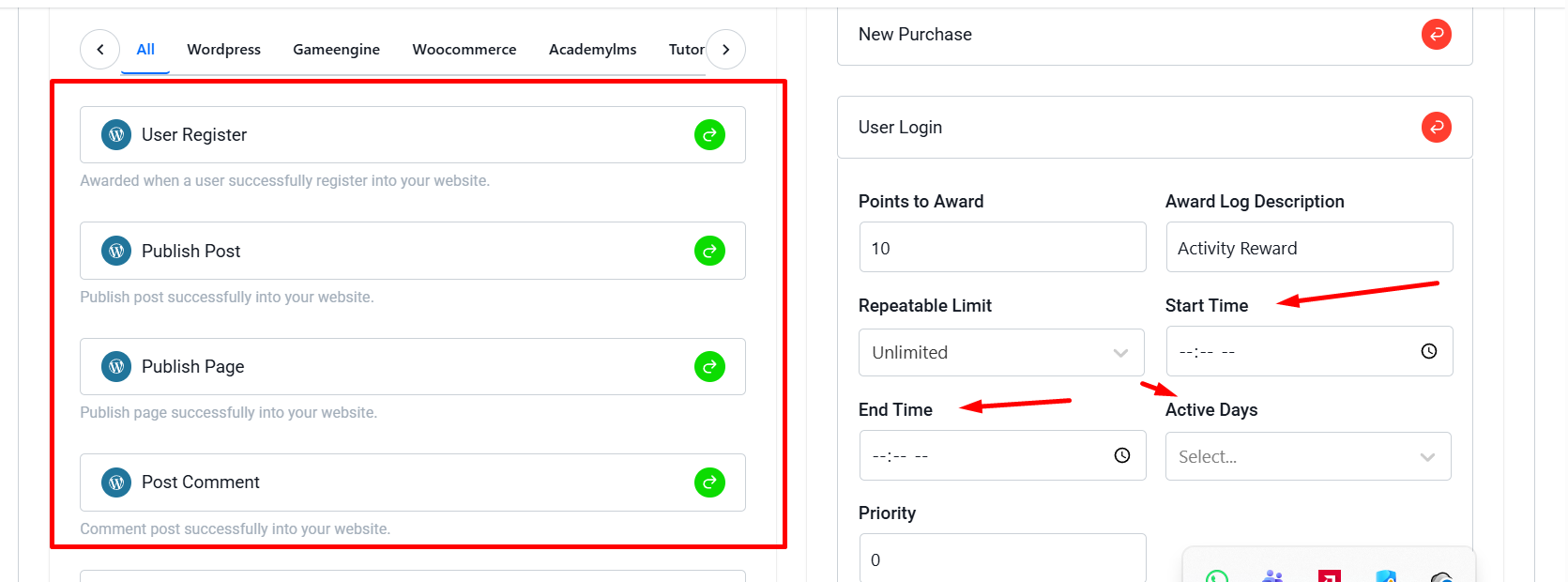
    1. Choose Your Activity (Trigger)

    First, decide which activity you want to reward during Happy Hours.

    • Example: Maybe you want users to earn double points for leaving comments on Friday nights, or extra points for visiting your shop between 8 PM and 10 PM.
    Activity

    2. Set Up Active Days

    Not every day has to be a Happy Day. You can select specific days of the week when the reward is active.

    • Go to the Triggers section in GameEngine.
    • In your rule settings, find the Active Days field.
    • Select the days (e.g., Saturday and Sunday for a “Weekend Bonus”).
    Active Days

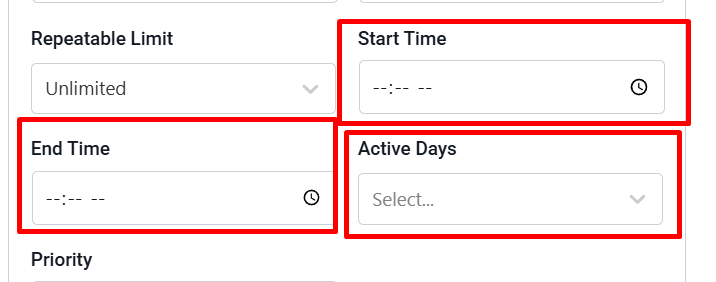
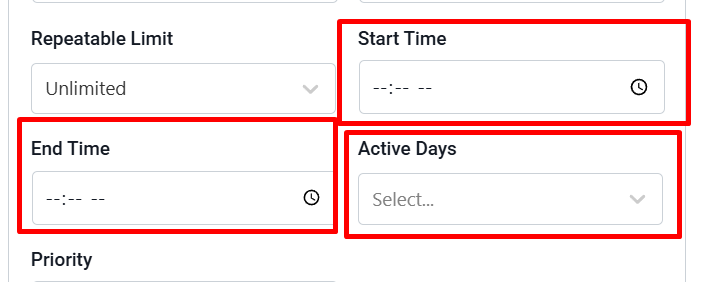
    3. Define the Happy Hour Window

    This is where the magic happens. You can restrict the reward to a specific time range.

    • Start Time: Set when the Happy Hour begins (e.g., 18:00).
    • End Time: Set when the window closes (e.g., 21:00).

    If a user completes the task outside of this window, they won’t receive the bonus. This creates a “Use it or lose it” mentality that brings users back exactly when you want them.

    Happy Hour

    4. Automated and Time-Zone Safe

    You don’t need to manually turn the rules on and off. GameEngine Pro uses your WordPress site’s time settings to automatically activate and deactivate the rewards based on your schedule.

    Why use Happy Hours?

    • Boost Traffic: Fill your low-traffic hours with active users.
    • Increase Sales: Encourage WooCommerce purchases during flash-sale hours.
    • Better Engagement: Give users a reason to check your site every single day at a specific time.

    Launch Your First Happy Hour Today!

    Stop running a static reward system. Make it dynamic, exciting, and urgent with GameEngine Pro.

    Ready to gamify your schedule? Upgrade to GameEngine Pro and start building your custom Happy Hour rules today!

    Happy Hour ideas worth trying

    Once the mechanics are in place, the creative possibilities open up. Here are some combinations that tend to generate strong engagement across different site types:

    Early bird bonus — double XP for the first lesson completed before 9 AM on weekdays. Works well for course creators whose students tend to procrastinate in the mornings.

    Late night flash — bonus purchase points from 10 PM to midnight on Thursdays and Fridays. Targets evening shoppers who browse before bed.

    Weekend warrior — triple login points on Saturday and Sunday mornings. Builds a weekend check-in habit without requiring any specific action.

    Midweek surge — bonus comment points on Tuesday and Wednesday afternoons, the two lowest-traffic days for most content sites.

    Rotating specials — change the active trigger each week. Monday it rewards comments, Thursday it rewards purchases. Keeps users checking back to see what’s currently boosted.

    What results to expect

    Happy Hours work best as a traffic shaping tool, not a growth hack. The goal isn’t to generate new visitors — it’s to influence when your existing users show up. That distinction matters when you’re measuring success.

    2–3×

    Spike in activity during the defined window

    ↑ 35%

    Increase in daily return visits once the habit forms

    ↓ 20%

    Drop in off-peak inactivity after 4 weeks

    Give it at least three to four weeks before drawing conclusions. Habit formation takes time — users need to encounter the Happy Hour a few times before they start planning around it. The first week is awareness. The second week is interesting. By the fourth week, it’s routine.

    The bottom line

    A flat reward system treats Tuesday at 2 PM exactly the same as Friday at 8 PM. That works fine as a foundation — but it leaves a lot of potential on the table. Happy Hours let you be strategic about when engagement happens, not just whether it happens.

    The setup is genuinely simple. Pick a trigger, select your days, set the window, and save. From that point on, your reward system is running on a schedule — creating urgency, shaping habits, and filling your slow hours with users who actually showed up on purpose.

    Start with one Happy Hour. Run it for a month. Look at your traffic data before and after. Then build from there.

    Ready to make your reward system time-aware?

    Happy Hours is one of the many advanced trigger features inside GameEngine Pro — alongside partial payments, the rewards marketplace, referral bonuses, and role-based spending.

    Get GameEngine Pro ↗ See all features ↗

    FREQUENTLY ASKED QUESTIONS

    Does GameEngine Pro adjust for each user’s timezone?

    No — the Happy Hour window runs on your WordPress site’s timezone, which you set under Settings → General. All users see the same window regardless of where they are in the world. If your audience spans multiple timezones, pick the one your most active users are in, or schedule the window at a time that works reasonably across your main regions.

    Can I run multiple Happy Hours at the same time?

    Yes. Each trigger rule has its own Happy Hour settings, so you can run different windows on different triggers simultaneously. You could have a comment bonus running Friday evenings while a purchase bonus runs Saturday afternoons — they operate independently and don’t interfere with each other.

    What happens if a user completes an action right at the boundary of the window?

    GameEngine Pro checks the server time at the moment the action is logged. If it falls within the defined window — even by a minute — the bonus applies. If it falls outside, the normal rate applies. There’s no buffer zone, so the cutoff is exact based on your site’s clock.

    Should I tell users about my Happy Hours?

    Yes — transparency is what makes the mechanic work. If users don’t know the window exists, they can’t plan around it. Announce it in an email, add a note to your points dashboard, or display a countdown on the page. The more visible the window, the stronger the urgency effect. A Happy Hour no one knows about is just a regular hour.

    Can I use Happy Hours with WooCommerce purchase triggers?

    Yes. You can attach a Happy Hour window to any trigger in GameEngine Pro, including WooCommerce purchase events. This is one of the most effective use cases — a time-limited purchase bonus functions like a flash sale, but instead of reducing the price, it rewards loyalty. Customers who buy during the window earn extra points, which brings them back for the next purchase.

  • How to Create a Rewards Marketplace in WordPress (No Coding Required)

    How to Create a Rewards Marketplace in WordPress (No Coding Required)

    Want to give your users a reason to keep coming back to your site? A Rewards Marketplace allows them to “buy” exclusive rewards like discount coupons using the points they’ve earned.

    With GameEngine Pro, you can set up a professional rewards store in minutes without writing a single line of code. Here is how:

    1. Enable the Rewards Marketplace

    First, make sure GameEngine Pro is active.

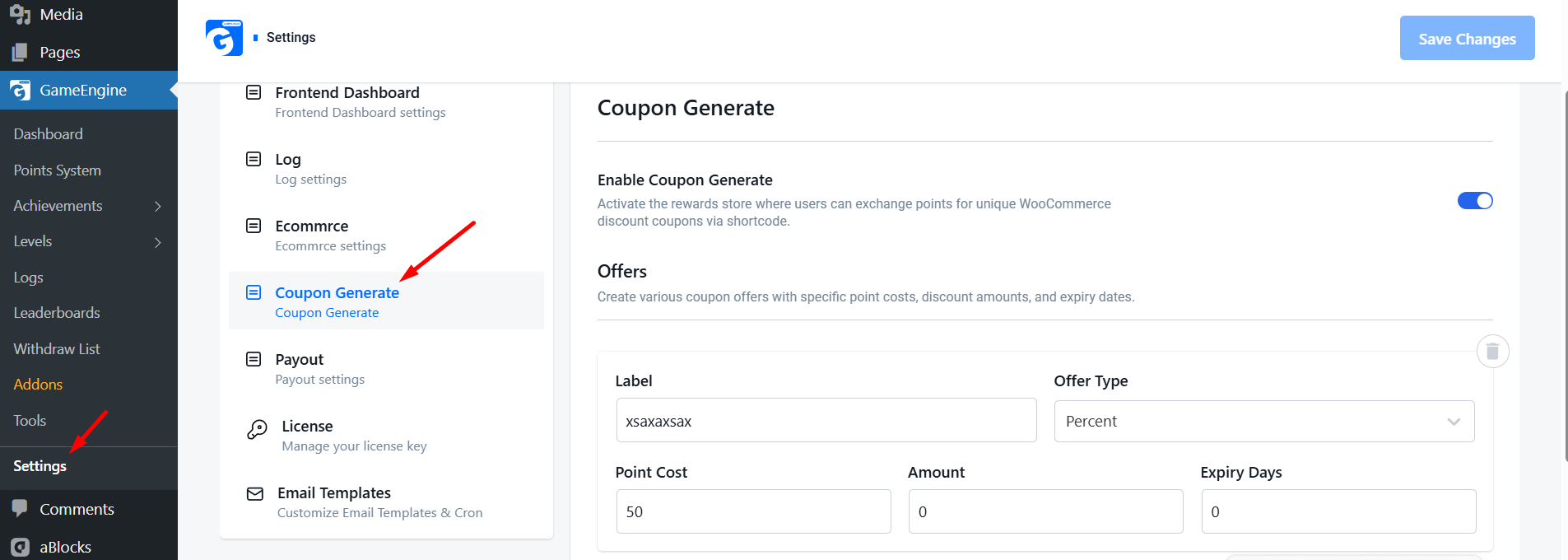
    • Go to your WordPress Dashboard and navigate to GameEngine > Settings.
    • Click on the Coupon Generate tab.
    • Switch the Enable Coupon Generate toggle to ON.
    GameEngine Enable Coupon Generate

    2. Create Your Reward Offers

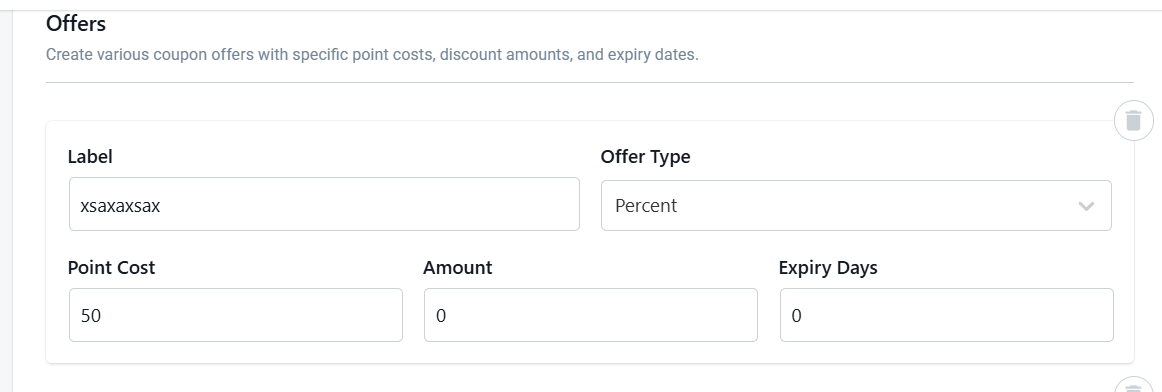
    Now it’s time to stock your shop! You can create different offers for your users using our easy repeater field. For each offer, you can set:

    • Label: Give it a name like “10% Discount” or “$25 Gift Card.”
    • Point Cost: How many points a user must spend to get this reward.
    • Discount Amount: The actual value of the coupon (e.g., 10 or 25).
    • Offer Type: Choose between a percentage discount or a fixed amount.
    • Expiry: Set how many days the coupon will be valid for.
    GameEngine Reward Offers

    3. Display the Store on Your Website

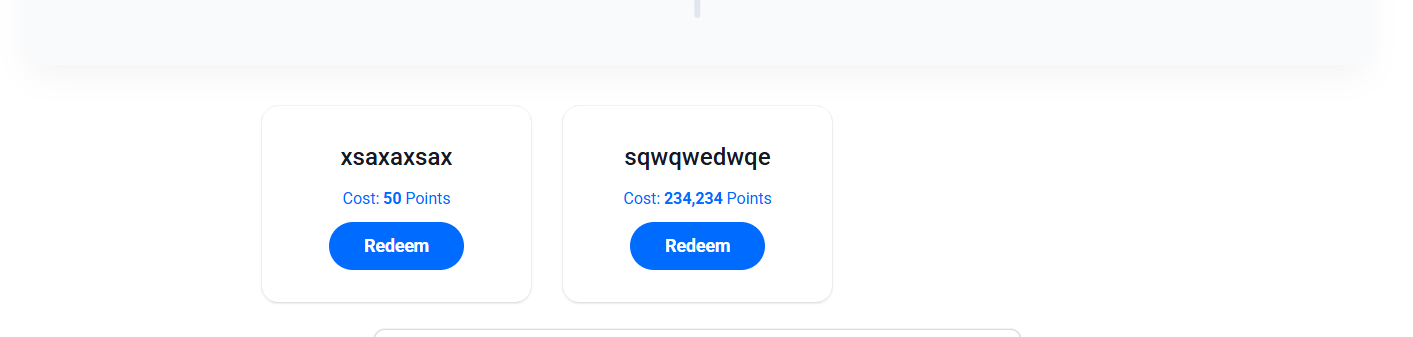
    To show the marketplace to your users, you don’t need a developer. Simply copy this shortcode:

    [gameengine_marketplace]

    Paste this code onto any page, post, or sidebar. GameEngine Pro will automatically generate a beautiful, responsive grid of all your reward cards.

    GameEngine coupon code

    4. Automatic Coupon Generation

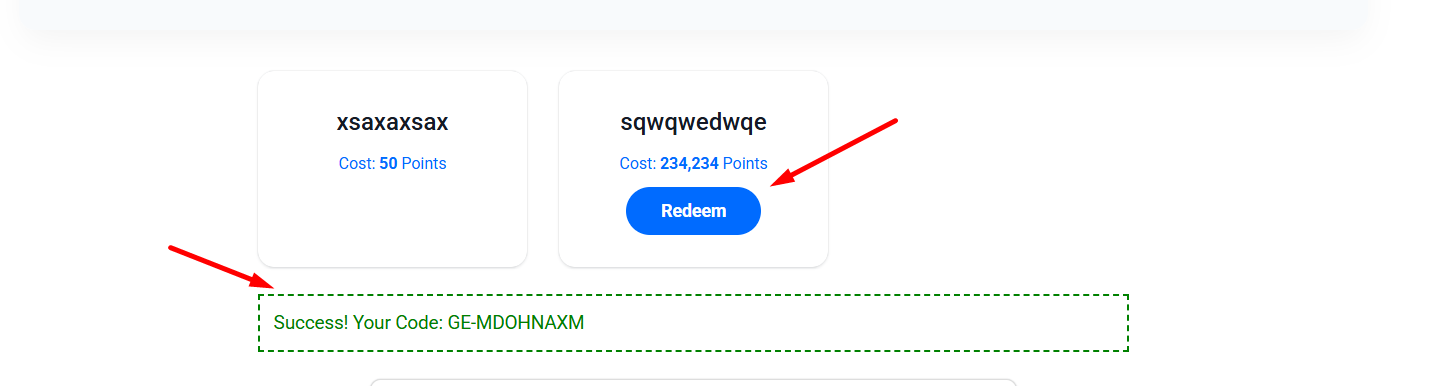
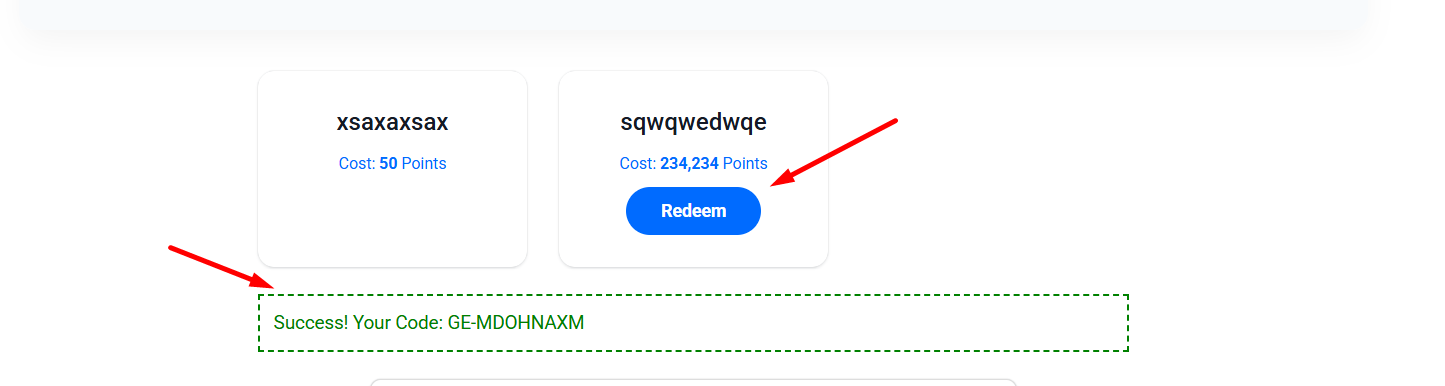
    The best part is that everything is automated. When a user clicks “Redeem”:

    • GameEngine checks their balance.
    • Points are instantly deducted.
    • A unique WooCommerce coupon code is generated just for that user.
    • The code appears on their screen immediately, and they can use it at checkout.
    coupon code

    5. Secure and Controlled

    You don’t have to worry about fraud. Each coupon is:

    Linked to the user’s specific email address.

    • Limited to one-time use only.
    • Tracked in your admin activity logs.

    Why Launch a Marketplace?

    A marketplace turns “boring” points into real value. When users see a “$50 Off” coupon just a few points away, they will engage more with your content, courses, or products to reach that goal.

    Stop just giving points—start giving rewards with GameEngine Pro!

    Why a marketplace works better than just giving discounts

    You might be wondering — why not just run a WooCommerce sale? The answer is in what the marketplace makes a user do before they get the reward.

    A sitewide sale requires nothing. Anyone who shows up gets the discount. A rewards marketplace requires engagement. Users have to earn points first — by visiting, commenting, completing courses, making purchases — and then they can spend them. The discount feels deserved rather than handed out.

    “A discount anyone can get trains customers to wait for sales. A reward they had to earn trains them to keep coming back.”

    That shift in psychology is the entire point. You’re not just reducing prices — you’re building a system where the act of engaging with your site feels like progress toward something real.

    3× More page visits from users with active point balances

    ↑ 40% Higher repeat purchase rate after first marketplace redemption

    ↓ 30% Lower coupon abuse rate vs open discount codes

    The bottom line

    Most loyalty features on WordPress require stitching together multiple plugins, paying for a separate SaaS platform, or spending hours configuring things that should just work. The GameEngine Pro rewards marketplace is different — it’s one toggle, a few offer fields, and a shortcode. The complexity lives in the automation, not the setup.

    More importantly, it changes what points mean on your site. They go from an abstract number in a dashboard widget to a currency with real purchasing power. That shift in perception is what turns occasional visitors into regulars, and regulars into loyal customers who genuinely look forward to coming back.

    Set up your first three offers today. Keep the entry-level reward within reach. Watch what happens to your return visitor rate over the next month.

    Ready to open your rewards marketplace?

    GameEngine Pro includes the marketplace, wallet, pay-with-points gateway, and referral system — all in one plugin, no monthly loyalty platform fee.

    Get GameEngine Pro ↗ See all features ↗

    FREQUENTLY ASKED QUESTIONS

    Do I need WooCommerce for the marketplace to work?

    Yes. The rewards marketplace generates real WooCommerce coupon codes when users redeem their points, so WooCommerce needs to be active on your site. If you’re running GameEngine Pro without WooCommerce, the points and gamification features still work — but the marketplace specifically requires it for coupon generation.

    Can I offer rewards that aren’t discount coupons?

    Currently, the marketplace generates WooCommerce coupon codes — percentage discounts or fixed amount coupons. If you want to offer other reward types like physical products, free shipping, or exclusive content access, you can handle those manually by creating a coupon that covers the item cost, or combine the marketplace with GameEngine Pro’s content unlock features for digital rewards.

    What happens if a user tries to redeem without enough points?

    GameEngine Pro checks the balance before processing the redemption. If a user doesn’t have enough points, the redeem button either stays disabled or shows an error message — no points are deducted and no coupon is generated. Users can see exactly how many points they need versus how many they have, which often motivates them to keep earning rather than leave the page.

    Can I limit how many times a single user can redeem the same reward?

    Yes. Each reward offer has redemption limit settings, so you can cap how many times a single user can claim a particular reward. This is useful for high-value offers — like a $50 coupon — where you don’t want one user repeatedly redeeming the same deal. You can also set global limits per offer to cap total redemptions across all users.

    Will the marketplace look good on mobile?

    Yes — the shortcode renders a responsive card grid that adapts to any screen size automatically. On mobile it stacks to a single column; on tablets it shows two cards side by side; on desktop it expands to three or four. You don’t need to write any CSS or adjust any settings — it works out of the box with whatever theme you’re running.

  • How to Let WooCommerce Customers Pay with Points at Checkout

    How to Let WooCommerce Customers Pay with Points at Checkout

    In today’s competitive e-commerce world, keeping customers loyal is just as important as finding new ones. One of the most effective ways to build loyalty is by letting your customers use their earned points like real money.

    With GameEngine Pro, you can easily turn your store into a rewarding experience by allowing customers to pay for their orders using points. Here is how you can set it up in just a few minutes.

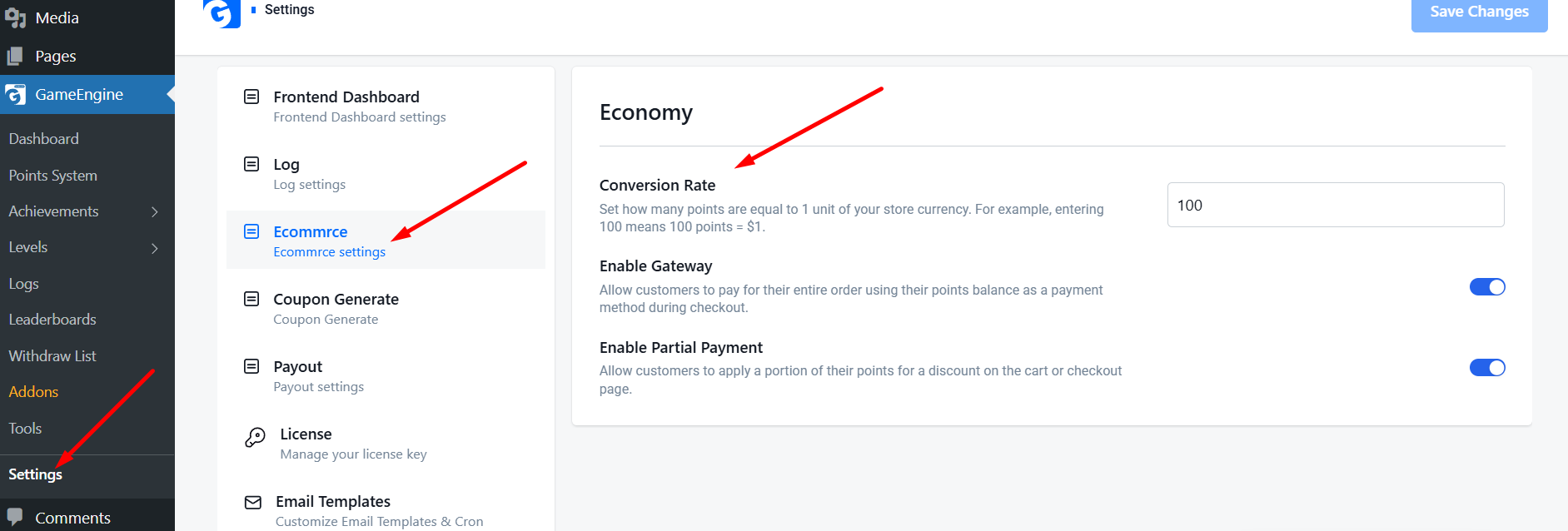
    1. Set Your Points Conversion Rate

    Before customers can spend points, you need to decide their value. In the GameEngine Pro settings, navigate to the Economy tab. Here, you can set the Conversion Rate.

    • Example: If you set it to 100, it means 100 Points = $1.
    • GameEngine Pro will automatically calculate the price in points for every product in your store based on this rate.
    Points Conversion Rate

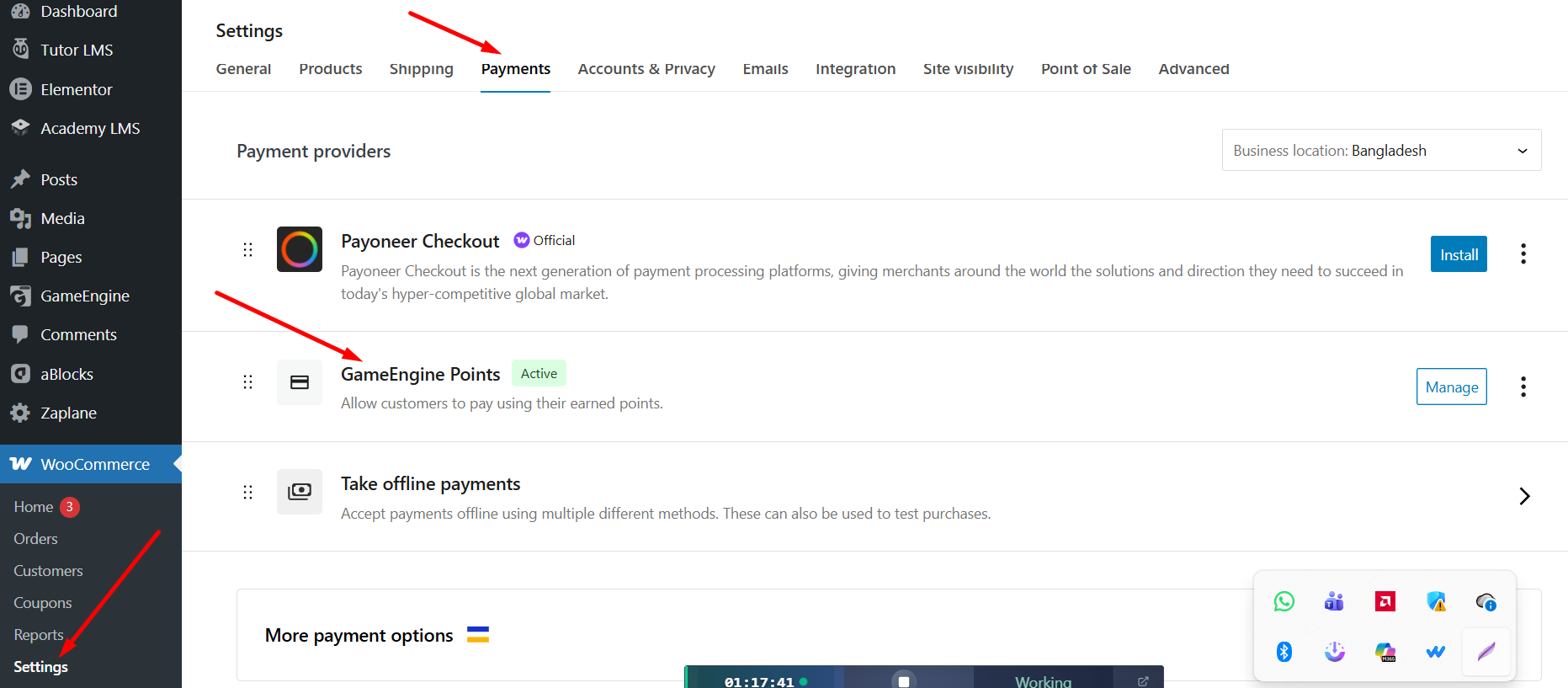
    2. Enable the “Pay with Points” Gateway

    GameEngine Pro integrates directly with the WooCommerce payment system. To enable it:

    • Go to WooCommerce > Settings > Payments.
    • Find GameEngine Points in the list.
    • Toggle the switch to Enable and click Save.

    Now, your customers will see “Pay with Points” as a payment option on the checkout page, right alongside PayPal or Credit Cards.

    Pay with Points

    3. Offer Partial Payments (Point Discounts)

    Sometimes, a customer might not have enough points to pay for a whole order. GameEngine Pro solves this with the Partial Payment feature.

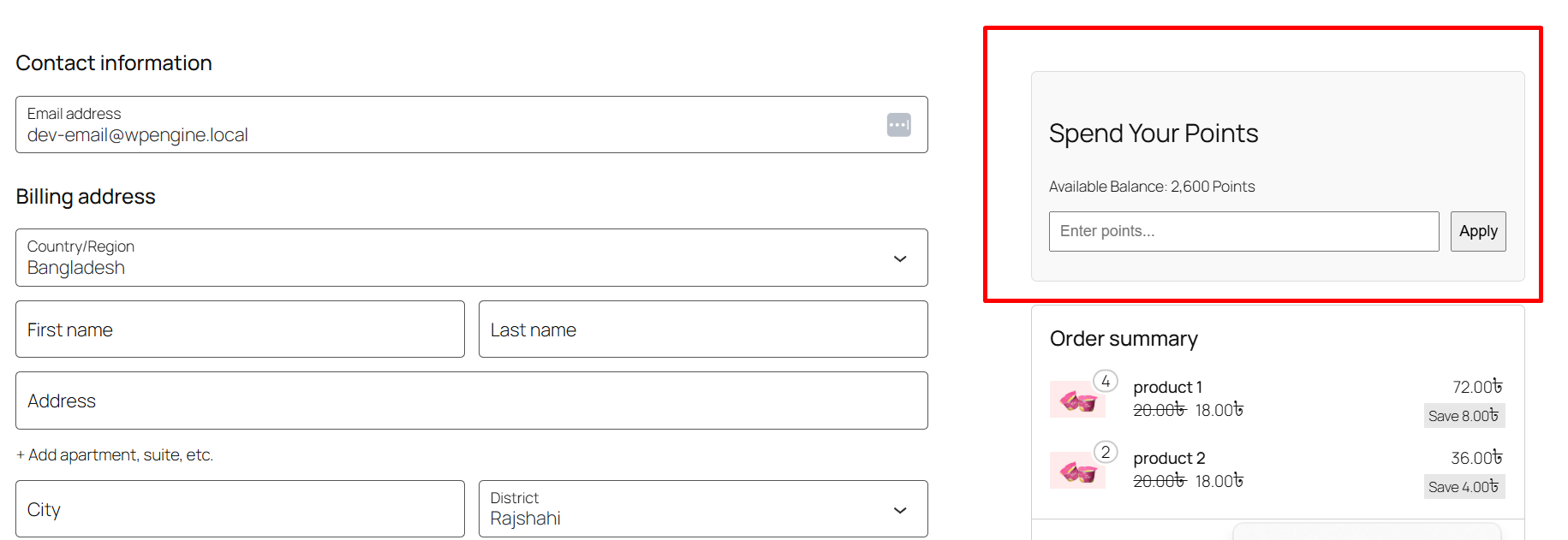
    When enabled, a “Spend Your Points” box will appear on the Cart or Checkout page. Customers can type in how many points they want to use (e.g., 500 points), and a discount (e.g., $5 off) will be applied to their total immediately.

    Spend Your Point

    4. Automated Success & Security

    The system is fully automated. When a customer pays with points:

    • Points are instantly deducted from their account.
    • A log is created in the admin panel for tracking.
    • The order status is automatically updated to “Processing” or “Completed.”

    Why Use GameEngine Pro for Your Store?

    Most plugins charge high monthly fees for these features. GameEngine Pro provides a built-in Payment Gateway, Partial Spending, and a Rewards Marketplace all in one package.
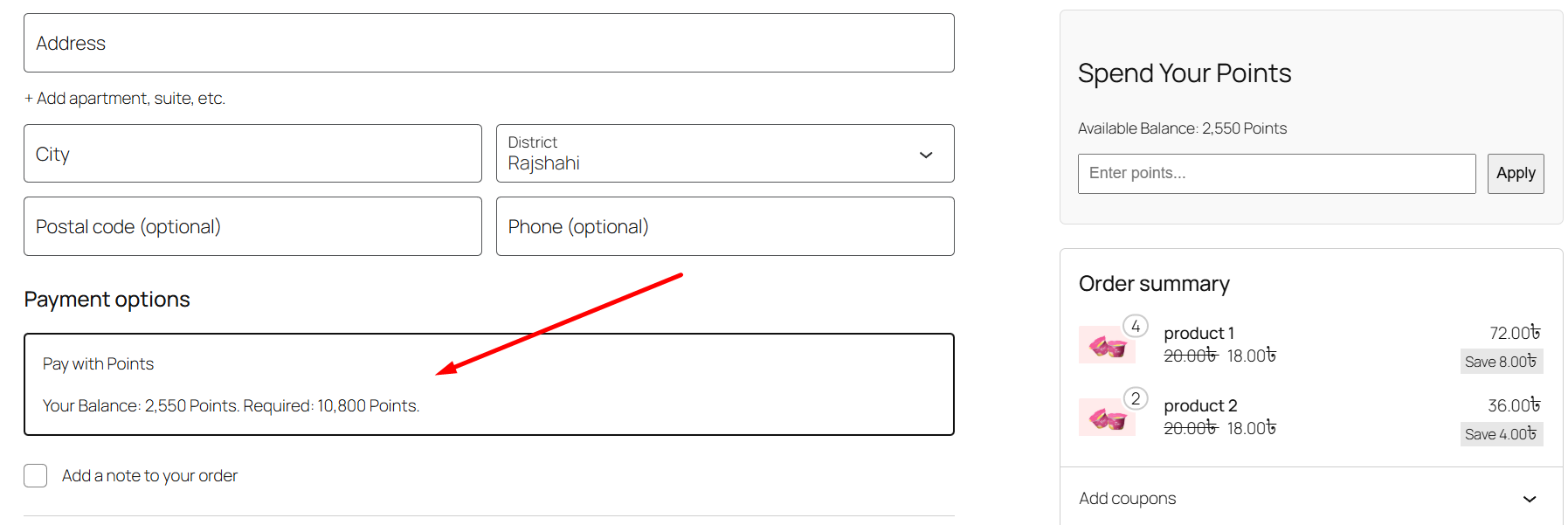
    Give your customers a reason to come back. Start rewarding them today with GameEngine Pro!A few things worth knowing

    You can set minimum and maximum point spend rules per order if you want to protect margins on smaller transactions. There’s also a role-based restriction option — so if you have a wholesale tier, for example, you can keep points spending exclusive to retail customers.

    Point expiration works independently of this system, so if you’ve set points to expire after 12 months, that still applies even if a customer hasn’t redeemed them. Some store owners use this intentionally to create urgency around spending — a “your points expire in 30 days” email combined with a loyalty reward can drive a surprising amount of return traffic.

    • Set expiration to 6–12 months and pair it with an email reminder — it consistently drives return purchases
    • Consider offering bonus points on orders paid with points during slow periods — it stacks the loyalty loop
    • Use the reward marketplace alongside the gateway so customers have multiple ways to spend, not just at checkout

    Why not just use a separate loyalty plugin?

    It’s a fair question. There are standalone loyalty platforms — some even integrate with WooCommerce — but they almost always involve a monthly subscription, a separate dashboard to manage, and a sync process that occasionally breaks. When it does break, you’re the one explaining to a customer why their points disappeared.

    GameEngine Pro keeps everything inside WordPress. Your points data lives in your own database. Your customer wallet, your activity logs, your payment gateway settings — all in one place, all under your control. No external dependencies, no recurring SaaS cost on top of your hosting.

    For most WooCommerce store owners, that’s the cleaner, cheaper, more reliable path.

    The bottom line

    Getting customers to buy once isn’t the hard part. Getting them to come back — and to choose you over a competitor they’ve never tried — that’s where most WooCommerce stores quietly struggle. A pay-with-points system doesn’t solve that problem with a marketing campaign or a discount code. It solves it by making your store feel like a place worth being loyal to.

    When someone reaches checkout and sees a balance sitting there — points they earned, points they’ve been building — the decision to return isn’t a rational one anymore. It’s almost automatic. That’s the mechanic you’re setting up here. Not a feature. A habit loop.

    “The best loyalty program isn’t the one with the most features. It’s the one customers actually think about between purchases.”
    GameEngine Pro makes that loop easy to build and easier to maintain. One conversion rate. One toggle in WooCommerce Payments. A partial payment slider that handles the edge cases. Everything is logged and automated so you’re not manually managing balances or chasing support requests about missing points.

    Set it up once, let it run, and pay attention to what changes over the next few weeks. Most store owners notice the difference before they’re even actively measuring it.

    Ready to set it up in your store?

    GameEngine Pro’s pay-with-points system works out of the box with WooCommerce — no third-party loyalty platform, no monthly subscription on top of your existing costs.

    Get GameEngine Pro ↗Explore all features ↗

    Frequently asked questions

    Can customers combine points with a regular payment method?

    Yes — that’s exactly what the partial payment feature is for. If a customer has 500 points worth $5 but their order is $30, they can apply those 500 points as a discount and pay the remaining $25 with their card or PayPal. The two methods work together at checkout without any friction.

    What happens to the points if a customer cancels or gets a refund?

    GameEngine Pro handles refunds automatically. If an order is cancelled or refunded, the points that were spent are returned to the customer’s wallet. You don’t have to manually adjust anything — it’s logged in the activity panel and the balance is restored immediately.

    Can I limit how many points a customer can spend per order?

    Yes. You can set a maximum points spend per order — either as a fixed point amount or as a percentage of the order total. This is useful if you want to protect margins on larger orders or prevent customers from paying entirely with points on high-value items. The setting lives in the Economy tab under GameEngine Pro settings.

    Does this work with WooCommerce coupons and other discounts?

    It does — points spending and WooCommerce coupons operate independently, so both can apply to the same order. That said, you can restrict stacking if needed. Some store owners prefer to prevent points and coupon codes from combining on the same transaction, and GameEngine Pro gives you a toggle to enforce that.

    Will customers be notified when they earn or spend points?

    Yes. GameEngine Pro includes built-in email notifications for point events — earning, spending, balance milestones, and expiration reminders. These notifications are one of the most underrated parts of the system. A simple “you just earned 120 points on your order” email is often enough to make a customer check their balance and think about their next purchase.

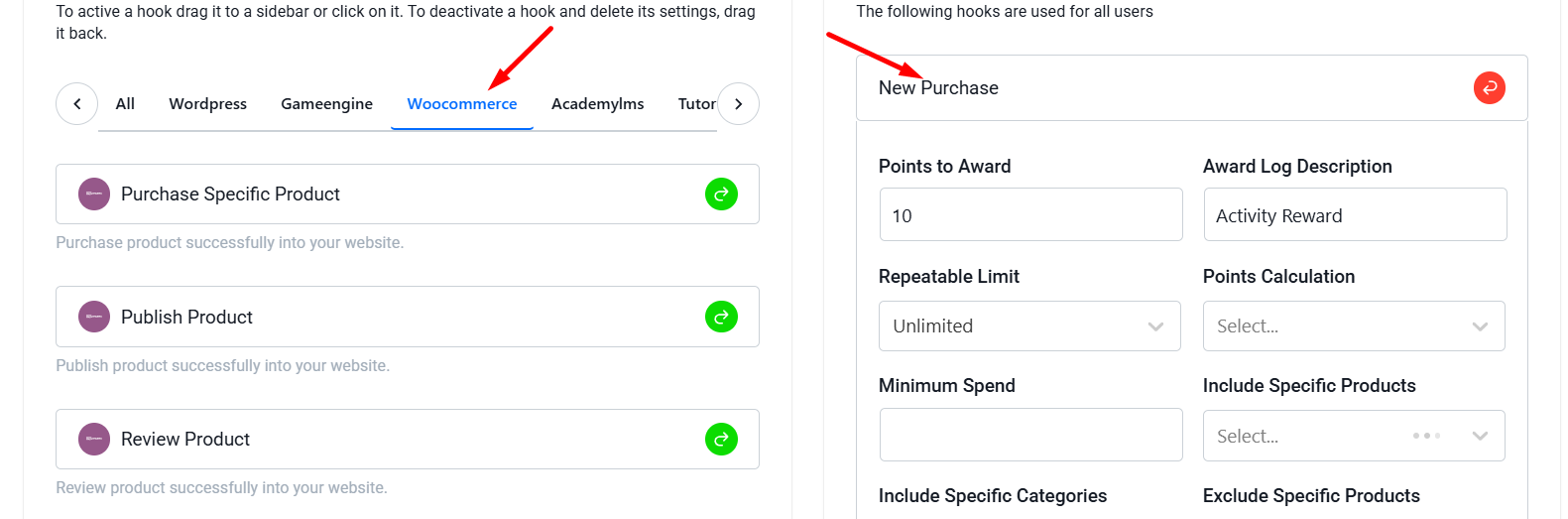
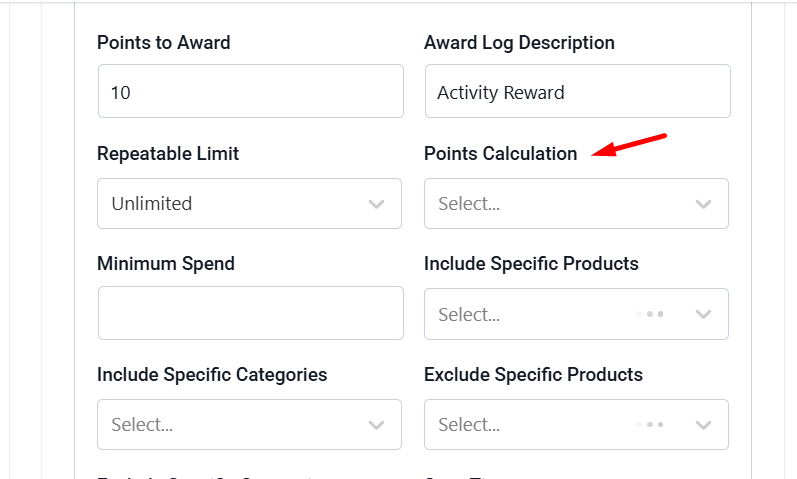
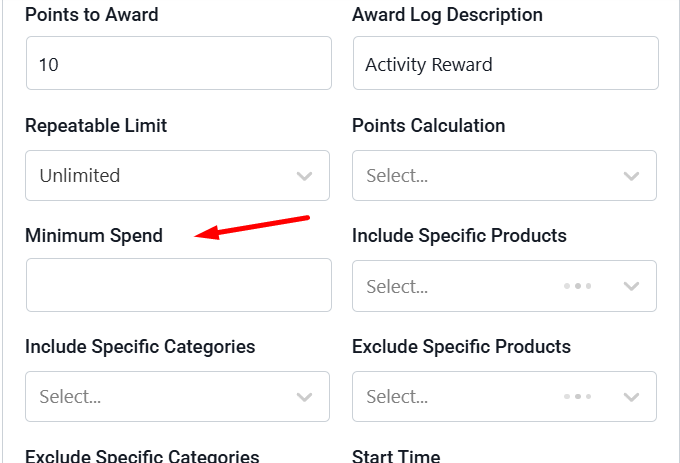
  • How to Award WooCommerce Points as a Percentage of Order Total

    How to Award WooCommerce Points as a Percentage of Order Total

    Most basic loyalty programs give a fixed number of points for every purchase (e.g., 10 points per order). However, this isn’t always fair. A customer spending $10 should probably earn fewer points than a customer spending $500.

    The most professional way to handle this is by awarding points as a percentage of the order total. With GameEngine Pro, you can set this up in seconds. Here is how:

    Fixed vs. percentage — why it matters more than it looks

    Here’s the practical difference between the two approaches on the same set of orders:

    Order total

    Fixed points (10 pts/order)

    Percentage points (10%)

    Fairer outcome?

    $10 order

    10 points

    1 point

    ✓ Proportional

    $50 order

    10 points

    5 points

    ✓ Proportional

    $100 order

    10 points

    10 points

    ✓ Proportional

    $500 order

    10 points

    50 points

    ✓ Proportional

    With a fixed rate, your $500 customer earns the exact same reward as your $10 customer. With percentage-based points, the $500 customer earns 50× more, which is proportionate to what they actually contributed. That’s the kind of difference high-value customers notice, even if they can’t articulate why one store feels more rewarding than another.

    “Percentage-based rewards don’t just feel fairer — they also give customers a concrete reason to build larger carts. Every extra dollar they spend is now worth something back.”

    Set Up the WooCommerce Trigger

    First, navigate to your GameEngine > Triggers section in the WordPress admin panel.

    1. Click on Add New Rule.
    2. Select the WooCommerce: New Purchase trigger.
    WooCommerce Points

    Change Calculation Type to “Percent”

    This is a premium feature of GameEngine Pro. In the rule settings, you will see an option called Points Calculation.

    • Select Percent of Order Total (Pro) from the dropdown.
    • In the Points to Award field, enter the percentage you want to give.

    Example: If you enter 10, a customer who spends 

    100∗∗willautomaticallyreceive∗∗10points∗∗.Iftheyspend∗∗

    100∗∗willautomaticallyreceive∗∗10points∗∗.Iftheyspend∗∗

    50, they get 5 points.

    Point Calculation

    Setting a Minimum Spend (Optional)

    To protect your profit margins, you can also set a Minimum Spend requirement.

    • Example: You can set the rule so that points are only awarded if the order total is above $20. If the order is lower, the trigger won’t fire.
    Minimum Spend

    Automated Logging and Tracking

    You don’t need to do any manual math. GameEngine Pro talks directly to WooCommerce:

    1. It detects the final order total (after discounts and before/after tax, depending on your WC settings).
    2. It calculates the percentage.
    3. It instantly deposits the points into the user’s account once the order status is marked as Completed.

    Combining with “Pay with Points”

    The best way to use this is to let users spend those points later. If you give 10% back in points, and your Conversion Rate is set to 100 points = $1, your customers are essentially getting 10% “cashback” to spend on their next visit.

    Pay with Points

    The bottom line

    Flat-rate points are fine as a starting point. But as your store grows and your customer base diversifies, a one-size-fits-all reward starts to feel unfair — especially to the customers placing your largest orders. Percentage-based points correct that in one setting change, and they do it in a way that naturally encourages bigger carts without you ever running a sale.

    Pair it with a sensible minimum spend, set your conversion rate so the cashback value feels real, and combine it with the pay-with-points gateway — and you’ve built a loyalty mechanic that actually scales with your store’s revenue.

    Ready to reward your best customers properly?

    Percentage-based points is a GameEngine Pro feature — available alongside the rewards marketplace, pay-with-points gateway, Happy Hours, and the full reward economy.

    Get GameEngine Pro ↗ See all features ↗

    FREQUENTLY ASKED QUESTIONS

    Does the percentage calculate before or after discounts and tax?

    GameEngine Pro reads the final order total from WooCommerce, which means it respects any coupon discounts applied at checkout. Whether tax is included in that total depends on your WooCommerce tax settings — specifically whether your product prices are set as tax-inclusive or tax-exclusive. Check your WooCommerce tax configuration to confirm what “order total” means in your setup before setting the percentage.

    Can I run different percentages for different product categories?

    Yes — you can create multiple trigger rules, each with a different percentage and scoped to a specific product category or product ID. For example, you might award 10% on full-price items and 2% on sale items, or offer a boosted rate on new arrivals you want to move. Each rule runs independently, so a single order could trigger multiple rules if it contains products from different categories.

    What if a customer returns the order after earning points?

    Points earned on a completed order are reversed automatically when that order is refunded or cancelled in WooCommerce. GameEngine Pro monitors order status changes — when an order moves from Completed back to Refunded or Cancelled, the corresponding points are deducted from the customer’s balance. The deduction is logged in the activity panel alongside the original earning event.

    Can I award percentage points and fixed points at the same time?

    Yes. You can have both a percentage-based purchase rule and a separate fixed-point rule running simultaneously — for example, a flat 5-point bonus for placing any order at all, plus a 10% percentage rule based on the order value. Both rules will fire on qualifying orders and the points stack. Just make sure the combined reward stays within your margin tolerance.

    Is there a way to cap the maximum points earned per order?

    Yes. The trigger rule settings include a maximum points cap per transaction. This is useful if you’re worried about very large orders earning a disproportionate amount — for example, a wholesale order in the thousands of dollars. Set a ceiling and GameEngine Pro will award the percentage up to that cap, then stop. The cap only applies to that specific rule, so other triggers are unaffected.

  • How to Add a Points System to WordPress Without Paid Add-ons

    How to Add a Points System to WordPress Without Paid Add-ons

    Do you want to boost user engagement on your website? The best way to reward your users for their activity is by setting up a Points System.

    Usually, adding a points system to WordPress requires buying expensive add-ons. However, by using the GameEngine plugin, you can launch a complete gamification system for free.

    The engagement problem no one talks about

    Most WordPress websites have the same invisible problem: people show up once and never come back.

    It’s not because your content is bad. It’s because there’s no reason to return. No progress to track. No reward waiting. No sense that this visit — this action — actually meant something.

    Users are wired to respond to feedback loops. When actions feel rewarded and progress feels visible, people come back. They comment more. They finish what they started. They refer friends. That’s not opinion — it’s basic behavioral psychology, and it’s exactly what the world’s most engaging platforms have been quietly using for years.

    The difference between a website people visit and a platform people return to is almost always one thing: a system that makes actions feel meaningful.

    The good news? You don’t need to hire a developer or buy a stack of expensive add-ons. With the right plugin, you can launch a complete gamification system on WordPress — for free — in under 30 minutes.

    This guide will show you exactly how.

    Why points systems actually work (the psychology)

    Before we dive into setup, it’s worth understanding why gamification works so reliably — because when you understand the mechanism, you can use it far more intentionally.

    Dopamine loops

    Earning a reward — even a small one — triggers a dopamine release. The brain learns: “this action feels good, do it again.” Points create micro-rewards for every interaction.

    Progress visibility

    Humans are powerfully motivated by visible progress. A level bar filling up is almost impossible to ignore. It turns abstract engagement into something concrete and satisfying.

    Habit formation

    Daily login bonuses, streaks, and time-based rewards train users into return habits. After a few weeks, checking in becomes automatic — not a choice they have to make.

    Social identity

    Leaderboards and badges give users a public identity on your platform. Losing a rank or missing a badge feels like loss — and loss aversion is one of the strongest behavioral drivers.

    Understanding these four mechanisms will help you set up your points system more strategically — not just technically.

    Who this is for

    A points system isn’t one-size-fits-all. Here’s how different types of WordPress sites can use it:

    Bloggers & publishers

    Reward commenting, sharing, and daily visits. Turn passive readers into active community members.

    LMS & course creators

    Award points for lesson completions, quiz passes, and certificates. Slash dropout rates with progress-driven motivation.

    WooCommerce stores

    Build a loyalty program that rewards purchases, reviews, and referrals. Increase repeat orders and average order value.

    Communities & memberships

    Gamify participation with ranks, badges, and leaderboards. Reduce churn by making membership feel like a journey.

    Here is a simple 5-step guide to get started:

    1. Install the GameEngine Plugin

    First, go to your WordPress dashboard. Navigate to Plugins > Add New, search for GameEngine, and click install and activate.

    GameEngine Click Install and Activate

    2. Use the Smart Setup Wizard

    Once activated, you will see a friendly Onboarding Wizard. Select a preset that matches your website type (such as Blogger, Author, or Shop). This will automatically create the default points and levels for you in just one click.

    Setup GameEngine

    3. Create Custom Point Types

    You can create your own custom points, such as “XP”, “Coins”, or “Reward Credits”. To do this, simply go to Point

    Types in the GameEngine settings and give your points a name.

    4. Set Up Reward Rules (Triggers)

    Decide what actions will earn users points. Without paying for any add-ons, GameEngine allows you to award points for free when users:

    • Register on your website.
    • Visit your site daily (Daily Login).
    • Leave comments on your blog posts.
    • Publish new posts or pages.
    Go to Points System and Add Point System
    Add your Hooks

    5. Display Leaderboards and User Profiles

    Points are only fun if users can see them. You can use these simple shortcodes to display profiles and rankings on any page:

    • [gameengine_leaderboard] – To show a list of top users.
    • [gameengine_profile] – To show a user’s personal dashboard with their points and badges.
    • [gameengine_progress_map] – To show a beautiful visual zig-zag roadmap.
    Leaderboards Result
    GameEngine Progress Map

    Why Choose GameEngine?

    Most gamification plugins charge you for small features. With GameEngine, you get premium features like the Visual Progress Map, Leaderboards, and the Auto-setup Wizard completely for free.
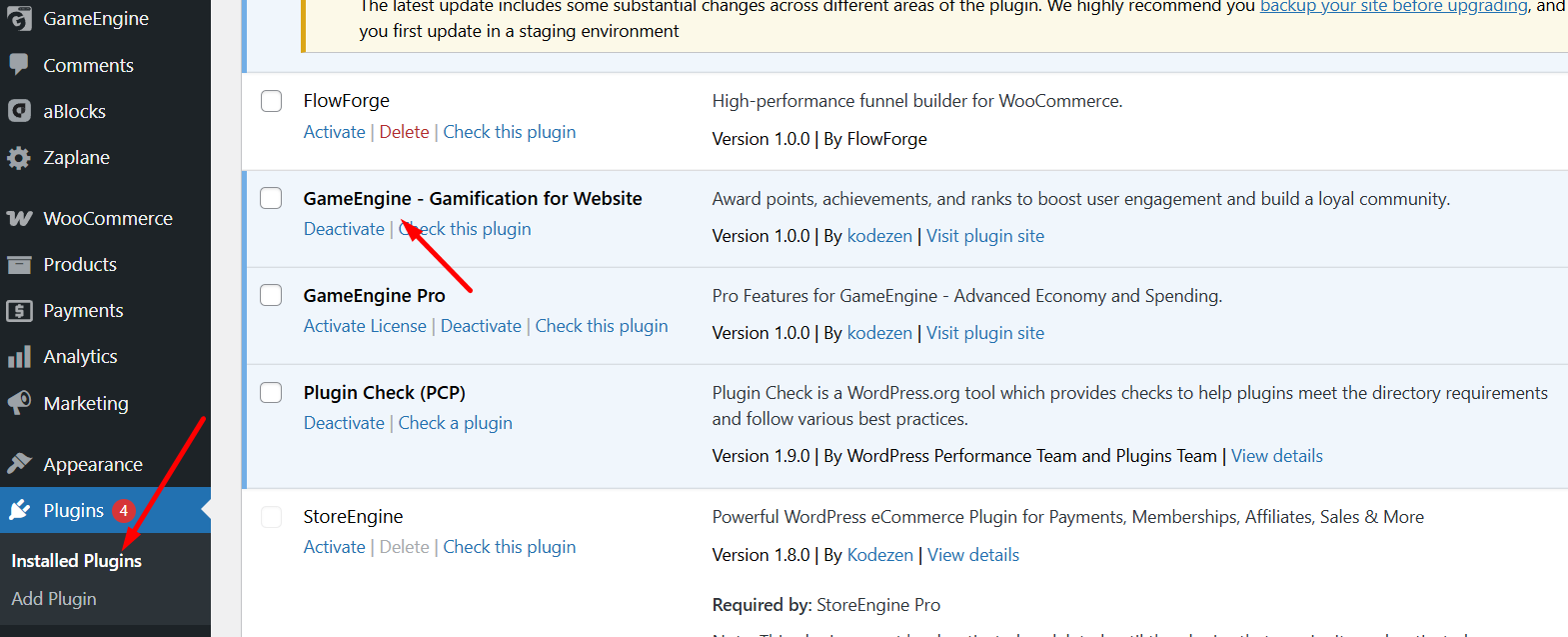
    Turn your website into a fun, rewarding platform today and keep your users coming back!

    Your website doesn’t have a traffic problem. It has an engagement one.

    Most site owners chase more visitors when the real opportunity is already sitting in their existing audience. The people who found you, read your post, completed a lesson, or made a purchase — they’re the ones worth keeping. And keeping them isn’t about better content alone. It’s about building a system that makes every visit feel worth returning for.

    A points system is the simplest, most proven version of that system. It gives users something to work toward. It makes progress visible. It rewards the behaviors you actually want — and turns occasional visitors into loyal regulars.

    “The best engagement strategy isn’t a campaign. It’s an environment — one where every action moves users forward, every milestone feels earned, and coming back feels natural.”

    With GameEngine, that environment takes about 30 minutes to set up. No expensive add-ons. No developer required. No fragmented stack to maintain. Just one unified system that grows with your site — from a simple points loop today, to a full reward economy tomorrow.

    Frequently Asked Questions

    Can I create multiple point types in GameEngine?

    Yes. GameEngine allows you to create multiple custom point types based on your website’s needs. You can set up currencies like XP, Coins, Credits, Gems, Reward Points, or any custom name you want. Each point type can be used for different engagement or reward systems across your website.
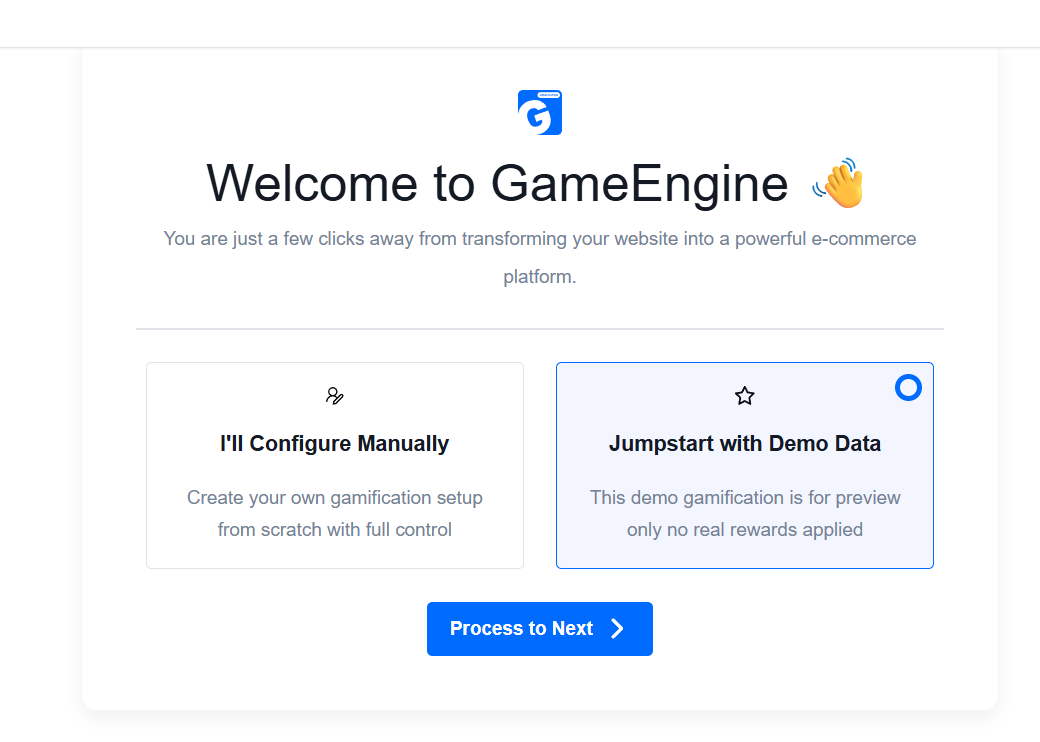
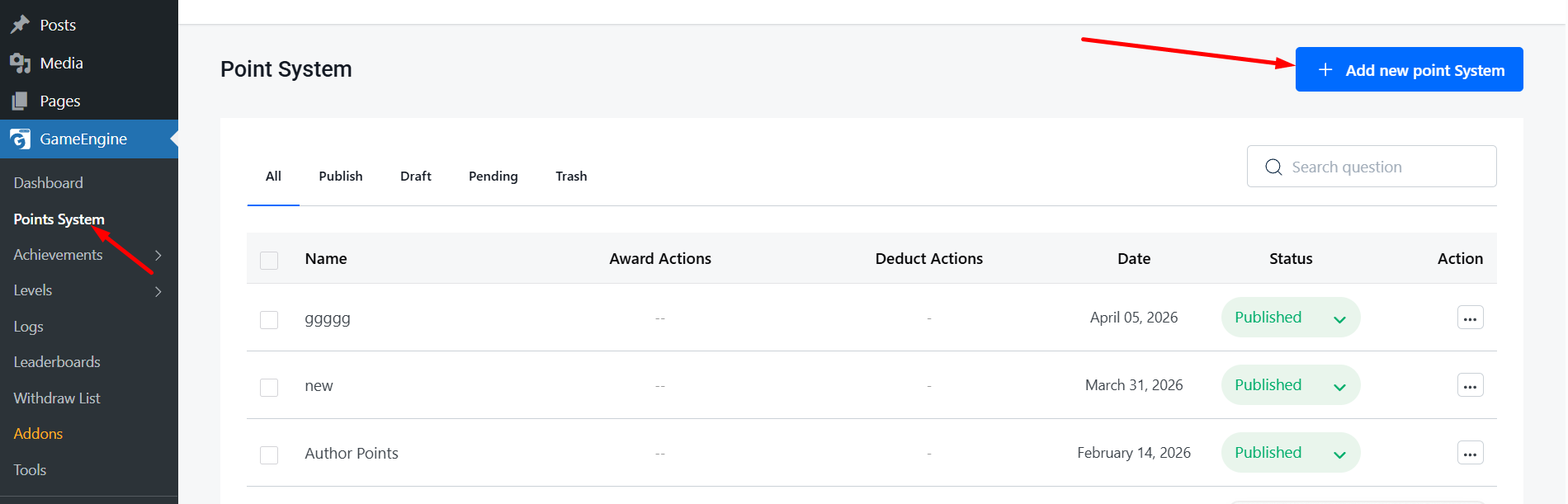
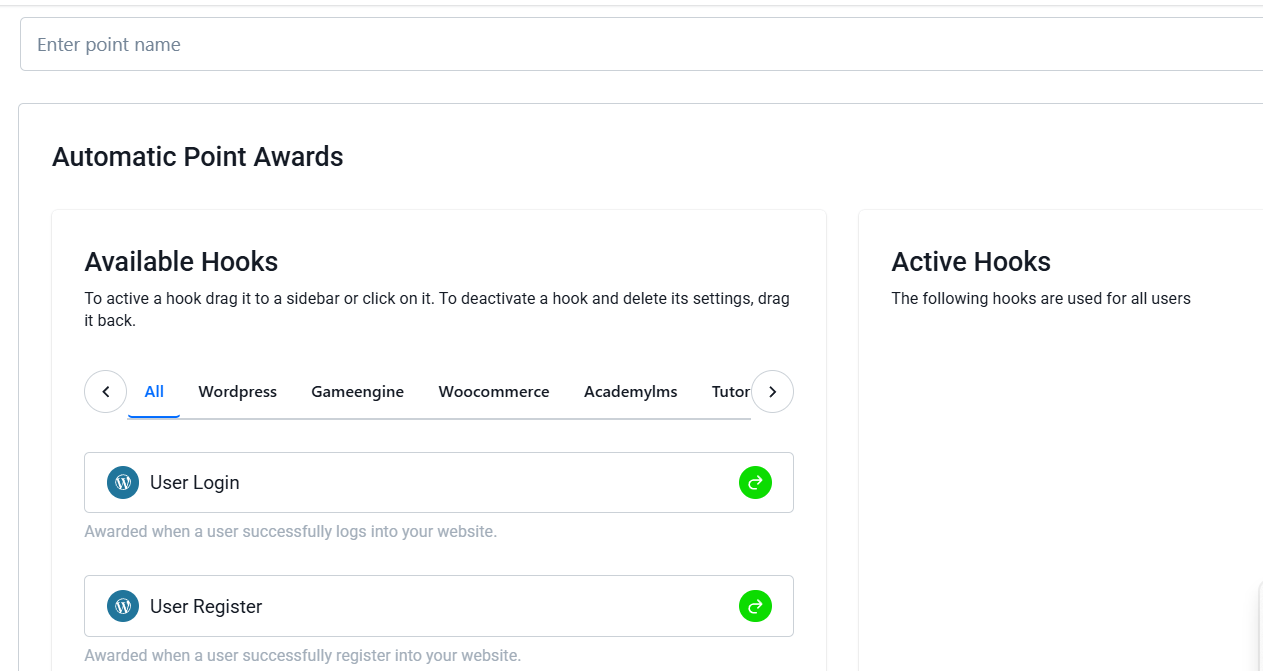
    Does GameEngine work with WooCommerce?

    Yes, GameEngine integrates with WooCommerce and lets you reward users for actions like purchases, reviews, product activity, and more. You can also create advanced reward systems such as points-based discounts, partial payments, and reward-driven loyalty experiences for your store.

    Is GameEngine beginner-friendly?

    Absolutely. GameEngine is designed to be beginner-friendly with a simple setup experience and an onboarding wizard that helps you launch your gamification system quickly. You can choose presets based on your website type and start rewarding users without complex configurations or coding.

    Can I reward users automatically?

    Yes. GameEngine includes automatic triggers that reward users based on specific actions performed on your website. For example, you can award points when users register, log in daily, comment on posts, complete lessons, pass quizzes, publish content, or interact with your platform in meaningful ways.

    Can I display leaderboards and user progress on my website?

    Yes. GameEngine includes built-in shortcodes for displaying leaderboards, user profiles, achievements, and visual progress maps anywhere on your website. This helps users track their progress and creates a more engaging and competitive experience.

    Does GameEngine support LMS plugins?

    Yes. GameEngine supports LMS integrations, including Academy LMS and Tutor LMS integrations. You can reward students for completing lessons, passing quizzes, finishing courses, submitting assignments, and other learning activities automatically.

    Can I restrict or unlock content using points or levels?

    Yes. You can lock specific content, rewards, or features behind points, achievements, or user levels. This allows you to create progression-based experiences where active users unlock more value as they engage with your website.

    Do I need paid add-ons to use core features?

    No. Unlike many gamification plugins, GameEngine includes essential features like points systems, leaderboards, badges, progress tracking, and onboarding tools without requiring multiple paid add-ons.