



Have you ever wondered why millions of people spend hours playing mobile games, earning badges, climbing leaderboards, and completing daily challenges — even when there’s no real prize at the end?
The answer is psychology. Games are designed to trigger dopamine, reward effort, and keep people coming back.
Now imagine applying that same psychology to your WordPress website.
That’s exactly what WordPress Gamification is all about. Whether you run an online course platform, a membership site, a WooCommerce store, or a community forum, gamification can transform passive visitors into loyal, highly engaged users.
In this complete guide, we’ll break down everything you need to know about WordPress Gamification — what it is, how it works, the best plugins, including GameEngine, and how to implement it on your site step by step.
What Is WordPress Gamification?
WordPress gamification is the process of integrating game-design mechanics — such as points, badges, levels, leaderboards, challenges, and rewards — into a WordPress website to motivate desired user behaviors.
Instead of passive browsing, visitors become active participants who earn rewards for actions like logging in, registering, commenting, publishing posts, completing courses, making purchases, or referring friends.
This strategy is rooted in behavioral psychology: humans are naturally motivated by achievement, progress, competition, and social recognition. By incorporating these elements into your website, you can significantly boost user engagement, retention, and loyalty.
According to MarketsandMarkets, the global gamification market is on track to exceed $48 billion by 2029.
Why Gamification Works on WordPress
WordPress powers over 43% of all websites, making it the ideal platform to deploy engagement mechanics at scale. Its open plugin ecosystem allows you to add sophisticated gamification without any custom development — plugins like GameEngine handle everything automatically.
Gamification works because it satisfies three core psychological needs:
Autonomy (users choose which actions to take),
Mastery (leveling up creates a sense of growth), and
Purpose (earning visible badges ties effort to meaningful recognition).
When these needs are met, bounce rates drop, session time increases, and users naturally share their achievements.
Core Gamification Elements
Points & XP
Award points for every trackable action. Users can spend or redeem them for rewards, discounts, or exclusive content.
Badges & Achievements
Visual trophies displayed on user profiles, triggering social proof and the desire to collect more.
Levels & Ranks
Structured progression with clear milestones — from Beginner to Expert — creates ongoing motivation.
Leaderboards
Public ranking that sparks friendly competition, especially effective in communities and LMS platforms.
Quests & Challenges
Time-limited tasks that drive specific behaviors — perfect for product launches or seasonal campaigns.
Progress Maps
Visual roadmaps showing users where they stand and what comes next, dramatically reducing drop-offs.
GameEngine: A Complete WordPress Gamification Plugin Review
GameEngine is a powerful self-hosted WordPress gamification plugin that automatically rewards users with points, badges, and levels. Its tagline — “Gamify Your WordPress Site with Smart Rewards” — perfectly captures its goal: increase engagement, guide user behavior, and build long-term loyalty with minimal setup.
It works seamlessly with LMS, WooCommerce, and Membership plugins right out of the box, making it one of the most versatile gamification solutions available.
Unlike many competitors that rely heavily on paid add-ons, GameEngine delivers a complete package — most essential and advanced features are included in one plugin.
What Makes GameEngine Stand Out
GameEngine directly competes with GamiPress and myCred by offering 80+ features in a single plugin. While competitors often require multiple expensive add-ons for full functionality, GameEngine bundles everything together for better value and simplicity.
GameEngine Full Feature Breakdown
Core Gamification
Build a powerful reward system with Flexible Points (XP or Coins), Achievements & Badges, Ranks, Levels & Progress System. Automatically reward WordPress actions like login, registration, publishing posts, and comments. Use Content Restriction & Unlock Rules along with Dependency Logic (Milestones) to create structured user journeys.
Rewards & WooCommerce
Turn your store into a loyalty machine with Points to Coupons, Pay With Points, Points Cart Discount, and Points Payment Gateway. Users can withdraw points as real money through the Wallet system. Includes Time-Based Rewards (Happy Hours & weekend bonuses), Rewards Marketplace, Dynamic Leaderboards, and Manual Points Management.
Boost daily activity with Daily Visit Rewards, Profile-Based Rewards, and Content Interaction Rewards. Keep everything organized with detailed Activity Logs, Points Expiry settings, and a Visual Progress Roadmap that shows current level and next milestones.
Display & Integration
Send instant Email Reward Alerts, display points, badges, and leaderboards anywhere using Shortcodes. Provide users with a clean User Profile Dashboard, apply Advanced Reward Filters, connect with external tools via REST API, and easily manage data with Import & Export tools.
GameEngine Pricing
GameEngine offers a free version with core features. Pro version includes advanced automation and rewards.
|
Plan |
Early Bird LTD (Lifetime) |
Regular Yearly |
Regular Lifetime |
|
Solo (1 Site) |
$79 (39% off) |
$129/yr |
$249 |
|
Team (10 Sites) |
$99 (60% off) |
$249/yr |
$449 |
|
Enterprise (Unlimited Sites) |
$199 (60% off) |
$499/yr |
$799 |
Note: Early Bird prices are one-time lifetime payments. The Team plan at $99 for 10 sites is currently one of the best deals in the gamification category.
Best For: eLearning sites, WooCommerce stores, membership communities, and content blogs that want a complete, high-performance gamification system without ongoing add-on costs.
How to Set Up WordPress Gamification with GameEngine (Step-by-Step)
Let’s walk through a practical setup using GameEngine as your primary gamification tool.
Step 1 — Install and Activate GameEngine
The first step is getting GameEngine installed on your WordPress site.
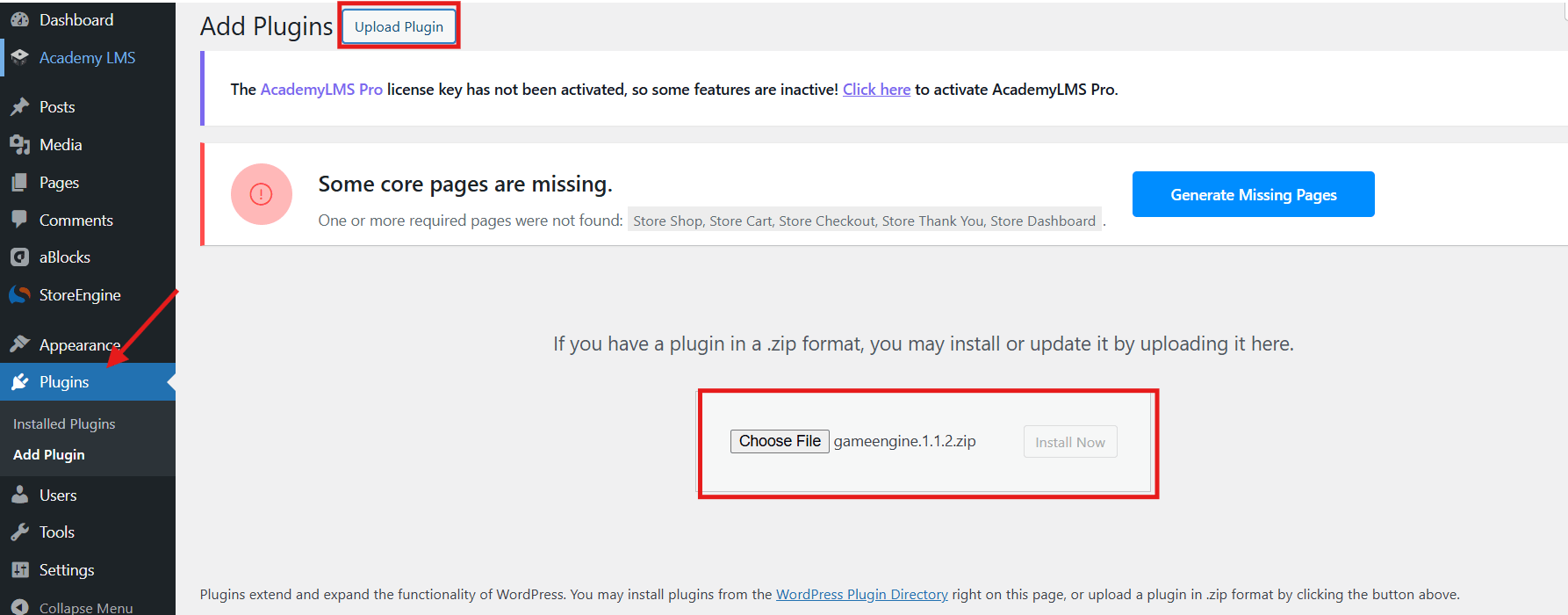
- Go to gameengine.pro and download the free version, or search for “GameEngine” in your WordPress plugin directory.
- In your WordPress admin panel, go to Plugins > Add New > Upload Plugin.
- Upload the .zip file and click Install Now.
- Once installed, click Activate.
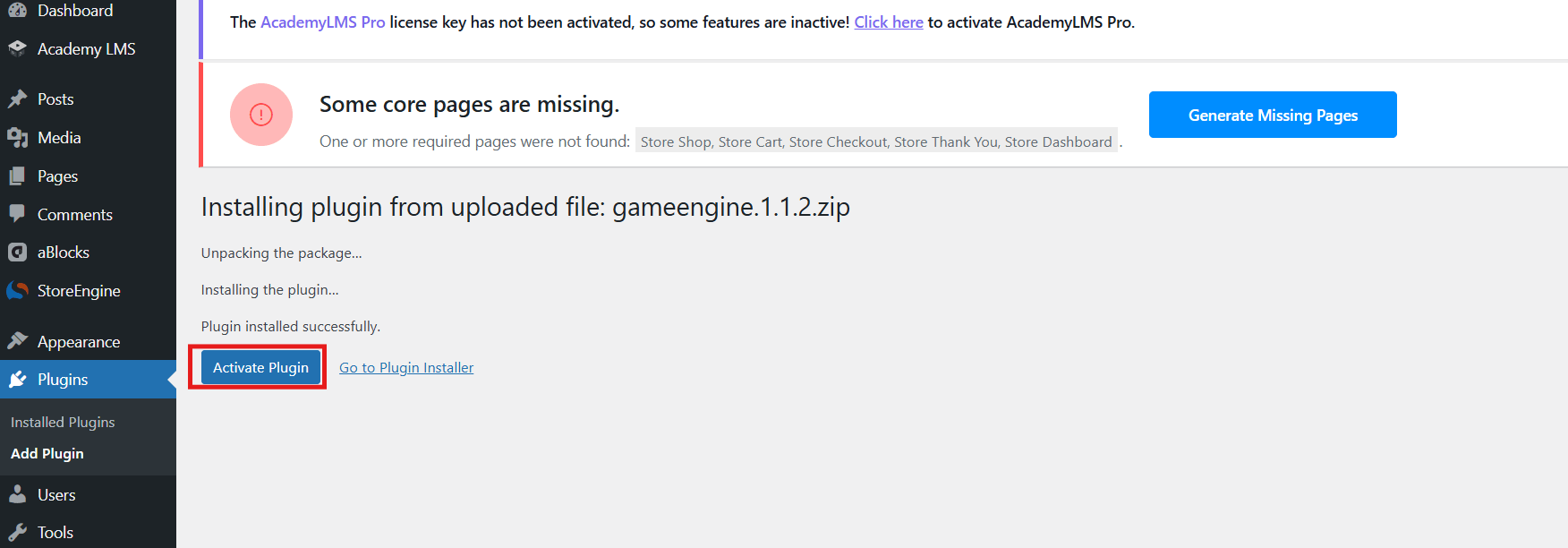
Once activated, you will see a new GameEngine menu in your WordPress sidebar with options like Dashboard, Points System, Achievements, Levels, Logs, Leaderboards, and more.
Step 2: Set Up Points & Achievements & Levels
- Go to GameEngine > Points System.
- In the Automatic Point Awards section, you will see an Available Hooks panel.
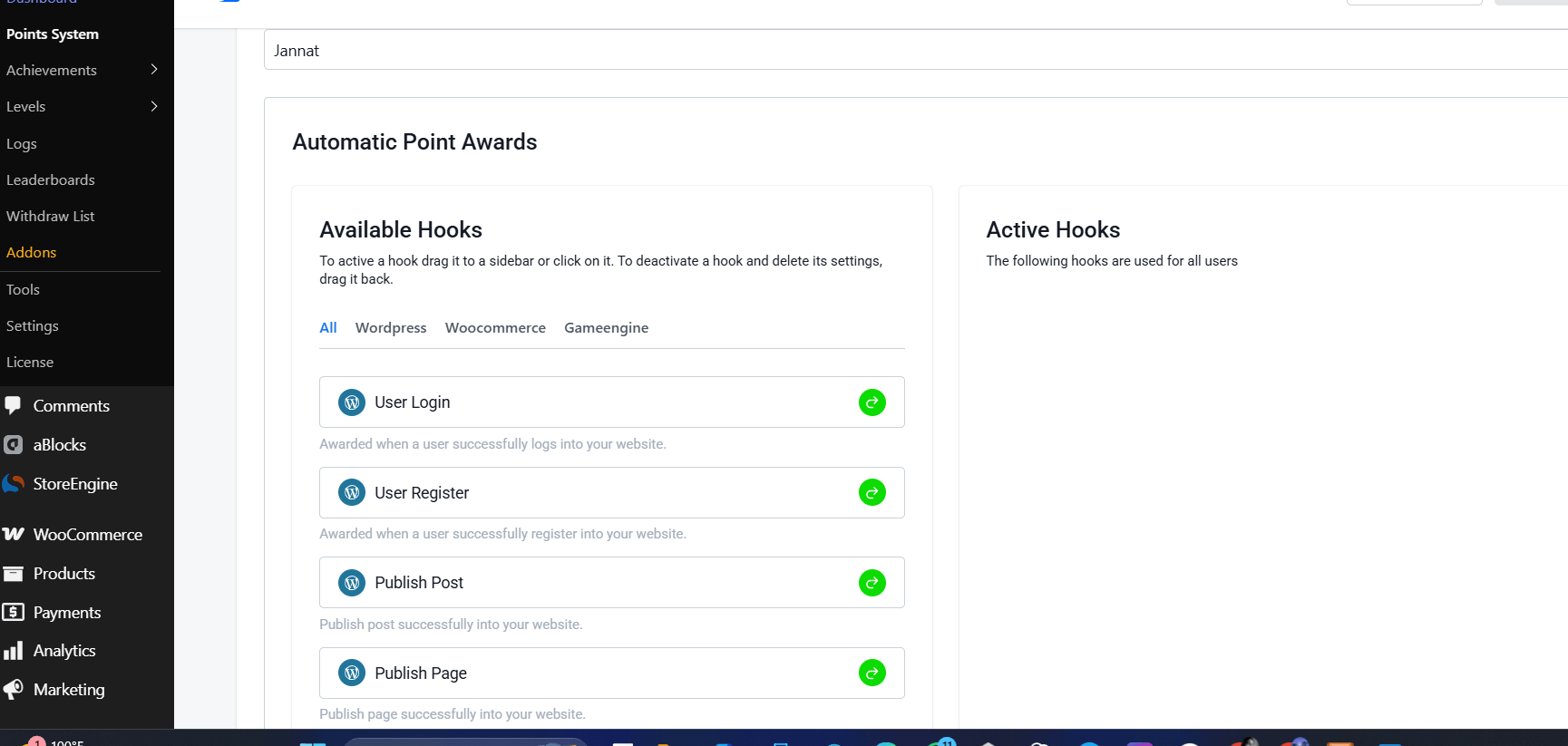
3. Hooks are organized into three tabs:
- WordPress — (User Login, User Registration, Publish Post, Post Comment, Daily Visit, Profile Update, etc.)
- WooCommerce — (New Purchase, Purchase Specific Product, Review Product, Refund, etc.)
- GameEngine — (Internal triggers like unlocking achievements)
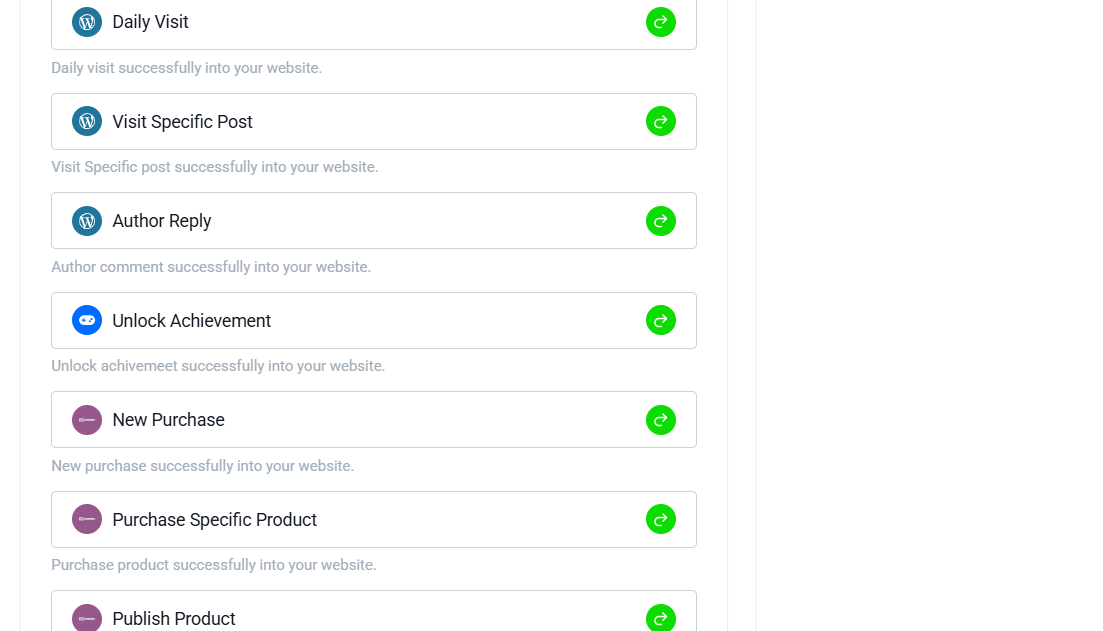
4. Drag or click the desired hooks to the Active Hooks panel on the right.
5. Set the number of points to be awarded for each action. Example: For a store, activate “New Purchase” and award 10 points per order or 1 point per $1 spent.
Note: You can also set up Automatic Point Deductions below for actions like refunds.
Step 3: Create Achievements (Badges)
- Go to GameEngine > Achievements.
- Click + Add New Achievement.
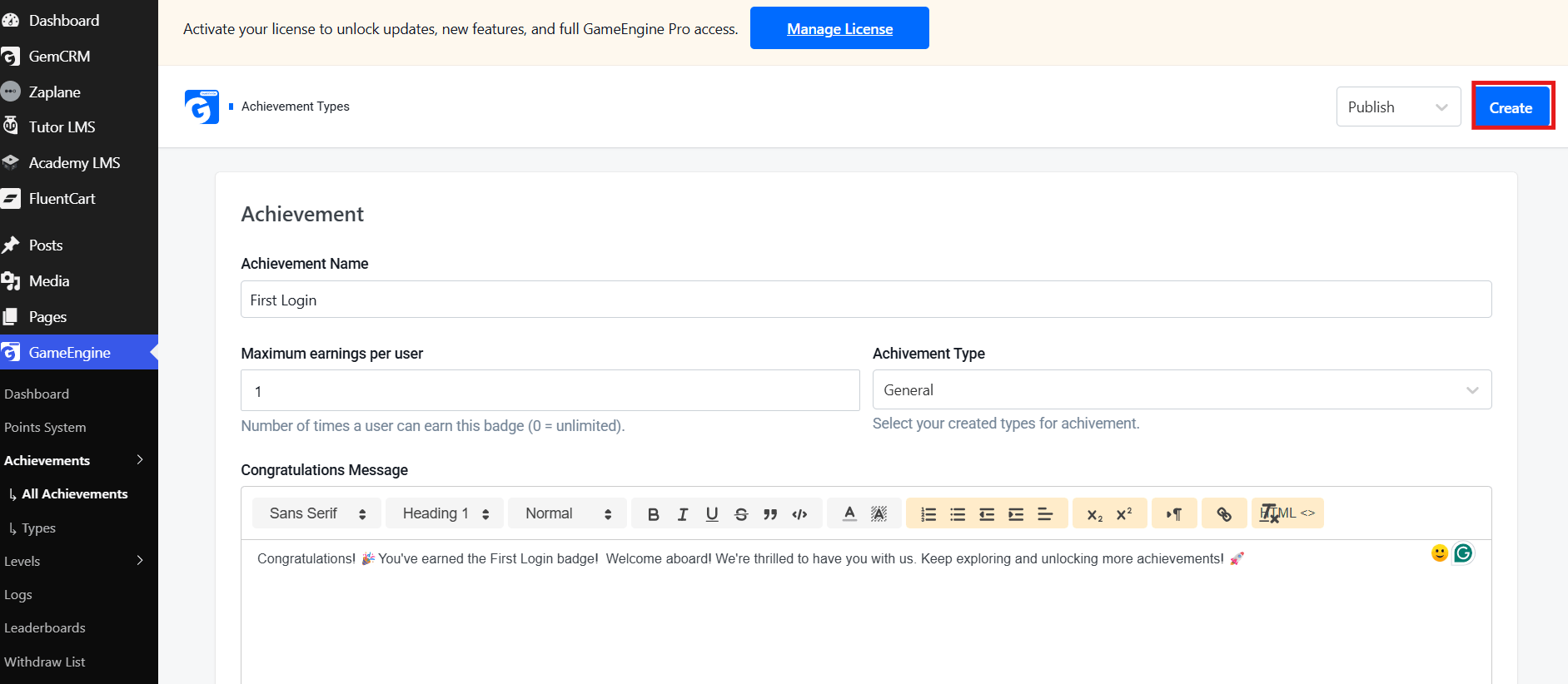
- Fill in the details:
- Achievement Name (e.g., “First Login”)
- Maximum earnings per user
- Achievement Type
- Write a Congratulations Message
Here’s what the achievement creation screen looks like:
- Upload a custom badge image, set the trigger conditions, and click Publish.
Repeat this process to create multiple engaging badges.
Step 4: Set Up Levels
- Go to GameEngine > Levels.
- Click the + Create button (top right).
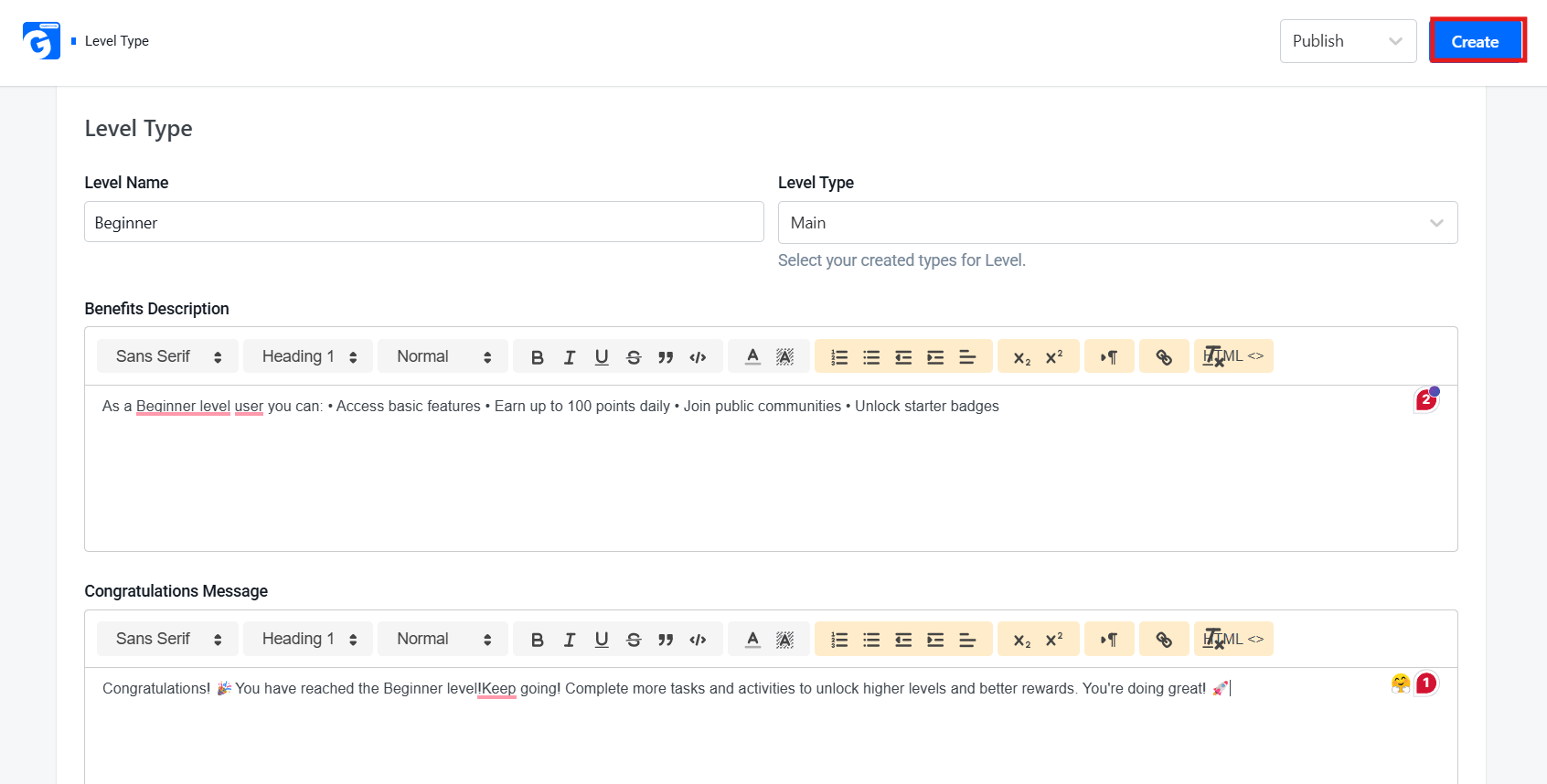
- Fill in the level details:
- Level Name (e.g., Beginner, Intermediate, Expert)
- Level Type
- Benefits Description
- Congratulations Message
Here’s what the level creation screen looks like:
5. Define the required points or achievements needed to unlock each level.
6. Set dependency logic so users progress smoothly from one level to the next.
Step 5: Configure Leaderboards
- Go to GameEngine > Leaderboards.
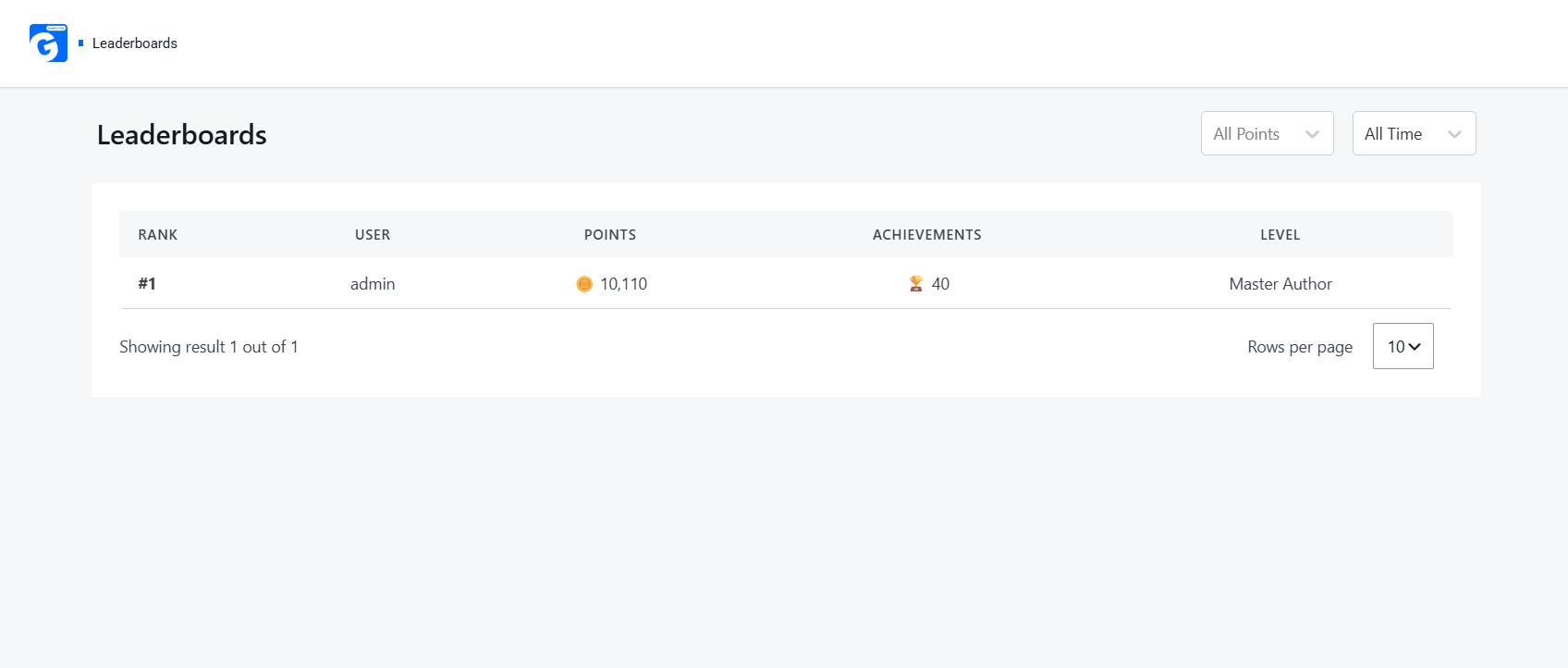
- Customize filters such as All Points, All Time, Monthly, or Weekly.
- The leaderboard updates automatically as users earn points and unlock achievements.
Here’s what the Leaderboards screen looks like:
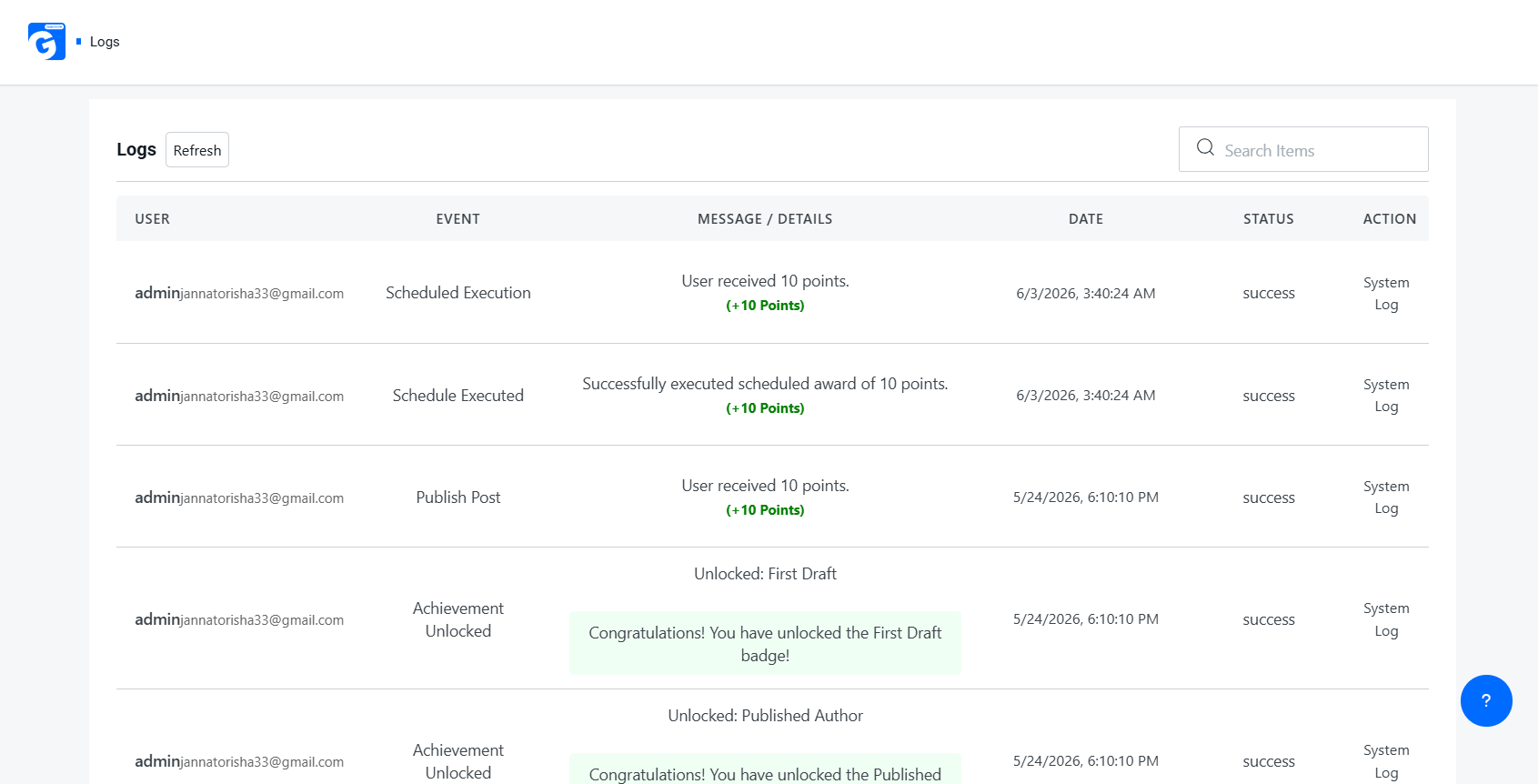
Step 7: Monitor Activity
- Go to GameEngine > Logs.
- Here you can view all point transactions, badge unlocks, and system events in detail.
- Use Manual Points Update (if available) for giving bonus points or making corrections.
Here’s what the Logs screen looks like:
Best Practices & Common Mistakes (Gamification & Reward System)
Best Practices (Do’s)
- Start with one point type — Complexity can always be added later (e.g., reputation points + redeemable points + streak multipliers). Most successful programs begin simply.
- Use Daily Visit Rewards (or Daily Login Streaks) to build return habits from day one. This is one of the highest-ROI mechanics in gamification.
- Enable immediate feedback — Email/SMS/Push reward alerts are great. Even better: in-app instant notifications + visual feedback (confetti, sound, animation) when points are earned.
- Use Points Expiry Control wisely. This is very effective for maintaining activity, but be transparent and generous (e.g., 6–12 months expiry, with warnings).
- Align reward triggers strictly with business goals, not vanity metrics. This is probably the most important point. Reward what actually drives revenue or key behaviors.
Additional Strong Do’s:
- Make the first reward feel generous (First-time user bonus).
- Show clear progress toward the next reward (progress bars are very powerful).
- Test different reward frequencies — variable rewards (random drops) often outperform fixed ones.
- Allow multiple redemption options (even if some are “coming soon”) to increase perceived value.
Common Mistakes (Don’ts)
- Don’t gamify every action — Perfect. This is a very common failure mode. Reward only meaningful actions.
- Avoid leaderboards in very small communities — Spot on. In small groups, they can be demotivating. Consider personal bests, team leaderboards, or localized ones instead.
- Never use withdrawal/real-money features without proper legal review. This can turn your program into regulated gambling or financial services in many jurisdictions.
- Don’t skip mobile testing — Most users will interact via mobile. Ensure badges, dashboards, and notifications are fully responsive.
Additional Important Don’ts:
- Don’t make earning feel too slow (users quit fast if progress is invisible).
- Don’t over-rely on extrinsic rewards — eventually combine them with intrinsic motivation (status, achievement, community).
- Don’t ignore reward fatigue — rotate rewards and mechanics over time.
- Don’t create too many badge types — quality > quantity (10–15 well-designed badges are better than 50 generic ones).
- Don’t forget to celebrate milestones (level-ups, anniversaries, etc.).
Conclusion
WordPress gamification is one of the highest-leverage strategies available to site owners today. Whether you run an online store, an LMS, a membership community, or a content site, adding points, badges, and levels transforms passive visitors into loyal, motivated participants.
GameEngine stands out in 2026 as a genuinely complete solution — its 80+ built-in features, WooCommerce-native reward tools, REST API, real-money withdrawal system, and competitive lifetime pricing make it the strongest single-plugin option on the market. The Early Bird LTD pricing (from $79 for 1 site, $99 for 10 sites) makes it accessible for freelancers and agencies alike.
Start with the free version, explore the triggers and point system, then upgrade when your engagement data confirms the ROI.
Frequently Asked Questions (FAQs)
Is WordPress Gamification suitable for small websites?
Absolutely. Even a small blog or community can benefit from a simple badge and points system. You don’t need thousands of users — even a few dozen engaged members create a meaningful community dynamic.
Does WordPress Gamification slow down my site?
Well-coded plugins like GameEngine are optimized for performance. However, as with any plugin, monitor your site speed after installation using tools like GTmetrix or Google PageSpeed Insights.
Can I use multiple gamification plugins together?
It’s possible, but it can lead to conflicts and complexity. It’s generally better to choose one comprehensive solution like GameEngine and use its built-in features.