



The GameEngine Leaderboard displays a ranked list of users based on their gamification progress, such as points, achievements, and levels. It helps motivate users by showcasing top performers and encouraging healthy competition within courses or platforms.
The leaderboard updates automatically as users earn points, complete achievements, or level up through GameEngine activities.
Step 1: Prerequisites for Using the Leaderboard
Before using the Leaderboard feature, make sure the following are already set up:
- A Points System is created
- (Optional) Achievements are configured
- (Optional) Levels are set up
- Users have started earning points through hooks or actions
The Leaderboard relies entirely on GameEngine’s gamification data.
Step 2: Access the Leaderboard in Admin Panel
To view the leaderboard from the WordPress admin dashboard:
- Go to WordPress Dashboard → GameEngine
- Click on Leaderboards
This page shows a real-time ranking of users based on their activity.
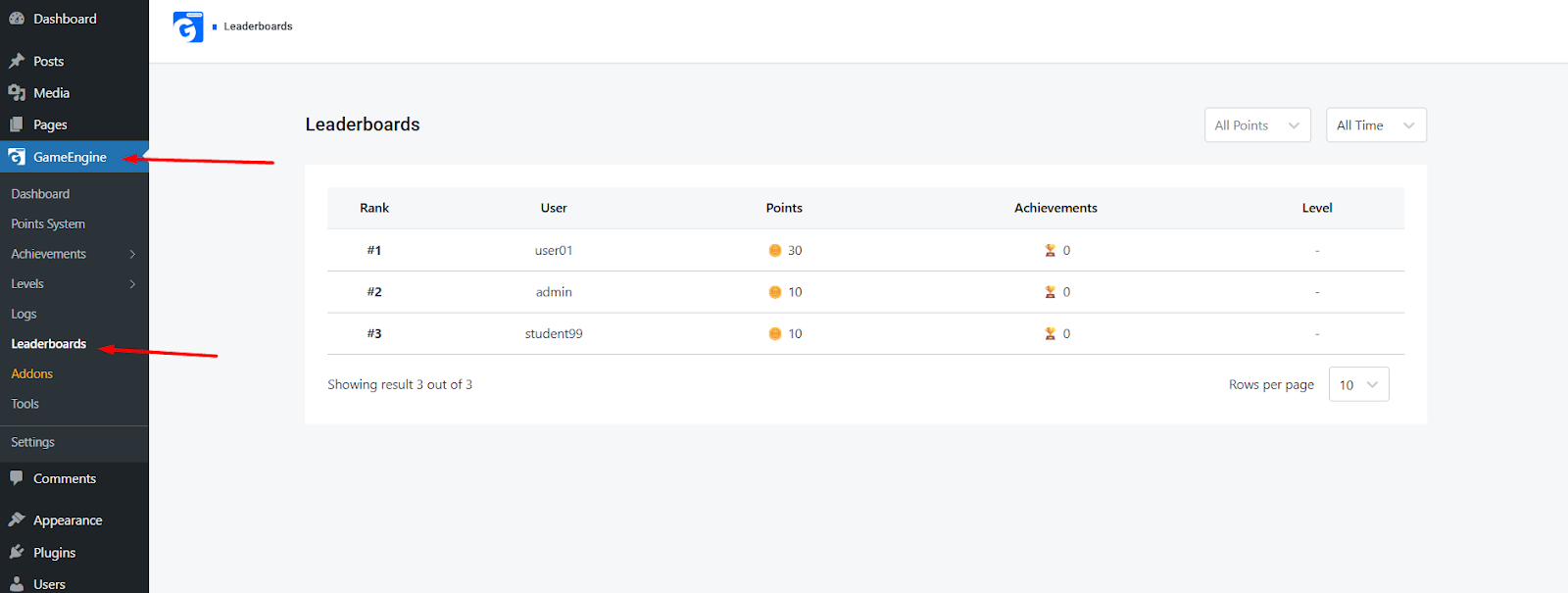
Step 3: Understanding Leaderboard Columns
The Leaderboard displays the following information:
- Rank
Position of the user based on total points - User
Username of the participant - Points
Total points earned by the user - Achievements
Number of achievements completed - Level
Current level of the user (if levels are configured)
If levels are not assigned, the level column will display a dash (-).
Step 4: Filter Leaderboard Results
The leaderboard includes filtering options for better insights.
Available Filters:
- Points Type
Filter rankings by a specific point system or view all points - Time Range
View rankings based on:- All Time
- (Optional future ranges like weekly or monthly if enabled)
Step 5: How Leaderboard Rankings Are Updated
- Rankings are updated automatically
- Whenever a user:
- Earns points
- Completes an achievement
- Advances a level
- The leaderboard reflects changes instantly without manual refresh or configuration
No shortcode or manual placement is required for the admin leaderboard view.
Example Use Cases
- Display top learners based on course activity
- Motivate students through competitive ranking
- Track user engagement across points and achievements
- Identify high-performing users quickly from the admin panel
Summary
The GameEngine Leaderboard provides a dynamic and automated way to rank users based on their gamification progress. By leveraging Points, Achievements, and Levels, it encourages engagement and competition while giving admins clear visibility into user performance. Once set up, the leaderboard requires no manual maintenance and updates in real time as users interact with the system.