



The GameEngine Smart Banners provide a dynamic and interactive way to highlight key gamification features directly within your dashboard. They help users quickly track their Points, Achievements, and Levels from a centralized interface, enhancing engagement and navigation.
Viewing Smart Banners
To view the Smart Banners: Complete the GameEngine setup process. Once setup is completed, the Smart Dashboard and its banners will appear in the following sections:
- Point System
- Achievements
- Levels
Important Note: The Smart Dashboard is only visible when you don’t have any existing Points, Achievements, or Levels created in your system.
- If you already have Points, Achievements, or Levels configured, the Smart Dashboard will not appear after the page reloads.
- The Smart Dashboard is primarily shown before completing the initial setup, when the system has no existing configurations.
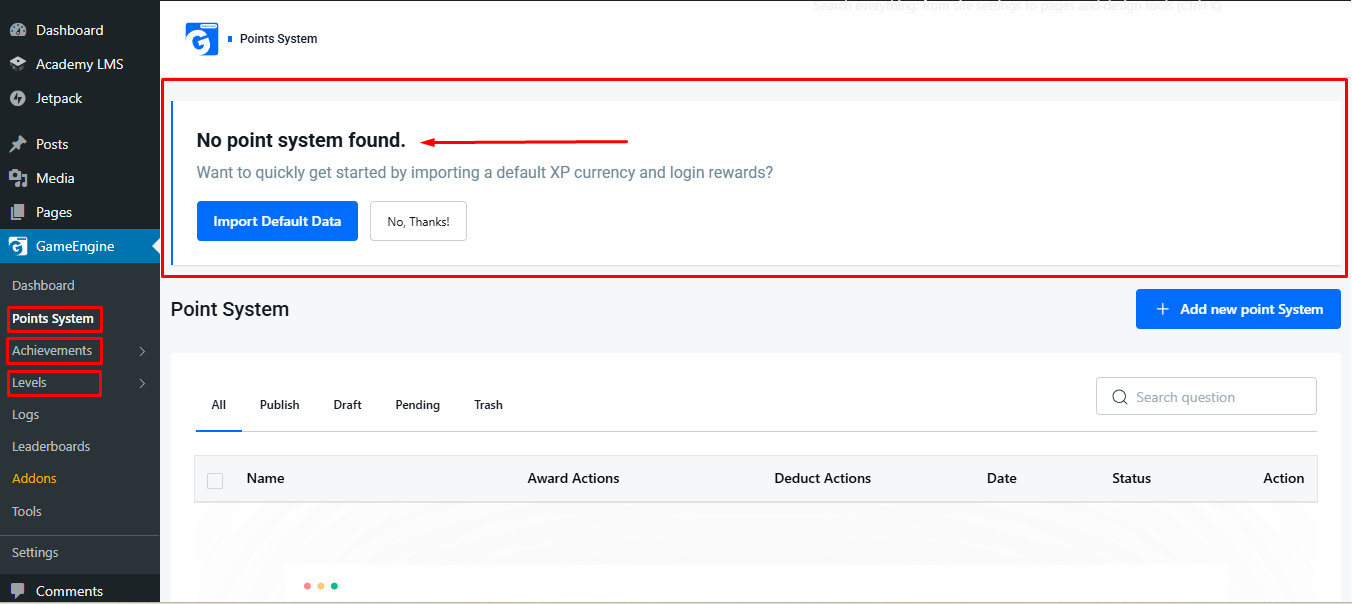
The GameEngine Smart Banners provide a dynamic, centralized way to monitor and manage your Points, Achievements, and Levels. By completing the initial setup, users gain access to these interactive banners, which simplify navigation and enhance engagement within the Smart Dashboard.
These banners ensure a smooth onboarding experience, helping users quickly understand and utilize GameEngine’s gamification features efficiently.