



The Coupon Generate feature allows you to transform earned points into tangible rewards. By enabling this feature, you create a “Rewards Store” where users can exchange their accumulated points for unique, one-time-use discount coupons.
How it Works
The Coupon Generate system functions as an automated exchange. Instead of manually sending codes to users, GameEngine generates a fresh, unique coupon code the moment a user “purchases” it with their points. These coupons are then immediately available for use at checkout.
1. Enable Coupon Generate
To activate the rewards exchange system on your site:
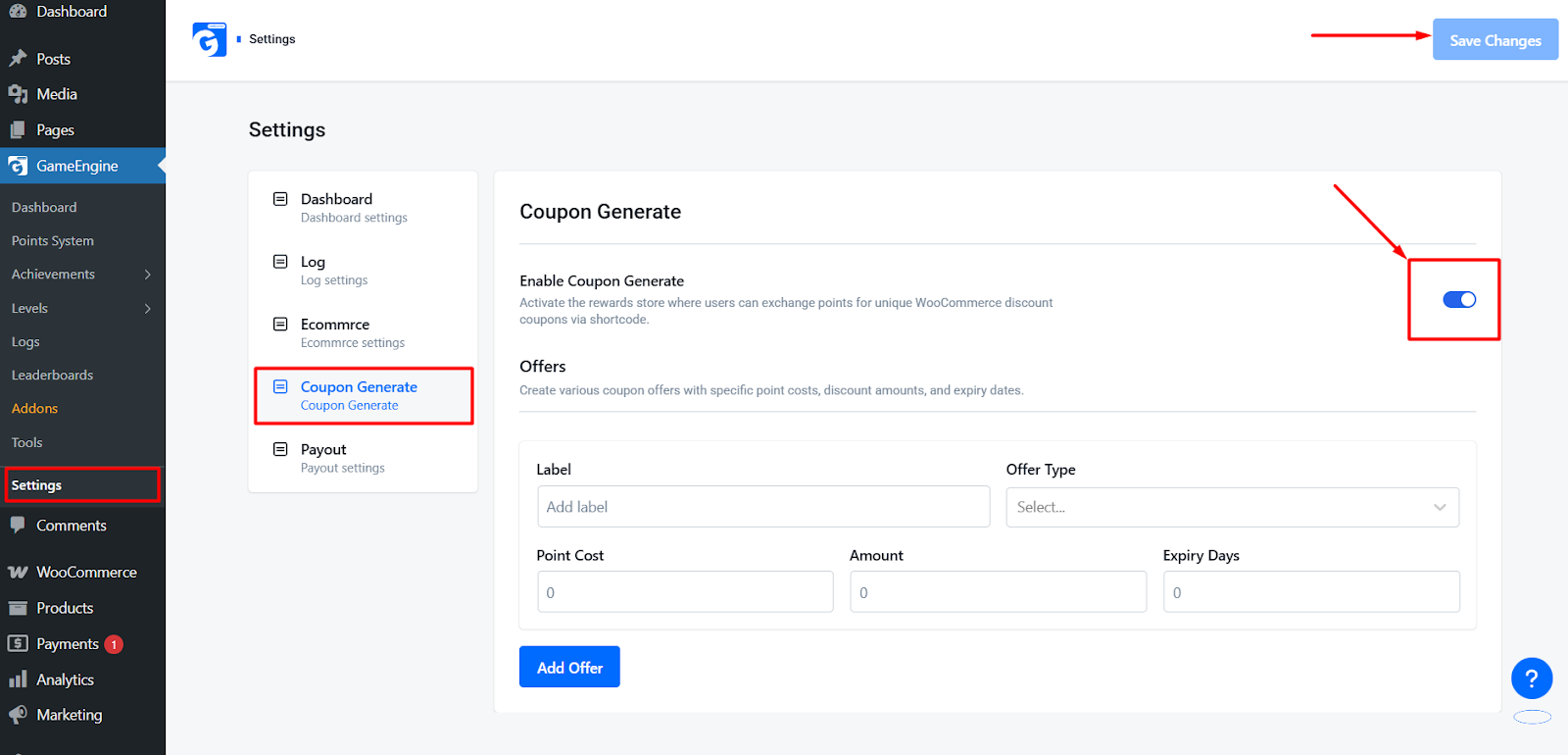
- Navigate to GameEngine > Settings.
- Locate Coupon Generate and switch the toggle to ON.
Key Feature: Creating Coupon Offers
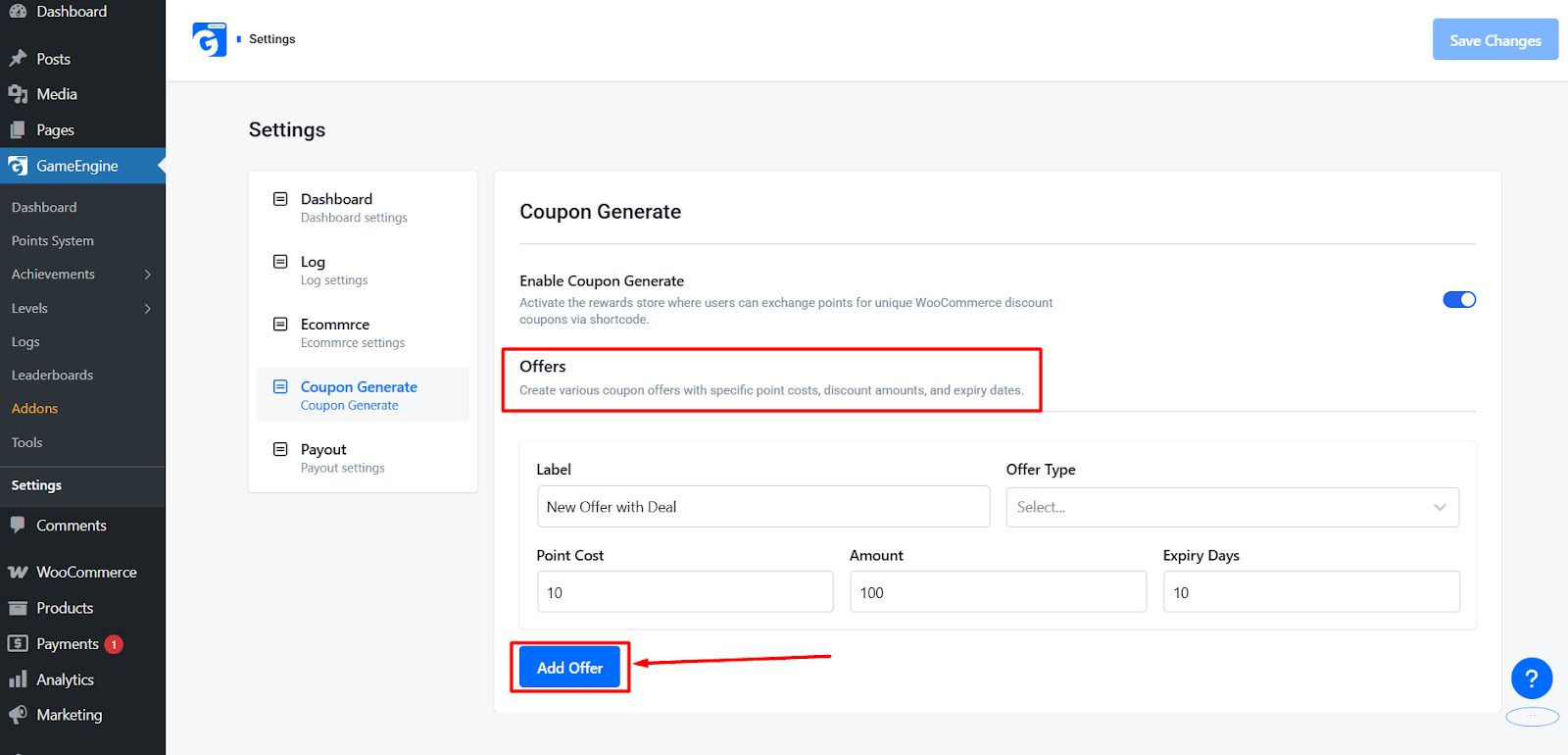
The heart of this system is the Offers management. You can create an unlimited variety of coupon types to cater to different segments of your audience.
Configuration Options for Offers:
When creating a new Coupon Offer, you can define the following specific parameters:
- Point Cost: Set exactly how many points a user must “spend” to generate the coupon (e.g., “Exchange 500 Gold for a Discount”).
- Amount: Define the value of the coupon. This can be a Percentage Discount (e.g., 10% off) or a Fixed Amount (e.g., $10 off).
- Coupon Prefix: Add a custom prefix to generated codes to help you track which marketing efforts are driving sales.
- Expiry Days: Set a “Validity Period” for the generated coupon. For example, you can set the coupon to expire 7 days after the user unlocks it, creating a sense of urgency.
- Usage Limits: Ensure each generated code can only be used once per customer.
Frontend Display & Shortcodes
To make these features accessible to your users, GameEngine provides two primary frontend components:
A. Coupon Marketplace
The Coupon Marketplace is a dynamic store where users browse and “buy” your configured offers using their points.
- Shortcode:
[gameengine_marketplace] - Function: Renders a responsive grid or list of all active reward offers set in your admin settings. Users can click “Exchange” to instantly generate a unique code and have the points deducted from their balance.
B. Payout Form
For sites that allow users to convert their points into actual currency, the Payout Form provides a secure way to handle withdrawal requests.
- Shortcode:
[gameengine_payout] - Function: Displays a secure form where users can select their preferred withdrawal method—such as PayPal—and provide their account details.
- Process: Once a user submits the form, a “Payout Request” is generated in your admin dashboard for manual or automated approval.
User Workflow
- Engagement: Users earn points through site activity.
- Marketplace Visit: Users view available rewards via
[gameengine_marketplace]. - Redemption: Users exchange points for a coupon or submit a withdrawal request via
[gameengine_payout]. - Reward Delivery: The system instantly generates the coupon or logs the payout request for processing.
The Coupon Generate feature is the ultimate way to close the loop between gamification and revenue. By allowing users to exchange Points for Offers, you provide a clear, valuable reason for them to stay engaged with your platform, significantly increasing customer lifetime value and brand loyalty.