



The Payment Payout module allows site administrators to offer a “Points-to-Cash” conversion service. By enabling this feature, you provide a secure workflow for users to request withdrawals based on their accumulated point balance.
1. Enable Payout
To allow users to start requesting withdrawals, you must first activate the points payouts engine:
- Navigate to GameEngine > Settings.
- Locate Payment Payout and switch the toggle to ON.
- Frontend Access: Use the shortcode
[gameengine_payout]on any page (such as a “User Dashboard” or “Wallet” page) to display the withdrawal request form to your users.
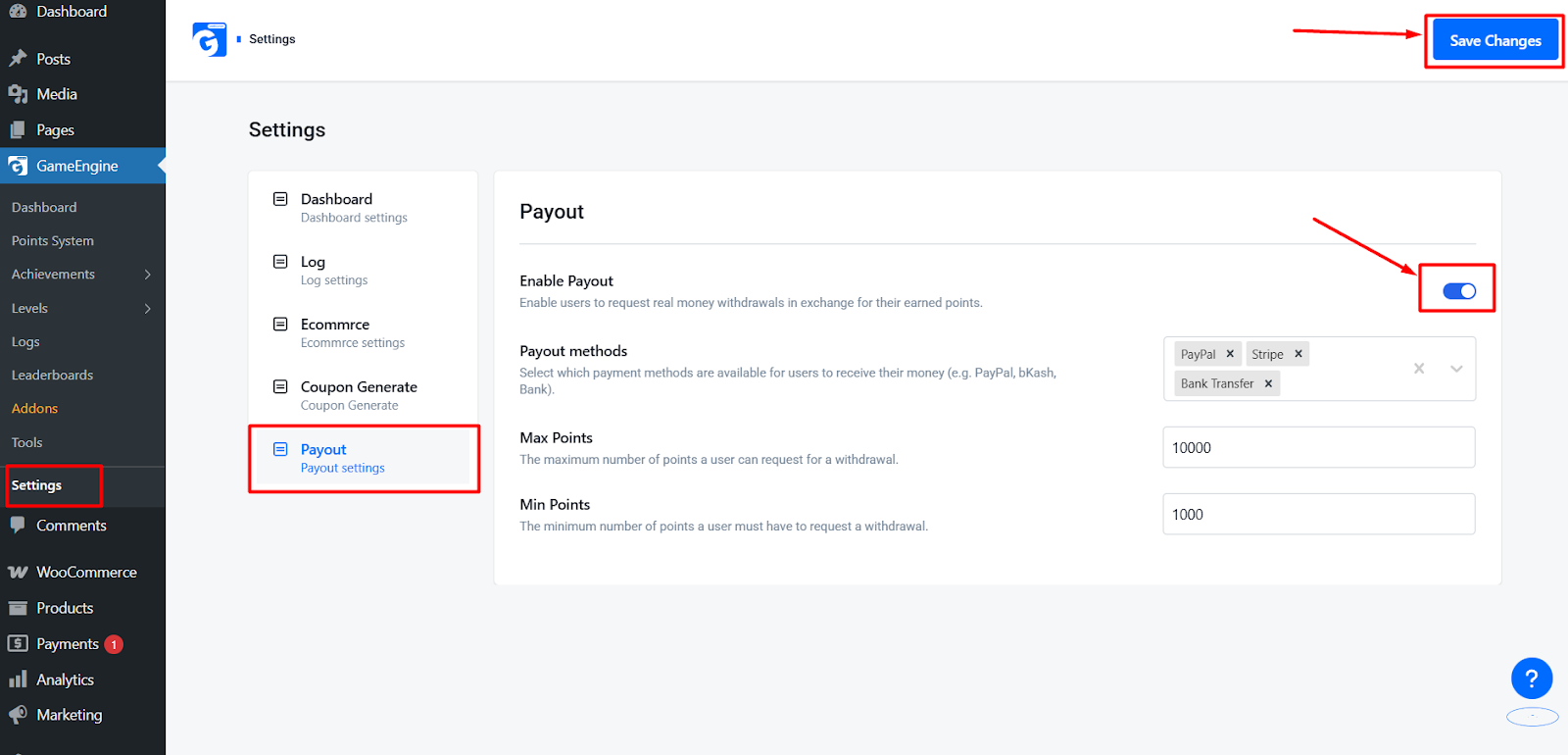
2. Configuration & Key Features
To maintain a healthy economy on your site, you can define specific rules for how and when users can request their money.
Payout Methods
You can control exactly how users receive their funds. Within the settings, you can select and enable multiple gateways:
- Digital Wallets: Enable mobile-friendly options like PayPal.
- Traditional Banking: Enable Bank Transfer for larger transactions.
- Custom Methods: Add your own specialized payout descriptions for local payment providers.
Min Points (Minimum Threshold)
This setting defines the “Floor” for a withdrawal. A user must reach this specific balance before the payout form becomes active.
- Purpose: Prevents high-frequency, low-value transactions that are difficult to manage.
Max Points (Withdrawal Limit)
This setting defines the “Ceiling” for a single withdrawal request.
- Purpose: Protects your site’s liquidity and allows for manual security checks on large-sum transfers.
3. The Payout Workflow
- Requirement Check: The user visits the page containing the
[gameengine_payout]shortcode. GameEngine automatically checks if their balance is between the Min Points and Max Points limits. - Request Submission: The user selects their preferred Payout Method (e.g.PayPal) and enters their account details (e.g., Phone Number or Email).
- Point Escrow: Upon submission, the requested points are “Locked” or deducted from the user’s active balance.
- Admin Approval: You will receive a notification in GameEngine > Payout Requests. From here, you can review the user’s activity and mark the request as Processing, Completed, or Rejected.
- Completion: Once you mark the request as “Completed,” the user is notified that their funds have been sent.
The Payment Payout feature is the ultimate reward for a highly engaged community. By offering a secure, structured way to exchange Points for real currency via methods like PayPal, you turn your website into a rewarding ecosystem that users will treat with professional dedication.