



Most basic loyalty programs give a fixed number of points for every purchase (e.g., 10 points per order). However, this isn’t always fair. A customer spending $10 should probably earn fewer points than a customer spending $500.
The most professional way to handle this is by awarding points as a percentage of the order total. With GameEngine Pro, you can set this up in seconds. Here is how:
Fixed vs. percentage — why it matters more than it looks
Here’s the practical difference between the two approaches on the same set of orders:
|
Order total |
Fixed points (10 pts/order) |
Percentage points (10%) |
Fairer outcome? |
|
$10 order |
10 points |
1 point |
✓ Proportional |
|
$50 order |
10 points |
5 points |
✓ Proportional |
|
$100 order |
10 points |
10 points |
✓ Proportional |
|
$500 order |
10 points |
50 points |
✓ Proportional |
With a fixed rate, your $500 customer earns the exact same reward as your $10 customer. With percentage-based points, the $500 customer earns 50× more, which is proportionate to what they actually contributed. That’s the kind of difference high-value customers notice, even if they can’t articulate why one store feels more rewarding than another.
“Percentage-based rewards don’t just feel fairer — they also give customers a concrete reason to build larger carts. Every extra dollar they spend is now worth something back.”
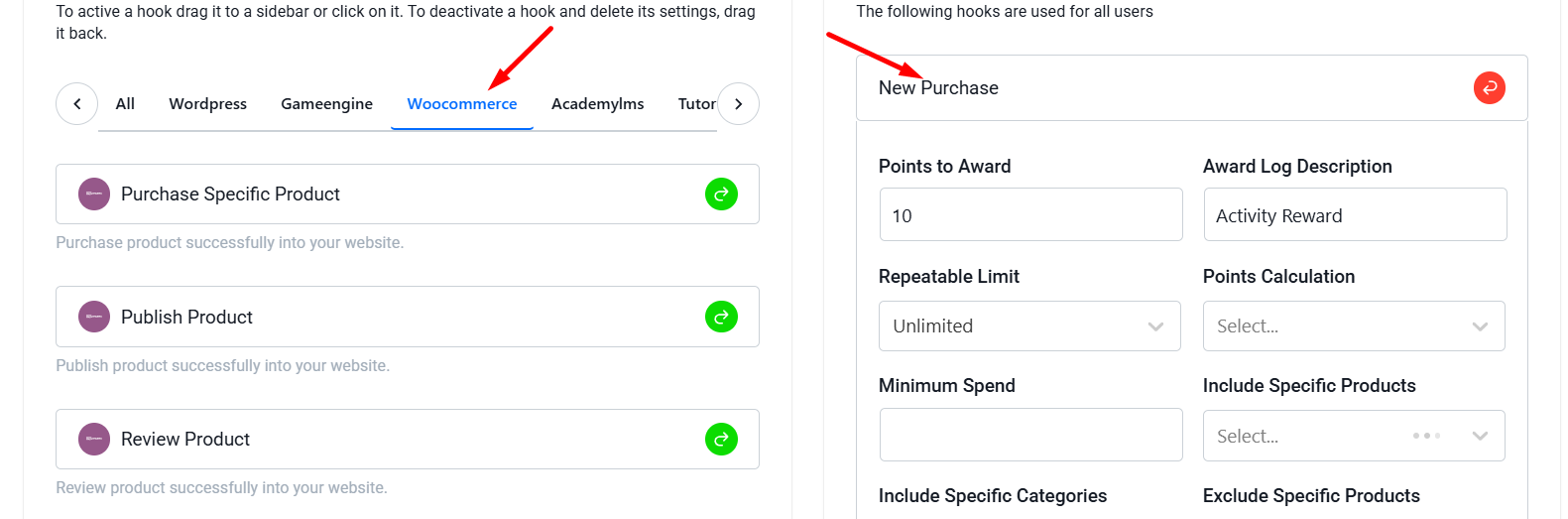
Set Up the WooCommerce Trigger
First, navigate to your GameEngine > Triggers section in the WordPress admin panel.
- Click on Add New Rule.
- Select the WooCommerce: New Purchase trigger.
Change Calculation Type to “Percent”
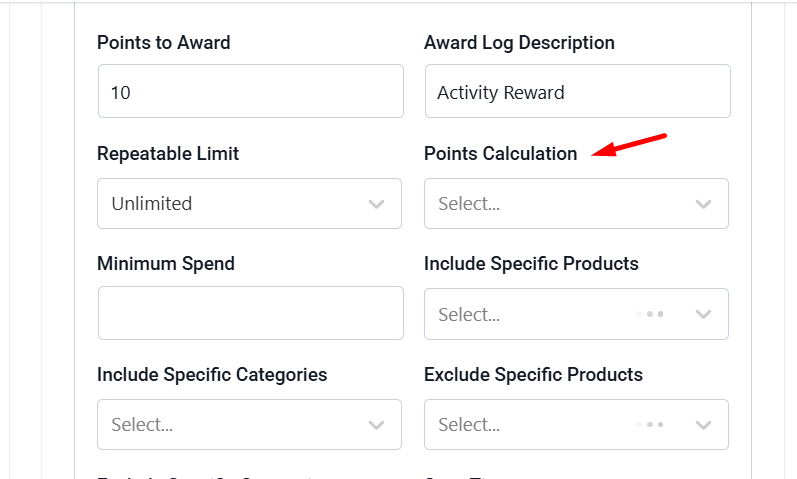
This is a premium feature of GameEngine Pro. In the rule settings, you will see an option called Points Calculation.
- Select Percent of Order Total (Pro) from the dropdown.
- In the Points to Award field, enter the percentage you want to give.
Example: If you enter 10, a customer who spends
100∗∗willautomaticallyreceive∗∗10points∗∗.Iftheyspend∗∗
100∗∗willautomaticallyreceive∗∗10points∗∗.Iftheyspend∗∗
50, they get 5 points.
Setting a Minimum Spend (Optional)
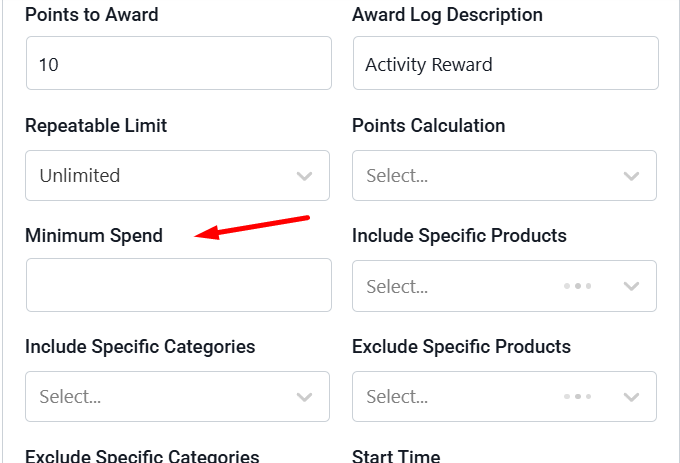
To protect your profit margins, you can also set a Minimum Spend requirement.
- Example: You can set the rule so that points are only awarded if the order total is above $20. If the order is lower, the trigger won’t fire.
Automated Logging and Tracking
You don’t need to do any manual math. GameEngine Pro talks directly to WooCommerce:
- It detects the final order total (after discounts and before/after tax, depending on your WC settings).
- It calculates the percentage.
- It instantly deposits the points into the user’s account once the order status is marked as Completed.
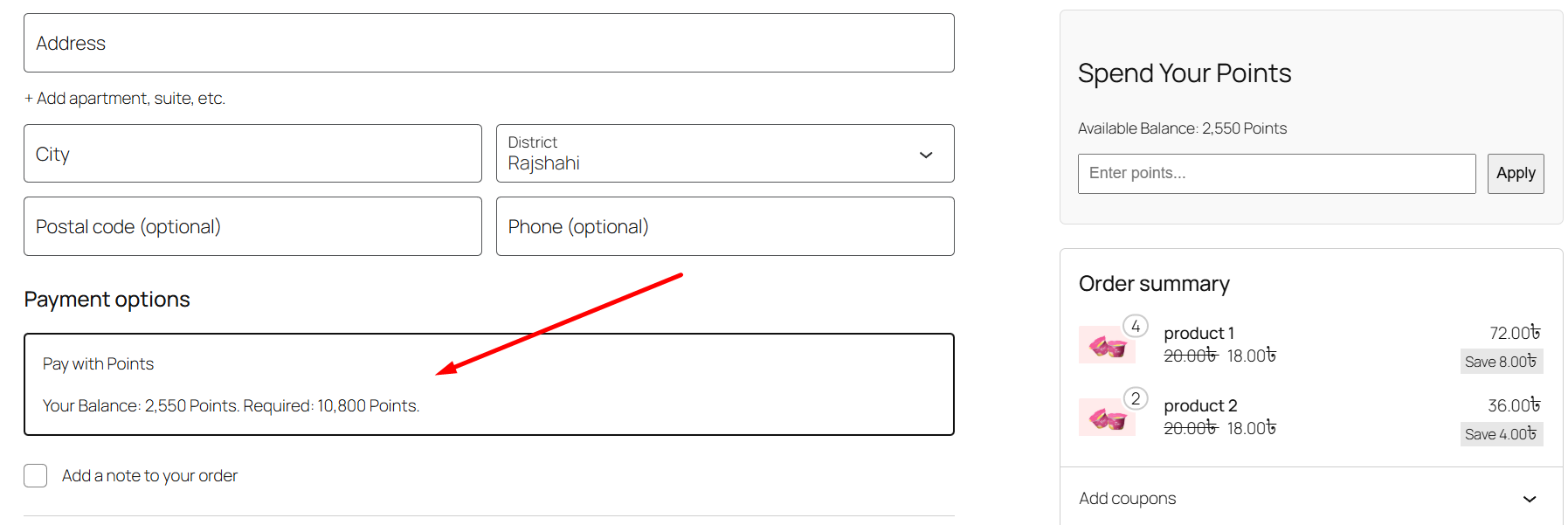
Combining with “Pay with Points”
The best way to use this is to let users spend those points later. If you give 10% back in points, and your Conversion Rate is set to 100 points = $1, your customers are essentially getting 10% “cashback” to spend on their next visit.
The bottom line
Flat-rate points are fine as a starting point. But as your store grows and your customer base diversifies, a one-size-fits-all reward starts to feel unfair — especially to the customers placing your largest orders. Percentage-based points correct that in one setting change, and they do it in a way that naturally encourages bigger carts without you ever running a sale.
Pair it with a sensible minimum spend, set your conversion rate so the cashback value feels real, and combine it with the pay-with-points gateway — and you’ve built a loyalty mechanic that actually scales with your store’s revenue.
Ready to reward your best customers properly?
Percentage-based points is a GameEngine Pro feature — available alongside the rewards marketplace, pay-with-points gateway, Happy Hours, and the full reward economy.
Get GameEngine Pro ↗ See all features ↗
FREQUENTLY ASKED QUESTIONS
Does the percentage calculate before or after discounts and tax?
GameEngine Pro reads the final order total from WooCommerce, which means it respects any coupon discounts applied at checkout. Whether tax is included in that total depends on your WooCommerce tax settings — specifically whether your product prices are set as tax-inclusive or tax-exclusive. Check your WooCommerce tax configuration to confirm what “order total” means in your setup before setting the percentage.
Can I run different percentages for different product categories?
Yes — you can create multiple trigger rules, each with a different percentage and scoped to a specific product category or product ID. For example, you might award 10% on full-price items and 2% on sale items, or offer a boosted rate on new arrivals you want to move. Each rule runs independently, so a single order could trigger multiple rules if it contains products from different categories.
What if a customer returns the order after earning points?
Points earned on a completed order are reversed automatically when that order is refunded or cancelled in WooCommerce. GameEngine Pro monitors order status changes — when an order moves from Completed back to Refunded or Cancelled, the corresponding points are deducted from the customer’s balance. The deduction is logged in the activity panel alongside the original earning event.
Can I award percentage points and fixed points at the same time?
Yes. You can have both a percentage-based purchase rule and a separate fixed-point rule running simultaneously — for example, a flat 5-point bonus for placing any order at all, plus a 10% percentage rule based on the order value. Both rules will fire on qualifying orders and the points stack. Just make sure the combined reward stays within your margin tolerance.
Is there a way to cap the maximum points earned per order?
Yes. The trigger rule settings include a maximum points cap per transaction. This is useful if you’re worried about very large orders earning a disproportionate amount — for example, a wholesale order in the thousands of dollars. Set a ceiling and GameEngine Pro will award the percentage up to that cap, then stop. The cap only applies to that specific rule, so other triggers are unaffected.