



Do you want to drive more traffic to your website at specific times? “Happy Hours” is a powerful marketing tactic used by the world’s biggest brands to create urgency. Now, you can do the same with your WordPress site.
With GameEngine Pro, you can set up time-restricted rewards that encourage users to be active during specific hours or days. Here is how to set it up without writing any code:
Why time-restricted rewards work
Before the setup steps, it’s worth understanding what actually makes Happy Hours effective — because if you set it up without thinking about the psychology, you’ll miss most of the benefit.
The mechanic works on two levels. First, scarcity: a reward that’s only available for three hours on a Friday night feels more valuable than one available all week. Users pay attention to things that can disappear. Second, habit: once a user shows up for your Happy Hour two or three times, they start anticipating it. It becomes part of their routine — which is exactly where you want to be.
“A reward you can get any time is easy to ignore. A reward that expires at 9 PM tonight is hard to forget.”
The brands that use this best — coffee chains, streaming platforms, food delivery apps — all understand that urgency isn’t manipulation, it’s motivation. You’re not tricking anyone. You’re giving them a genuinely better deal, within a window that serves both of you.
1. Choose Your Activity (Trigger)
First, decide which activity you want to reward during Happy Hours.
- Example: Maybe you want users to earn double points for leaving comments on Friday nights, or extra points for visiting your shop between 8 PM and 10 PM.
2. Set Up Active Days
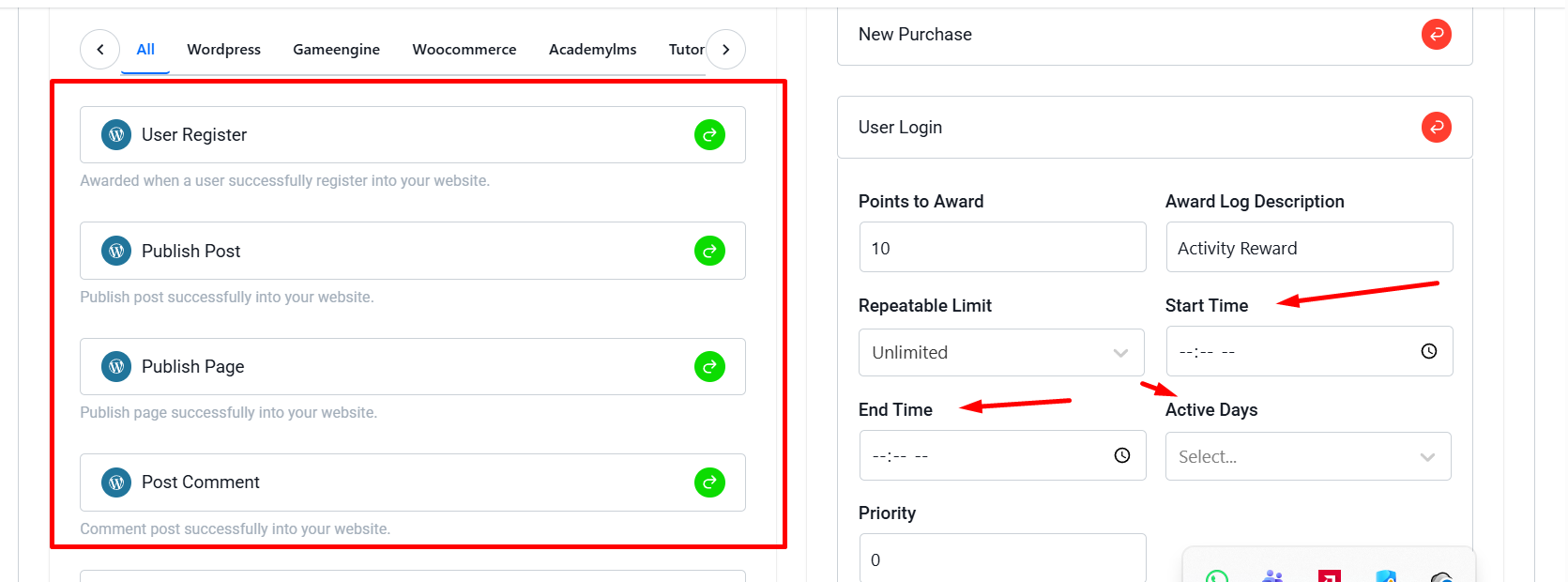
Not every day has to be a Happy Day. You can select specific days of the week when the reward is active.
- Go to the Triggers section in GameEngine.
- In your rule settings, find the Active Days field.
- Select the days (e.g., Saturday and Sunday for a “Weekend Bonus”).
3. Define the Happy Hour Window
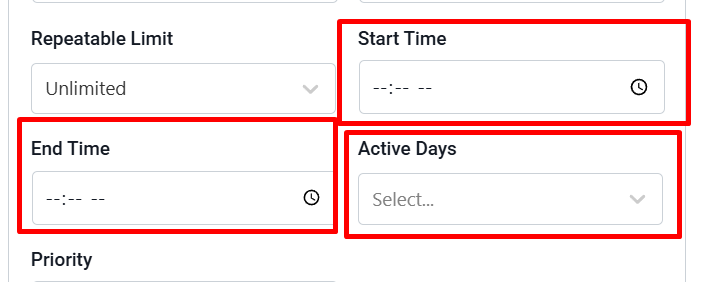
This is where the magic happens. You can restrict the reward to a specific time range.
- Start Time: Set when the Happy Hour begins (e.g., 18:00).
- End Time: Set when the window closes (e.g., 21:00).
If a user completes the task outside of this window, they won’t receive the bonus. This creates a “Use it or lose it” mentality that brings users back exactly when you want them.
4. Automated and Time-Zone Safe
You don’t need to manually turn the rules on and off. GameEngine Pro uses your WordPress site’s time settings to automatically activate and deactivate the rewards based on your schedule.
Why use Happy Hours?
- Boost Traffic: Fill your low-traffic hours with active users.
- Increase Sales: Encourage WooCommerce purchases during flash-sale hours.
- Better Engagement: Give users a reason to check your site every single day at a specific time.
Launch Your First Happy Hour Today!
Stop running a static reward system. Make it dynamic, exciting, and urgent with GameEngine Pro.
Ready to gamify your schedule? Upgrade to GameEngine Pro and start building your custom Happy Hour rules today!
Happy Hour ideas worth trying
Once the mechanics are in place, the creative possibilities open up. Here are some combinations that tend to generate strong engagement across different site types:
Early bird bonus — double XP for the first lesson completed before 9 AM on weekdays. Works well for course creators whose students tend to procrastinate in the mornings.
Late night flash — bonus purchase points from 10 PM to midnight on Thursdays and Fridays. Targets evening shoppers who browse before bed.
Weekend warrior — triple login points on Saturday and Sunday mornings. Builds a weekend check-in habit without requiring any specific action.
Midweek surge — bonus comment points on Tuesday and Wednesday afternoons, the two lowest-traffic days for most content sites.
Rotating specials — change the active trigger each week. Monday it rewards comments, Thursday it rewards purchases. Keeps users checking back to see what’s currently boosted.
What results to expect
Happy Hours work best as a traffic shaping tool, not a growth hack. The goal isn’t to generate new visitors — it’s to influence when your existing users show up. That distinction matters when you’re measuring success.
2–3×
Spike in activity during the defined window
↑ 35%
Increase in daily return visits once the habit forms
↓ 20%
Drop in off-peak inactivity after 4 weeks
Give it at least three to four weeks before drawing conclusions. Habit formation takes time — users need to encounter the Happy Hour a few times before they start planning around it. The first week is awareness. The second week is interesting. By the fourth week, it’s routine.
The bottom line
A flat reward system treats Tuesday at 2 PM exactly the same as Friday at 8 PM. That works fine as a foundation — but it leaves a lot of potential on the table. Happy Hours let you be strategic about when engagement happens, not just whether it happens.
The setup is genuinely simple. Pick a trigger, select your days, set the window, and save. From that point on, your reward system is running on a schedule — creating urgency, shaping habits, and filling your slow hours with users who actually showed up on purpose.
Start with one Happy Hour. Run it for a month. Look at your traffic data before and after. Then build from there.
Ready to make your reward system time-aware?
Happy Hours is one of the many advanced trigger features inside GameEngine Pro — alongside partial payments, the rewards marketplace, referral bonuses, and role-based spending.
Get GameEngine Pro ↗ See all features ↗
FREQUENTLY ASKED QUESTIONS
Does GameEngine Pro adjust for each user’s timezone?
No — the Happy Hour window runs on your WordPress site’s timezone, which you set under Settings → General. All users see the same window regardless of where they are in the world. If your audience spans multiple timezones, pick the one your most active users are in, or schedule the window at a time that works reasonably across your main regions.
Can I run multiple Happy Hours at the same time?
Yes. Each trigger rule has its own Happy Hour settings, so you can run different windows on different triggers simultaneously. You could have a comment bonus running Friday evenings while a purchase bonus runs Saturday afternoons — they operate independently and don’t interfere with each other.
What happens if a user completes an action right at the boundary of the window?
GameEngine Pro checks the server time at the moment the action is logged. If it falls within the defined window — even by a minute — the bonus applies. If it falls outside, the normal rate applies. There’s no buffer zone, so the cutoff is exact based on your site’s clock.
Should I tell users about my Happy Hours?
Yes — transparency is what makes the mechanic work. If users don’t know the window exists, they can’t plan around it. Announce it in an email, add a note to your points dashboard, or display a countdown on the page. The more visible the window, the stronger the urgency effect. A Happy Hour no one knows about is just a regular hour.
Can I use Happy Hours with WooCommerce purchase triggers?
Yes. You can attach a Happy Hour window to any trigger in GameEngine Pro, including WooCommerce purchase events. This is one of the most effective use cases — a time-limited purchase bonus functions like a flash sale, but instead of reducing the price, it rewards loyalty. Customers who buy during the window earn extra points, which brings them back for the next purchase.