



Want to give your users a reason to keep coming back to your site? A Rewards Marketplace allows them to “buy” exclusive rewards like discount coupons using the points they’ve earned.
With GameEngine Pro, you can set up a professional rewards store in minutes without writing a single line of code. Here is how:
1. Enable the Rewards Marketplace
First, make sure GameEngine Pro is active.
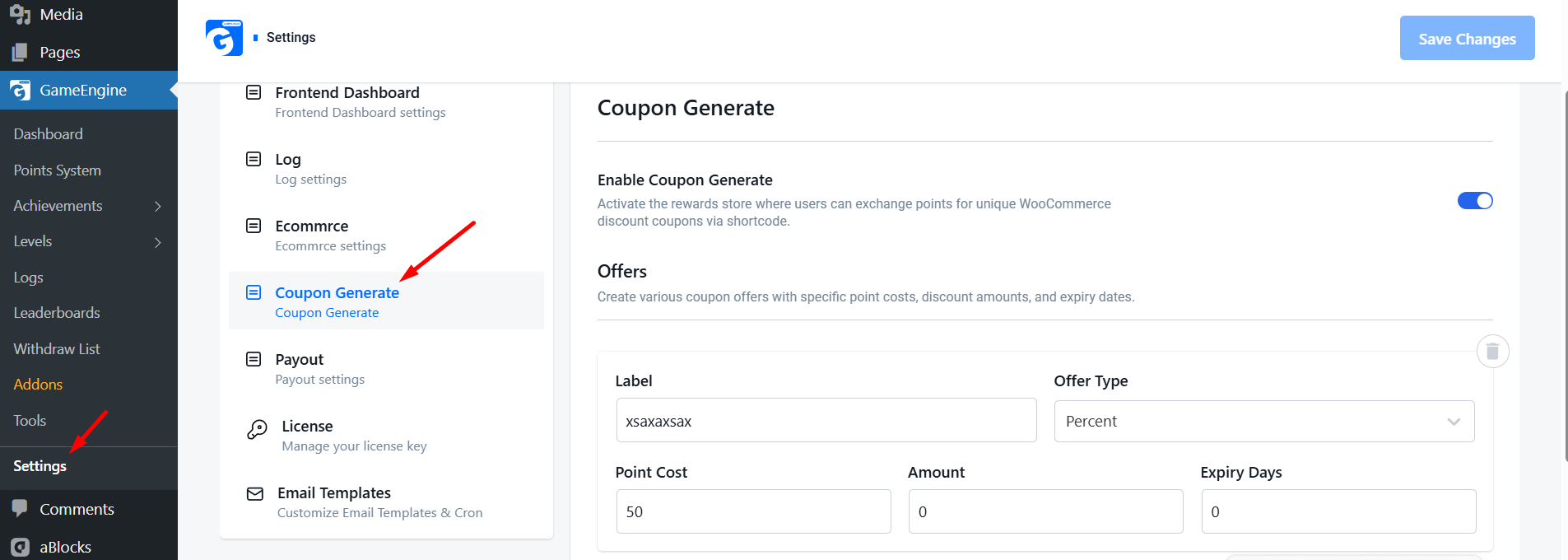
- Go to your WordPress Dashboard and navigate to GameEngine > Settings.
- Click on the Coupon Generate tab.
- Switch the Enable Coupon Generate toggle to ON.
2. Create Your Reward Offers
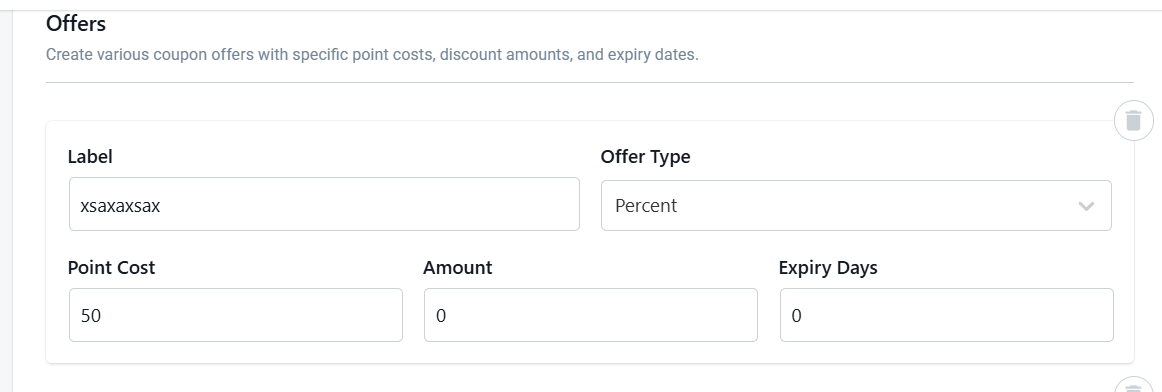
Now it’s time to stock your shop! You can create different offers for your users using our easy repeater field. For each offer, you can set:
- Label: Give it a name like “10% Discount” or “$25 Gift Card.”
- Point Cost: How many points a user must spend to get this reward.
- Discount Amount: The actual value of the coupon (e.g., 10 or 25).
- Offer Type: Choose between a percentage discount or a fixed amount.
- Expiry: Set how many days the coupon will be valid for.
3. Display the Store on Your Website
To show the marketplace to your users, you don’t need a developer. Simply copy this shortcode:
[gameengine_marketplace]Paste this code onto any page, post, or sidebar. GameEngine Pro will automatically generate a beautiful, responsive grid of all your reward cards.

4. Automatic Coupon Generation
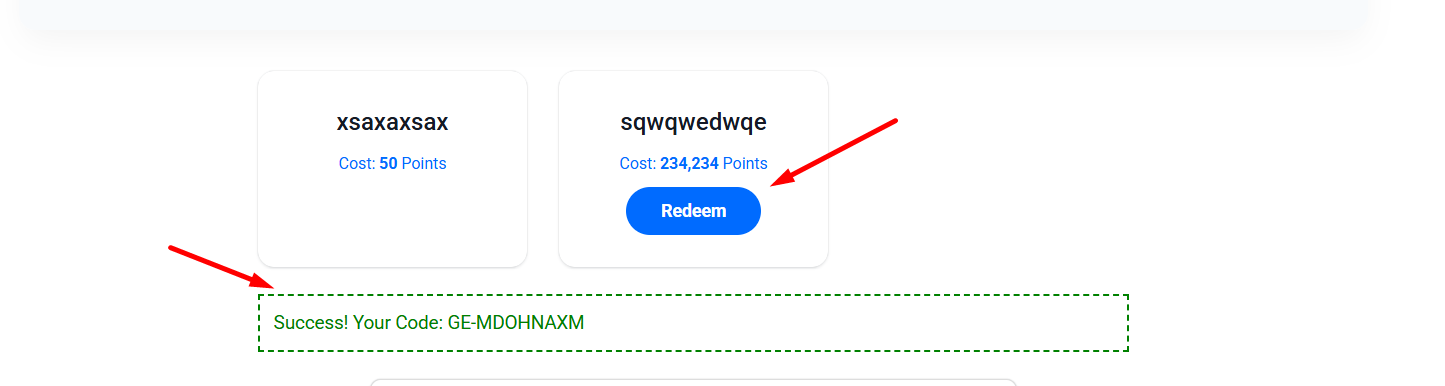
The best part is that everything is automated. When a user clicks “Redeem”:
- GameEngine checks their balance.
- Points are instantly deducted.
- A unique WooCommerce coupon code is generated just for that user.
- The code appears on their screen immediately, and they can use it at checkout.
5. Secure and Controlled
You don’t have to worry about fraud. Each coupon is:
Linked to the user’s specific email address.
- Limited to one-time use only.
- Tracked in your admin activity logs.
Why Launch a Marketplace?
A marketplace turns “boring” points into real value. When users see a “$50 Off” coupon just a few points away, they will engage more with your content, courses, or products to reach that goal.
Stop just giving points—start giving rewards with GameEngine Pro!
Why a marketplace works better than just giving discounts
You might be wondering — why not just run a WooCommerce sale? The answer is in what the marketplace makes a user do before they get the reward.
A sitewide sale requires nothing. Anyone who shows up gets the discount. A rewards marketplace requires engagement. Users have to earn points first — by visiting, commenting, completing courses, making purchases — and then they can spend them. The discount feels deserved rather than handed out.
“A discount anyone can get trains customers to wait for sales. A reward they had to earn trains them to keep coming back.”
That shift in psychology is the entire point. You’re not just reducing prices — you’re building a system where the act of engaging with your site feels like progress toward something real.
3× More page visits from users with active point balances
↑ 40% Higher repeat purchase rate after first marketplace redemption
↓ 30% Lower coupon abuse rate vs open discount codes
The bottom line
Most loyalty features on WordPress require stitching together multiple plugins, paying for a separate SaaS platform, or spending hours configuring things that should just work. The GameEngine Pro rewards marketplace is different — it’s one toggle, a few offer fields, and a shortcode. The complexity lives in the automation, not the setup.
More importantly, it changes what points mean on your site. They go from an abstract number in a dashboard widget to a currency with real purchasing power. That shift in perception is what turns occasional visitors into regulars, and regulars into loyal customers who genuinely look forward to coming back.
Set up your first three offers today. Keep the entry-level reward within reach. Watch what happens to your return visitor rate over the next month.
Ready to open your rewards marketplace?
GameEngine Pro includes the marketplace, wallet, pay-with-points gateway, and referral system — all in one plugin, no monthly loyalty platform fee.
Get GameEngine Pro ↗ See all features ↗
FREQUENTLY ASKED QUESTIONS
Do I need WooCommerce for the marketplace to work?
Yes. The rewards marketplace generates real WooCommerce coupon codes when users redeem their points, so WooCommerce needs to be active on your site. If you’re running GameEngine Pro without WooCommerce, the points and gamification features still work — but the marketplace specifically requires it for coupon generation.
Can I offer rewards that aren’t discount coupons?
Currently, the marketplace generates WooCommerce coupon codes — percentage discounts or fixed amount coupons. If you want to offer other reward types like physical products, free shipping, or exclusive content access, you can handle those manually by creating a coupon that covers the item cost, or combine the marketplace with GameEngine Pro’s content unlock features for digital rewards.
What happens if a user tries to redeem without enough points?
GameEngine Pro checks the balance before processing the redemption. If a user doesn’t have enough points, the redeem button either stays disabled or shows an error message — no points are deducted and no coupon is generated. Users can see exactly how many points they need versus how many they have, which often motivates them to keep earning rather than leave the page.
Can I limit how many times a single user can redeem the same reward?
Yes. Each reward offer has redemption limit settings, so you can cap how many times a single user can claim a particular reward. This is useful for high-value offers — like a $50 coupon — where you don’t want one user repeatedly redeeming the same deal. You can also set global limits per offer to cap total redemptions across all users.
Will the marketplace look good on mobile?
Yes — the shortcode renders a responsive card grid that adapts to any screen size automatically. On mobile it stacks to a single column; on tablets it shows two cards side by side; on desktop it expands to three or four. You don’t need to write any CSS or adjust any settings — it works out of the box with whatever theme you’re running.