



Gamification can transform a flat WordPress site into a thriving, loyal community. But the moment your points carry real value — coupons, cashouts, exclusive content — abuse becomes inevitable. Fake logins, comment spam, multi-account farming, and coupon exploitation can silently drain your reward economy before you even notice.
This guide walks you through how GameEngine — a self-hosted WordPress gamification plugin built for LMS, WooCommerce, and Membership platforms — gives you the tools to stop points abuse before it starts.
Why WordPress Points Abuse Happens — And Why Most Plugins Miss It

Plugins like GamiPress and myCred have solid free cores. But as GameEngine’s own comparison page notes, they are “add-on heavy” — nearly every advanced WordPress point of abuse prevention control costs extra on top of the base plugin. You are essentially buying fraud protection as an afterthought.
GameEngine was built differently. The features you need to protect your points economy — Advanced Reward Filters, Activity Logs, Achievements System, Level Requirements, and Payout Controls — are all part of the core plugin itself.
The most common WordPress gamification abuse patterns you will face:
- Login farming — users log in and out repeatedly to trigger Daily Visit Rewards
- Comment spam — low-quality, repetitive comments posted purely to earn Content Interaction Rewards
- Multi-account abuse — new accounts created to claim signup bonuses repeatedly
- Time-window farming — bulk triggering rewards during a Happy Hours promotion
- Coupon stacking — redeeming points for coupons faster than intended
- Withdrawal exploitation — accumulating points via exploits and converting them to real money through the Points Withdrawal System
9 Ways GameEngine Prevents WordPress Points Abuse
1. GameEngine Advanced Reward Filters — Block Low-Effort Triggers
GameEngine’s Advanced Reward Filters is one of the most effective tools to prevent points abuse. It lets you add smart conditions to any reward rule so points are only awarded for genuine engagement.
For each reward rule, you can configure:
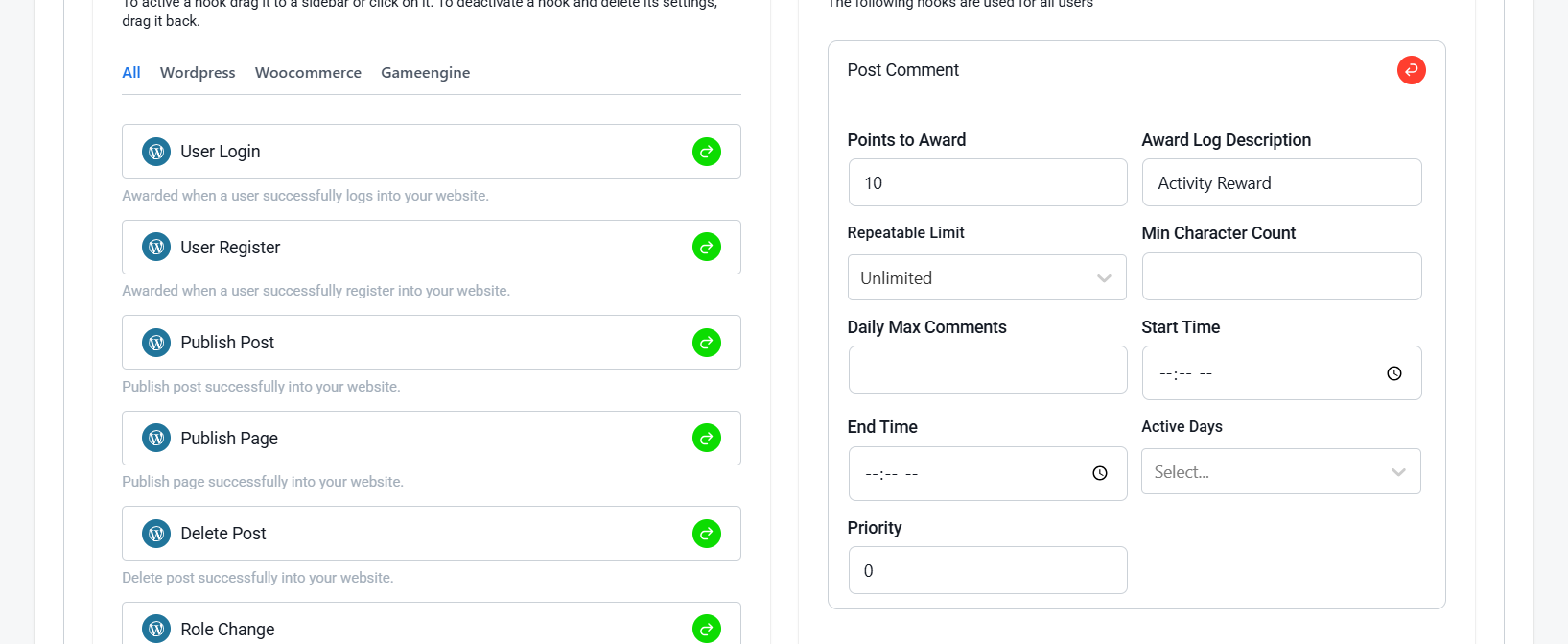
- Min Character Count — only award points when a comment meets a minimum character requirement
- Repeatable Limit — controls how many times a user can earn points for the same action
- Daily Max Comments — cap how many comments per day can earn points
- Start Time / End Time — restrict rewards to specific time windows
- Active Days — limit rewards to certain days of the week
Practical Example:
Set a minimum character count on Post Comment rewards. This instantly filters out low-effort spam comments and only rewards genuine engagement.
2. GameEngine Activity Logs — See Everything, Miss, Nothing
You can’t fight points abuse if you can’t see it. GameEngine’s Activity Logs give you a complete real-time audit trail of every point award, deduction, badge unlock, and level change.
What You Can Do With Activity Logs:
- Monitor all point events in real time across your site
- Search for a specific user to check their recent activity
- Catch misconfigured rules and accidental reward loops
- Maintain a clear audit trail for all point-related activities
How to Use GameEngine Activity Logs for Weekly Abuse Monitoring:
Step 1 — Open the Logs Dashboard
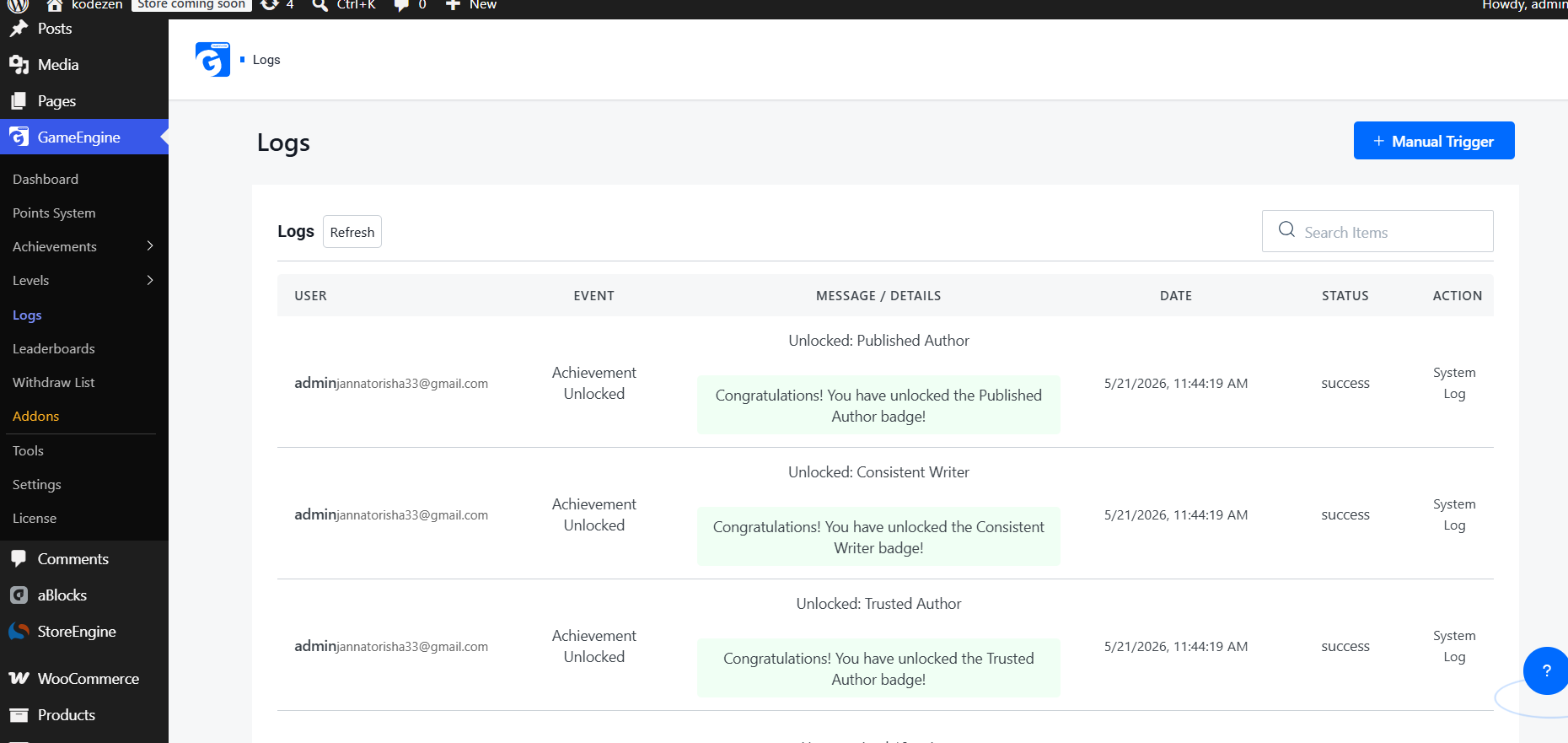
Go to GameEngine > Activity Logs in your WordPress admin panel. You’ll see a full chronological timeline of every point event across your entire site.
Step 2 — Search and Identify Suspicious Users
Use the Search Items bar on the Logs page to look up any user by username. Review their recent activity and look for the same event repeating multiple times in a short period — that’s your clearest sign of abuse.
Step 3 — Investigate Repeated Actions
On the Logs page, scan through the activity list and look for the same user appearing repeatedly in a short time. Clear abuse signals include the same event — like “Comment Published” or “Daily Login” — showing up multiple times within minutes or hours.
Step 4 — Make Weekly Monitoring a Routine
Reserve 10–15 minutes every Monday to scroll through the Logs and look for any unusual activity from the previous week. Regular weekly checks help you detect abuse patterns early before they grow into bigger problems.
Step 5 — Correct with Manual Points Update
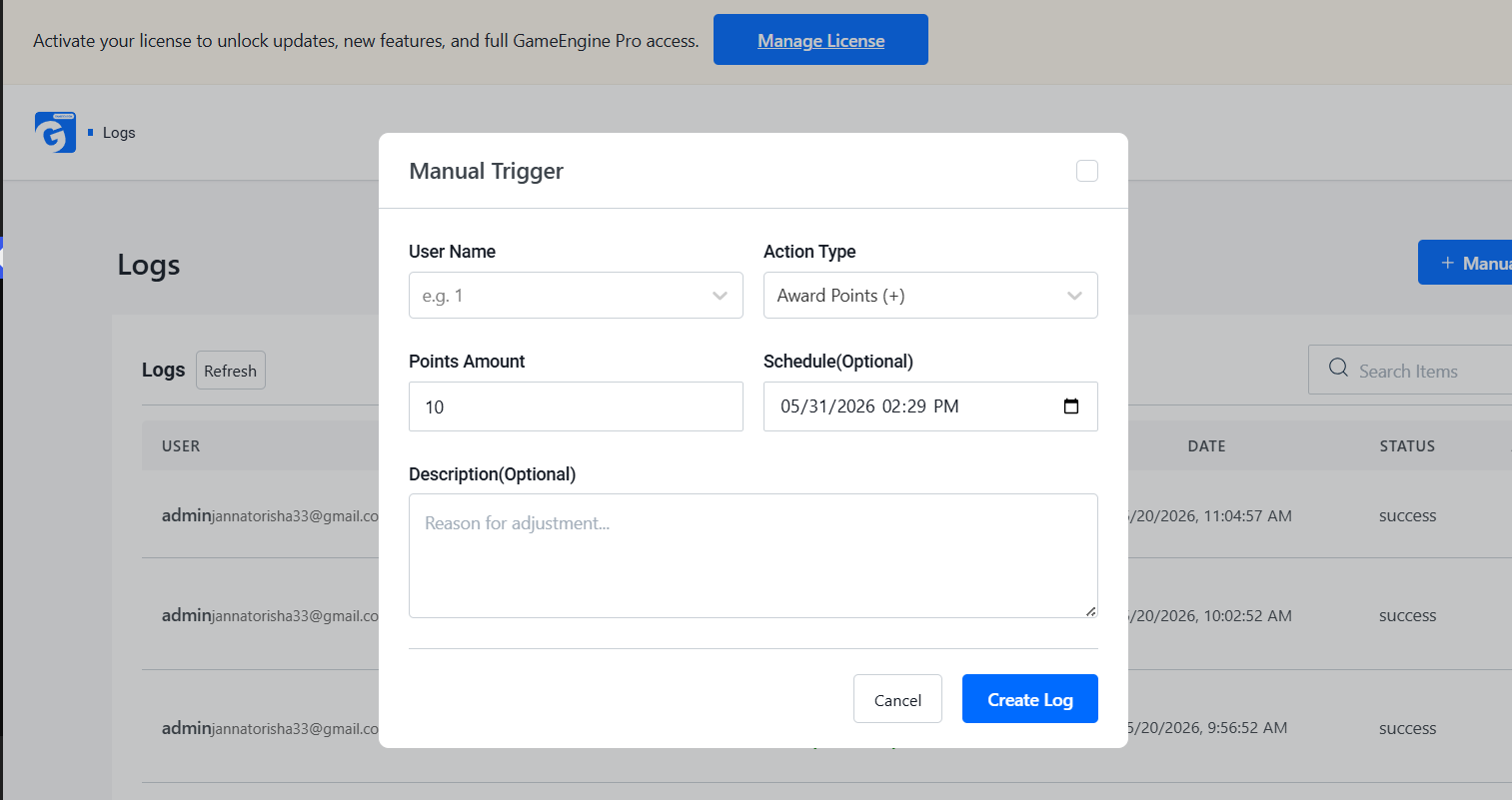
If abuse is confirmed, open the Manual Trigger panel directly from the Logs page. This allows you to manually adjust a user’s points without any coding.
Follow these steps:
- Select the suspicious user from the User Name field
- Set Action Type to Deduct Points (-) to remove abused points
- Enter the number of points you want to adjust
- Add a short internal note explaining the reason
Example note: “Points adjusted due to suspicious repetitive activity.”
Click Create Log to save the update. This helps maintain a fair rewards system and keeps your community protected from point farming or spam abuse.
3. GameEngine Dependency Logic (Milestones) — Gate High-Value Rewards Behind Real Progress
GameEngine’s Achievements system lets you control exactly how users unlock badges and rewards. You can require a minimum points threshold before a badge becomes accessible, making it harder for fake or new accounts to claim high-value rewards instantly.
How It Prevents Abuse:
- New accounts must earn real points before unlocking achievements
- High-value badges can be locked behind a points requirement
- Eliminates instant reward shortcuts for throwaway accounts
Where to Set It:
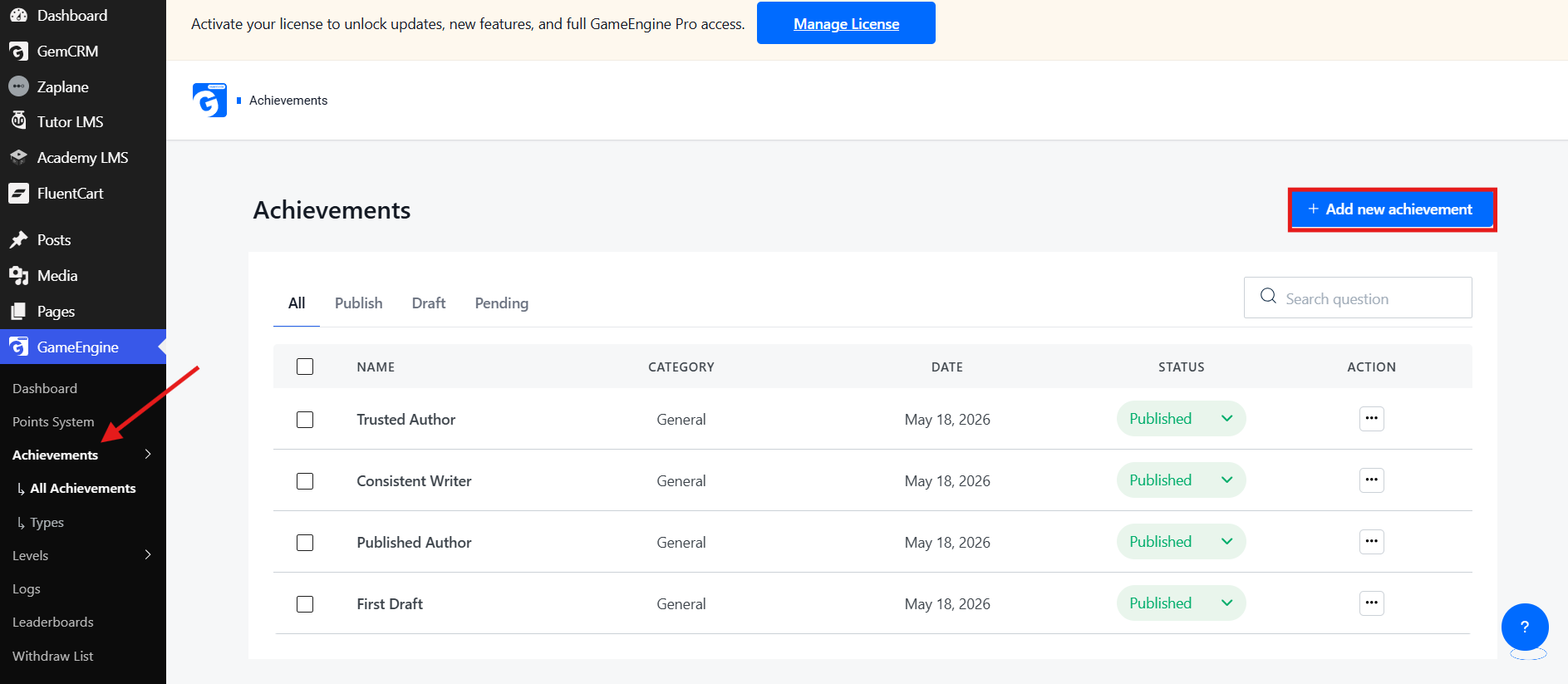
- From your WordPress dashboard, click on GameEngine from the left sidebar
- Go to Achievements → All Achievements
- Click + Add new achievement from the top right corner
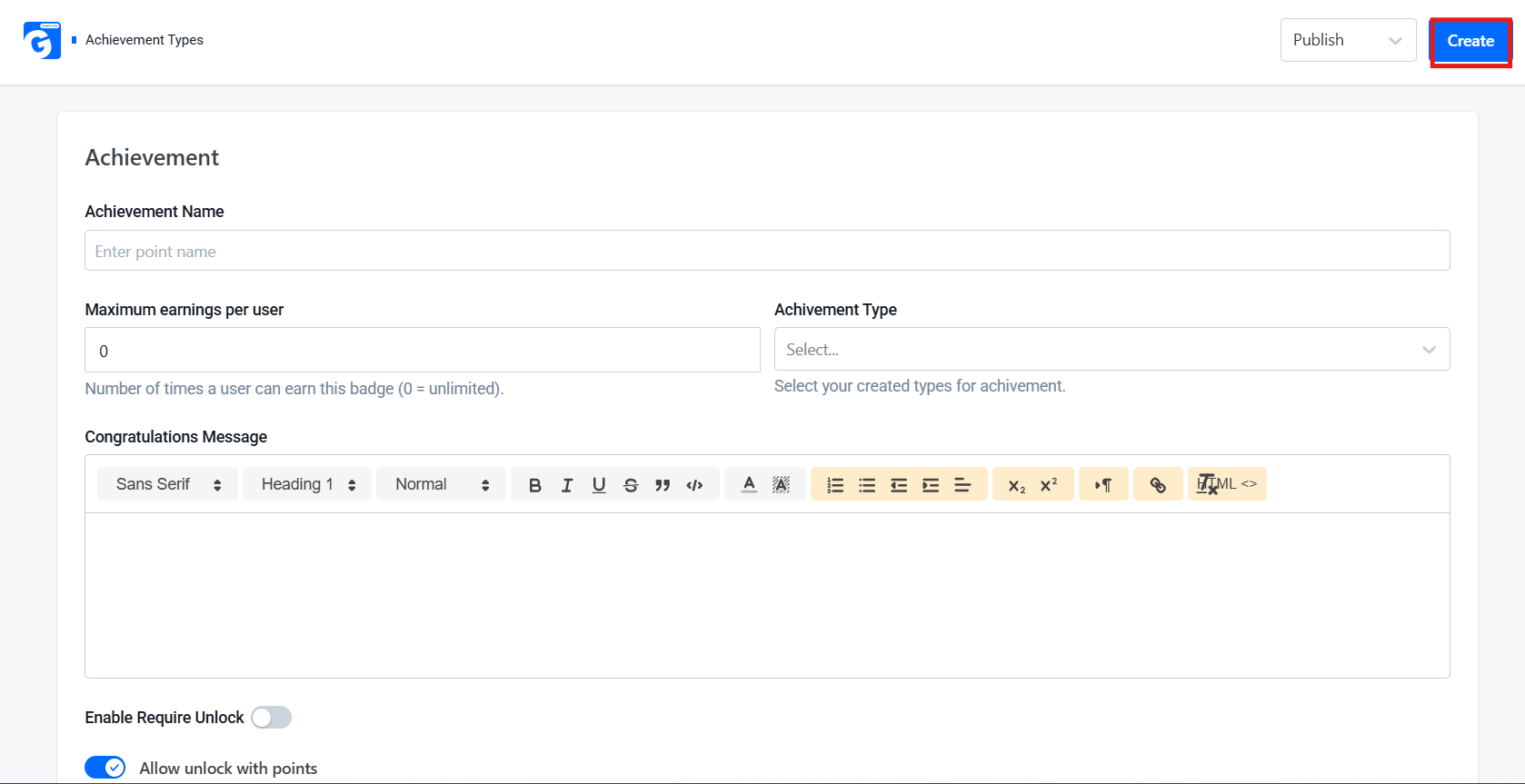
- Enter your Achievement Name, set the maximum earnings per user, and select an Achievement Type
- Scroll down and enable the Allow unlock with points toggle
- Set your required points amount and click Create
The goal is to ensure only genuinely active users can unlock high-value rewards — keeping badges meaningful and abuse-proof.
4. GameEngine Time-Based Rewards — Powerful, But Configure Carefully
GameEngine’s Time-Based Rewards let you run Happy Hours, weekend multipliers, or day-specific bonuses to boost engagement. However, they can easily be exploited if left unprotected.
How to Prevent Abuse:
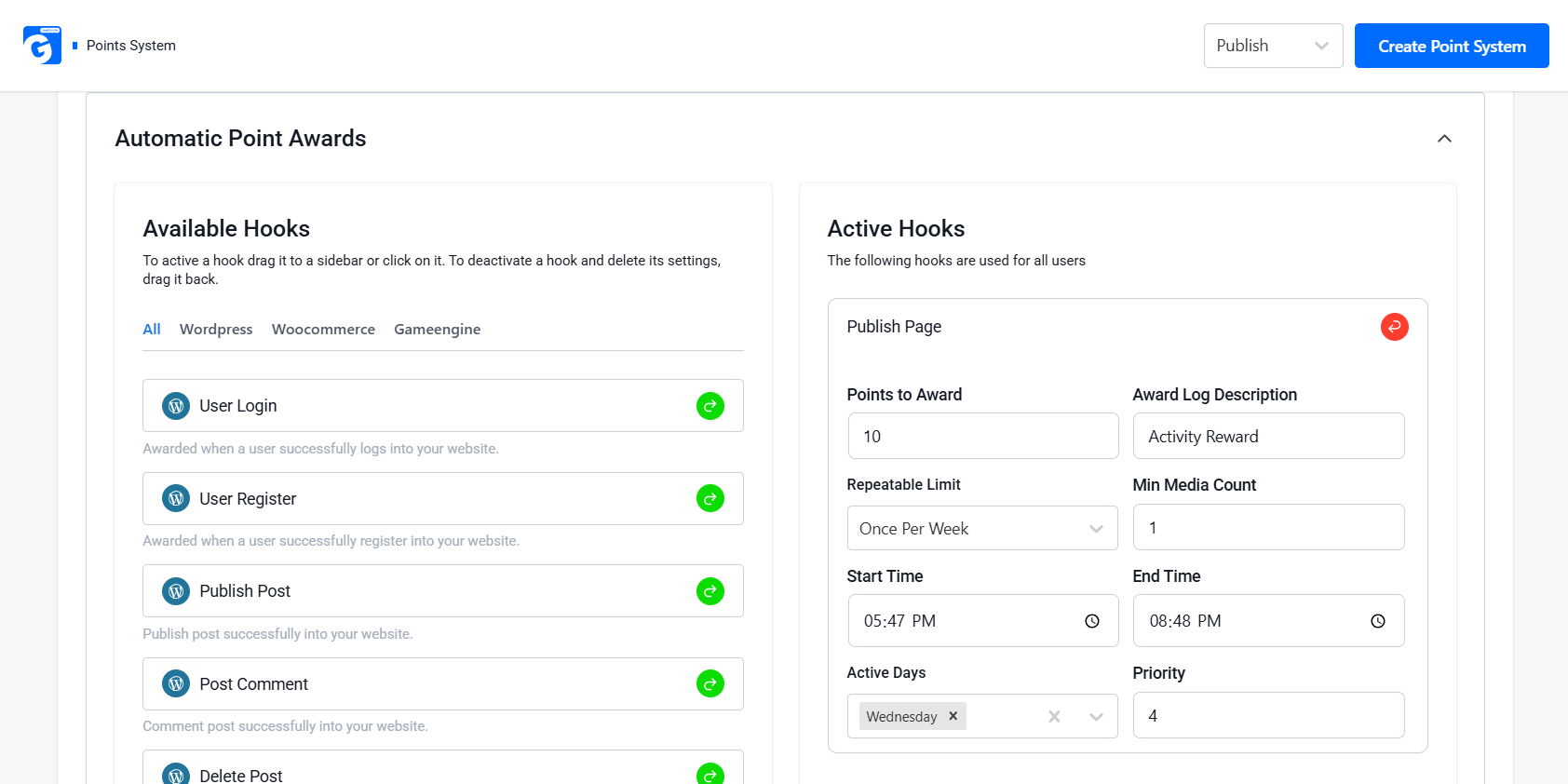
- Set Start Time / End Time to restrict rewards to specific hours only
- Use Active Days to limit rewards to certain days of the week
- Set the daily max limit to cap how many times a reward can trigger per user per day
- Monitor Activity Logs during active periods for unusual spikes
The goal is to let legitimate, active users benefit from time-based promotions while making those same promotions worthless to bots and point farmers.
5. GameEngine Points to Coupons and Rewards Marketplace — High Risk, Needs Hard Limits
GameEngine’s Coupon Generate feature lets users exchange points for WooCommerce discount coupons — making it a prime target for abuse if not configured carefully.
What You Can Configure:
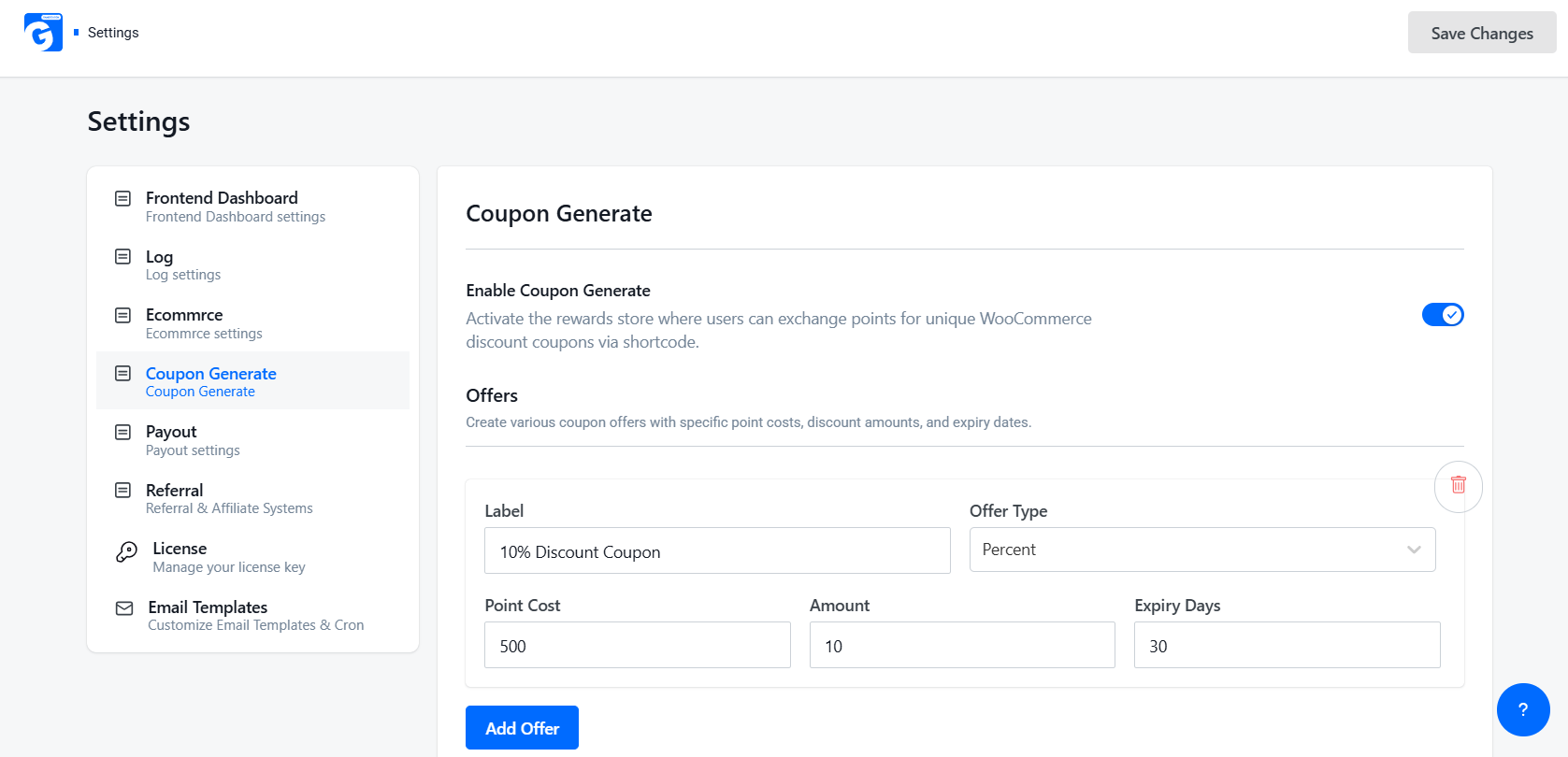
- Set the Point Cost required to redeem a coupon
- Set Expiry Days so coupons don’t last forever
- Choose the Offer Type to control what kind of discount is given
Best Practice:
Always set a high enough Point Cost so users must genuinely earn points before redeeming. Never leave it at 0.
6. GameEngine Withdraw Points and Wallet Management — Treat It Like a Financial System
When points can be converted into real money, the risk is at its highest. GameEngine’s Payout feature allows users to withdraw points as real money via PayPal, Stripe, or other methods.
What You Can Configure:
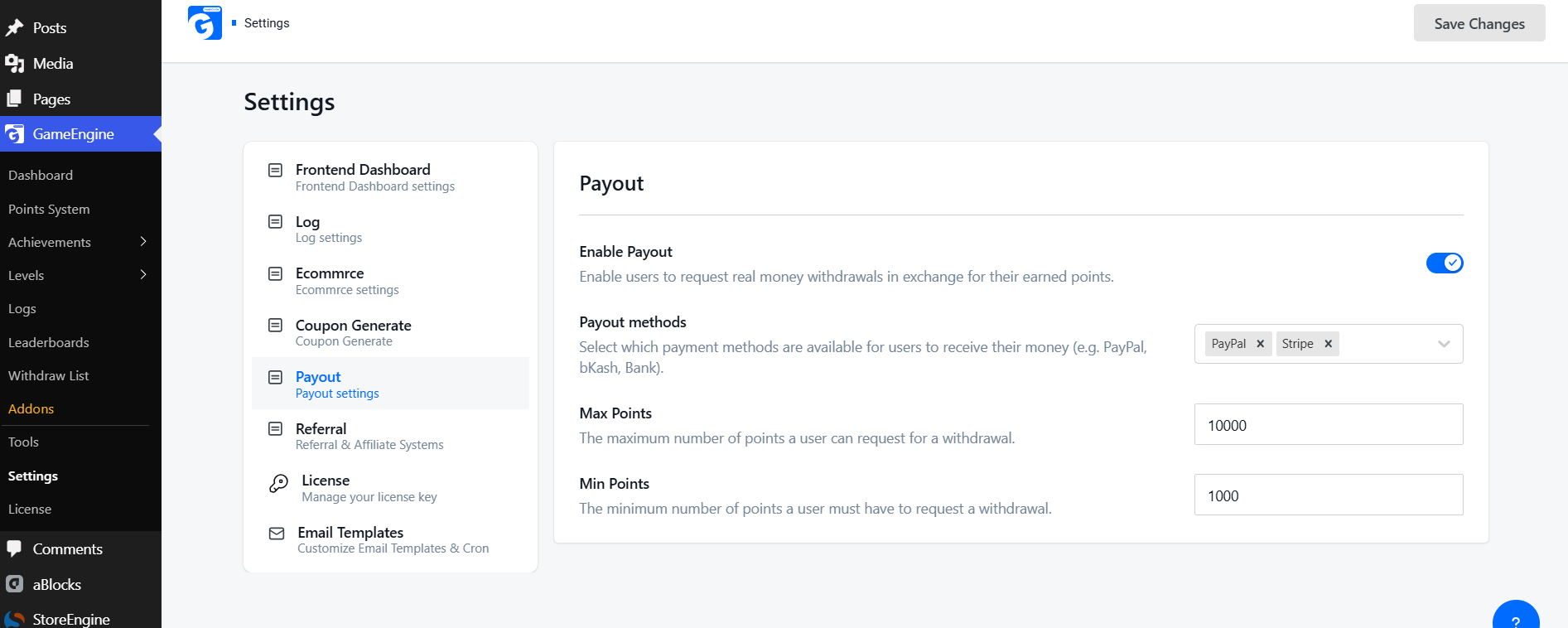
- Enable/Disable Payout — turn it off completely when not needed
- Min Points — set a minimum threshold before withdrawal is allowed
- Max Points — cap how many points can be withdrawn at once
- Payout Methods — control which payment methods are available
Best Practice:
Keep Min Points high so users must genuinely earn before cashing out. Never leave it at the default.
7. GameEngine Daily Visit Rewards and Profile-Based Rewards — Set Strict Frequency Caps
Daily Visit is one of GameEngine’s easiest triggers to abuse. Here’s how to protect it:
How to Protect Daily Visit Rewards:
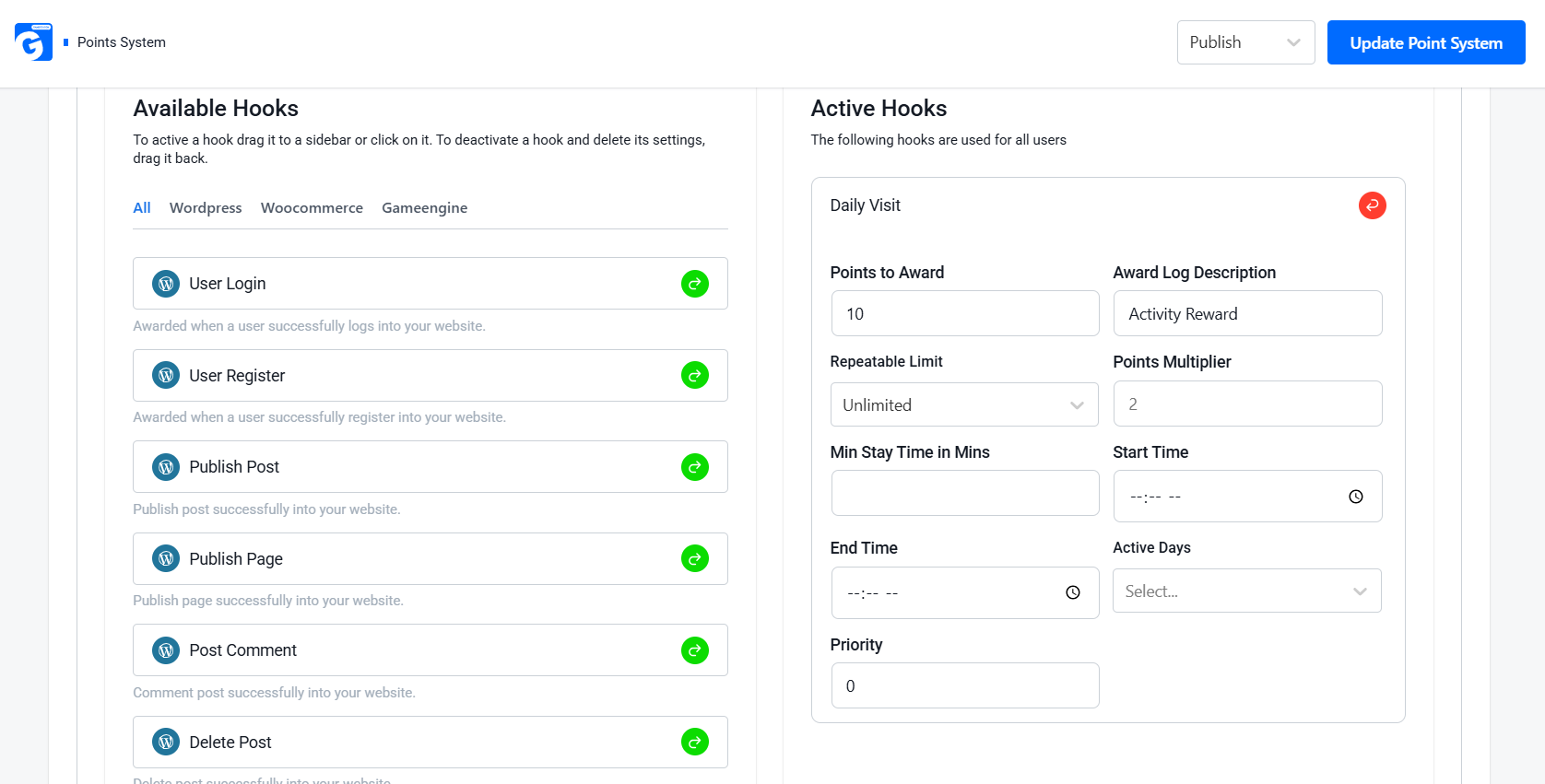
- Set Repeatable Limit to “Once” so users earn points only once per day
- Set Min Stay Time in Mins — require users to spend a minimum time on site before earning
- Use Active Days to restrict rewards to specific days only
How to Protect Profile-Based Rewards:
- Set Repeatable Limit to 1 — make it a one-time lifetime reward
- Remove or limit points for minor profile updates
Best Practice:
Save higher point values for meaningful tasks like content creation or course completion.
8. GameEngine Progress Roadmap and Level System — Use Levels as Abuse Gates
GameEngine’s Level System lets you create progression tiers that users must unlock by earning points. This makes throwaway accounts almost useless — they can’t access higher-level rewards without genuine effort.
How to Use Levels as Abuse Gates:
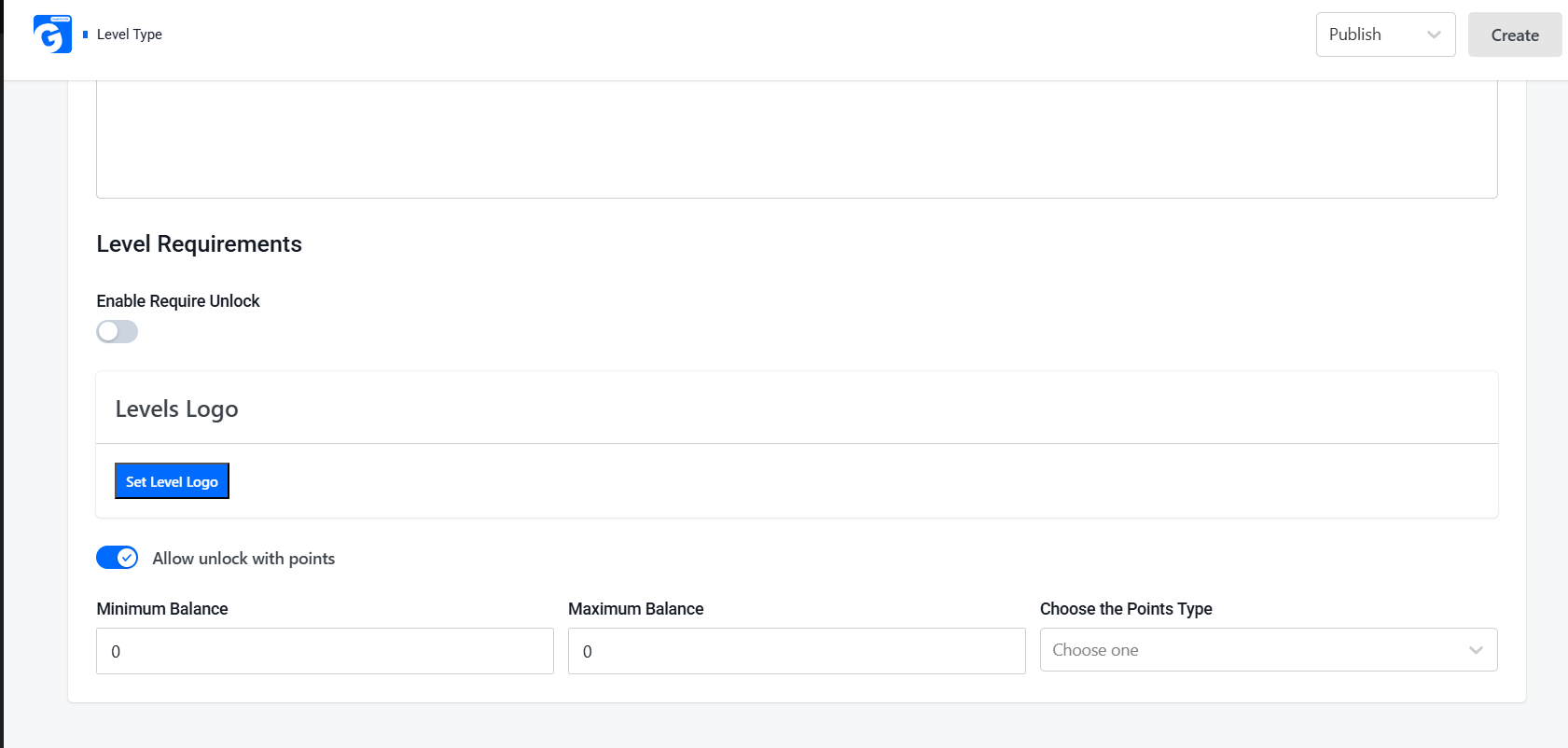
- Enable Require Unlock on higher levels
- Set Minimum Balance — require a specific points amount to reach each level
- Keep early levels easy to welcome new users, but make higher levels much harder to reach
Best Practice:
Gate high-value features like Coupons and Withdrawals behind higher levels. This naturally discourages short-term farming.
9. GameEngine REST API Access and Import & Export Tools — Advanced Protection and Recovery
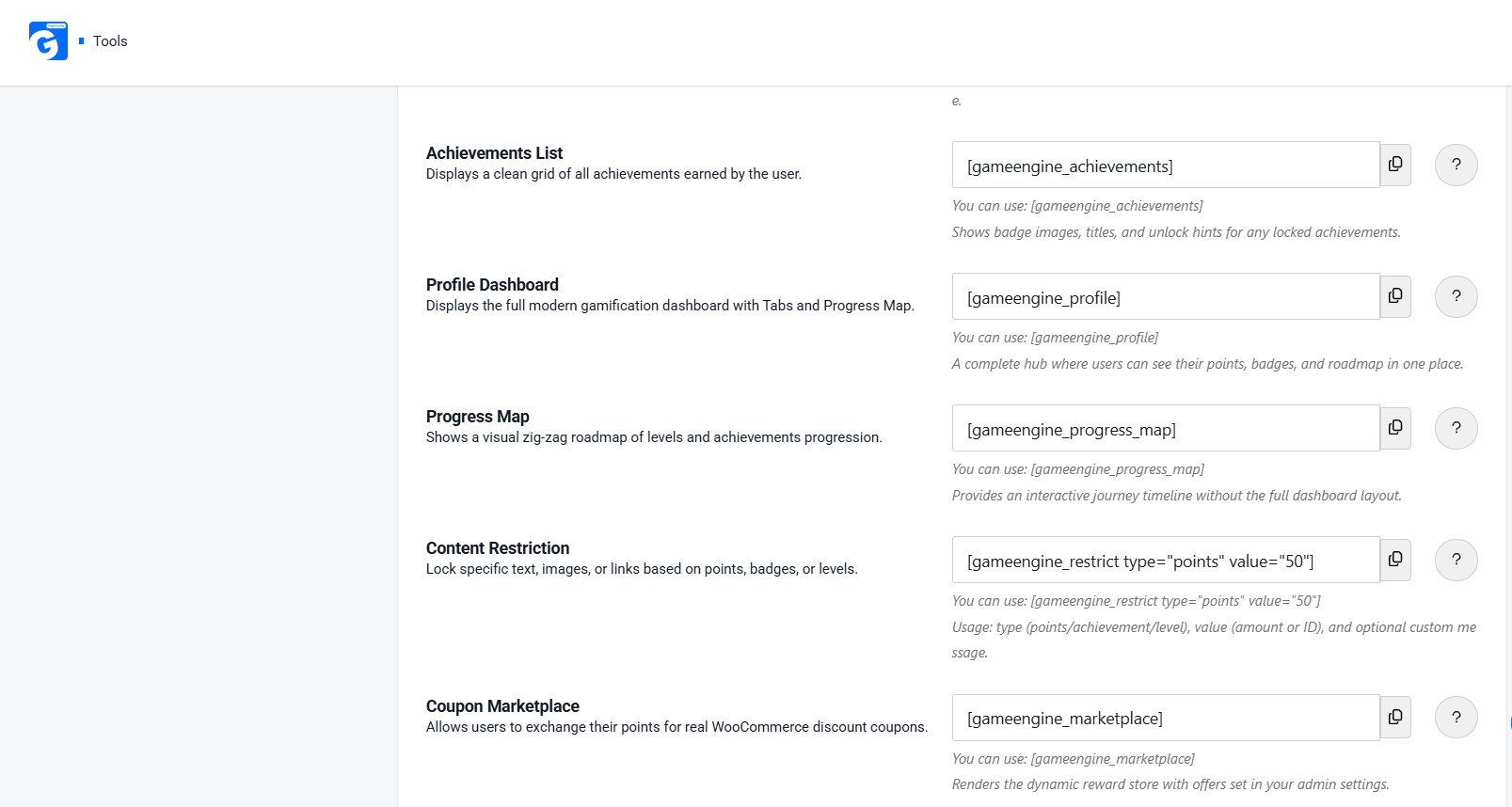
GameEngine’s Content Restriction shortcode lets you lock specific text, images, or links based on a user’s points, badges, or level. This is a powerful abuse-prevention tool — high-value content or offers stay hidden until users genuinely earn access.
How to Use It:
- Use
[gameengine_restrict type=" points" value="50"]to lock content behind a points threshold
- Combine with Level or Achievement requirements for stronger protection
- Keep reward-related content hidden from new or low-effort accounts
The Full WordPress Points Abuse Prevention Stack at a Glance
Here’s a quick overview of common threats and how GameEngine stops them:
|
Threat |
GameEngine Feature |
Protection It Provides |
|
Comment spam |
Min Character Count + Repeatable Limit |
Blocks low-effort submissions |
|
Daily Visit farming |
Daily Visit + Repeatable Limit + Min Stay Time |
One reward per day |
|
Multi-account abuse |
Achievements + Level Requirements |
Real progress required |
|
Happy Hour farming |
Start Time / End Time + Active Days |
Time-restricted rewards |
|
Coupon exploitation |
Points to Coupons + Point Cost |
High cost to redeem |
|
Cash-out abuse |
Payout + Min Points threshold |
Minimum points required |
|
Level manipulation |
Level System + Minimum Balance |
Real points required |
|
Undetected abuse |
Activity Logs + Search |
Full audit trail |
|
Content access abuse |
Content Restriction shortcode |
Locked behind points/levels |
GameEngine Pricing — All Abuse Prevention Features Included
GameEngine is available as a free core version with essential gamification features. For full power and advanced abuse-prevention tools, Pro plans are offered under a limited Early Supporter Program.
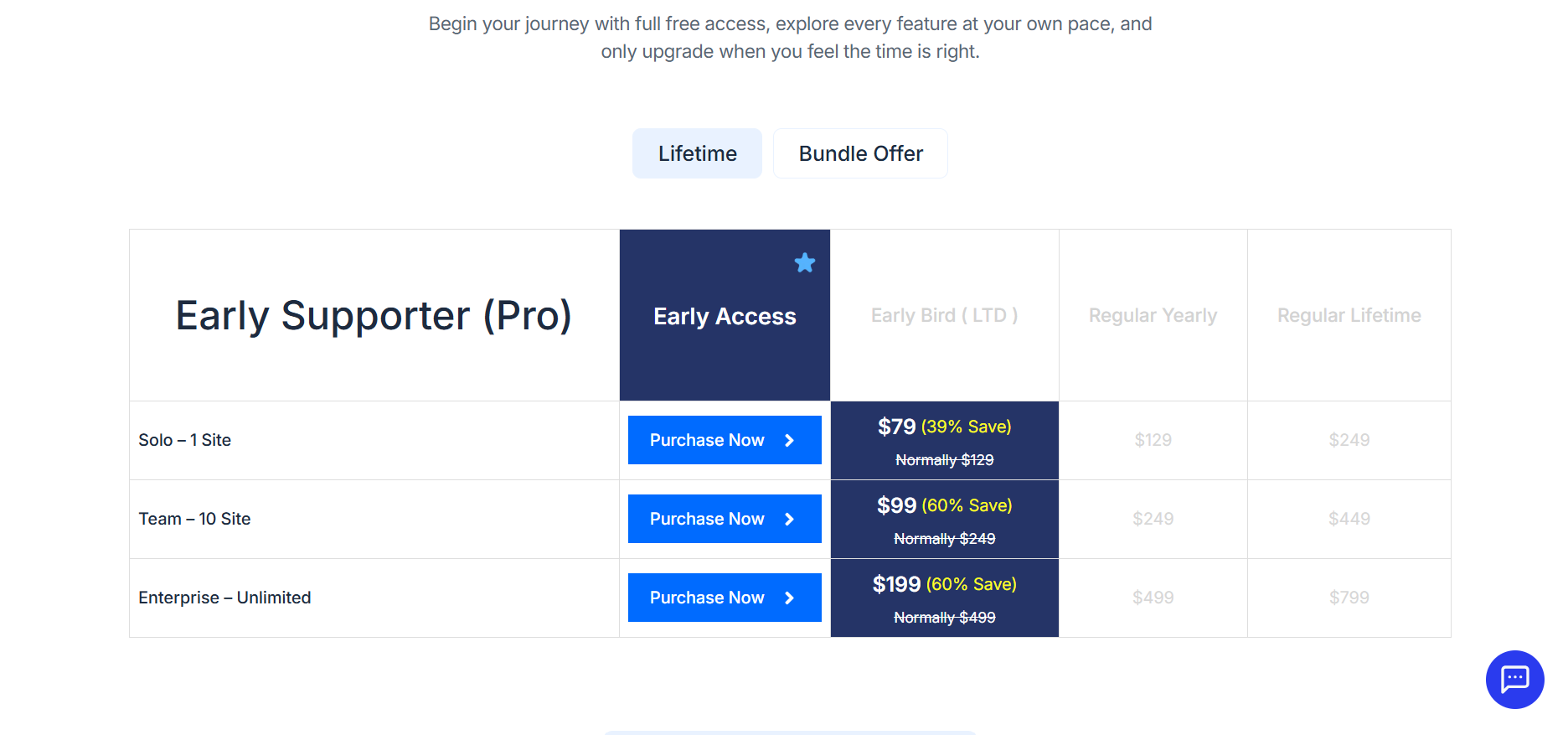
Every WordPress point abuse prevention feature in this guide — Advanced Reward Filters, Activity Logs, Points Expiry Control, Dependency Logic, Wallet Management, REST API Access, and Import & Export Tools — is included across all tiers. No separate fraud-protection add-ons to purchase.
WordPress Points Abuse Prevention Checklist
Before launching or updating your GameEngine-powered gamification system, go through this final checklist to ensure strong protection against points abuse:
- Min Character Count set on all comments and content rewards
- Repeatable Limit configured for all low-effort triggers (comments, profile updates, daily visits)
- Daily Max limit set for high-risk hooks like Post Comment and Daily Visit
- Min Stay Time configured for Daily Visit rewards
- Start Time / End Time and Active Days set for time-based rewards
- Achievements locked behind points requirements using Allow Unlock with Points
- Level Requirements set with a minimum balance for higher levels
- Points to Coupons Point Cost set high enough to prevent easy redemption
- Coupon Expiry Days are configured so coupons don’t last forever
- Payout Min Points threshold set high before enabling withdrawals
- Content Restriction shortcode used to hide high-value content behind points or levels
- Activity Logs are reviewed every Monday for suspicious activity
Final Thoughts
WordPress points abuse prevention is not a one-time setup — it is an ongoing commitment to keeping your gamification system fair, valuable, and trustworthy for genuine users.
GameEngine stands out by offering a genuinely layered defense with powerful built-in tools: Advanced Reward Filters, Activity Logs, Achievements System, Level Requirements, Payout Controls, Content Restriction, and Time-Based Reward settings — all included in the core plugin.
Frequently Asked Questions
What is points abuse in a WordPress gamification system?
Points abuse is when users exploit reward rules to earn points artificially — through fake logins, spam comments, multi-account creation, or bot-driven actions — without genuine engagement.
Can any WordPress gamification plugin prevent points abuse completely?
No plugin offers 100% prevention. The goal is to make abuse difficult enough that it’s not worth the effort. Layered controls — filters, expiry, milestone gating, and logs — significantly reduce risk across any plugin you use.
How often should I review my GameEngine Activity Logs?
For small sites, a weekly review is sufficient. For sites with active Rewards Marketplace, Points to Coupons, or Points Withdrawal System features enabled, daily log checks or automated email alerts are strongly recommended.