



Most websites treat every visitor the same. A user who signed up yesterday sees the same content as someone who has been active for six months, completed every course, and referred a dozen friends. There’s no acknowledgment of that loyalty — and no reward for it.
Content restriction flips that. It creates a tiered experience where the most engaged users get access to things that newer or less active users are still working toward. Not to punish newcomers, but to give everyone something to aim for.
Exclusivity is one of the best ways to motivate your community. By “locking” special content and requiring users to earn a certain number of points or reach a specific rank to see it, you turn your website into a goal-oriented experience.
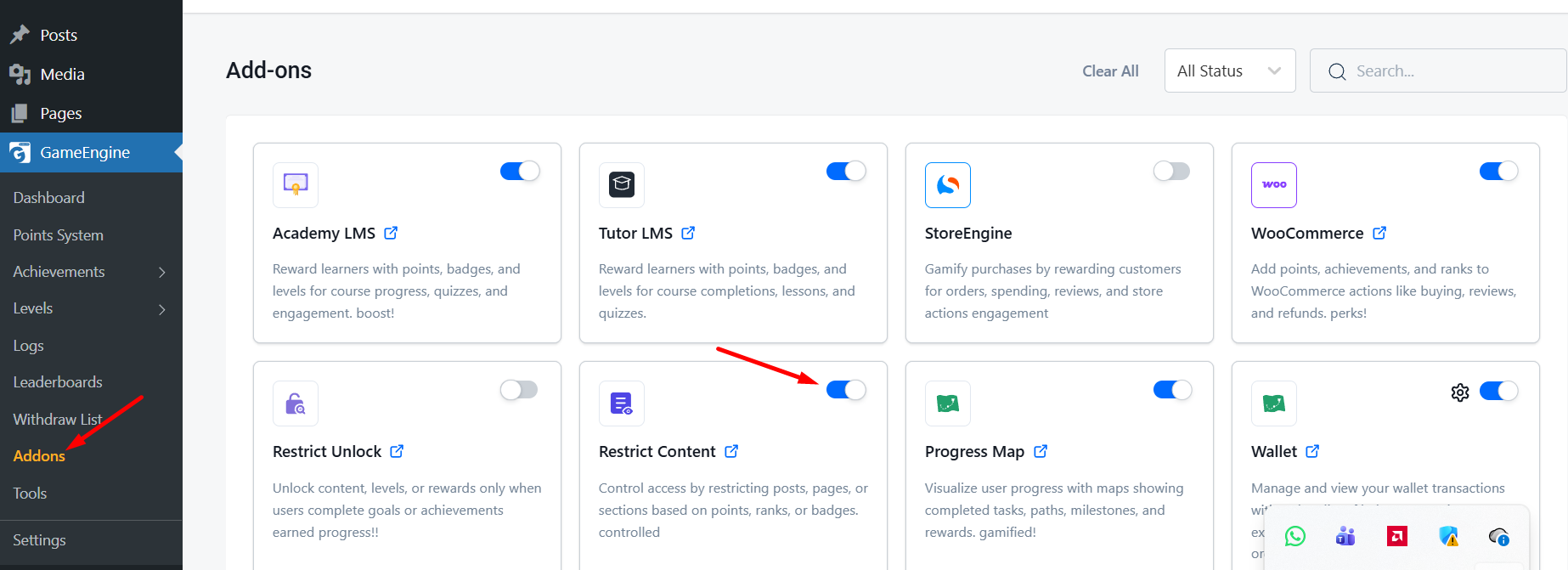
With GameEngine, you can easily restrict text, download links, or premium videos based on a user’s progress. Here is how to set it up using a simple shortcode.
What content restriction actually does for your site
Before diving into the shortcodes, it’s worth being clear about what you’re building and why it works.
When a user can see that something exists — a guide, a video, a download — but can’t access it yet, something interesting happens. The locked content becomes a goal. The points or rank required to unlock it become meaningful in a way they weren’t before. Suddenly “earn 100 points” isn’t an abstract number. It’s the thing standing between them and that resource they want.
- “The most motivating progress bar isn’t the one that shows how far someone has come. It’s the one that shows them exactly what they’re about to unlock.”
- That’s the mechanic. Visibility of the reward combined with a clear path to reach it. GameEngine handles both sides — the lock on the content, and the points system that gives users the key.
- Downloads & resources
- Lock PDF guides, templates, or toolkits behind a points threshold. Reward active readers with assets casual visitors can’t access.
- Premium video content
- Gate bonus lessons or behind-the-scenes content behind a level or badge. Gives course completers something extra to look forward to.
- VIP member areas
- Restrict entire sections to users who’ve reached a specific rank. Turns your highest tier into something genuinely exclusive.
- Secret links & offers
- Hide discount codes, affiliate links, or special offers behind a points gate. Only your most engaged users ever see them.
2. Restricting Content by Points
If you want to hide a secret link or a special message from anyone who has less than 50 points, you can use the following shortcode:
[gameengine_restrict type="points" value="50"] Your secret content goes here... [/gameengine_restrict]
What happens?
- Users with 50+ points see the content immediately.
- Users with less than 50 points see a default “Locked” message.
3. Restricting Content by Achievement (Badges)
You can also lock content behind a specific milestone. For example, only users who have earned the “Senior Author” badge (ID: 15) can see a specific resource.
[gameengine_restrict type="achievement" value="15"] Link to Premium PDF [/gameengine_restrict]
4. Restricting Content by Level (Rank)
This is perfect for membership sites. You can restrict content to users who have reached a high level, such as “Level 5 – Gold Member.”
[gameengine_restrict type="level" value="5"] This video is for Gold Members only! [/gameengine_restrict]
5. Customizing the “Locked” Message
You don’t want to just hide content; you want to tell users how to unlock it! You can add a custom message directly inside the shortcode:
[gameengine_restrict type="points" value="100" message="Earn 100 points to unlock this premium video!"] ... [/gameengine_restrict]
6. Works with Any Page Builder
Because GameEngine uses standard WordPress shortcodes, this feature works perfectly with Elementor, Gutenberg, Divi, or any other page builder. Simply drop a “Shortcode” or “Text” widget and wrap your content with the restriction tags.
The bottom line
Content restriction done well doesn’t feel like a paywall. It feels like a destination. When users can see that something is waiting for them — a guide, a video, a resource they actually want — and they know exactly what it takes to get there, the locked content becomes one of the best engagement tools on your site.
The shortcode itself takes thirty seconds to add. The real work is deciding what’s worth locking and setting the threshold at a level that feels genuinely attainable. Too easy and the exclusivity disappears. Too hard and users give up before they get there. Most sites find the sweet spot somewhere around three to five sessions worth of activity for the first locked piece — close enough to feel reachable, far enough to feel earned.
Start with one piece of restricted content. Watch how your users respond. Then build a ladder of locked resources that give people a reason to keep climbing.
Ready to build a content ladder your users actually want to climb?
Content restriction is available in GameEngine — combine it with points, achievements, levels, and the rewards marketplace for a complete engagement system.
Get GameEngine ↗See all features ↗
FREQUENTLY ASKED QUESTIONS
Can I restrict content for logged-out visitors too?
Yes. If a user isn’t logged in at all, they’ll see the locked message by default — since GameEngine has no points or level data to check against an anonymous visitor. This makes content restriction a useful tool for encouraging registration, not just rewarding existing users.
Can I nest multiple restrictions on the same content?
You can use separate restriction shortcodes for different content blocks on the same page — each with its own threshold. What you can’t do is stack multiple conditions (points AND level) inside a single shortcode tag. If you need multi-condition gating, the workaround is to use level as the gate and design your level system so that reaching it naturally requires a certain point total.
Will search engines index the locked content?
Lorem ipsum dolor sinonet amet, consectetur adipiscing elit. Ut elit tellus, luctus nec ullaThis depends on how the restriction is implemented at the rendering level. In most setups, GameEngine replaces the content with the locked message on the server side, so search engine crawlers see the locked state rather than the hidden content. If SEO indexing of restricted content matters for your site, test with Google’s URL Inspection tool to confirm what the crawler actually sees.
What happens when a user reaches the threshold mid-page?
The restriction check happens when the page loads. If a user earns the required points while on the same page session, they’ll need to refresh the page for the content to unlock. GameEngine doesn’t dynamically update the page in real time — the check runs at page load. Most site owners add a note to the locked message telling users to refresh after earning the required points.
Can admins always see restricted content regardless of their points?
Yes. WordPress administrators bypass content restrictions by default — they always see the full content regardless of their points balance or level. This lets you preview and test restricted content from your admin account without needing to earn the required threshold first.