



In today’s competitive e-commerce world, keeping customers loyal is just as important as finding new ones. One of the most effective ways to build loyalty is by letting your customers use their earned points like real money.
With GameEngine Pro, you can easily turn your store into a rewarding experience by allowing customers to pay for their orders using points. Here is how you can set it up in just a few minutes.
1. Set Your Points Conversion Rate
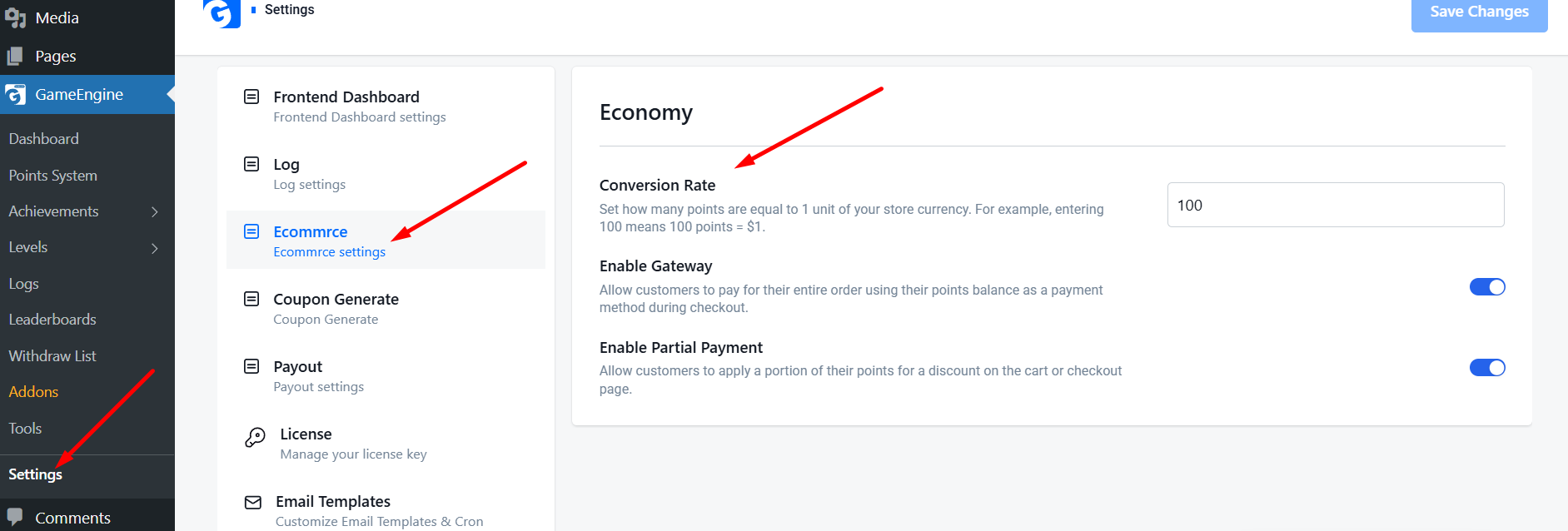
Before customers can spend points, you need to decide their value. In the GameEngine Pro settings, navigate to the Economy tab. Here, you can set the Conversion Rate.
- Example: If you set it to 100, it means 100 Points = $1.
- GameEngine Pro will automatically calculate the price in points for every product in your store based on this rate.
2. Enable the “Pay with Points” Gateway
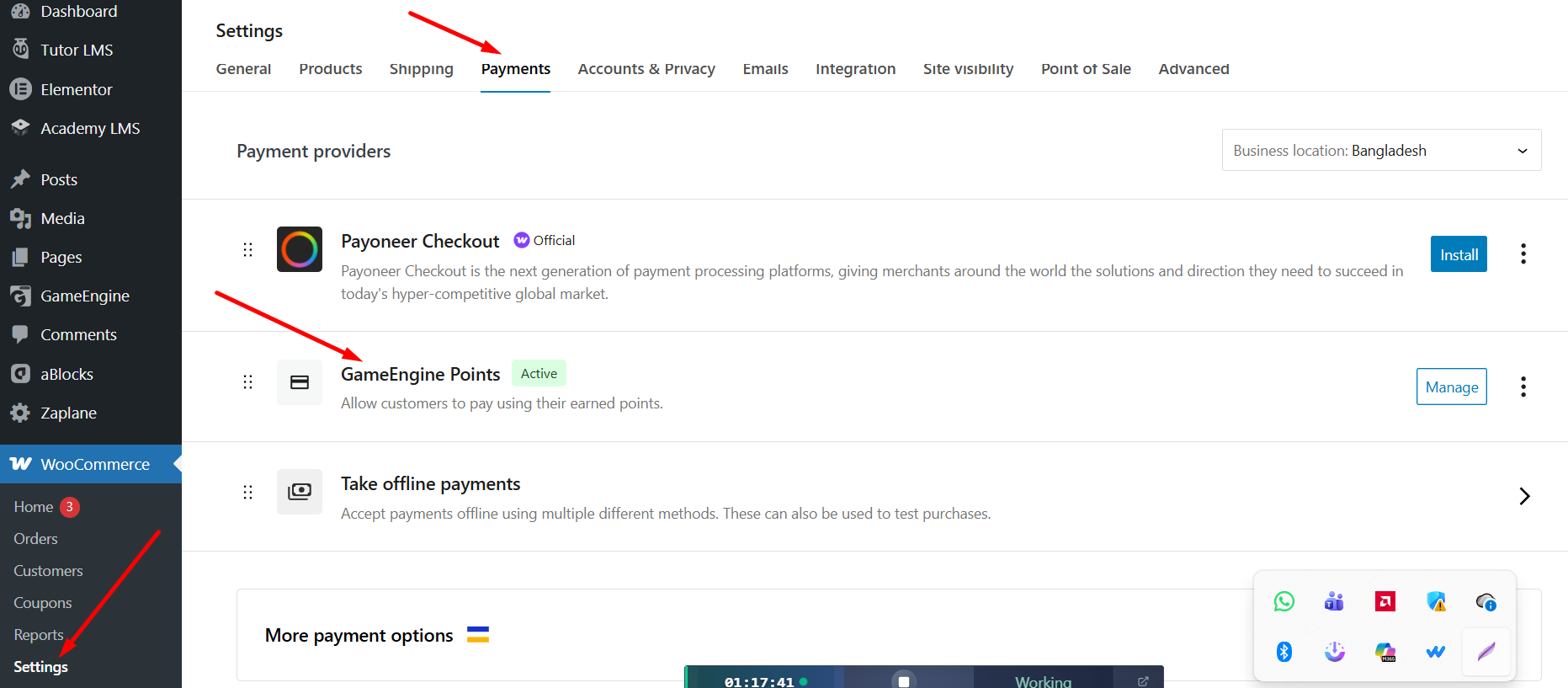
GameEngine Pro integrates directly with the WooCommerce payment system. To enable it:
- Go to WooCommerce > Settings > Payments.
- Find GameEngine Points in the list.
- Toggle the switch to Enable and click Save.
Now, your customers will see “Pay with Points” as a payment option on the checkout page, right alongside PayPal or Credit Cards.
3. Offer Partial Payments (Point Discounts)
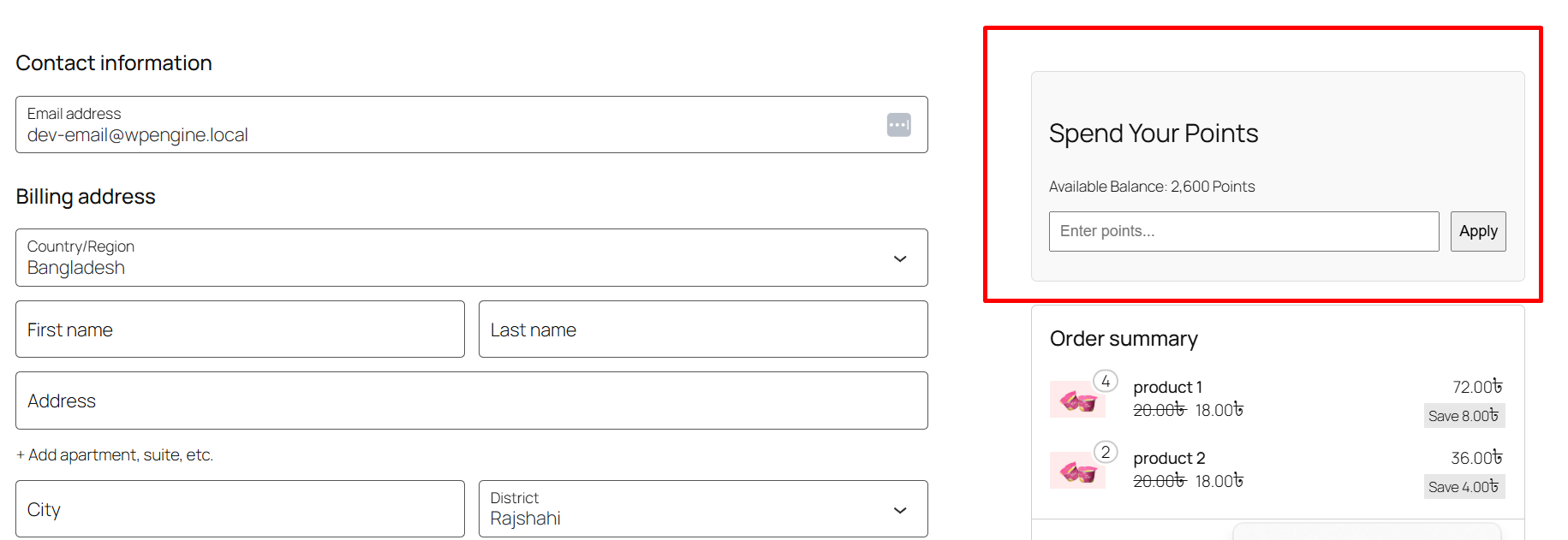
Sometimes, a customer might not have enough points to pay for a whole order. GameEngine Pro solves this with the Partial Payment feature.
When enabled, a “Spend Your Points” box will appear on the Cart or Checkout page. Customers can type in how many points they want to use (e.g., 500 points), and a discount (e.g., $5 off) will be applied to their total immediately.
4. Automated Success & Security
The system is fully automated. When a customer pays with points:
- Points are instantly deducted from their account.
- A log is created in the admin panel for tracking.
- The order status is automatically updated to “Processing” or “Completed.”
Why Use GameEngine Pro for Your Store?
Most plugins charge high monthly fees for these features. GameEngine Pro provides a built-in Payment Gateway, Partial Spending, and a Rewards Marketplace all in one package.
Give your customers a reason to come back. Start rewarding them today with GameEngine Pro!A few things worth knowing
You can set minimum and maximum point spend rules per order if you want to protect margins on smaller transactions. There’s also a role-based restriction option — so if you have a wholesale tier, for example, you can keep points spending exclusive to retail customers.
Point expiration works independently of this system, so if you’ve set points to expire after 12 months, that still applies even if a customer hasn’t redeemed them. Some store owners use this intentionally to create urgency around spending — a “your points expire in 30 days” email combined with a loyalty reward can drive a surprising amount of return traffic.
- Set expiration to 6–12 months and pair it with an email reminder — it consistently drives return purchases
- Consider offering bonus points on orders paid with points during slow periods — it stacks the loyalty loop
- Use the reward marketplace alongside the gateway so customers have multiple ways to spend, not just at checkout
Why not just use a separate loyalty plugin?
It’s a fair question. There are standalone loyalty platforms — some even integrate with WooCommerce — but they almost always involve a monthly subscription, a separate dashboard to manage, and a sync process that occasionally breaks. When it does break, you’re the one explaining to a customer why their points disappeared.
GameEngine Pro keeps everything inside WordPress. Your points data lives in your own database. Your customer wallet, your activity logs, your payment gateway settings — all in one place, all under your control. No external dependencies, no recurring SaaS cost on top of your hosting.
For most WooCommerce store owners, that’s the cleaner, cheaper, more reliable path.
The bottom line
Getting customers to buy once isn’t the hard part. Getting them to come back — and to choose you over a competitor they’ve never tried — that’s where most WooCommerce stores quietly struggle. A pay-with-points system doesn’t solve that problem with a marketing campaign or a discount code. It solves it by making your store feel like a place worth being loyal to.
When someone reaches checkout and sees a balance sitting there — points they earned, points they’ve been building — the decision to return isn’t a rational one anymore. It’s almost automatic. That’s the mechanic you’re setting up here. Not a feature. A habit loop.
“The best loyalty program isn’t the one with the most features. It’s the one customers actually think about between purchases.”
GameEngine Pro makes that loop easy to build and easier to maintain. One conversion rate. One toggle in WooCommerce Payments. A partial payment slider that handles the edge cases. Everything is logged and automated so you’re not manually managing balances or chasing support requests about missing points.
Set it up once, let it run, and pay attention to what changes over the next few weeks. Most store owners notice the difference before they’re even actively measuring it.
Ready to set it up in your store?
GameEngine Pro’s pay-with-points system works out of the box with WooCommerce — no third-party loyalty platform, no monthly subscription on top of your existing costs.
Get GameEngine Pro ↗Explore all features ↗
Frequently asked questions
Can customers combine points with a regular payment method?
Yes — that’s exactly what the partial payment feature is for. If a customer has 500 points worth $5 but their order is $30, they can apply those 500 points as a discount and pay the remaining $25 with their card or PayPal. The two methods work together at checkout without any friction.
What happens to the points if a customer cancels or gets a refund?
GameEngine Pro handles refunds automatically. If an order is cancelled or refunded, the points that were spent are returned to the customer’s wallet. You don’t have to manually adjust anything — it’s logged in the activity panel and the balance is restored immediately.
Can I limit how many points a customer can spend per order?
Yes. You can set a maximum points spend per order — either as a fixed point amount or as a percentage of the order total. This is useful if you want to protect margins on larger orders or prevent customers from paying entirely with points on high-value items. The setting lives in the Economy tab under GameEngine Pro settings.
Does this work with WooCommerce coupons and other discounts?
It does — points spending and WooCommerce coupons operate independently, so both can apply to the same order. That said, you can restrict stacking if needed. Some store owners prefer to prevent points and coupon codes from combining on the same transaction, and GameEngine Pro gives you a toggle to enforce that.
Will customers be notified when they earn or spend points?
Yes. GameEngine Pro includes built-in email notifications for point events — earning, spending, balance milestones, and expiration reminders. These notifications are one of the most underrated parts of the system. A simple “you just earned 120 points on your order” email is often enough to make a customer check their balance and think about their next purchase.