All in One Place Complete Gamification

00
Days
:
00
Hours
:
00
Minute
:
00
Second

Category: Tutorial

Explore GameEngine tutorials for step-by-step guides, tips, and practical solutions to create engaging gaming experiences, rewards, and gamification in WordPress.

  • How to Prevent Points Abuse in a WordPress Gamification System

    How to Prevent Points Abuse in a WordPress Gamification System

    Gamification can transform a flat WordPress site into a thriving, loyal community. But the moment your points carry real value — coupons, cashouts, exclusive content — abuse becomes inevitable. Fake logins, comment spam, multi-account farming, and coupon exploitation can silently drain your reward economy before you even notice.

    This guide walks you through how GameEngine — a self-hosted WordPress gamification plugin built for LMS, WooCommerce, and Membership platforms — gives you the tools to stop points abuse before it starts. 

    Why WordPress Points Abuse Happens — And Why Most Plugins Miss It

    WordPress

    Plugins like GamiPress and myCred have solid free cores. But as GameEngine’s own comparison page notes, they are “add-on heavy” — nearly every advanced WordPress point of abuse prevention control costs extra on top of the base plugin. You are essentially buying fraud protection as an afterthought.

    GameEngine was built differently. The features you need to protect your points economy — Advanced Reward Filters, Activity Logs, Achievements System, Level Requirements, and Payout Controls — are all part of the core plugin itself.

    The most common WordPress gamification abuse patterns you will face:

    • Login farming — users log in and out repeatedly to trigger Daily Visit Rewards
    • Comment spam — low-quality, repetitive comments posted purely to earn Content Interaction Rewards
    • Multi-account abuse — new accounts created to claim signup bonuses repeatedly
    • Time-window farming — bulk triggering rewards during a Happy Hours promotion
    • Coupon stacking — redeeming points for coupons faster than intended

    9 Ways GameEngine Prevents WordPress Points Abuse

    1. GameEngine Advanced Reward Filters — Block Low-Effort Triggers

    GameEngine’s Advanced Reward Filters is one of the most effective tools to prevent points abuse. It lets you add smart conditions to any reward rule so points are only awarded for genuine engagement.

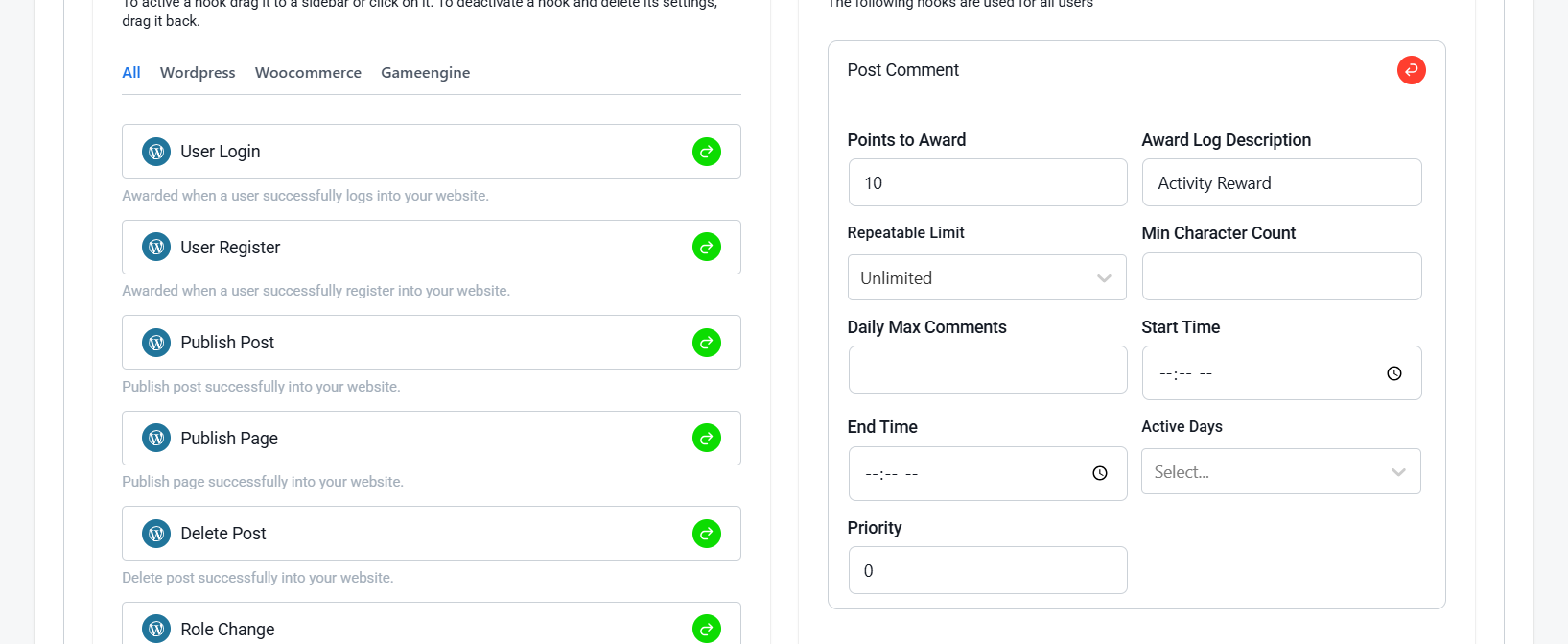
    For each reward rule, you can configure:
    Points Abuse
    • Min Character Count — only award points when a comment meets a minimum character requirement
    • Repeatable Limit — controls how many times a user can earn points for the same action
    • Daily Max Comments — cap how many comments per day can earn points
    • Start Time / End Time — restrict rewards to specific time windows
    • Active Days — limit rewards to certain days of the week

    Practical Example:

    Set a minimum character count on Post Comment rewards. This instantly filters out low-effort spam comments and only rewards genuine engagement.

    2. GameEngine Activity Logs — See Everything, Miss, Nothing

    You can’t fight points abuse if you can’t see it. GameEngine’s Activity Logs give you a complete real-time audit trail of every point award, deduction, badge unlock, and level change.

    What You Can Do With Activity Logs:

    • Monitor all point events in real time across your site
    • Search for a specific user to check their recent activity
    • Catch misconfigured rules and accidental reward loops
    • Maintain a clear audit trail for all point-related activities

    How to Use GameEngine Activity Logs for Weekly Abuse Monitoring:

    Step 1 — Open the Logs Dashboard

    Go to GameEngine > Activity Logs in your WordPress admin panel. You’ll see a full chronological timeline of every point event across your entire site.
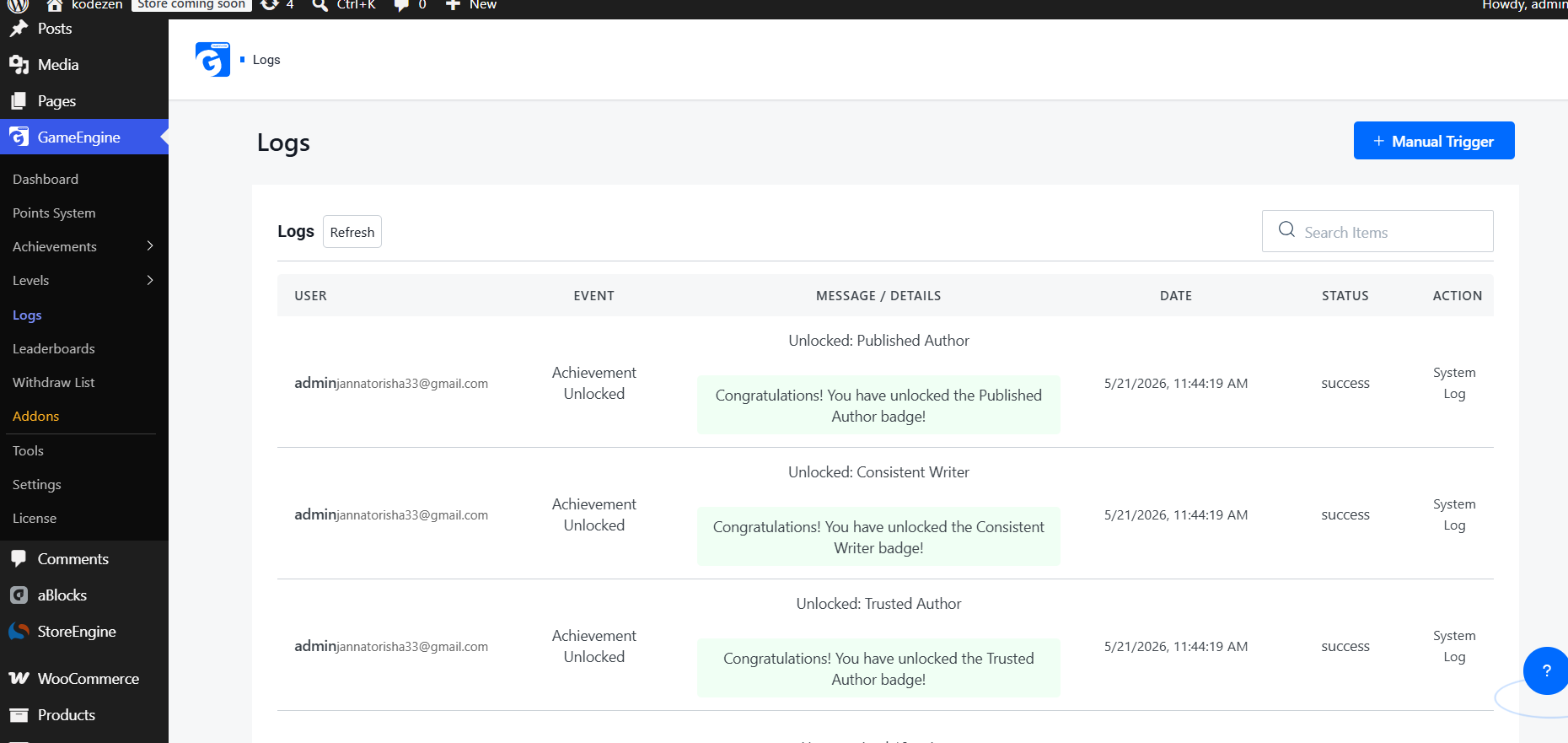
    Activity Logs

    Step 2 — Search and Identify Suspicious Users

    Use the Search Items bar on the Logs page to look up any user by username. Review their recent activity and look for the same event repeating multiple times in a short period — that’s your clearest sign of abuse.

    Step 3 — Investigate Repeated Actions

    On the Logs page, scan through the activity list and look for the same user appearing repeatedly in a short time. Clear abuse signals include the same event — like “Comment Published” or “Daily Login” — showing up multiple times within minutes or hours.

    Step 4 — Make Weekly Monitoring a Routine

    Reserve 10–15 minutes every Monday to scroll through the Logs and look for any unusual activity from the previous week. Regular weekly checks help you detect abuse patterns early before they grow into bigger problems. 

    Step 5 — Correct with Manual Points Update

    If abuse is confirmed, open the Manual Trigger panel directly from the Logs page. This allows you to manually adjust a user’s points without any coding.
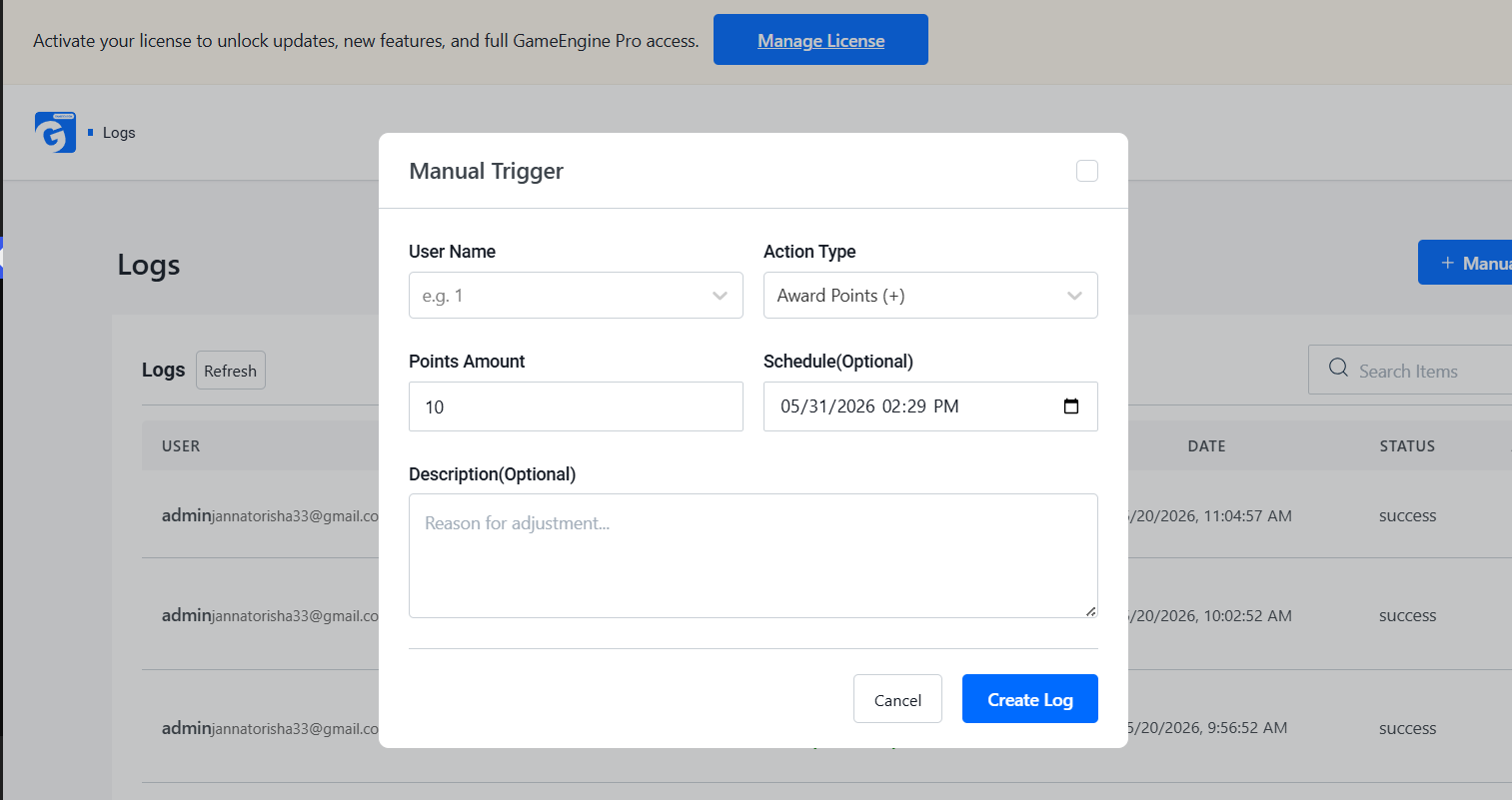
    Create Log

    Follow these steps:

    • Select the suspicious user from the User Name field
    • Set Action Type to Deduct Points (-) to remove abused points
    • Enter the number of points you want to adjust
    • Add a short internal note explaining the reason

    Example note: “Points adjusted due to suspicious repetitive activity.”

    Click Create Log to save the update. This helps maintain a fair rewards system and keeps your community protected from point farming or spam abuse.

    3. GameEngine Dependency Logic (Milestones) — Gate High-Value Rewards Behind Real Progress

    GameEngine’s Achievements system lets you control exactly how users unlock badges and rewards. You can require a minimum points threshold before a badge becomes accessible, making it harder for fake or new accounts to claim high-value rewards instantly.

    How It Prevents Abuse:

    • New accounts must earn real points before unlocking achievements
    • High-value badges can be locked behind a points requirement
    • Eliminates instant reward shortcuts for throwaway accounts

    Where to Set It:

    1. From your WordPress dashboard, click on GameEngine from the left sidebar
    2. Go to Achievements → All Achievements
    3. Click + Add new achievement from the top right corner
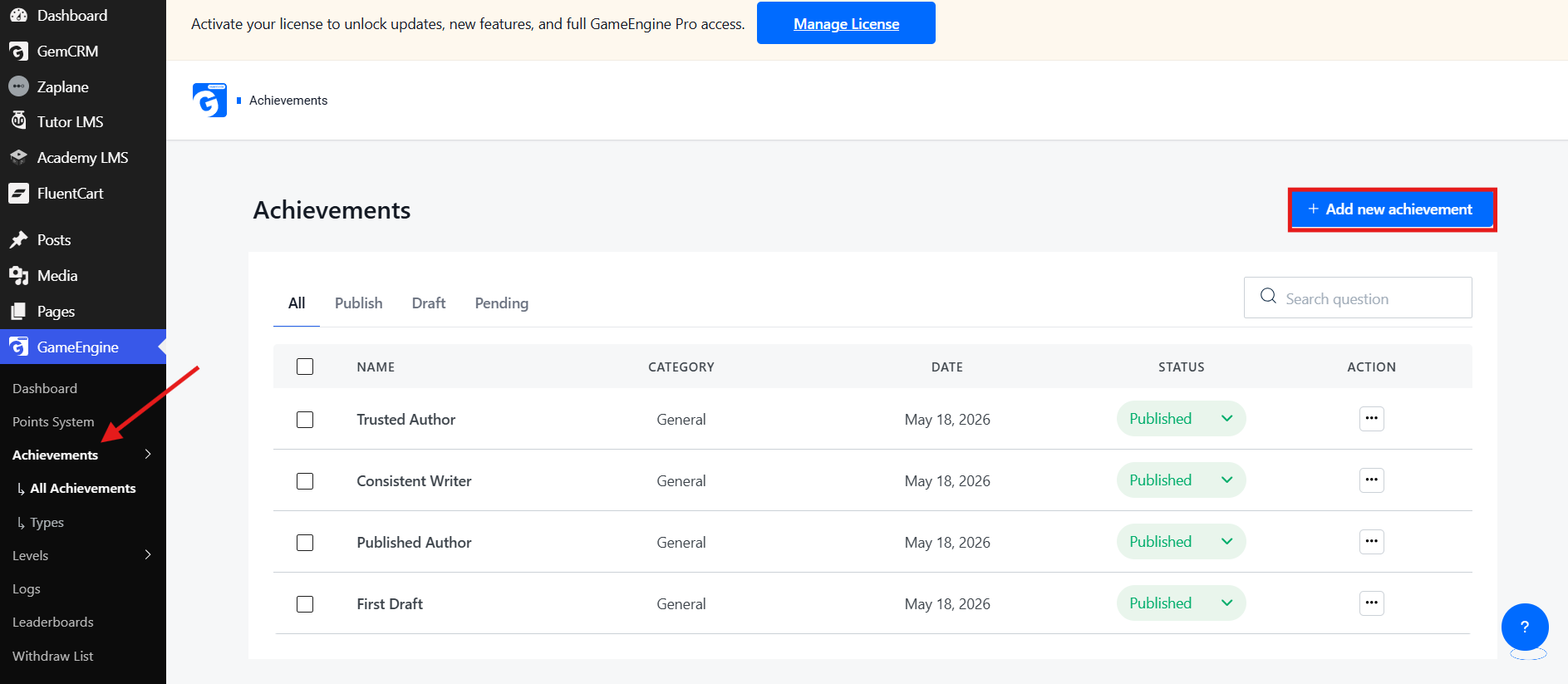
    Add new achievement
    1. Enter your Achievement Name, set the maximum earnings per user, and select an Achievement Type
    2. Scroll down and enable the Allow unlock with points toggle
    3. Set your required points amount and click Create
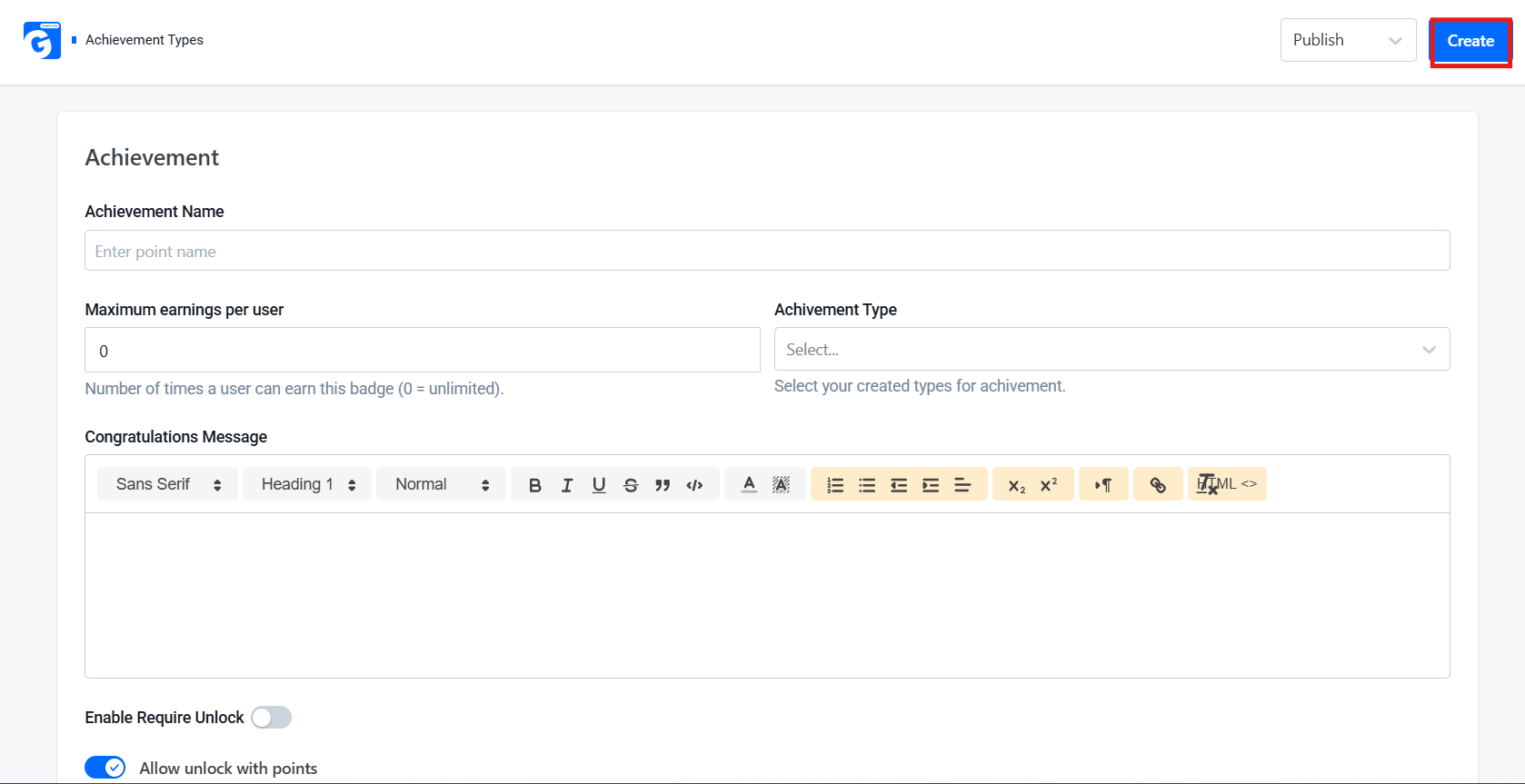
    Create Achievement

    The goal is to ensure only genuinely active users can unlock high-value rewards — keeping badges meaningful and abuse-proof. 

    4. GameEngine Time-Based Rewards — Powerful, But Configure Carefully

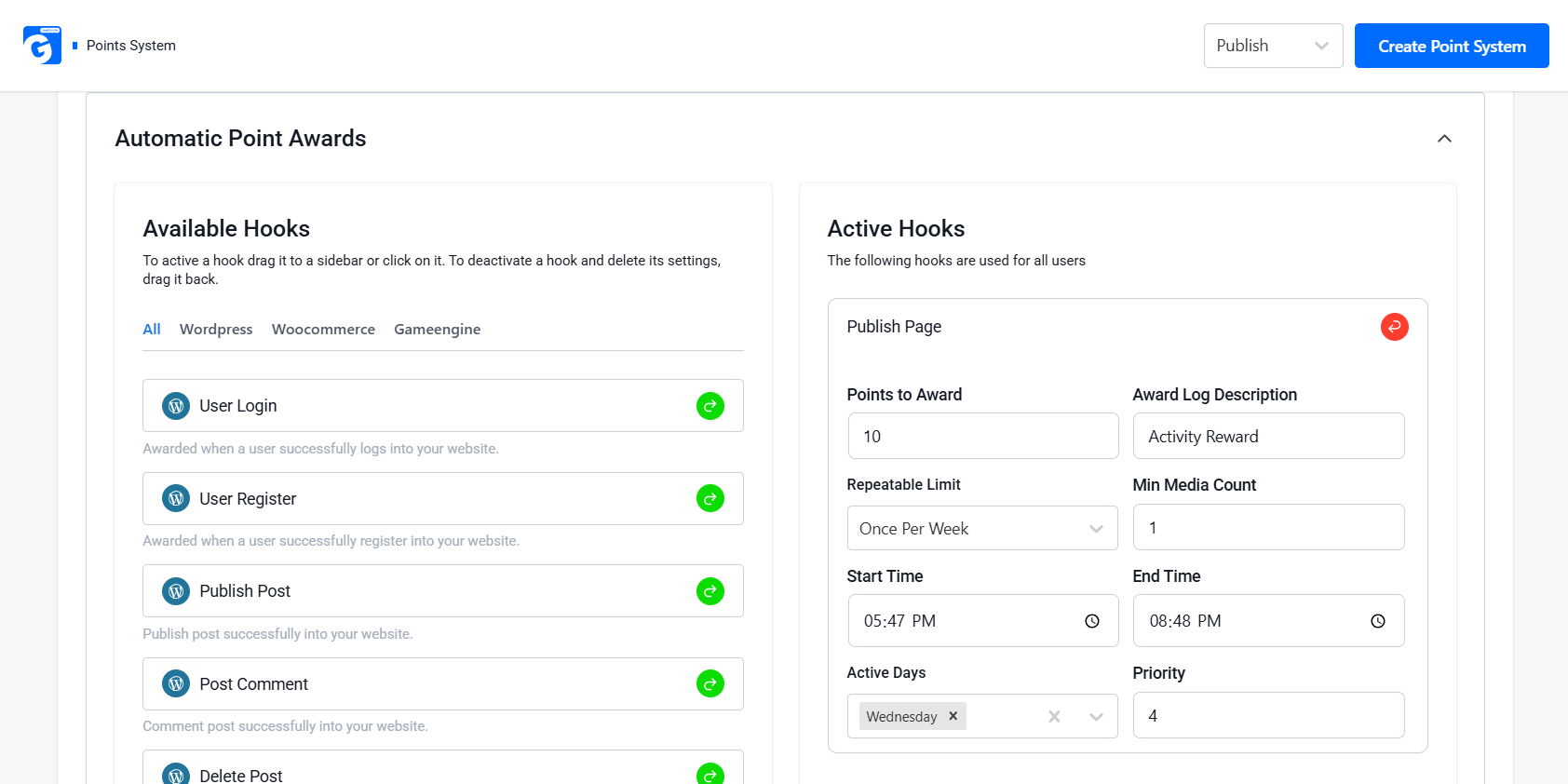
    GameEngine’s Time-Based Rewards let you run Happy Hours, weekend multipliers, or day-specific bonuses to boost engagement. However, they can easily be exploited if left unprotected. 

    How to Prevent Abuse:
    Time-Based Rewards
    • Set Start Time / End Time to restrict rewards to specific hours only
    • Use Active Days to limit rewards to certain days of the week
    • Set the daily max limit to cap how many times a reward can trigger per user per day
    • Monitor Activity Logs during active periods for unusual spikes

    The goal is to let legitimate, active users benefit from time-based promotions while making those same promotions worthless to bots and point farmers.

    5. GameEngine Points to Coupons and Rewards Marketplace — High Risk, Needs Hard Limits

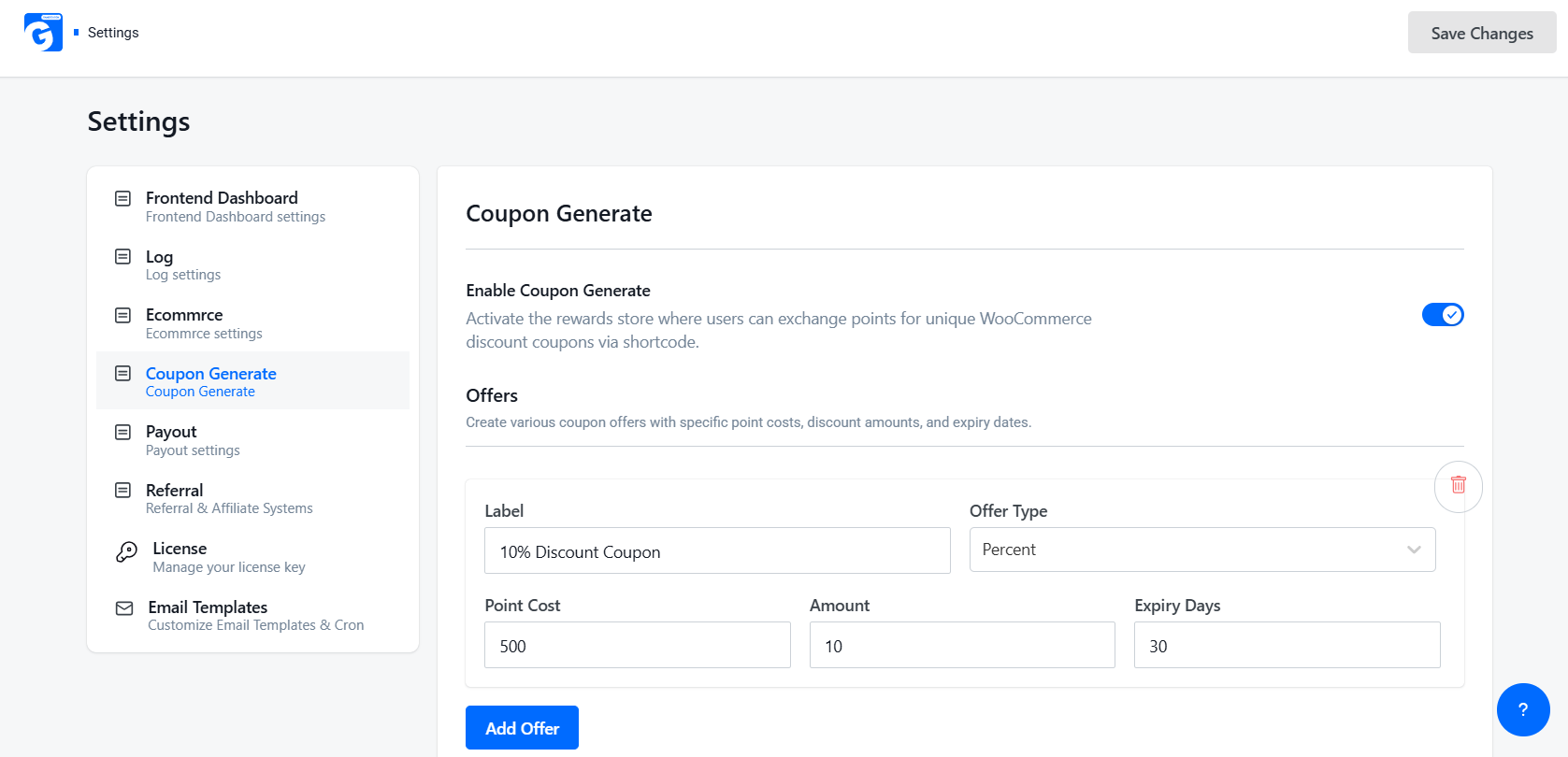
    GameEngine’s Coupon Generate feature lets users exchange points for WooCommerce discount coupons — making it a prime target for abuse if not configured carefully.

    What You Can Configure:
    Coupon Generate
    • Set the Point Cost required to redeem a coupon
    • Set Expiry Days so coupons don’t last forever
    • Choose the Offer Type to control what kind of discount is given

    Best Practice: 

    Always set a high enough Point Cost so users must genuinely earn points before redeeming. Never leave it at 0.

    6. GameEngine Withdraw Points and Wallet Management — Treat It Like a Financial System

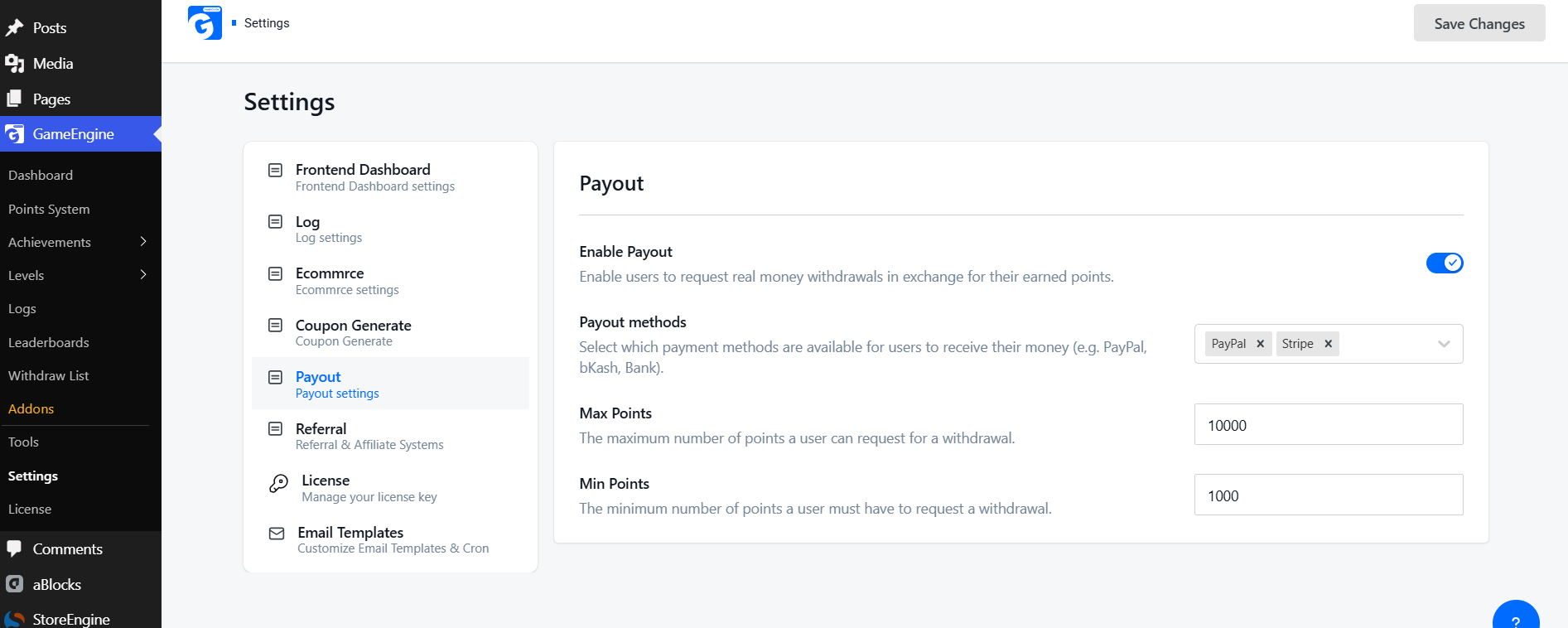
    When points can be converted into real money, the risk is at its highest. GameEngine’s Payout feature allows users to withdraw points as real money via PayPal, Stripe, or other methods.

    What You Can Configure:
    Wallet Management
    • Enable/Disable Payout — turn it off completely when not needed
    • Min Points — set a minimum threshold before withdrawal is allowed
    • Max Points — cap how many points can be withdrawn at once
    • Payout Methods — control which payment methods are available

    Best Practice:

    Keep Min Points high so users must genuinely earn before cashing out. Never leave it at the default.

    7. GameEngine Daily Visit Rewards and Profile-Based Rewards — Set Strict Frequency Caps

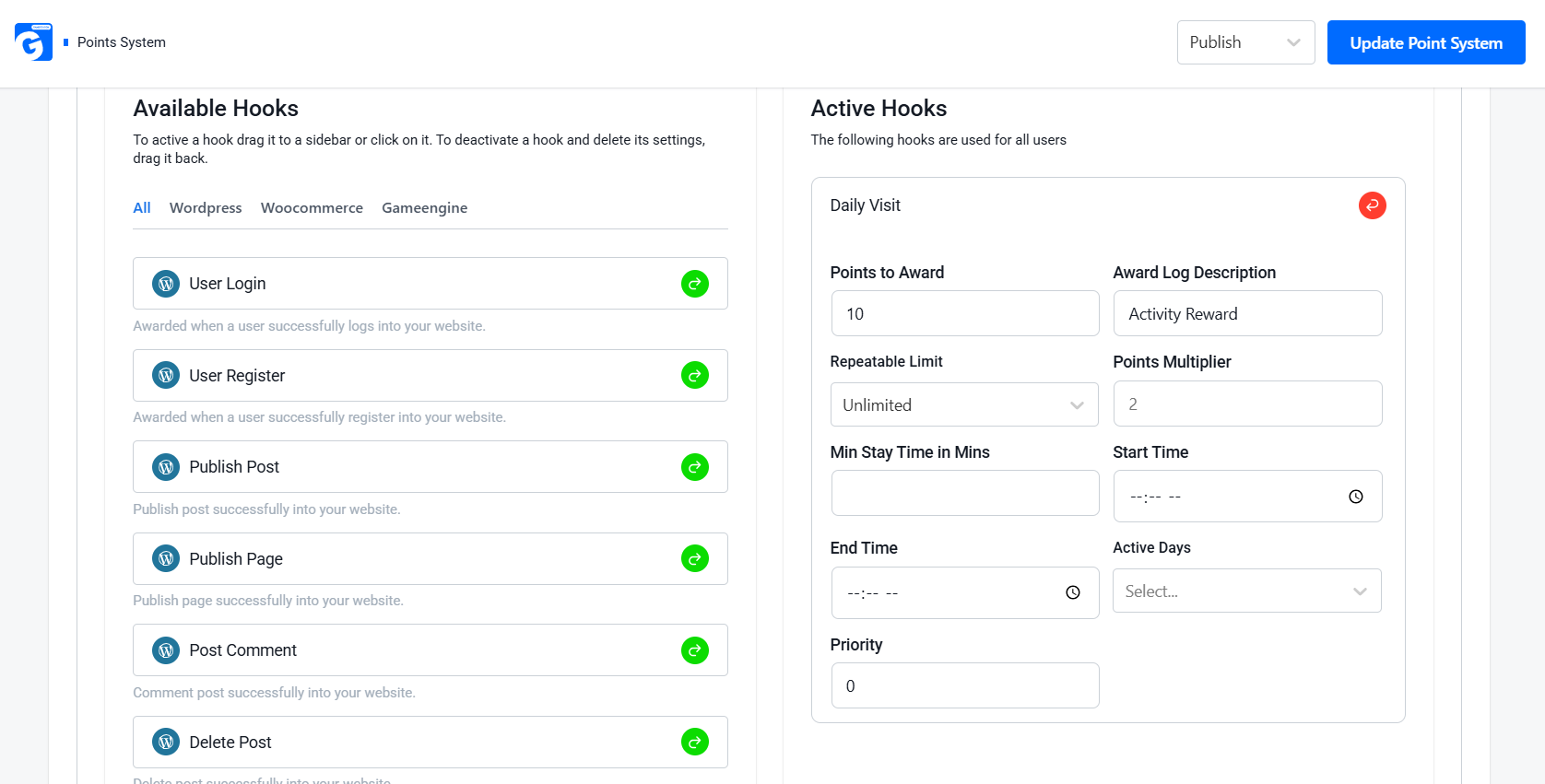
    Daily Visit is one of GameEngine’s easiest triggers to abuse. Here’s how to protect it:

    How to Protect Daily Visit Rewards:
    Visit Rewards
    • Set Repeatable Limit to “Once” so users earn points only once per day
    • Set Min Stay Time in Mins — require users to spend a minimum time on site before earning
    • Use Active Days to restrict rewards to specific days only

    How to Protect Profile-Based Rewards:

    • Set Repeatable Limit to 1 — make it a one-time lifetime reward
    • Remove or limit points for minor profile updates

    Best Practice:

    Save higher point values for meaningful tasks like content creation or course completion.

    8. GameEngine Progress Roadmap and Level System — Use Levels as Abuse Gates

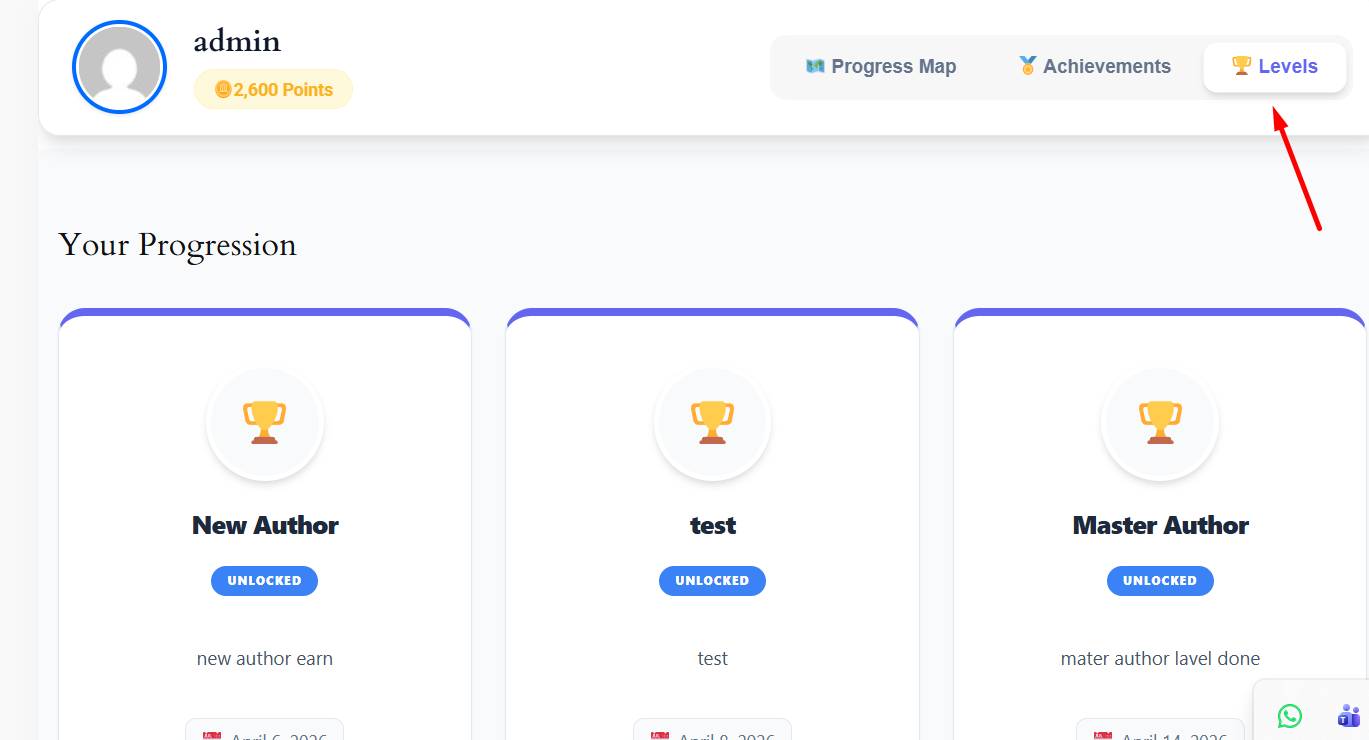
    GameEngine’s Level System lets you create progression tiers that users must unlock by earning points. This makes throwaway accounts almost useless — they can’t access higher-level rewards without genuine effort.

    How to Use Levels as Abuse Gates:
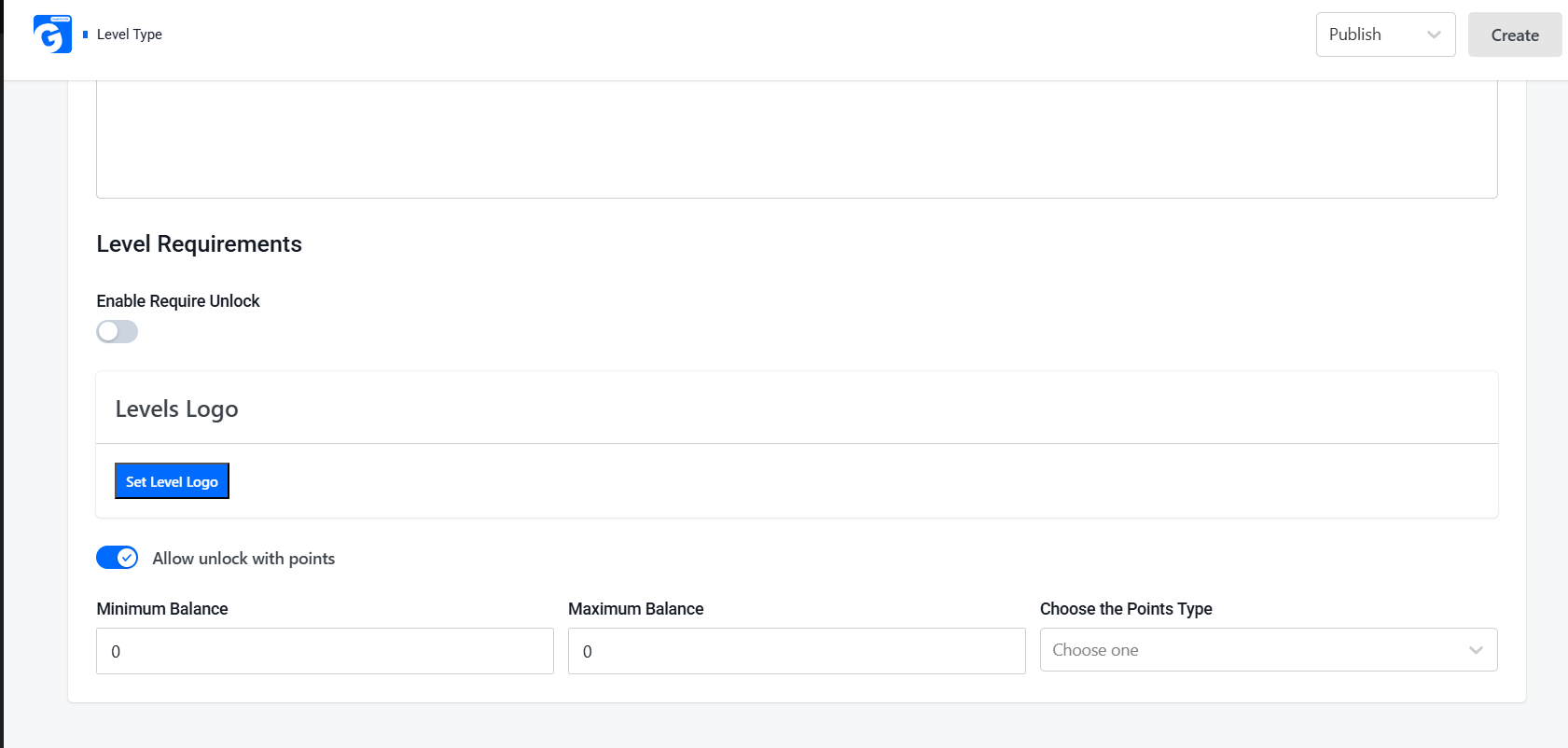
    Level System
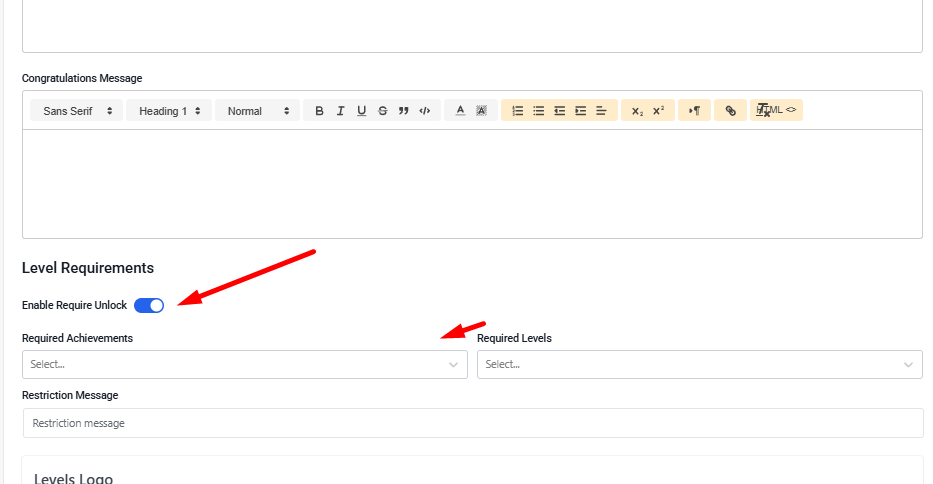
    • Enable Require Unlock on higher levels
    • Set Minimum Balance — require a specific points amount to reach each level
    • Keep early levels easy to welcome new users, but make higher levels much harder to reach

    Best Practice:

    Gate high-value features like Coupons and Withdrawals behind higher levels. This naturally discourages short-term farming.

    9. GameEngine REST API Access and Import & Export Tools — Advanced Protection and Recovery
    REST API Access

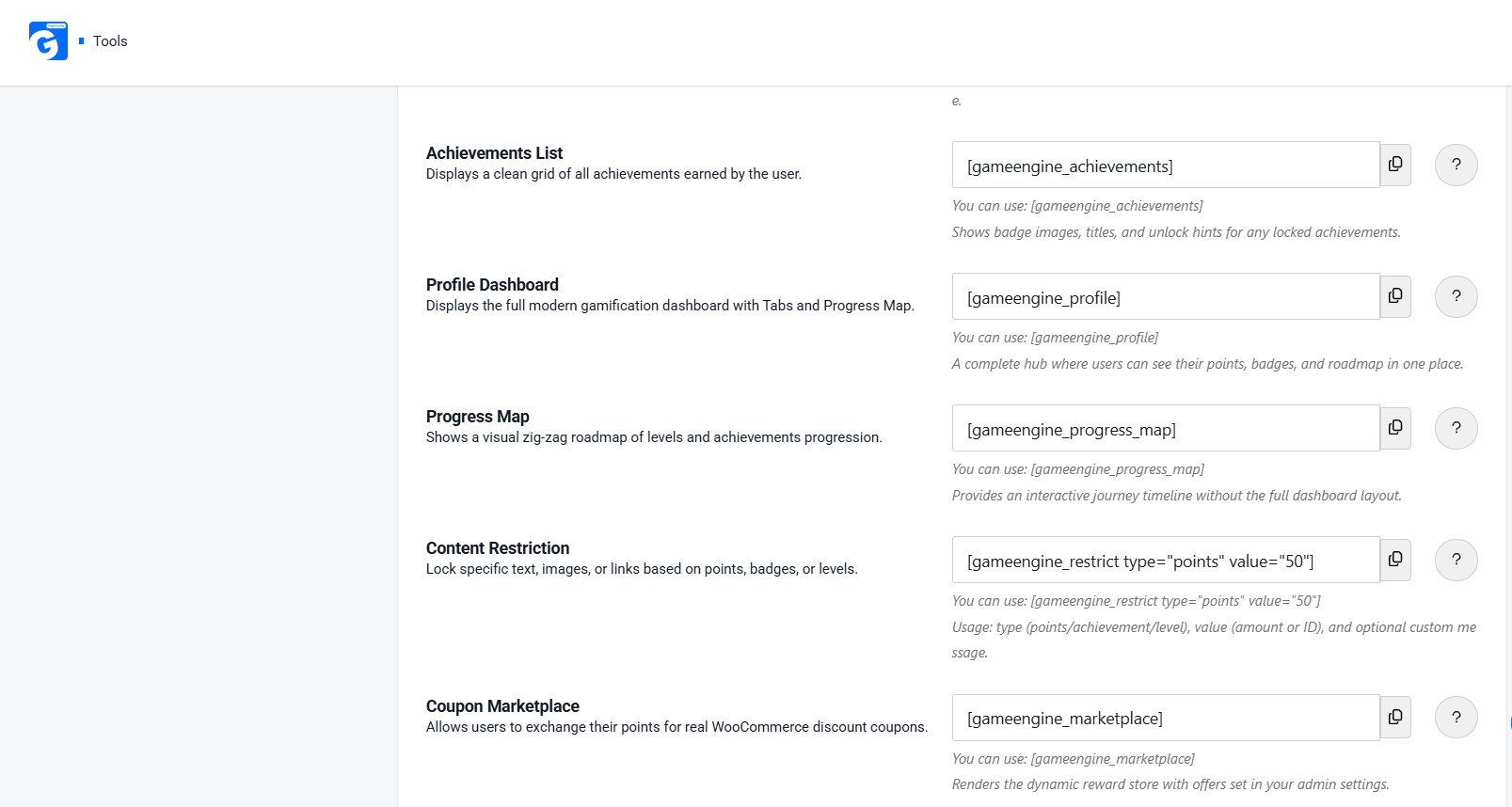
    GameEngine’s Content Restriction shortcode lets you lock specific text, images, or links based on a user’s points, badges, or level. This is a powerful abuse-prevention tool — high-value content or offers stay hidden until users genuinely earn access.

    How to Use It:

    • Use [gameengine_restrict type=" points" value="50"] to lock content behind a points threshold
    • Combine with Level or Achievement requirements for stronger protection
    • Keep reward-related content hidden from new or low-effort accounts

    The Full WordPress Points Abuse Prevention Stack at a Glance

    Here’s a quick overview of common threats and how GameEngine stops them:

    Threat

    GameEngine Feature

    Protection It Provides

    Comment spam

    Min Character Count + Repeatable Limit

    Blocks low-effort submissions

    Daily Visit farming

    Daily Visit + Repeatable Limit + Min Stay Time

    One reward per day

    Multi-account abuse

    Achievements + Level Requirements

    Real progress required

    Happy Hour farming

    Start Time / End Time + Active Days

    Time-restricted rewards

    Coupon exploitation

    Points to Coupons + Point Cost

    High cost to redeem

    Cash-out abuse

    Payout + Min Points threshold

    Minimum points required

    Level manipulation

    Level System + Minimum Balance

    Real points required

    Undetected abuse

    Activity Logs + Search

    Full audit trail

    Content access abuse

    Content Restriction shortcode

    Locked behind points/levels

    GameEngine Pricing — All Abuse Prevention Features Included

    GameEngine is available as a free core version with essential gamification features. For full power and advanced abuse-prevention tools, Pro plans are offered under a limited Early Supporter Program.
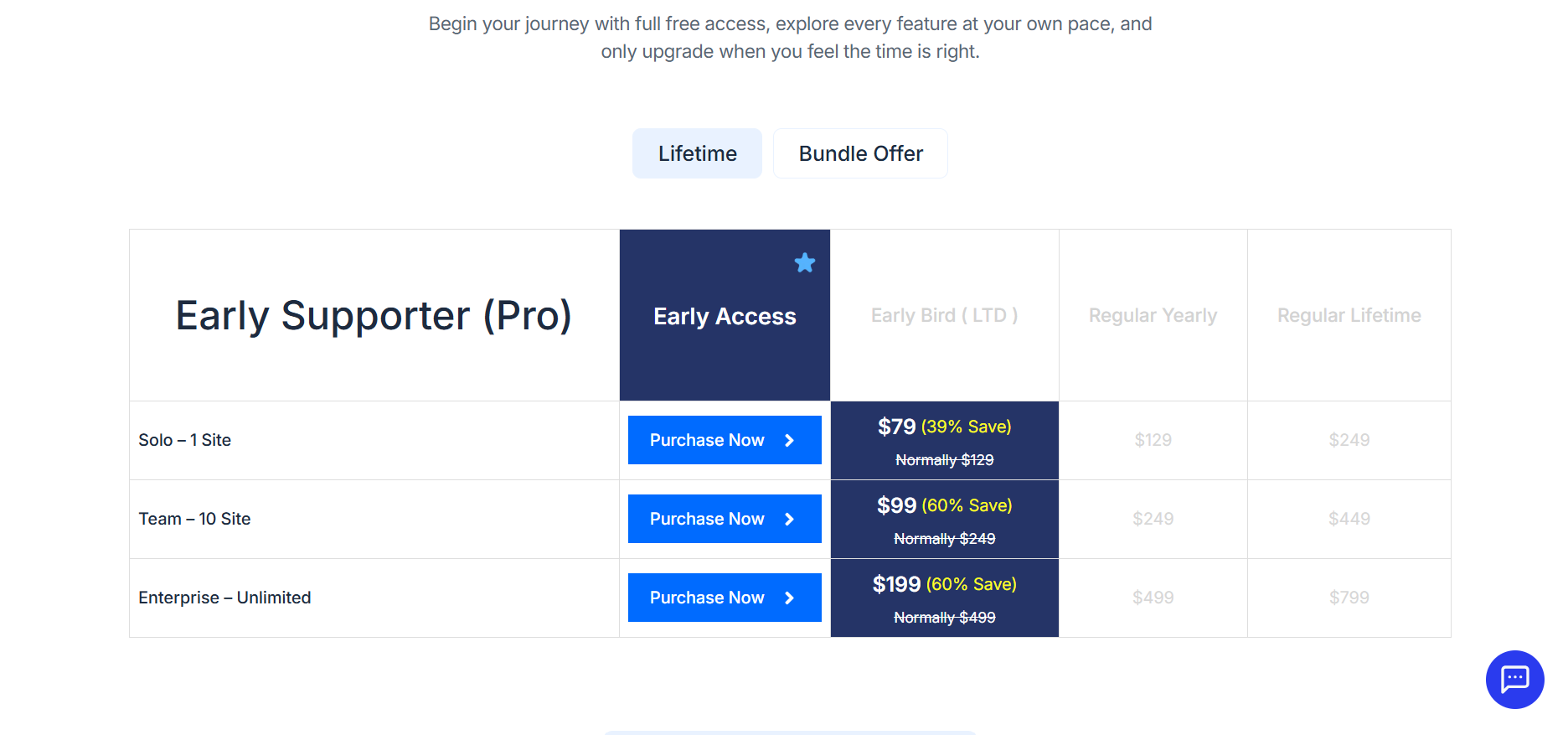
    GameEngine Pricing

    Every WordPress point abuse prevention feature in this guide — Advanced Reward Filters, Activity Logs, Points Expiry Control, Dependency Logic, Wallet Management, REST API Access, and Import & Export Tools — is included across all tiers. No separate fraud-protection add-ons to purchase.

    WordPress Points Abuse Prevention Checklist

    Before launching or updating your GameEngine-powered gamification system, go through this final checklist to ensure strong protection against points abuse:

    • Min Character Count set on all comments and content rewards
    • Repeatable Limit configured for all low-effort triggers (comments, profile updates, daily visits)
    • Daily Max limit set for high-risk hooks like Post Comment and Daily Visit
    • Min Stay Time configured for Daily Visit rewards
    • Start Time / End Time and Active Days set for time-based rewards
    • Achievements locked behind points requirements using Allow Unlock with Points
    • Level Requirements set with a minimum balance for higher levels
    • Points to Coupons Point Cost set high enough to prevent easy redemption
    • Coupon Expiry Days are configured so coupons don’t last forever
    • Payout Min Points threshold set high before enabling withdrawals
    • Content Restriction shortcode used to hide high-value content behind points or levels
    • Activity Logs are reviewed every Monday for suspicious activity

    Final Thoughts

    WordPress points abuse prevention is not a one-time setup — it is an ongoing commitment to keeping your gamification system fair, valuable, and trustworthy for genuine users.

    GameEngine stands out by offering a genuinely layered defense with powerful built-in tools: Advanced Reward Filters, Activity Logs, Achievements System, Level Requirements, Payout Controls, Content Restriction, and Time-Based Reward settings — all included in the core plugin.

    Frequently Asked Questions

    What is points abuse in a WordPress gamification system?

    Points abuse is when users exploit reward rules to earn points artificially — through fake logins, spam comments, multi-account creation, or bot-driven actions — without genuine engagement.

    Can any WordPress gamification plugin prevent points abuse completely?

    No plugin offers 100% prevention. The goal is to make abuse difficult enough that it’s not worth the effort. Layered controls — filters, expiry, milestone gating, and logs — significantly reduce risk across any plugin you use.

    How often should I review my GameEngine Activity Logs?

    For small sites, a weekly review is sufficient. For sites with active Rewards Marketplace, Points to Coupons, or Points Withdrawal System features enabled, daily log checks or automated email alerts are strongly recommended. 
  • How to Create a WordPress Leaderboard for Your Community or Store

    How to Create a WordPress Leaderboard for Your Community or Store

    A leaderboard is one of the most strategically effective tools you can implement on a WordPress website. Whether you manage an e-commerce store, a membership platform, or an online community, a well-configured leaderboard gives your users a compelling, ongoing reason to remain engaged with your site.

    Unlike conventional promotional tactics, a leaderboard leverages intrinsic human motivators — the desire to compete, earn recognition, and track personal progress — to drive consistent user behavior without relying on discounts or paid campaigns.

    This guide provides a complete, step-by-step walkthrough for implementing a WordPress leaderboard using GameEngine, a flexible gamification plugin designed specifically for the WordPress ecosystem.

    What Is a WordPress Leaderboard?

    What Is Leaderboard

    A WordPress leaderboard is a dynamic ranking system that displays users in order of a measurable metric — typically a points total accumulated through defined on-site actions. It functions as a persistent scoreboard that updates in real time as users engage with your platform.

    The system is equally applicable to commercial and community contexts:

    • WooCommerce stores — rank customers by total purchases or points earned per order
    • Membership sites — rank members by content views, comments, or login frequency
    • eLearning platforms — rank students by lessons completed or quiz performance
    • Community forums — rank contributors by posts submitted, likes received, or helpful answers
    • Nonprofit or volunteer platforms — rank participants by hours logged, tasks completed, or milestones reached

    The underlying principle is consistent across all use cases: when users can see their position relative to others, they are naturally motivated to improve it. This converts passive visitors into active, returning participants — without requiring additional marketing spend.

    Why Add a Leaderboard to Your WordPress Site?

    Why Add a Leaderboard

    Before proceeding with the technical setup, it is worth examining the core reasons a leaderboard functions as an effective growth mechanism — whether your priority is revenue, community health, or both.

    1. It Activates Competitive Motivation

    The competitive impulse is a well-documented aspect of human psychology. A customer who sees themselves ranked eighth — only 20 points behind the person in seventh place — will frequently take an additional action solely to advance their position. The same applies to a forum member who is close to reaching the top contributor spot. A leaderboard channels this impulse directly into measurable engagement.

    2. It Publicly Rewards High-Value Users

    Your most loyal customers and most active community members represent significant value to your platform. A visible leaderboard confers status and social recognition upon these individuals — a form of reward that is often more motivating than a discount code or a badge delivered in private, and costs nothing to deliver.

    3. It Encourages Long-Term Repeat Behavior

    A single transaction does not create a loyal customer. A single comment does not build a thriving community. A leaderboard provides users with an ongoing, evolving reason to return — whether to place another order, contribute more content, or simply maintain their ranking. This sustained engagement is the foundation of both customer retention and community growth.

    4. It Drives Results Without Discounting

    Store owners often default to price reductions when they want to stimulate activity. Community managers resort to email campaigns. A leaderboard achieves comparable outcomes without either, because the incentive is recognition and achievement rather than monetary value.

    Step-by-Step: Setting Up a WordPress Leaderboard with GameEngine 

    Step 1 — Install and Activate GameEngine

    Begin by installing the GameEngine plugin on your WordPress site. 

    1. Download GameEngine from the official website. A free version is available with core features; Pro plans are also offered — refer to the pricing page for current details. 
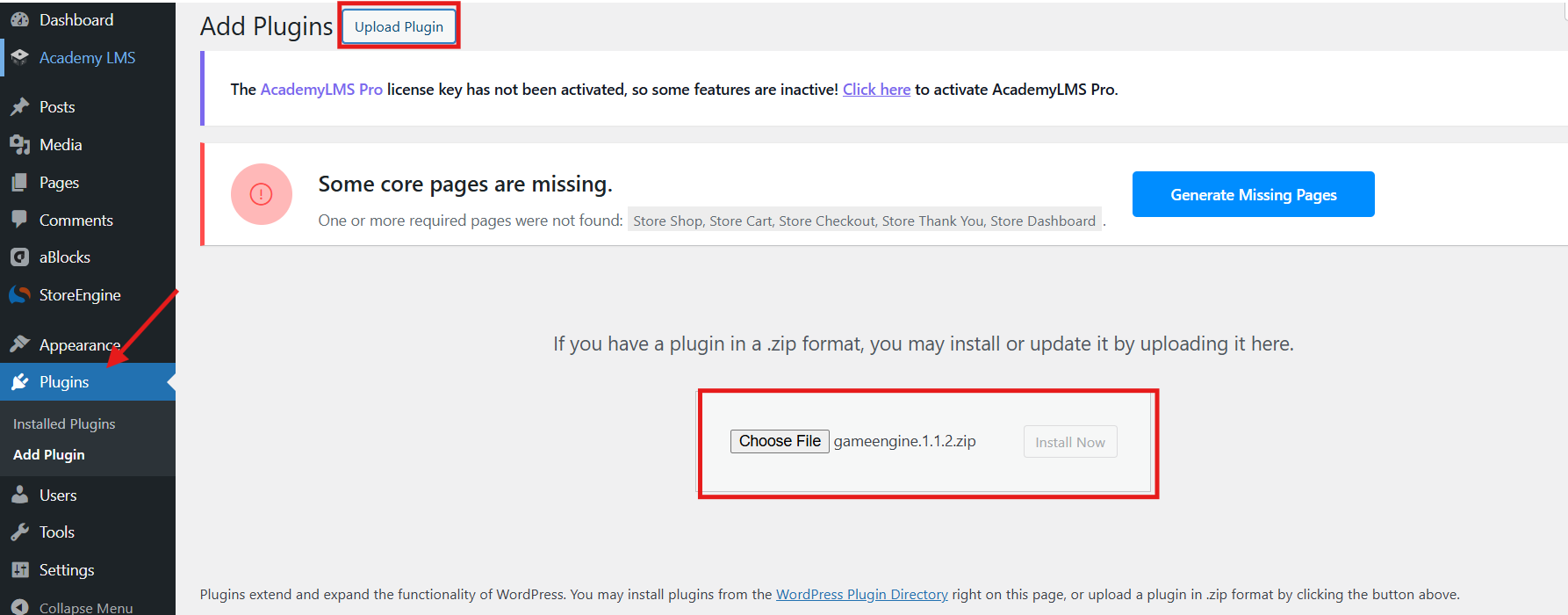
    1. In your WordPress admin panel, go to Plugins > Add New > Upload Plugin.
    1. Upload the .zip file and click Install Now.
    Install Now

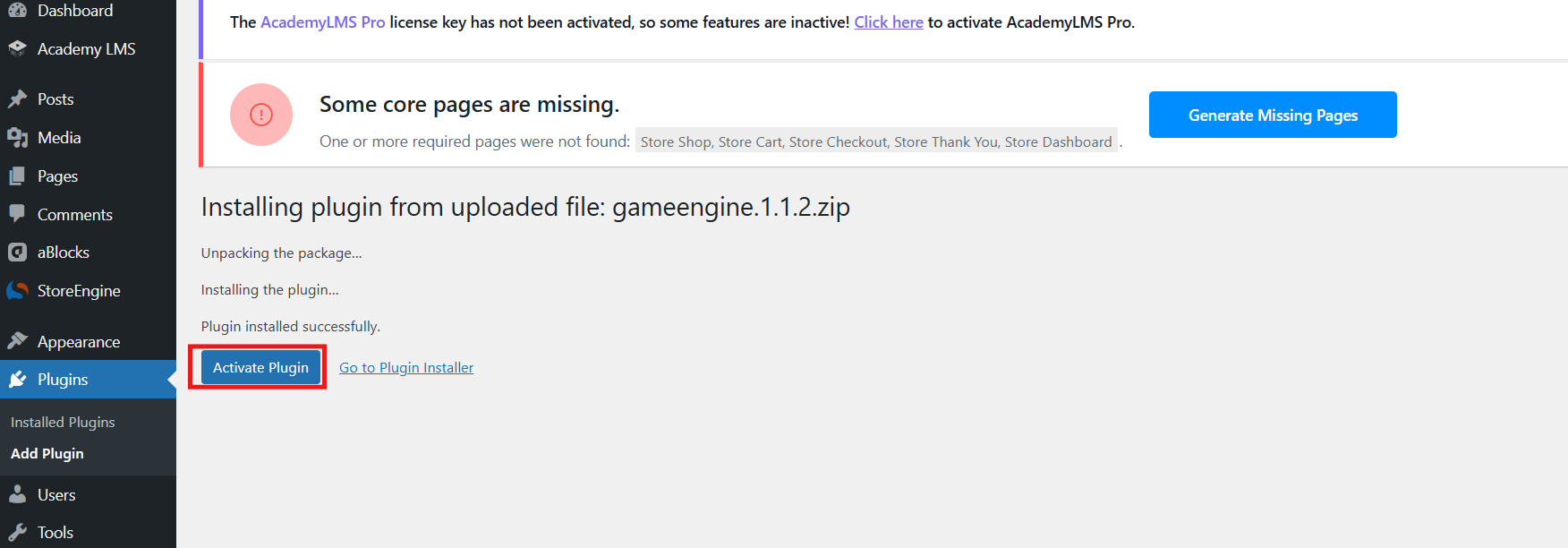
    4. Once installed, click Activate.

    Activate

    After activation, you will see a new GameEngine menu item in your WordPress admin sidebar with options including Dashboard, Points System, Achievements, Levels, Logs, Leaderboards, and more.

    Step 2 — Set Up a Points System

    A leaderboard ranks users by their points. Before the leaderboard can display anything, you need to set up a points system that automatically awards points for user actions.

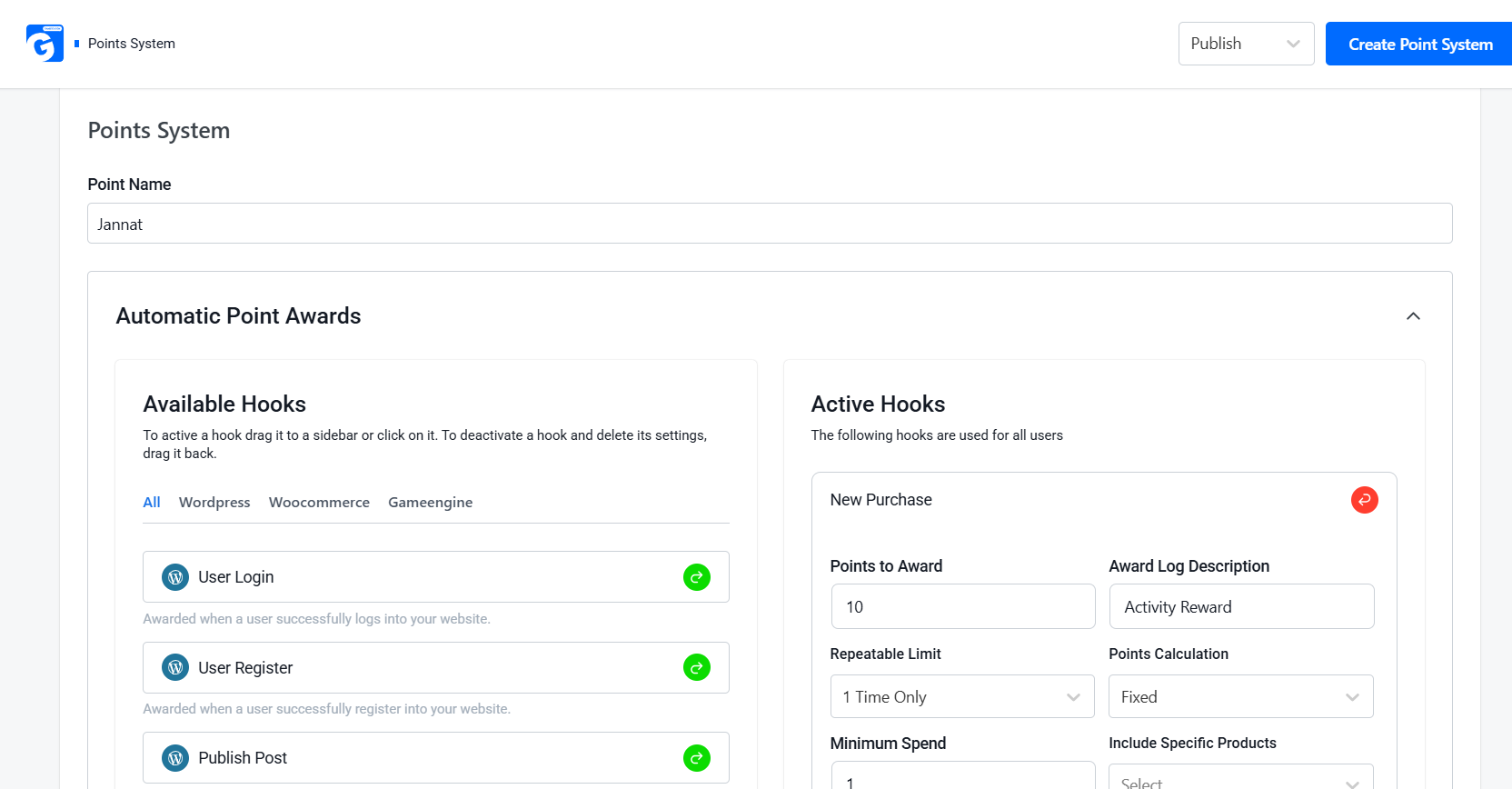
    Go to GameEngine > Points System in your WordPress admin panel. At the top, enter your points currency name in the Point Name field — for example, Jannat.

    You will see the Automatic Point Awards section with an Available Hooks panel. Hooks are the actions that trigger point awards. They are organized into three tabs:

    • WordPress — User Login, User Register, Publish Post, Post Comment, Profile Update, Daily Visit, Visit Specific Post, Author Reply, and more
    • WooCommerce — New Purchase, Purchase Specific Product, Review Product, Refund Order, and more
    • GameEngine — Unlock Achievement and other in-plugin triggers

    To activate a hook, simply click on it or drag it to the Active Hooks panel on the right. Each hook lets you set the number of points awarded for that action.

    For a store-based leaderboard, activate the New Purchase hook and set your points value — for example, 10 points per order. Once activated, fill in the settings and click Create Point System to save.

    Point System

    Step 3 — Review the Leaderboard 

    With a points system in place, the leaderboard will begin populating as users earn points.

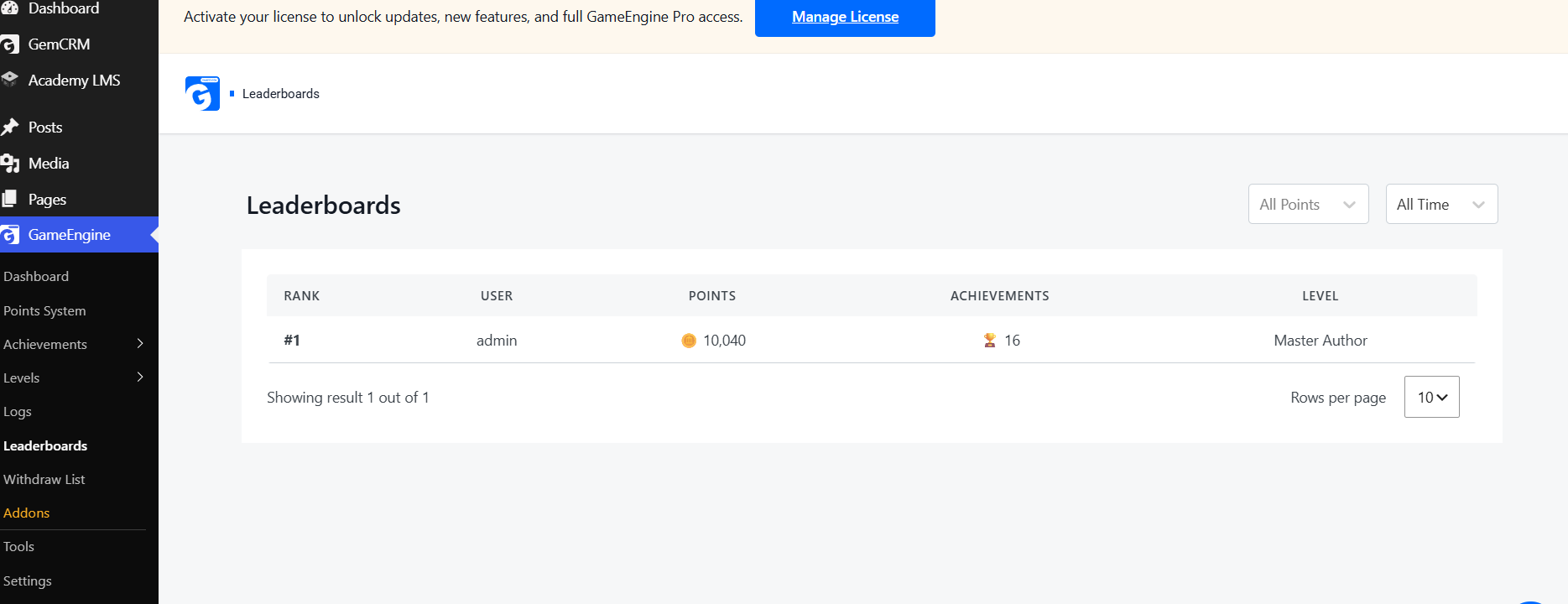
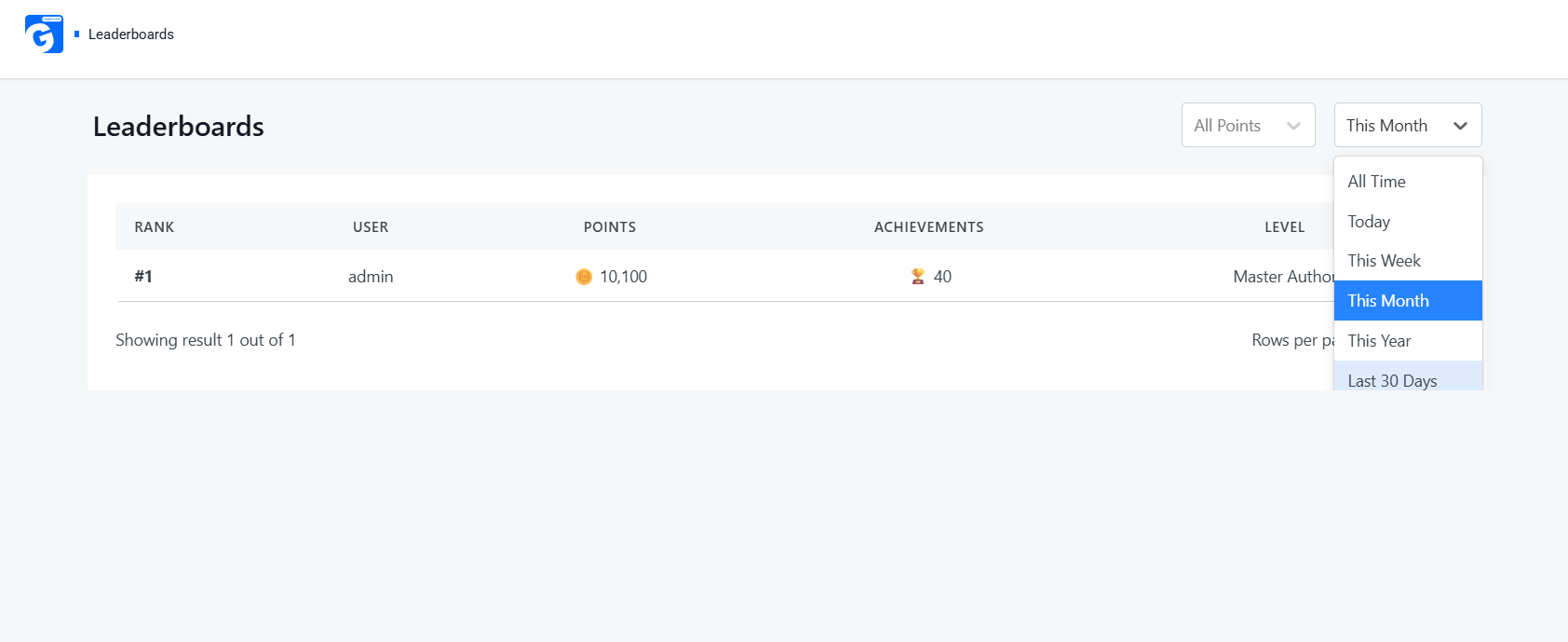
    Navigate to GameEngine > Leaderboards in your admin panel. The leaderboard updates automatically and displays the following data for each user:

    Leaderboard

    Column

    Description

    Rank

    The user’s current position

    User

    Their username or display name

    Points

    Total points earned

    Achievements

    Number of badges/unlocks

    Level

    Their current level (e.g., Master Author, Legend)

    Use the All Points dropdown to filter by a specific points system, and the All Time dropdown to toggle between All Time, Monthly, and Weekly views. 

    Step 4 — Display Gamification Data on Your Site 

    GameEngine provides a set of shortcodes, accessible under GameEngine > Tools > Shortcodes, that allow you to embed gamification elements on any page or post.

    Gamification Data

    Shortcode

    What It Displays

    [gameengine_points]

    User’s current points balance

    [gameengine_level]

    User’s highest achieved level

    [gameengine_achievements]

    Clean grid of all achievements earned, with badge images, titles, and unlock hints

    [gameengine_profile]

    Full modern gamification dashboard with tabs and progress map — a complete hub for points, badges, and roadmap

    [gameengine_progress_map]

    Interactive zig-zag journey timeline of levels and achievements

    [gameengine_marketplace]

    A dynamic reward store where users exchange points for WooCommerce coupons

    Recommended: To provide users with a consolidated view of their rank, points, and achievements, create a dedicated page and insert the [gameengine_profile] shortcode. Publish the page and link to it from your navigation menu or user dashboard. This is the most efficient way to surface your leaderboard on the front end — for both store customers and community members alike. 

    Step 5 — Connect the Leaderboard to Tangible Rewards 

    A leaderboard generates competitive engagement. Pairing it with meaningful rewards sustains that engagement over time. GameEngine supports four primary reward mechanisms, applicable to both store and community contexts. 

    Option A — Points Redemption at Checkout (Store) 

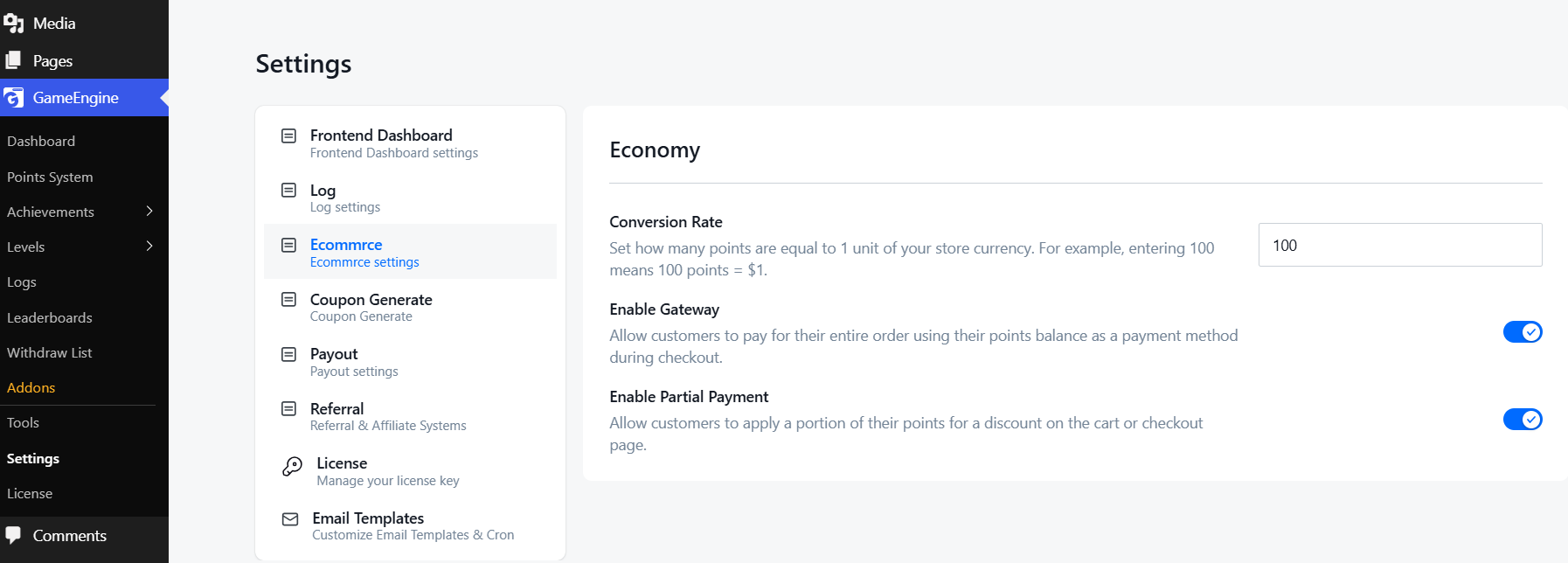
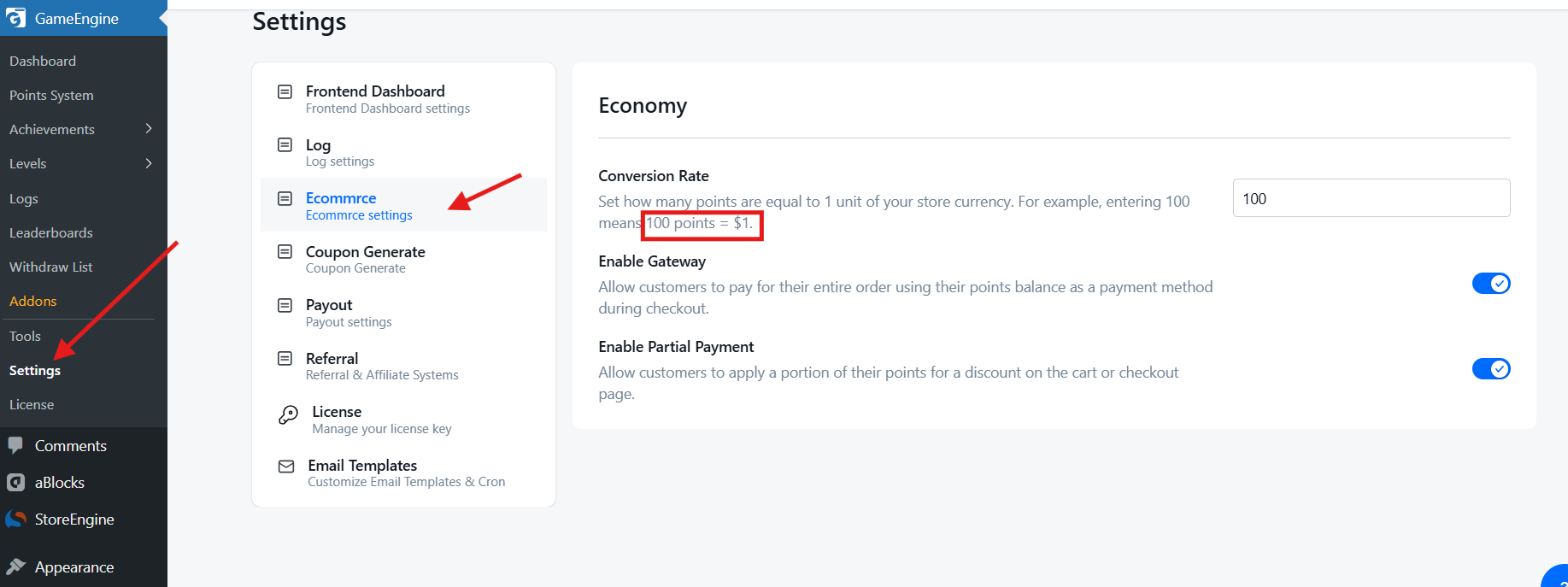
    Navigate to GameEngine > Settings > Ecommerce and configure the following Economy settings:

    • Conversion Rate — Define how many points equal one unit of currency (default: 100 points = $1)
    • Enable Gateway — Allow customers to pay for an entire order using points
    • Enable Partial Payment — Allow customers to apply points as a partial discount at checkout
    Ecommerce

    Option B — Rewards Marketplace (Store & Community) 

    Navigate to GameEngine > Settings > Coupon Generate and enable the Enable Coupon Generate toggle. Click Add Offer and complete the following fields:

    Rewards Marketplace

    Then click Add Offer and fill in the details:

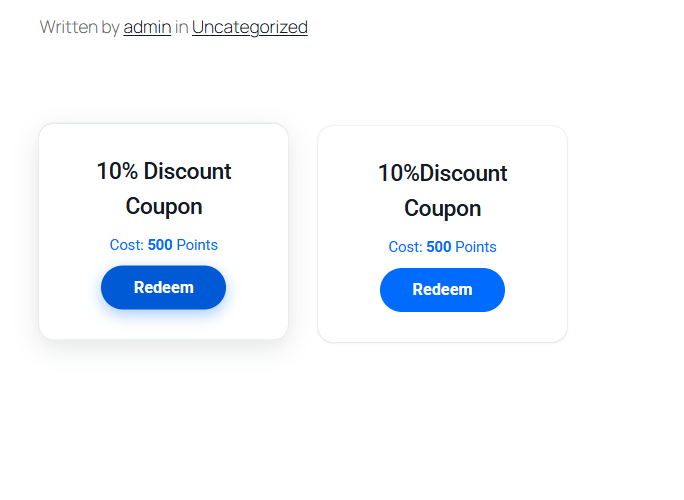
    • Label — Name of the coupon (e.g., 10% Discount Coupon)
    • Offer Type — Percent or Fixed amount
    • Point Cost — How many points to redeem (e.g., 500)
    • Amount — Discount value (e.g., 10)
    • Expiry Days — How long the coupon stays valid (e.g., 30)

    Place the [gameengine_marketplace] shortcode on any page. Users can browse available offers and redeem them instantly using their accumulated points. For community sites, this can be configured to unlock premium content, exclusive forum access, or other non-monetary rewards.

    Discount

    Option C — Points Withdrawal (Store) 

    GameEngine allows users to convert earned points into monetary payouts. Navigate to GameEngine > Settings > Payout, enable the Enable Payout toggle, and configure the following:

    Points Withdrawal
    • Payout Methods — Choose PayPal, Stripe, or bKash
    • Max Points — Maximum points per withdrawal (default: 10,000)
    • Min Points — Minimum points required to withdraw (default: 1,000)

    Then place [gameengine_payout] on any page to display the withdrawal form for users.

    Option D — Monthly Winner Recognition (Store & Community) 

    At the end of each month, navigate to GameEngine > Leaderboards and select This Month from the time filter dropdown. The leaderboard will display that month’s top-ranked users along with their points, achievements, and level.

    Monthly Winner

    Announce the top performers via your email newsletter or social media channels. For community platforms, public recognition of top contributors can be particularly effective in reinforcing a culture of participation and generosity. 

    GameEngine also includes a built-in Email Reward Alerts feature that automatically notifies users when they earn points, unlock badges, or advance to a new level. 

    Implementation Best Practices

    The following guidelines apply equally to store and community leaderboard deployments:

    Lower the entry barrier. If the leaderboard only displays users with 1,000 or more points while the majority of your users have fewer than 100, the gap will appear insurmountable. Display a broader list — the top 50 or top 100 — and always include a “Your Current Rank” indicator so that every user understands precisely where they stand.

    Reset rankings periodically. Monthly or weekly resets create a level playing field for newer users and prevent a small group of established users from permanently dominating the rankings. This is particularly important for community sites, where long-tenured members can otherwise discourage newer participants from competing. GameEngine’s built-in time filters (This Month / This Week) make periodic resets straightforward to manage.

    Promote the leaderboard actively. Users cannot be motivated by a feature they are unaware of. Add a leaderboard widget to your site’s sidebar, reference it in welcome emails, order confirmation messages, and community announcements. Consistent promotion ensures that the leaderboard remains visible and relevant.

    Communicate the rules clearly. Provide a clear explanation of how points are earned, how rankings are calculated, and which actions yield the highest point values. Consider linking to a dedicated “How the Leaderboard Works” page. Transparency builds trust; ambiguity erodes it.

    Final Thoughts

    A WordPress leaderboard is not a superficial engagement feature. When implemented thoughtfully — with a well-defined points system, meaningful rewards, and consistent promotion — it becomes one of the most cost-efficient tools available for driving repeat purchases, deepening community participation, and recognizing your most valuable users.

    GameEngine enables the entire implementation to be completed within the WordPress dashboard, from configuring point triggers to publishing a fully functional leaderboard, without any custom development. Its hook system is broad enough to support both commercial and community use cases within the same installation.

    For sites that are ready to move beyond transactional discounts and isolated engagement campaigns — and toward durable, lasting loyalty — a WordPress leaderboard powered by GameEngine is a sound and proven starting point.

    Frequently Asked Questions (FAQ)

    Do I need development experience to set up a WordPress leaderboard?

    No. GameEngine is configured entirely within the WordPress admin dashboard. No coding knowledge is required.

    Can I run separate leaderboards for my store and my community?

    Yes. GameEngine allows you to create multiple point systems with different hook configurations. Each system can be displayed independently, allowing you to maintain a purchase-based store leaderboard and an engagement-based community leaderboard side by side. 

    Can I configure a monthly leaderboard rather than an all-time ranking?

    Yes. GameEngine supports All Time, Monthly, and Weekly display periods, selectable via a dropdown filter.

  • How to Pay Users with Real Money Using WordPress Points (PayPal & Stripe)

    How to Pay Users with Real Money Using WordPress Points (PayPal & Stripe)

    Imagine running a WordPress site where users earn points for leaving reviews, completing courses, or referring friends — and then those points convert directly into cash deposited into their PayPal or Stripe accounts. That’s not a fantasy. It’s a real, working setup thousands of WordPress site owners are using right now to drive unprecedented engagement and loyalty.

    This guide walks you through exactly how to build that system from scratch — plugin choices, configuration, payout setup, fraud prevention, and launch.

    Why Pay Users with Real Money Instead of Just Points?

    Virtual points and digital badges are powerful motivators — but the moment users realize their points can be converted into actual cash, engagement rates skyrocket.

    Here’s why:

    Real Value Beats Perceived Value

    Points alone have perceived value. But points that turn into real dollars have tangible value. Users work harder, visit more frequently, and refer more friends when there’s actual money on the table.

    Lower Churn Rate

    Loyalty programs that offer cashback or real-money payouts experience significantly lower churn than badge-only or points-only systems. When real money is involved, users think twice before leaving your platform.

    Powerful Word-of-Mouth

    Real-money rewards are highly shareable. A user who just withdrew $20 from your site will proudly tell their friends. Regular discount coupons or points rarely create the same level of excitement and buzz.

    Strong Competitive Advantage

    Most WordPress communities and membership sites still run closed-loop point systems (points can only be spent on-site). Offering real-money withdrawals puts you in a much smaller, premium category that stands out from the crowd.

    Meet GameEngine: WordPress Gamification Built for Real-World Payouts

    GameEngine is a self-hosted WordPress gamification plugin designed around one core philosophy: turning user actions into real, measurable value. Unlike many older plugins that treat points mainly as store credit, GameEngine includes a native wallet and points withdrawal system that supports real money payouts via PayPal and Stripe.

    What Makes GameEngine Different

    Most gamification plugins stop at points and badges. GameEngine goes further with a complete points economy:

    Real Money Withdrawals — Users convert earned points into cash and request payouts via PayPal or Stripe without leaving your site.

    Admin Wallet Dashboard — All withdrawal requests land in one dedicated dashboard. Admins can review, approve, reject, and track every payout in one place.

    Automatic Point Triggers — Award points for logins, registrations, purchases, comments, course completions, and custom actions — all without manual intervention.

    WooCommerce Integration — Users spend points at checkout, generate coupons from a reward shop, or apply instant cart discounts using their balance.

    Leaderboards, Levels & Happy Hours — Dynamic leaderboards, user ranks, progress roadmaps, and time-based bonus events (weekend multipliers, daily specials) keep engagement high.

    Full Activity Logs — Every point award, deduction, badge, and manual adjustment is logged — essential for transparency in any financial payout system.

    GameEngine integrates natively with Academy LMS, StoreEngine, WooCommerce, and other major WordPress plugins — making it a solid fit for learning platforms, eCommerce stores, membership sites, and online communities.

    Setting Up WordPress Points With Real-Money Payouts: Step-by-Step

    Step 1: Define Point Earning Rules

    Go to GameEngine → Rewards → Earning Rules and create rules for different actions:

    Point Earning Rules

    Action

    Points Awarded

    User Registration

    50 points 

    Daily Login

    10 points

    Writing a Post or Comment

    25 points

    Completing a Course Module

    100 points

    Making a Purchase

    1 point per $1 spent

    Referring a New User

    200 points

    Step 2: Set Point-to-Cash Conversion Rate

    Go to Wallet → Payout Settings and define your conversion rate. Example:

    Cash Conversion Rate

    100 points = $1.00

    Also set a minimum withdrawal threshold (recommended: $5 or $10) to avoid too many small payout requests and reduce transaction fees.

    Step 3: Configure Payout Settings

    Go to GameEngine → Settings → Payout and configure the following:

    Configure Payout Settings

    Enable Payout. Toggle it ON to allow users to request real money withdrawals in exchange for their earned points.

    Payout Methods: Select which payment methods users can use to receive their money. Available options: PayPal, Stripe, bKash, Bank, etc. You can add multiple methods at once.

    Max Points: Set the maximum number of points a user can request for a single withdrawal. Example: 10000

    Min Points: Set the minimum number of points a user must have before they can request a withdrawal. Example: 1000

    Once done, click Save Changes in the top right corner.

    Step 4: Enable the User Withdrawal Interface

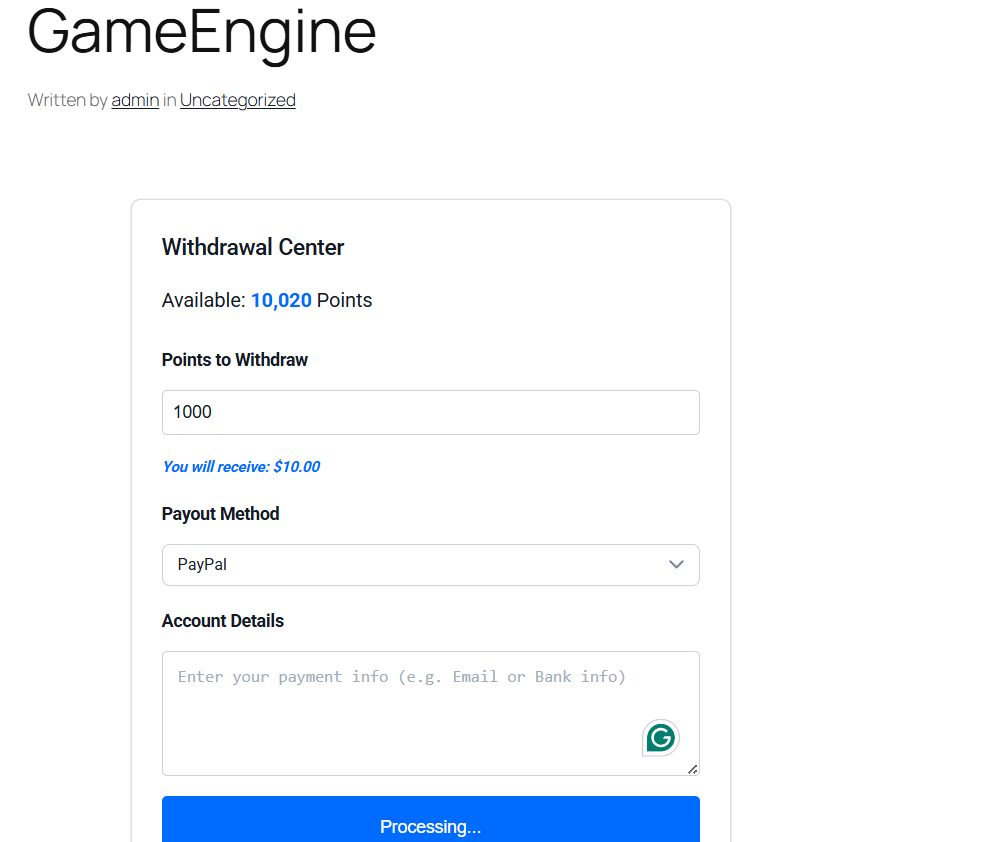
    Withdrawal Interface

    [gameengine_wallet]

    This renders a clean wallet panel where users can:

    • View their current point balance
    • See the equivalent cash value
    • Choose their preferred payout method (PayPal or Stripe)
    • Submit a withdrawal request

    Step 5: Manage Payout Requests (Admin Side)

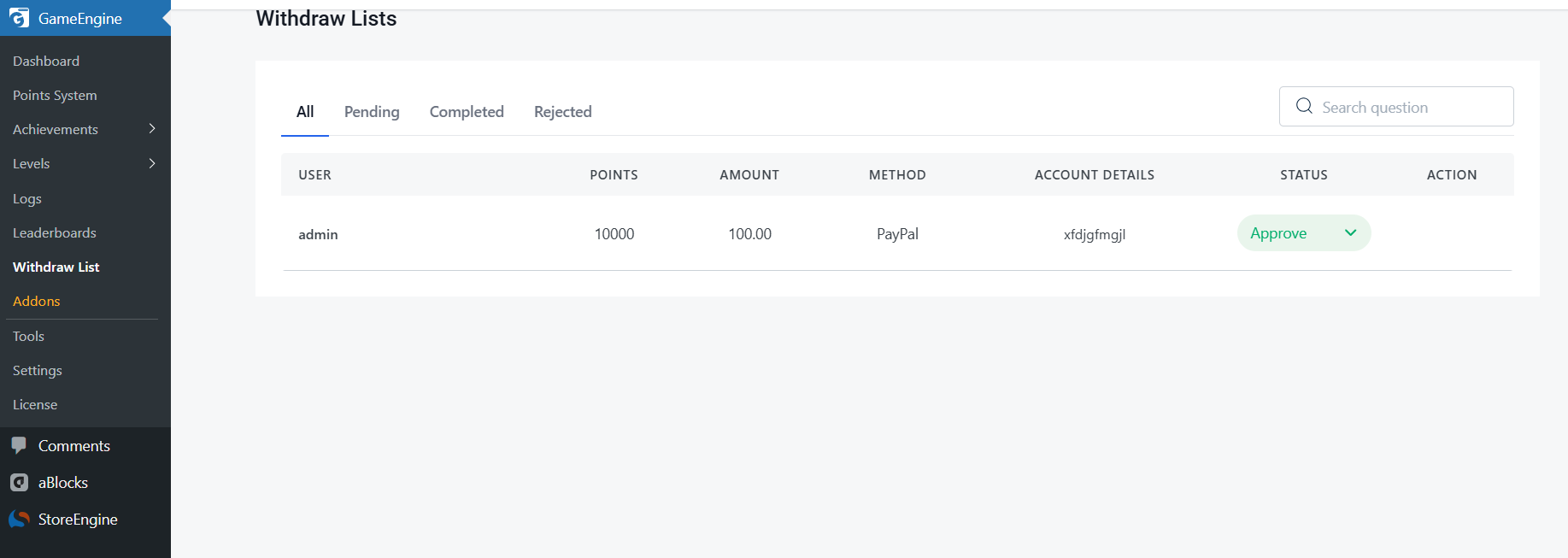
    All withdrawal requests appear in GameEngine → Wallet Dashboard. As an admin, you can:

    Manage Payout Requests
    • Review each user’s full balance and transaction history
    • Approve or reject individual requests
    • Trigger PayPal or Stripe payouts directly from the dashboard
    • Manually adjust point balances (for bonuses or corrections)
    • Export payout logs for accounting and tax purposes

    Every action is logged with a timestamp and admin user ID for security and audit purposes.

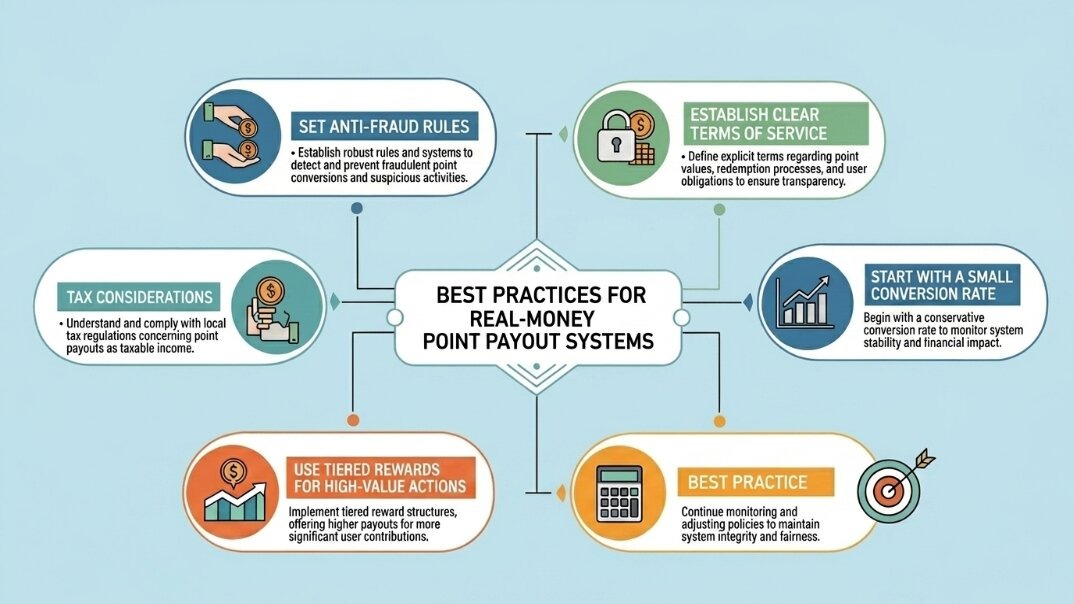
    Best Practices for Real-Money Point Payout Systems

    wordpress Points Payout Systems

    Running a real-money rewards system comes with responsibility. Here are the non-negotiables:

    1. Set Anti-Fraud Rules

    Enable cooldown periods on point-earning actions. GameEngine lets you block the same IP or device from triggering the same reward more than once in a defined period. For high-value triggers (referrals, purchases), consider adding email verification steps.

    2. Establish Clear Terms of Service

    Your site’s Terms of Service must explicitly describe how points are earned, the conversion rate, withdrawal minimums, processing times, and circumstances under which points can be voided (fraud, chargebacks, account termination). This is both a legal and user-trust requirement.

    3. Tax Considerations

    In most jurisdictions, cash payouts to users may be considered taxable income. If your platform pays out more than $600/year to a US user via PayPal or Stripe, you may be required to issue a 1099-K. Consult a tax professional and consider requiring users to submit a W-9 or equivalent before their first payout. Both PayPal and Stripe have tax reporting documentation worth reviewing.

    4. Start with a Small Conversion Rate

    When first launching, set a conservative conversion rate (e.g., 1,000 points = $1). You can always increase generosity as you validate the economics. Starting too generous is very hard to walk back without angering your user base.

    5. Use Tiered Rewards for High-Value Actions

    Not all actions should earn the same points. Create tiers: low-value actions (logins, page views) earn small amounts; high-value actions (purchases, verified referrals, course completions) earn significantly more. This focuses payout liability on the behaviors that actually grow your business.

    GameEngine vs. Other WordPress Points Plugins

    It’s worth understanding where GameEngine sits relative to the broader landscape of WordPress gamification plugins:

    MyCred is the most established name in WordPress points systems and offers PayPal payout support via premium add-ons. However, the Stripe payout module is sold separately, and combining multiple add-ons can push costs well above $200/year. GameEngine bundles payout functionality into its core offering.

    GamiPress is highly modular and integrates with BuddyPress, LearnDash, and WooCommerce — but real-money payouts require significant customization or third-party bridging. It’s better suited to badge and achievement systems than cash-out ecosystems.

    CM MicroPayments (by CreativeMinds) is a specialized micropayment plugin that supports both PayPal and Stripe payouts and integrates with WooCommerce and Easy Digital Downloads. It’s a valid alternative for developers who want an API-first approach, though its interface is more technical.

    GameEngine sits at the intersection of modern UX, built-in payout infrastructure, and WooCommerce compatibility — making it the strongest choice in 2025–2026 for site owners who want an all-in-one solution without cobbling together multiple plugins.

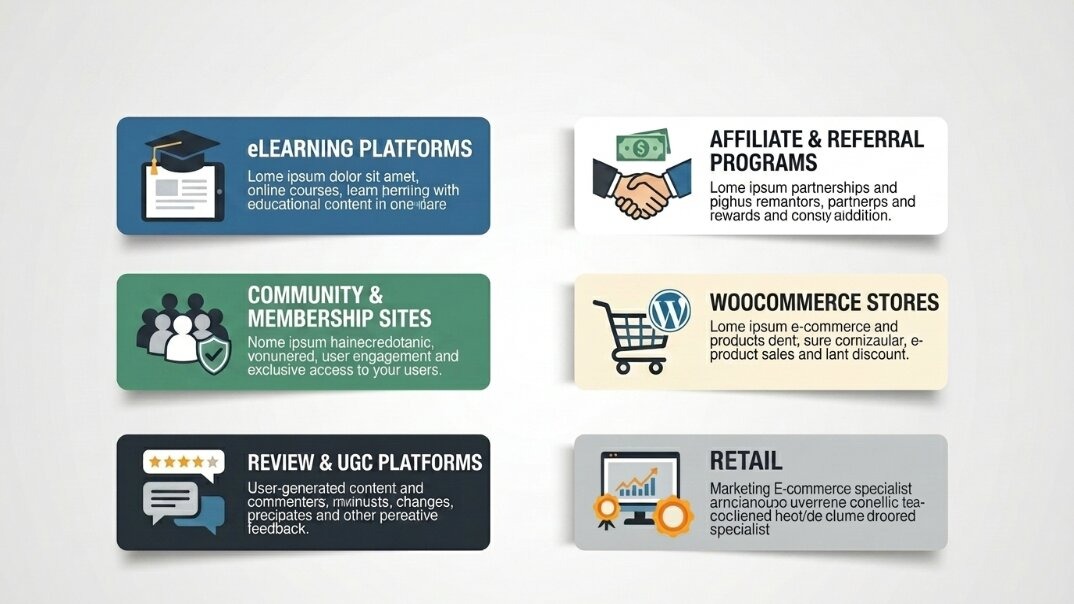
    Real-World Use Cases: Who Should Build This System?

    Real-World Use Cases

    eLearning Platforms

    Reward students for completing modules, passing quizzes, and finishing full courses. Offering real cash payouts for top performers transforms your LMS into a competitive, high-engagement learning environment. Academy LMS and LearnDash integrate directly with GameEngine’s point triggers.

    Community & Membership Sites

    Pay contributors for creating posts, answering questions, and mentoring new members. Wikipedia-style crowdsourcing without the volunteer-only model. Real payouts attract serious contributors and dramatically improve content quality.

    Review & UGC Platforms

    If your business model relies on user-generated content — reviews, tutorials, testimonials — a real-money point system is one of the most cost-effective ways to incentivize volume and quality. You only pay out to the most active contributors.

    Affiliate & Referral Programs

    Rather than a static affiliate commission, use a points-based referral system where users earn points for successful referrals that convert. The delayed gratification of accumulating points before withdrawal reduces fraud and increases the lifetime engagement of your affiliate base.

    WooCommerce Stores

    Reward customers with points for purchases (e.g., 1 point per $1 spent) that they can later cash out, creating a genuine cashback loyalty program — far more compelling than a standard coupon system.

    Final Thoughts

    Building a real-money point payout system on WordPress is no longer reserved for enterprise platforms with custom development budgets. With GameEngine, you get a self-hosted, WooCommerce-compatible gamification engine that connects directly to PayPal and Stripe — letting you reward users with real cash for the actions that grow your platform.

    The key is to start with intentional design: choose your earning triggers carefully, set conservative conversion rates, protect against fraud from day one, and be transparent with your users about the rules. Done right, this system doesn’t just increase engagement — it fundamentally changes the relationship between your platform and your community. Users stop being visitors and start becoming invested stakeholders.

    Frequently Asked Questions (FAQ) 

    Can any WordPress site pay users with real money?

    Yes — as long as you use a plugin that supports payout gateways (like GameEngine, myCred, or CM MicroPayments) and you have a business account on PayPal or Stripe.

    Do I need a business PayPal account to send payouts?

    Yes. PayPal’s Payouts API requires a verified Business account. Personal accounts cannot send API-triggered or bulk payments to users.

    Is Stripe or PayPal better for user payouts?

    Stripe is generally a better option for international websites, as it supports payouts to over 40 countries and offers built-in currency conversion. PayPal is more familiar to everyday users, especially in the US. Offering both is ideal.

    What is the minimum payout WordPress plugins usually allow?

    Most plugins let you set a custom minimum. A common threshold is $5–$10 (or its point equivalent) to avoid micro-transactions that eat into processing fees.

  • How to Add User Ranks and Levels to Your WordPress Site

    How to Add User Ranks and Levels to Your WordPress Site

    Static websites are a thing of the past. To keep users engaged, you need to turn their journey into an experience. One of the most effective ways to do this is by adding User Ranks and Levels.

    Levels provide a sense of status, progression, and competition. Whether you run a community forum, an e-learning site, or a blog, giving users a rank like “Newbie,” “Expert,” or “Legend” keeps them coming back.

    With the GameEngine plugin, you can set up a professional leveling system for free. 

    Why levels work — the psychology behind ranks

    Before the setup steps, it helps to understand why a leveling system actually changes user behavior — because if you understand the mechanism, you can design it much more intentionally.

    There are three things at work. First, identity: a user who has reached “Gold Member” or “Expert Contributor” starts to identify with that title. They don’t want to lose it — and that loss aversion keeps them engaged. Second, progress visibility: seeing a rank bar fill up is almost impossible to ignore. The brain treats incomplete progress as unfinished business. Third, social status: when ranks are visible to other users — on leaderboards, comment sections, or profiles — they become a form of reputation. People work to protect and improve their public standing.

    “A title like ‘Legend’ doesn’t just describe where a user is — it tells them who they are on your platform. That identity is worth protecting.”

    None of this requires manipulation. You’re just building visible structure around progress that’s already happening — and making it feel meaningful.

    What kind of sites benefit most

    Community forums

    Ranks give members a visible status that rewards consistent contribution. “Senior Member” means something when others can see it.

    LMS & course sites

    Levels map naturally to learning progression — Beginner, Intermediate, Advanced. Completing more courses means a higher rank.

    WooCommerce stores

    Tiered membership levels (Bronze, Silver, Gold) unlock exclusive pricing, early access, or VIP perks for your best customers.

    Blogs & publications

    Reward regular readers and commenters with reader ranks. Turns a passive audience into an active contributor community.

    1. Define Your Ranks

    Before you touch any code, decide on your ranking structure. A classic example would be:

    • Level 1: Bronze Member
    • Level 2: Silver Member
    • Level 3: Gold Member

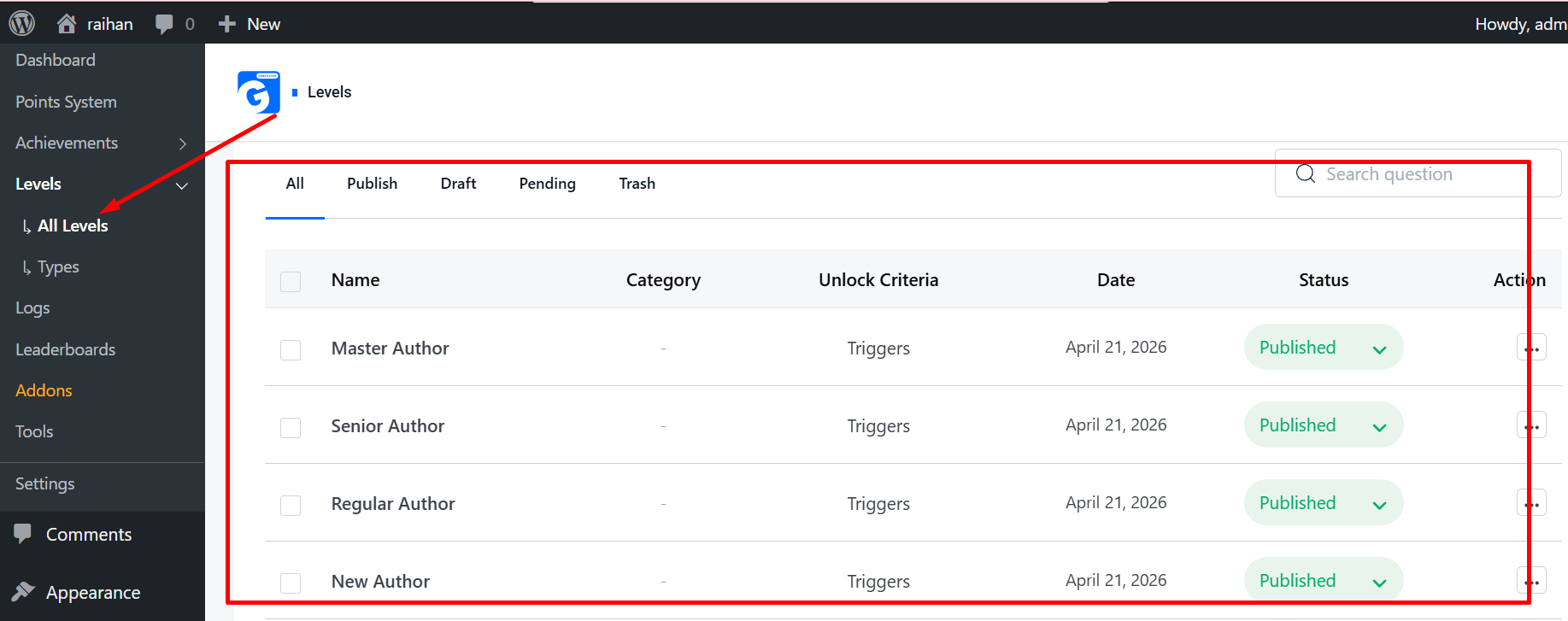
    In GameEngine, navigate to Levels > Add New. Give your level a title, upload a beautiful icon (like a trophy or star), and set the Priority (Level 1, Level 2, etc.).

    Levels

    2. Set Point Requirements (Automatic Leveling)

    The easiest way to let users level up is by connecting ranks to their points balance.

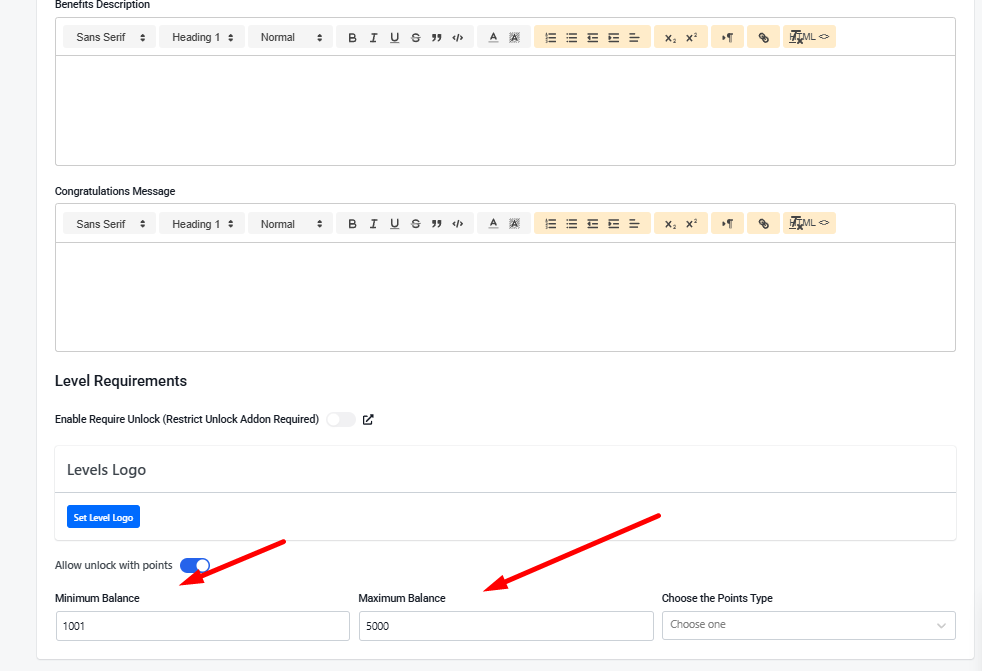
    1. In the Level settings, look for the Requirement section.
    2. Set the Minimum Points needed to reach this rank.
    3. Choose the Point Type (e.g., XP or Coins).

    How it works: Once a user reaches 500 points, GameEngine will automatically “promote” them to the next level. No manual work required!

    Requirement

    3. Show a Visual Journey (The Progress Map)

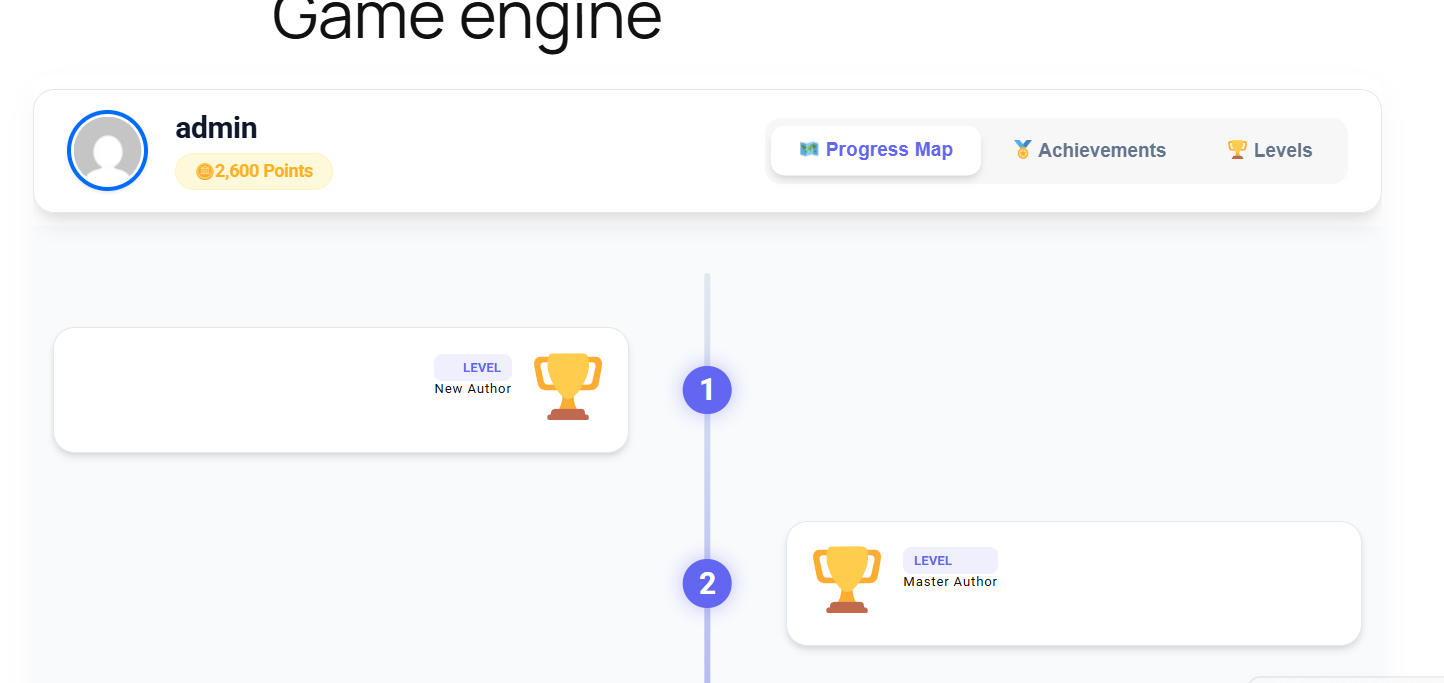
    Users are much more motivated when they can see their goals. GameEngine includes a unique Visual Progress Map that displays a beautiful zig-zag roadmap of all available levels.

    Simply paste this shortcode on your user profile page:
    [gameengine_progress_map]

    Progress Map

    This shows the user exactly which levels they have unlocked and how far they are from the next rank.

    4. Reward Users for Leveling Up

    When a user works hard to reach a new rank, they deserve a celebration!

    • Congratulation Messages: Set a custom message that appears when they hit a new level.
    • Unlock Content: You can use our content restriction features to allow only “Level 5” users to access specific premium pages or download links.
    Unlock Content

    5. Display Ranks in Headers and Profiles

    Make your users proud of their status. Use these shortcodes to display their current rank anywhere on your site:

    • [gameengine_level] — Displays the user’s current highest level title and icon.
    • [gameengine_profile] — Displays a full dashboard with all their stats.
    Display Rank

    Why Choose GameEngine for Levels?

    Most plugins charge a premium for visual roadmaps and automated leveling logic. GameEngine gives you a high-end, responsive, and easy-to-manage system completely for free.

    The bottom line

    A leveling system doesn’t change what your site is. It changes how using your site feels. The content, the courses, the community — all of that stays the same. But now every action accumulates toward something. Every visit is a step. Every comment matters. The journey has a shape, and users can see where they are on it.

    That shift — from “I visited a website” to “I’m making progress toward something” — is the difference between a site people forget and one they come back to on purpose.

    Start with three or four levels, keep the first one easy to reach, and add the progress map somewhere prominent. Watch how users respond over the first few weeks. Then layer in content unlocks and level-up bonuses as you see what motivates your specific audience.

    Ready to give your users something to work toward?

    GameEngine’s leveling system is completely free — including the visual progress map,

    automatic leveling, and all display shortcodes. Upgrade to Pro whetailen you’re ready for the full

    reward economy.

    Get GameEngine free ↗ See Pro features ↗

    FREQUENTLY ASKED QUESTIONS

    Can a user be demoted if their points drop below a level threshold?

    By default, levels are earned and held — users aren’t automatically demoted if their points balance drops. This is the recommended approach for most sites because demotion creates frustration rather than motivation. If you want a more competitive system where ranks must be maintained, you can configure demotion rules in the advanced level settings — but think carefully about whether that serves your community before enabling it.

    Can I use different point types for different levels?

    Each level requirement is tied to a single point type — so Level 3 might require 1,500 XP, while a separate rank system could check Coins instead. If you run multiple point currencies, you can build separate level ladders for each one. Most sites keep things simple with one point type powering the main level system, but the flexibility is there if your setup needs it.

    How many levels should I create?

    For most sites, three to six levels is the sweet spot. Too few and there’s nothing to work toward after the first month. Too many and the progression feels diluted — if there are twenty levels, reaching Level 4 means very little. A good rule of thumb: the top level should feel genuinely hard to reach, and the bottom level should be achievable in the first few visits. Everything in between is the journey.

    Can I restrict WooCommerce product pricing based on user level?

    Content restriction by level works for pages, posts, and downloadable resources. For product-level pricing based on rank, you’d typically combine GameEngine’s level detection with a WooCommerce role-based pricing plugin — assign higher-level users a specific WordPress role, then use that role for pricing rules. It’s a two-plugin approach, but it’s a clean solution for tiered membership pricing.

    Will existing users get assigned a level based on their current points?

    Yes. When you set up levels and point requirements, GameEngine checks existing users’ point balances and assigns them to the appropriate level retroactively. Users who already have points won’t start from scratch — they’ll land at whatever level their current balance qualifies them for. This is important to communicate when you launch the system, as some users may wake up to a level-up notification without having done anything new.